
Custom CRM Development Cost: Full Breakdown for 2026

TL;DR

Custom CRM development typically costs $30,000 for a lean MVP and $300,000+ for an enterprise-grade build, with most projects landing between $50,000 and $150,000. This guide breaks down what each budget tier actually delivers, the factors that move the price – scope, integrations, compliance, and team geography – and how a custom build compares with extending Salesforce or HubSpot over three years. It also shows where teams overspend and how to cut costs without compromising core functionality.

Make a summary of this article with AI:

Custom CRM development cost typically ranges from $30,000 for a lean MVP to $300,000+ for enterprise-grade builds, with most projects landing in the $50,000–$150,000 range. The final number depends on three variables more than any feature checklist: scope discipline, team geography, and whether you operate under regimes like HIPAA, SOC 2, or GDPR.

This breakdown walks decision-makers through what each budget tier actually delivers, the six factors that move costs up or down, and how a custom build compares to extending Salesforce or HubSpot over a three-year horizon. You’ll also see where most teams overspend — and the four levers that consistently bring costs down without compromising what ships.

Let’s start with the numbers themselves.
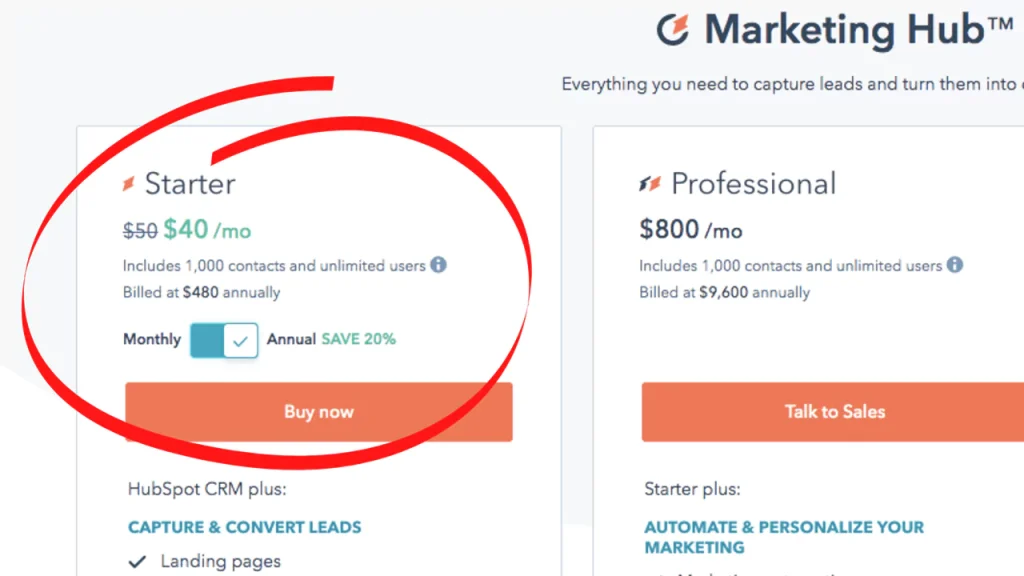
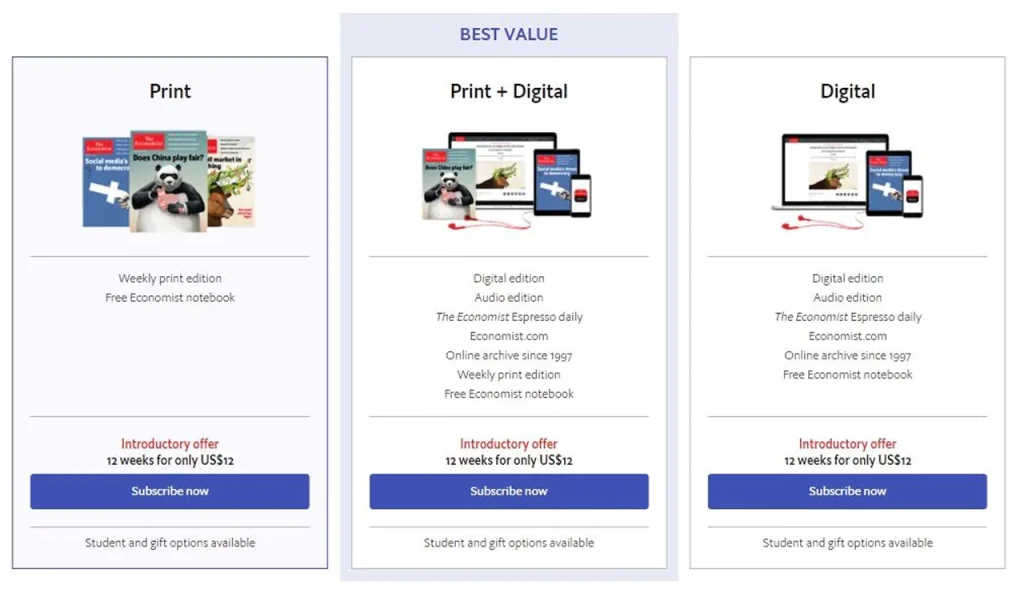
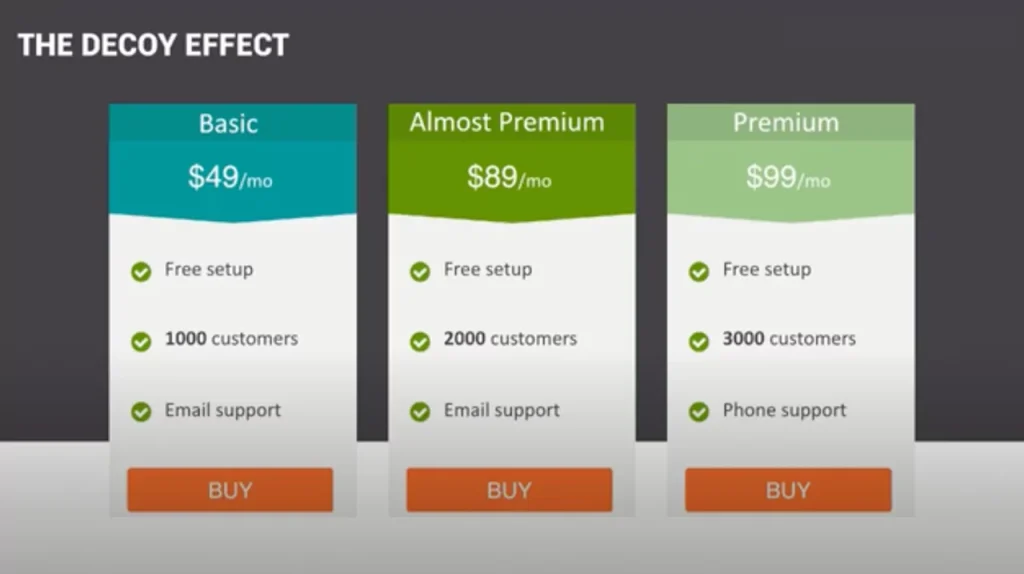
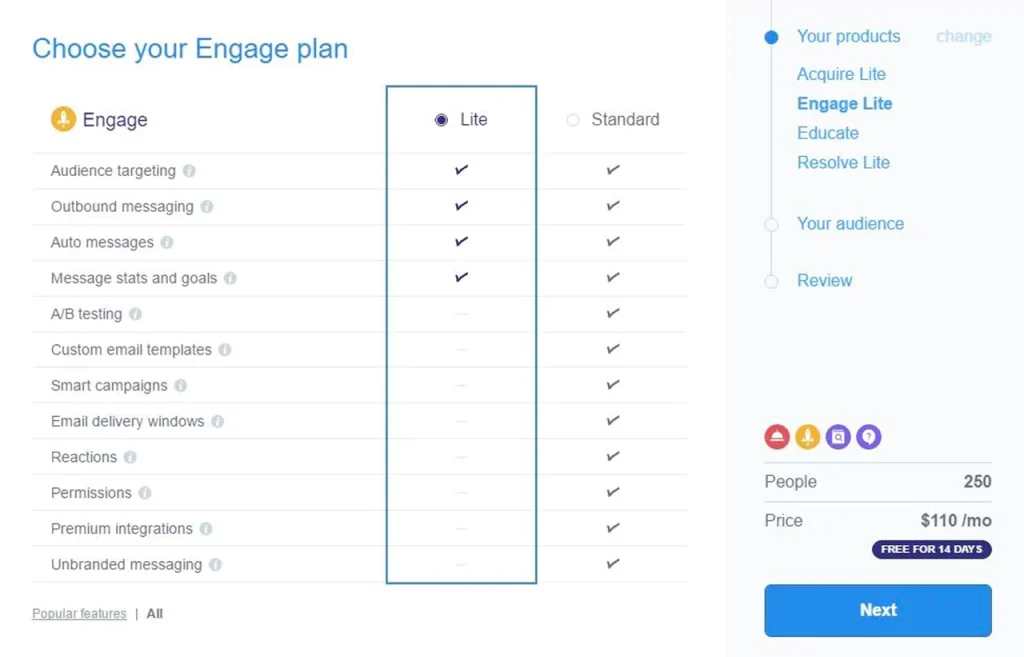
Custom CRM development cost breakdown chart for 2026

How much does custom CRM development cost?

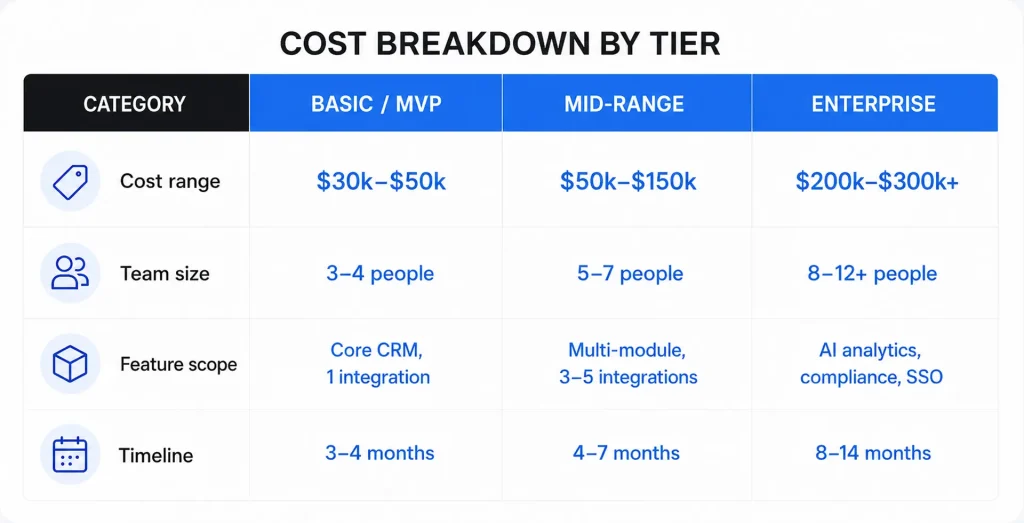
Custom CRM development cost ranges from $30,000 to $300,000+, with most projects landing between $50,000 and $150,000. A lean MVP with contact management, a sales pipeline, and one integration sits at the $30,000 floor. Enterprise-grade systems with AI analytics, compliance controls, and multi-region deployments push past $300,000. The $50,000–$150,000 sweet spot covers what most growing businesses actually need: a multi-module CRM with custom workflows, role-based access, and three to five integrations.

Where does your project land on that scale? It comes down to three variables more than any others: feature scope, where your engineering team sits geographically, and whether you operate under HIPAA, SOC 2, GDPR, or similar regimes. A SaaS startup building a sales-ops tool with a nearshore team will spend a fraction of what a US healthcare network pays for the same headline feature set.

Two budget lines get forgotten in nearly every first draft. Data migration from legacy systems or spreadsheets typically runs $3,000–$15,000 depending on record volume and data quality. You should also add a 15–20% contingency buffer for scope changes — not because your team can’t plan, but because real workflows reveal edge cases that no discovery phase catches in full.
Custom CRM development cost breakdown by tier, from MVP to enterprise

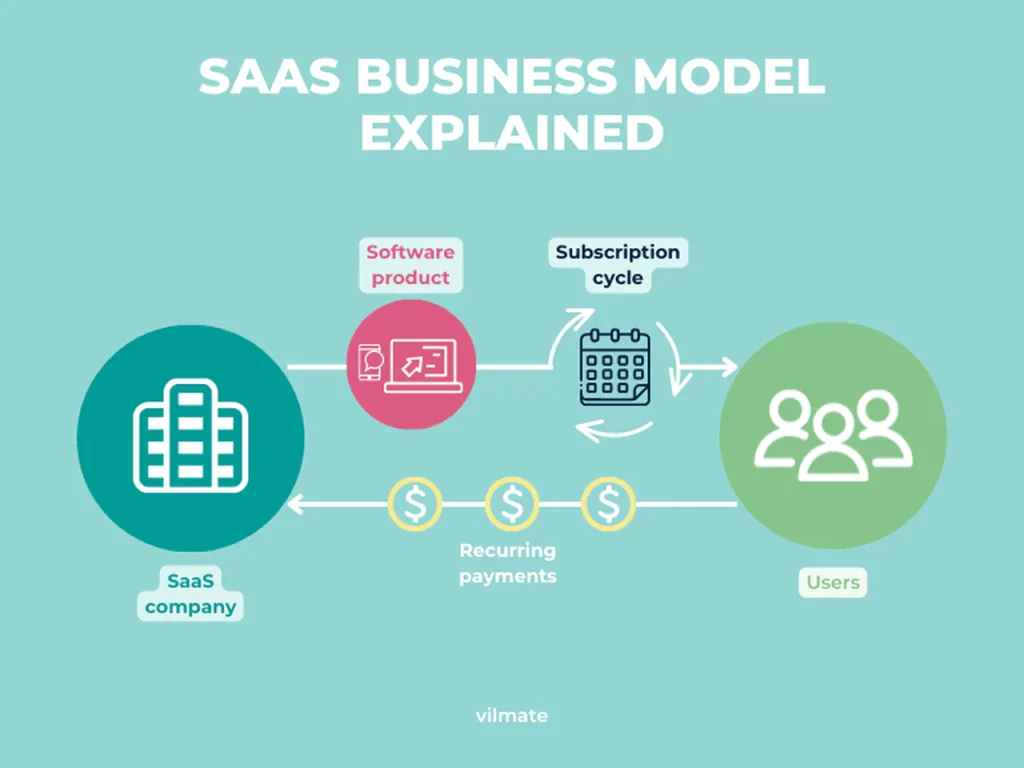
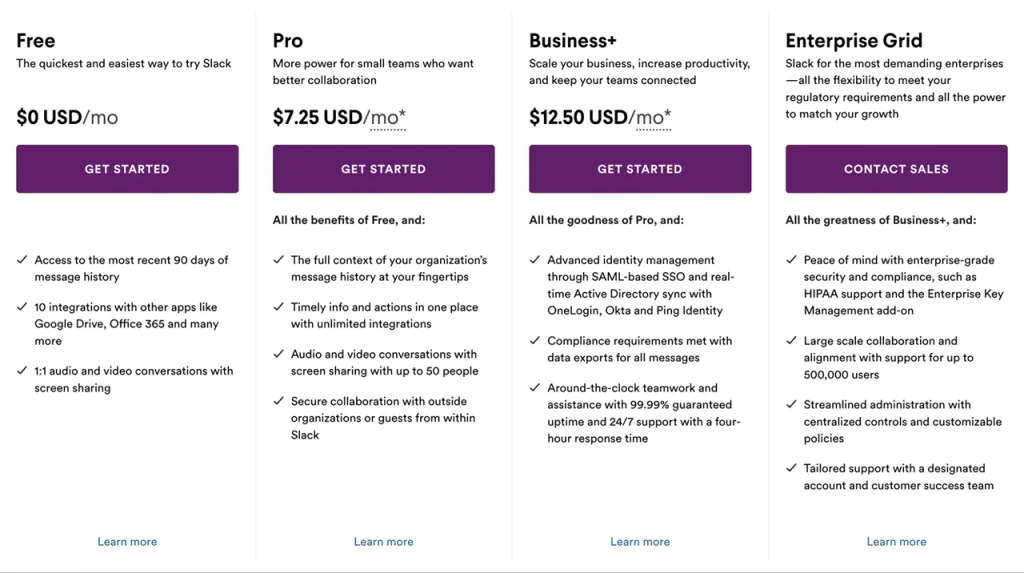
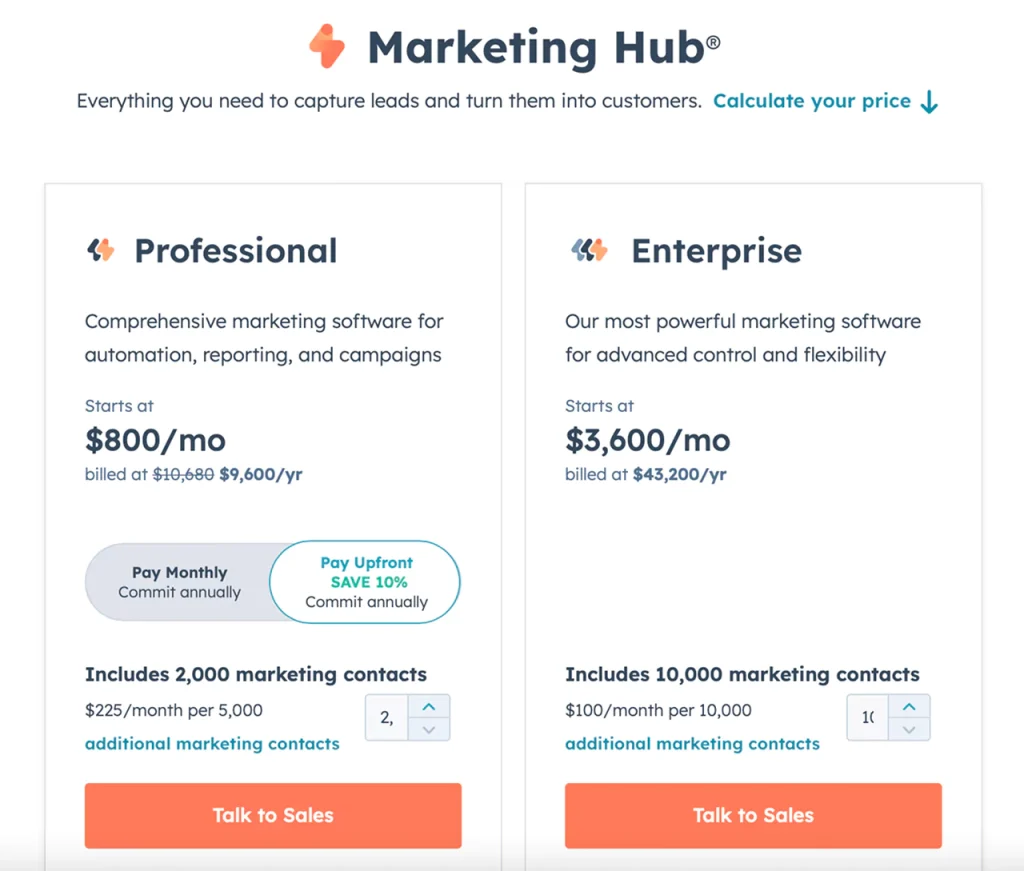
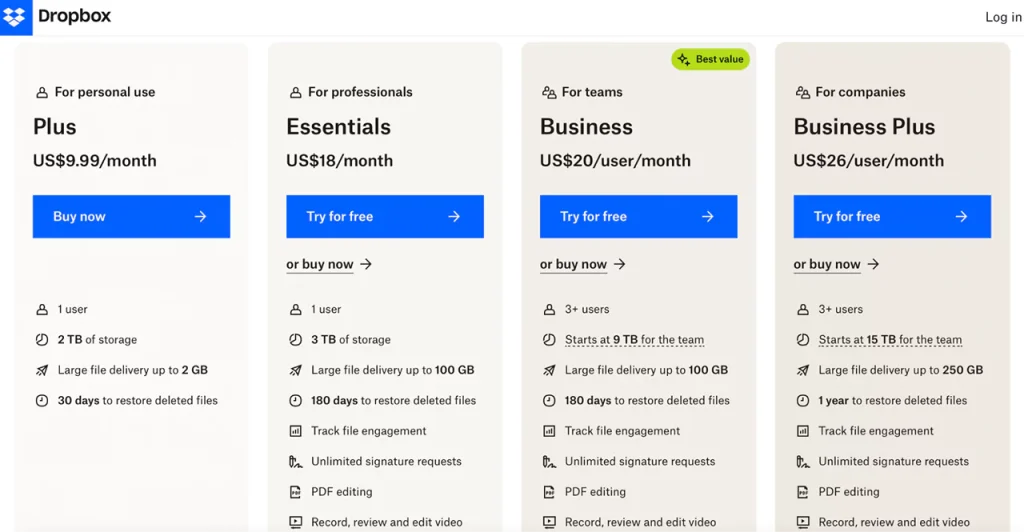
It’s worth weighing that custom build against the off-the-shelf math. Popular cloud CRMs run $60–$160 per user per month, so a 50-seat deployment costs $36,000–$96,000 annually — every year, indefinitely, with prices that tend to rise at renewal. A custom CRM can break even against ongoing per-seat licensing within a few years, with the timeline depending on team size, chosen platform, and annual subscription growth. That’s the TCO argument in one paragraph, and it’s why the build-vs-buy question deserves its own section later in this article.

For a broader sense of how these ranges compare to other custom software projects, this custom app development cost breakdown walks through similar variables across product categories.

The headline numbers are useful anchors. But they don’t tell you why one $80,000 quote is reasonable and another is a red flag. Before you can pin down where your project falls on that spectrum, you need to understand the specific variables that push costs up or down — which is exactly what the next section covers.

Factors that drive custom CRM development cost

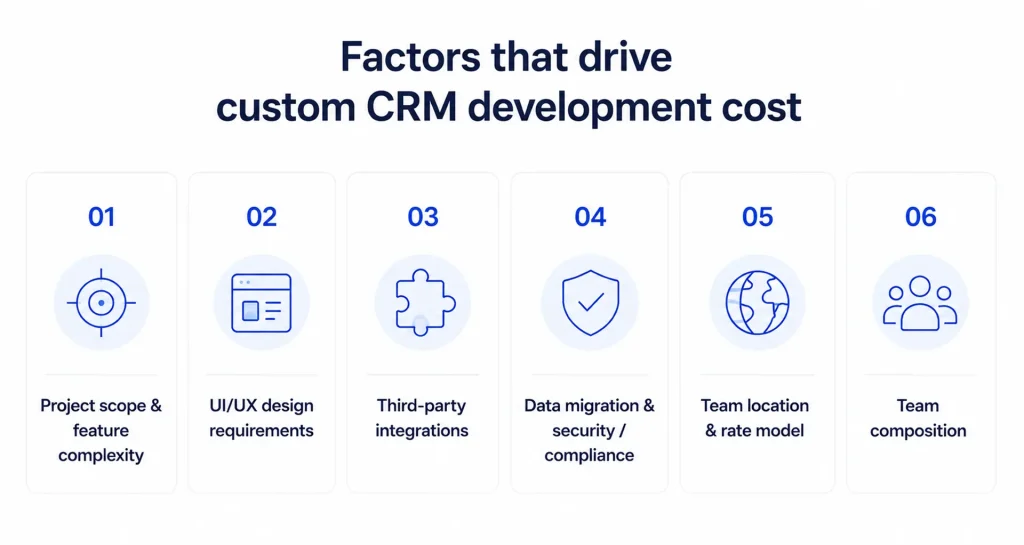
Six variables explain almost every dollar of variance in a custom CRM development cost estimate. Get these right in discovery, and your final invoice will land close to the original number. Get them wrong, and the 15–20% contingency buffer mentioned earlier won’t be enough.

Project scope and feature complexity

Feature scope is the single largest cost driver in custom software development. Each added module adds meaningful weeks of engineering time, plus QA and design overhead. Poorly defined scope causes more budget overruns than every other factor combined. So the fix isn’t more features — it’s a sharper definition of what ships in v1.

UI/UX design requirements

An internal sales-ops tool used by 30 reps doesn’t need the polish of a customer-facing CRM. Internal tooling can ship with library components and minimal custom UI/UX work. A client portal — especially in regulated industries where WCAG accessibility is enforced — needs proper design systems, usability testing, and accessibility audits. That gap can shift design budgets significantly depending on complexity and accessibility requirements.

Third-party integrations

Each non-trivial third-party integration adds substantial cost, depending on API quality and authentication complexity. Projects with three or more integrations, or any legacy system connection, should budget an additional 10–20% for integration risk. Salesforce-to-NetSuite syncs and homegrown ERP connectors are the usual offenders — undocumented endpoints turn two-week tickets into two-month sagas. If you’re pairing your CRM with back-office systems, ERP development services often handle the middleware layer alongside the CRM build.

Data migration and security/compliance

HIPAA, SOC 2, and GDPR controls typically add $10,000–$30,000 to the build. That covers encryption at rest and in transit, role-based access control, audit trails, and data residency configuration. Skipping compliance upfront and retrofitting it later costs two to three times more. Data migration from legacy CRM software or spreadsheets adds another $3,000–$15,000 depending on record volume and how messy the source data is.

Team location and rate model

Geography sets your blended hourly rate more than seniority does. Typical 2026 ranges:

  • US/Canada onshore rates are significantly higher than other regions, typically well above rates in Eastern Europe or Asia.
  • Western European rates are considerably lower than North American onshore but higher than Eastern European or Asian alternatives.
  • Eastern European and Latin American nearshore rates offer meaningful savings versus North American onshore.
  • South and Southeast Asian offshore rates represent the lowest end of the market, though quality varies significantly within the region.

The same build can cost dramatically less with an Eastern European team than a US-based one, reflecting the wide regional rate spread. Quality varies within each region, so vet portfolios — but the rate spread is real and durable.

Team composition

Junior-heavy teams look cheap until rework shows up. Production-grade CRMs need a solutions architect, senior backend and frontend engineers, a DevOps engineer, dedicated QA, and — for regulated builds — a security specialist. Each specialist role raises the blended rate, but reduces the risk of costly architectural mistakes.

So what does this mean in practice? Your features list is only one of six knobs. Now that you understand what moves the needle on cost, it helps to see how those levers combine differently for SaaS companies, service businesses, and regulated enterprises.

Cost breakdown by CRM type and business size

Your feature list matters, but your company profile predicts cost more reliably. A 40-person SaaS startup and a 40-person cardiology group can request the exact same CRM on paper — and one will cost three times the other once data models, compliance, and integration depth are factored in. Here’s how the three vertical profiles actually price out.

SaaS companies: $80k–$180k

SaaS CRMs carry weight that pure sales tools don’t: subscription and billing logic synced with Stripe or Chargebee, webhook infrastructure for product-event ingestion, and SOC 2 readiness if you sell to mid-market or enterprise customers. SOC 2 alone runs $20,000–$80,000+ before tooling, and that’s before your CRM touches a single customer record. In most cases, expect a four-to-six-month build with three to five integrations covering product analytics, billing, and support.

Service businesses: $40k–$100k

Agencies, consultancies, field-service firms, and retail operators need pipeline, scheduling, a client portal, and clean handoffs between sales and delivery. Compliance overhead is minimal, integrations typically number two or three (calendar, accounting, email), and the data model rarely strains a well-designed PostgreSQL schema. This is where the $50,000–$80,000 sweet spot lives for most mid-sized businesses. For sector-specific builds, retail CRM software development typically layers POS and inventory sync on top of the standard customer relationship management core.

Regulated enterprises: $150k–$300k+

Healthcare, financial services, and public-sector deployments carry HIPAA, FINRA, or GDPR requirements that compound across every layer. SSO via SAML or OIDC, full audit trails on every record mutation, encryption with customer-managed keys, and data residency controls aren’t optional — they’re table stakes. Add the cost of non-compliance failure: HIPAA violations reach $1.5 million per category annually, which is why retrofit-later thinking gets vetoed in the first steering committee.
CRM benchmarks by company size

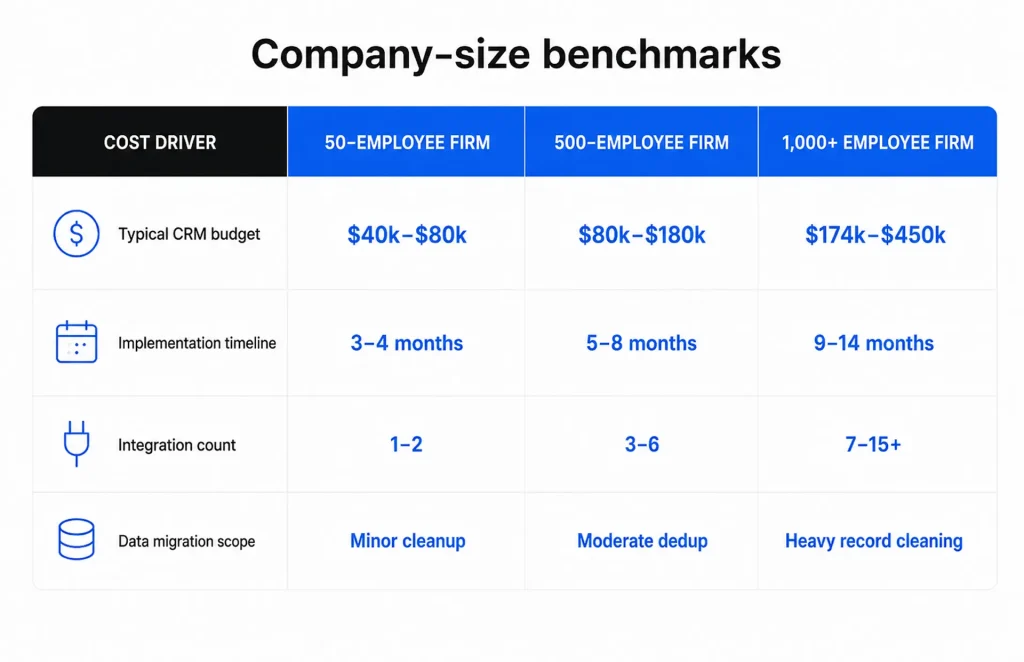
Larger headcount doesn’t just mean more seats. It means more source systems, dirtier data, heavier training programs, and more stakeholders in the requirements meeting. Larger companies don’t pay proportionally more simply because the software is more complex — coordination costs, data complexity, and training overhead all compound.

What does this mean for your custom CRM development cost estimate? Anchor your expectations to your company profile first, then refine with your feature list. A service business that budgets like a regulated enterprise will substantially overspend relative to what their use case actually requires. A healthcare network that budgets like a service business ships an audit failure.

Once you have a realistic budget range for your company type, the next strategic question is whether a custom build is actually the right path — or whether buying or adapting an existing platform makes more financial sense.

Build vs. buy vs. customize: choosing your approach

Three paths, three very different financial profiles. The right choice isn’t about upfront price — it’s about three-year total cost of ownership and one honest question: are your workflows genuinely proprietary, or do they just feel that way?

Build from scratch

A custom build carries zero licensing fees, fits your workflows from day one, and gives you full ownership of the data model and business logic. Upfront cost is the highest of the three options — $50,000–$300,000 depending on scope — and time to first usable version typically runs 10–18 weeks. The payoff is that TCO break-even against Salesforce usually arrives within a few years, and every year after that compounds as a cost-effective decision. This is the right path when your workflows are a competitive advantage you can’t afford to standardize away.

Extend a SaaS CRM (Salesforce, HubSpot)

Time-to-value is the headline win here. You’re live in weeks, not months, with a mature ecosystem of plugins and certified consultants. The trade-off shows up in years two and three: per-seat licensing scales linearly with headcount, premium add-ons (CPQ, Marketing Cloud, advanced analytics) are billed separately, and implementation costs diverge sharply between platforms. For a 50-seat mid-market deployment, Salesforce TCO tends to run roughly 2–3x HubSpot’s over three years — driven by ecosystem overhead and admin headcount, not the license line itself.

Customize an open-source base (SuiteCRM, Vtiger)

Zero licensing fees, and Open-source CRM implementation carries moderate upfront cost for a typical mid-sized deployment, with full access to source code. The catch is staffing. Research on self-hosted open-source CRM platforms suggests internal IT teams spend 40–60% of their time on maintenance rather than feature work. If you don’t already have PHP/MySQL talent on payroll, the “free” platform gets expensive fast.

Decision framework

Two tests cut through the noise. First, the proprietary workflow test: if you removed your CRM tomorrow and replaced it with vanilla HubSpot, would your competitive position actually suffer? If no, buy. If yes, the custom CRM development cost is justified. Second, the 3-year TCO model: stack licensing, implementation, admin headcount, and customization against a custom build amortized over 36 months.
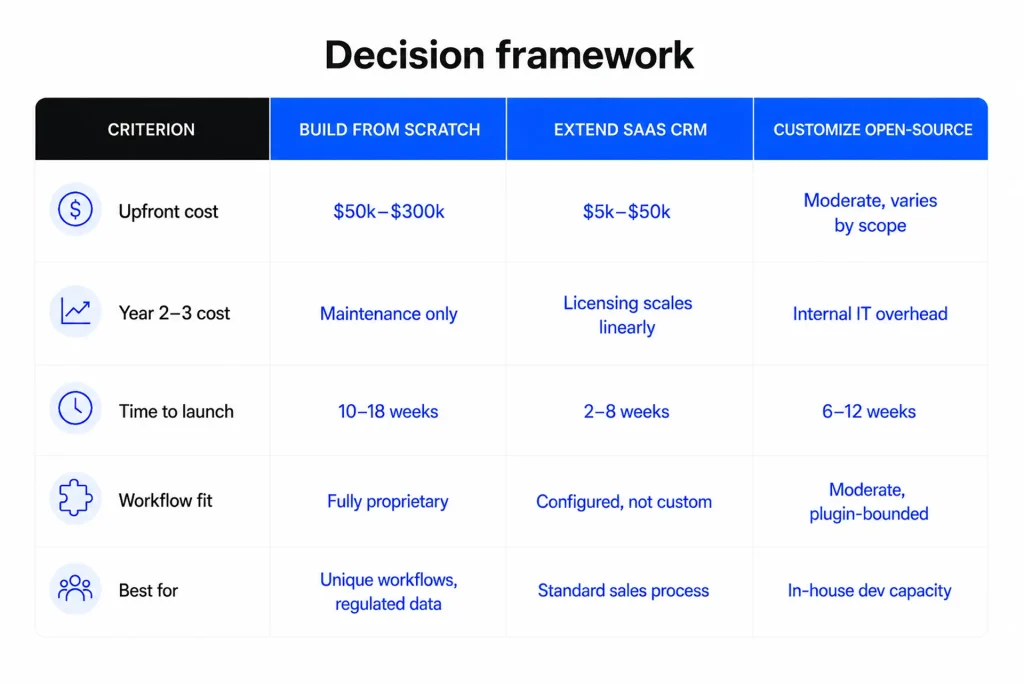
CRM decision framework

In practice, most companies should buy, a meaningful minority should build, and a small slice with the right engineering talent should customize.

Interesting

The decision isn’t ideological — it’s a TCO spreadsheet with a workflow-uniqueness column.

With the build-vs-buy decision framed, the natural next question is: what does each budget tier actually deliver in terms of concrete functionality?

What’s included in a $30k–$300k CRM project?

Three budget brackets, three fundamentally different systems. Knowing what actually ships at each tier — and what gets deferred — lets you scope your initial engagement with eyes open and plan the evolution path before you sign anything.

$30k–$50k: the lean MVP

This tier replaces spreadsheets and validates the concept. You get contact and lead management, a simple deal pipeline with drag-and-drop stages, a basic reporting dashboard, email integration, task management, and a mobile-responsive UI. One third-party integration is included — typically Gmail, Outlook, or your accounting tool. Timeline runs 3–4 months with a team of three or four. What you don’t get: workflow automation, custom dashboards, role-based access beyond admin/user, or multi-entity data models.

$80k–$150k: the production CRM system

This is where most growing businesses land, and where the custom CRM development cost starts buying real differentiation. You get a multi-module CRM covering sales, marketing, and service workflows; custom automation rules; three to five integrations (billing, support, marketing, analytics, calendar); role-based access control; a polished mobile-responsive UI; and a reporting layer with custom dashboards. Picture a 60-person SaaS company syncing Stripe billing events, HubSpot marketing data, and Intercom support tickets into a single customer record with automated lifecycle triggers. Timeline: 4–7 months with five to seven people.

$200k+: the enterprise tier

At this level you’re buying compliance-grade architecture, not just more features. Expect AI-driven analytics (lead scoring, churn prediction, next-best-action), HIPAA/SOC 2/GDPR controls with audit logging and data residency, SSO via SAML or OIDC, a scalable microservices architecture, and seven or more integrations including ERP and data warehouse pipelines. Compliance work alone adds $10,000–$30,000 to the base cost, and retrofitting it later costs 2–3× more.
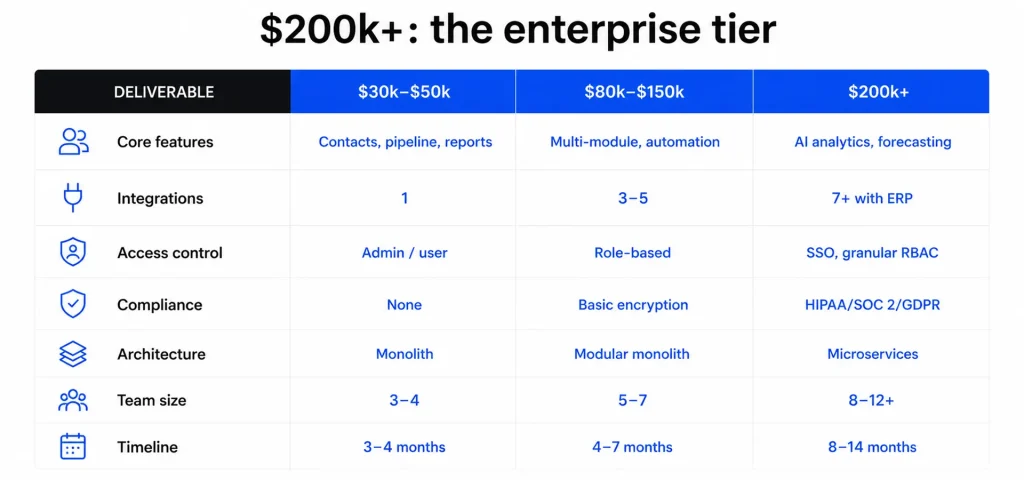
Enterprise CRM tier breakdown

The smartest move for most companies isn’t picking the biggest tier you can afford — it’s picking the smallest tier that proves the concept, then planning the evolution path in writing. An MVP-first approach saves 40–60% upfront, and deferred integrations alone can bank $20k–$40k you can redeploy once you’ve validated which workflows actually need the custom treatment. Want a clear picture of which tier fits your situation? Tell us about your project and get a clear development roadmap from our team.

Knowing what each tier delivers also reveals where the most practical cost levers are — and there are several concrete strategies for getting more capability within a tighter budget.

How to reduce custom CRM development costs

There are four levers that consistently move custom CRM development cost down without compromising what you actually ship. Cutting corners on architecture or skipping discovery isn’t on the list — those decisions create the rework that blows budgets in month four.

Ship an MVP first, then iterate

Scope your v1 to three things: contact management, a deal pipeline, and one integration. That’s it. No marketing automation, no custom dashboards, no role-based access beyond admin and user. An MVP-first approach cuts upfront custom CRM development cost by 40–60% compared to a full-scope build, and it does something more valuable than save money — it puts a working system in front of real users in 12–16 weeks. That’s when you learn what your team actually needs versus what they said they needed in the requirements meeting.

Why does this work? Because 50–60% of software projects fail partially or completely, and scope creep is the leading cause. Smaller scope means a smaller failure surface.

Triage features with MoSCoW before discovery closes

Run a MoSCoW pass — Must-have, Should-have, Could-have, Won’t-have — with your product owner and one senior engineer in the room. Every feature gets assigned to a bucket, and only Must-haves enter v1. Should-haves go into a documented v2 backlog with rough estimates. This exercise frequently removes a significant portion of the original feature list, reducing scope and cost before development begins. It’s the difference between a clean $80,000 build and a messy $140,000 one. If you’re scoping from scratch, this guide on how to build a CRM system walks through the prioritization framework in more depth.

Build on open-source frameworks

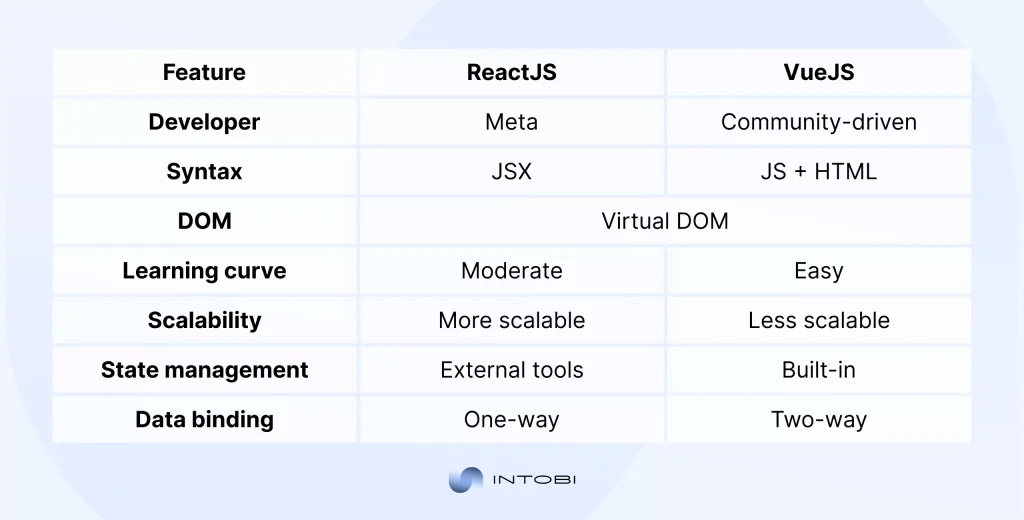
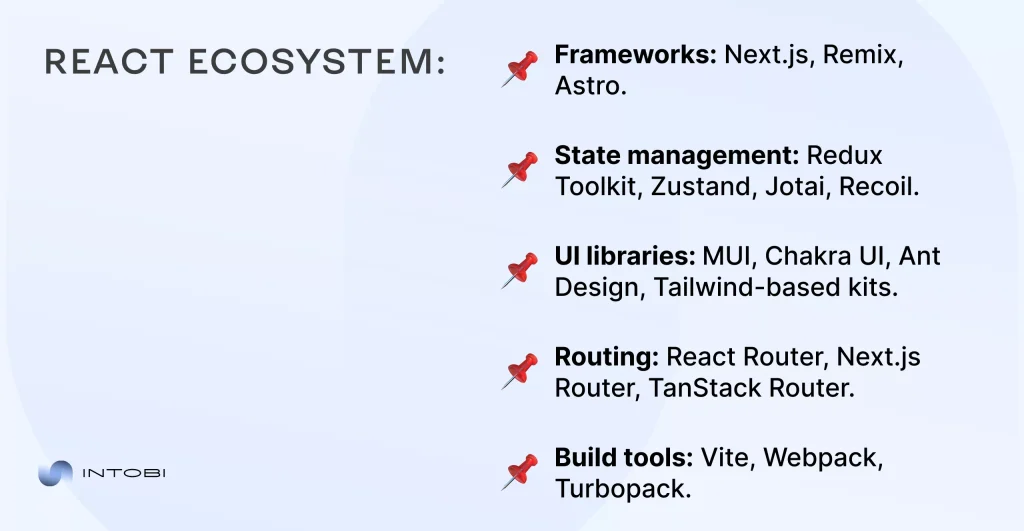
Pay for engineering hours, not licenses. React on the frontend, Node.js or Django on the backend, PostgreSQL for data — all free, all production-grade, all backed by communities that ship security patches faster than most commercial vendors. The savings show up in two places: zero licensing fees today, and lower maintenance bills for years afterward. Open-source stack choices can eliminate meaningful licensing spend that would otherwise go to proprietary tooling.

Use API aggregators as a temporary integration layer

Need to connect Stripe, HubSpot, and Slack in v1 but can’t afford three custom integrations? Route them through Zapier or Make for the first six months. You’ll pay $50–$200/month in tool fees and defer $20,000–$40,000 in custom API work until you’ve validated which integrations genuinely need the engineering investment.

Choose nearshore over onshore

Geography is the biggest cost-effective lever you’ll pull. Nearshore teams in Eastern Europe or Latin America deliver 40–60% cost savings versus US onshore, with 6–8 hours of daily working overlap — enough for real-time standups and same-day code review. Pure offshore is cheaper still but loses you the collaboration velocity that keeps projects on track. For most US-based businesses, nearshore is the sweet spot between rate and responsiveness.

Cost savings at build time only tell part of the story. The other half is understanding what you’ll spend to operate, maintain, and evolve the system over its full lifespan.

Scalability and long-term ownership costs

The day you ship is the day your second budget starts. Founders who model only the build cost — and skip the operating cost — routinely under-fund their CRM by six figures over a three-year horizon. Here’s what actually shows up on the bill after launch.

The annual maintenance retainer: 15–25% of build cost

The working benchmark across the industry: budget 15–25% of your initial build cost per year for ongoing maintenance. On a $120,000 customer relationship management build, that’s $18,000–$30,000 annually. The retainer typically breaks down into four buckets:

  • Hosting and infrastructure — $100–$400/month for small deployments, $1,000–$5,000+/month for production-grade setups with redundancy and backups
  • Security patches and dependency updates — quarterly framework upgrades, monthly library patches, immediate response on critical CVEs
  • Bug fixes and minor feature iterations — the steady drip of “can we add a filter to this view” that keeps users engaged
  • Monitoring and incident response — uptime tooling, log aggregation, and on-call coverage when something breaks at 2am

Skip the retainer and you don’t save money. You defer it — and deferred maintenance compounds. A year of skipped dependency updates can turn a two-week upgrade into a two-month rewrite.

Cloud vs. on-premise hosting

Cloud now accounts for over 80% of CRM software revenue globally, and for good reason: predictable monthly cost, elastic scaling, no hardware refresh cycles. For most companies under 500 seats, cloud wins on TCO and engineering velocity.

On-premise flips the math at enterprise scale. Once you’re past several hundred concurrent users with stable, predictable load, per-user cloud subscriptions can exceed amortized hardware cost — but only if you already carry the IT staffing, data center contracts, and security operations to run it. Gartner has noted that on-premise software lifetime cost can reach four times the initial purchase price once staffing and upgrades are factored in, so the “cheaper at scale” argument only holds when your operations team is already there.

Compliance and security audits as recurring line items

For regulated industries, audits aren’t a one-time launch cost — they recur. HIPAA, GDPR, and SOC 2 audits typically add $5,000–$50,000 annually depending on scope, auditor, and remediation work. SOC 2 Type II in particular requires continuous evidence collection across a 12-month observation window, which means tooling spend, not just auditor fees. Pair this with ongoing application hardening — the same disciplines covered in mobile app security best practices — and you’re looking at a security line that holds steady year over year.

The competitive advantage you’re paying to preserve

Why absorb these costs at all? Because the alternative — per-seat SaaS licensing — never stops scaling with your headcount, and the workflow logic you’ve encoded is yours. No vendor lock-in, no surprise price hikes at renewal, no third party deciding your data model. That’s the moat a custom build buys you.

Those long-term dynamics are easy to discuss in the abstract. The next section draws on direct project experience to ground them in real numbers and real decisions.

Our experience delivering custom CRM projects

Across SaaS, healthcare, and professional services builds, the projects that ship on budget look different from the ones that don’t — and the tells show up in week one of discovery, not month four when the burn rate spikes.

Discovery quality predicts on-budget delivery more than any other variable

Show us a project where scope is documented to the user-story level by day five of discovery, and we’ll show you a build that lands within 10% of the original quote. Show us a project where the discovery deck still says “TBD” next to integration counts and user roles by week two, and the contingency buffer is already gone before the first sprint starts. Scope clarity isn’t paperwork — it’s the single highest-impact activity in the entire engagement. Every hour invested in tight requirements typically saves three to five hours of rework downstream.

Vertical patterns that separate adoption from shelf-ware

SaaS teams adopt fast when the CRM mirrors their existing product-led motion — webhook ingestion of product events, billing sync, lifecycle automation that sales reps don’t have to think about. Healthcare adoption hinges on workflow fit with clinical rhythms; a CRM that adds clicks to a patient encounter gets bypassed within a quarter, no matter how clean the audit trail is. Professional services firms — agencies, consultancies, law practices — adopt when the system genuinely shortens the path from inquiry to invoice, and they abandon it when it duplicates work already happening in their PM tool.

The pattern across all three verticals? Adoption tracks workflow fit, not feature count. The CRM systems that get used daily are the ones built around how the team already works, not how a vendor template says they should.

Week-one signals that predict budget overruns

Three red flags consistently forecast trouble, and you can spot all of them in the first five working days:

  • Underdocumented legacy integrations When the answer to “how does data get into your current CRM today?” involves three people, two spreadsheets, and a Zapier account nobody owns, integration cost will double.
  • No empowered product owner If the person who can say yes to scope decisions isn’t in the discovery sessions, every decision routes through committee and timelines slip by 30–50%.
  • No data model decision by end of week one Teams that defer the “single source of truth” conversation pay for it later when migrations and merges turn into custom engineering work nobody budgeted for.

Catch any one of these early and you can correct course. Ignore all three and your custom CRM development cost estimate becomes a piece of historical fiction by month three.

What this means for your engagement

If you’re scoping a CRM — or a cross-platform app development project that touches the same patterns — invest disproportionately in the first two weeks. Get the product owner in the room. Document the integrations honestly. Lock the data model. The teams that do this ship on budget. The teams that don’t, don’t.

Tell us about your project and get a clear development roadmap from our team.

Get a clear estimate for your custom CRM

Speak to us

Bottom line on custom CRM development cost

Custom CRM development cost lands between $30,000 and $300,000+, but the headline range matters less than three decisions: scope discipline, team geography, and whether your workflows are genuinely proprietary or just feel that way. Get those right and your invoice tracks your quote. Get them wrong and the contingency buffer disappears before the first demo.

The math that actually decides the question is three-year TCO. A custom build typically breaks even against per-seat SaaS licensing within a few years — provided you’ve also budgeted the 15–25% annual maintenance retainer honestly.

Curious how other teams have approached similar builds? Our portfolio of CRM projects shows what shipped, what it cost, and where the trade-offs landed.

For deeper reading on scoping, integrations, and architecture decisions, our engineering blog covers these topics in detail.

When you’re ready for a concrete number on your build, tell us about your project and get a clear development roadmap from our team.

FAQ

How much does it cost to build a custom CRM system?

A lean MVP with core contact management, a basic pipeline, and one integration starts at $30,000. Mid-range builds with 3–5 integrations run $60,000–$150,000. Enterprise systems with compliance and AI features reach $150,000–$300,000+. Budget another 15–20% annually for maintenance.

What is the cheapest way to build a custom CRM?

Lock a tight MVP scope before development starts and enforce change control. Use open-source frameworks (React, Node.js, PostgreSQL) to skip licensing fees. Engage a nearshore team at a fraction of US agency rates. Defer non-critical integrations via Zapier to save $20k–$40k.

How long does it take to develop a custom CRM?

Timelines vary by scope: MVP builds typically take 3–4 months, mid-range systems with 3–5 integrations run 4–7 months, and enterprise builds with compliance controls take 8–14 months. Each additional module adds 2–4 weeks to the baseline timeline.

What are the 4 types of CRM?

Operational CRM automates sales, marketing, and service workflows. Analytical CRM focuses on segmentation, forecasting, and data analysis. Collaborative CRM handles cross-team communication and partner portals. Strategic CRM covers long-term relationship strategy, often overlapping the other three in custom builds.

Is building a custom CRM better than buying Salesforce or HubSpot?

For companies under 50 users with standard workflows, HubSpot or Salesforce typically wins on three-year TCO. Custom builds break even within a few years once add-on licensing and admin overhead pile up. If your workflows are proprietary or regulated, off-the-shelf workarounds rarely solve the problem cleanly.

What ongoing costs should I budget for after CRM launch?

Plan 15–20% of build cost annually for maintenance — patches, dependency updates, bug fixes, API changes. Cloud hosting adds $200–$2,000/month depending on scale. Budget quarterly feature sprints separately. On-premise shifts spend to infrastructure CapEx and internal IT, often exceeding cloud at mid-market scale.

Understanding the UX Design Process: A Step-by-Step Guide

TL;DR

The UX design process is a user-focused way to build digital products people actually find useful. This guide explains how UX differs from general design and walks through the six core steps – research, define, ideation, prototyping, testing, and implementation. It also covers how to measure success after launch and the common UX mistakes that derail products, whether you are building a mobile app, a website, or a SaaS platform.

Make a summary of this article with AI:

UX has become mainstream in the contemporary IT community. However, much misconception still exists about this approach to product creation. Its distinctive feature is going through the most significant stages, from research, product and idea definition to creation of a prototype, testing, to obtain final product implementation. 

What is the UX design process?

This process is a user-focused approach to designing digital products with a high rate of functionality. UX stands for User Experience, focusing on understanding users’ needs, motivations, and comfort to create products that provide effective business solutions.

How the UX design process improves product usability

Usability is the way of achieving business goals when a product is used. Usability improvement starts with product research. In mobile app development, for instance, user research helps designers identify friction points and reveal unmet needs. 

The stage of prototyping ensures early visualization of business solutions to identify if the product implementation is on the right track. Finally, the process of usability testing is to identify the most problematic areas to reduce the likelihood of a negative user experience.

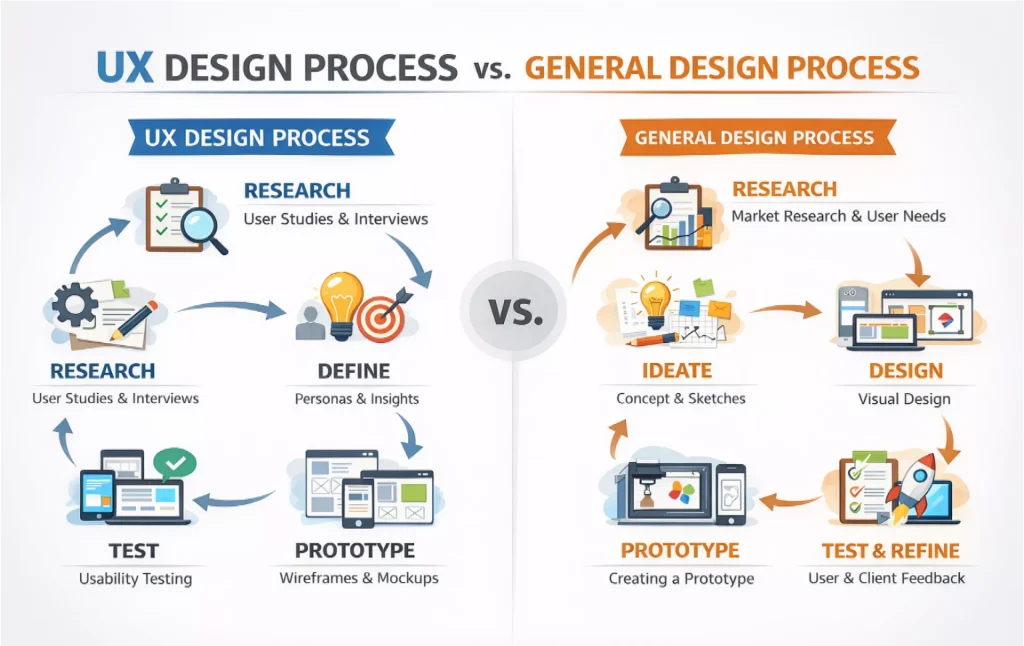
UX design process vs. general process

There are several basic differences between general and UX design. First, the general design prioritizes aesthetics, branding, and visual communication, while functionality, user satisfaction, and positive experience are the core of the UX. Secondly, the general design starts with the creative concepts and shifts to visualization. 

UX process begins with research and identification of the main business problems. It is characterized by deep analytical work before interface decisions. Thirdly, general design does not emphasize testing as a key stage, whereas UX does. Finally, the UX, unlike general design, is the integration of psychology and behavioral science to create products. 

differences between ux and general designs

Where the UI/UX design process fits in product development

Product development is influenced by the UI or UX design process and begins long before the engineering process. In the early stages, UX ensures that resources are allocated to generate ideas based on validated solutions. 

In Agile environments, UX work must be completed before development, prototyping, and validation to create a clear understanding of the product. Meanwhile, lean startups use UX to test minimum viable products (MVPs), identify weaknesses, and prevent potential negative impacts on user experience.

Overview of UX design process steps

Despite the variations in the workflow and specific amendments, there are six design process steps:

  • research
  • definition
  • ideation
  • prototyping
  • test
  • implementation

Flexibility remains a fundamental feature of these stages, avoiding rigidity and creating opportunities for additional adjustments. Each stage builds upon the next, while maintaining openness to iteration. Testing insights may trace back to ideation and redefinition of problems. Thus, the teams must dig into the stages to ensure effective alignment throughout the project.

The сore stages of ux explained

  1. Research Identification of user and business needs and understanding business requirements.
  2. Definition Resuming research into problem articulation and identification of finite users.
  3. Ideation Brainstorming of potential solutions and methods for their realization.  
  4. Prototyping Formulation and representation of ideas through interaction.
  5. Test Assessment and validation of solutions in real-life settings. 
  6. Implementation Realization of designs through interaction between designers and developers.

How many UX steps are there in a typical project?

Some frameworks claim there are five stages, while other methodologies assume seven of them. The choice of phases depends upon the project complexity, the structure of the team, user expectations, and project size. For instance, large projects may require protracted discovery, extended ideation, and validation phases. 

Intobi is ready to work with startups that require a combination of certain phases to expedite testing and implementation.

Interesting

Even when some steps are omitted, research, validation, and iteration remain compulsory.

Differences between UX design processes across teams

The differences between these processes are explained by a great diversity of teams, organizations, sizes, maturity, and culture of teams. In agile teams, iteration and continuous feedback are of paramount importance. Meanwhile, waterfall environments are characterized by the focus on sequential phases. 

Teams working with startups may require designers to be versatile and combine different roles, from research to UI design and collaboration with users. At the same time, design in larger enterprises is manifested by the separation of roles. It means that each stage is being conducted separately by different teams, which, however, apply user-centered thinking as a guiding principle.

Step 1 – research in the user experience UX design process

The heart of the UX is research, as it is supported by evidence rather than based on assumptions and mere project visualization. The primary objective of the research phase is to understand users, their motivations, expectations, and apply their previous experiences to product creation. More than that, the research phase is crucial for the evaluation of market competition and business constraints. 

User interviews, surveys, and behavioral data

The data retrieved from user interviews, surveys, and behavioral analysis offer quantitative information about user needs and motivations. The data from larger audiences is gathered through surveys, thus enabling trend validation. Behavioral data, in turn, uncovers the specifics of user-product interaction. However, effective results should be based on both qualitative and quantitative research.

Competitive analysis in the UX design process

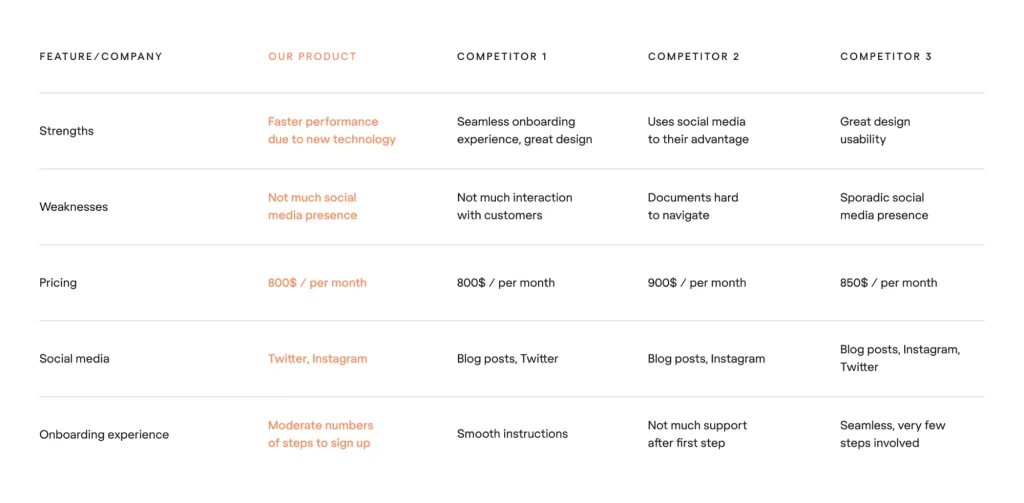
Like any other market segment, competitive analysis is applied to examine leading market trends, usability expectations, strengths, and weaknesses of similar products. This process is important to understand market needs, expectations, and opportunities for differentiation, while avoiding the creation of a rocket science product that will be too complex for users. 

competitive analysis on ux design

Identify problems in early steps of ux design

Research is about a clear problem definition. In the early stages of design, it reveals the gaps between needs and solutions are established. As a result, the subsequent design decisions are driven by the research information. Thus, research-based information eradicates the possibility of mistakes and underrating of user expectations.  

Step 2 – define: turning research into insights

The define stage is characterized by the synthesis of research findings and the manifestation of actionable insights in the long run. This phase presents a clear and structured understanding of raw data and offers a preliminary solution.

Creating personas and user journey maps

Archetypal users identified by research refer to personas. The main criteria of persona identification are:

  • demographics
  • objectives
  • hindrances and previous experience
  • behaviors

Interaction of the user with the product is visualized in user journey maps, which highlight emotions, expectations, and the most common friction areas. These criteria enable teams to keep focus on user-centeredness in UX design process.

Establishing сlear problem statements

Establishing a problem statement centers around the needs of users and the context of their operation. One of the examples of a clear problem statement is: “Large enterprises require a more complex user interface to uncover and meet the needs of all areas of the hierarchy”. A clear problem statement entails more user-focused ideation free from scope creep.

Aligning business goals with ux/ui process outcomes

In UI UX design process, UX solutions must harmonize with basic business objectives. Whatever the goal of the design is, UX outcomes should be based on measurable features. They can include the number of subscriptions, support costs, and retention indicators. Additionally, collaboration with stakeholders is vigorous to ensure a balance between user needs and company targets.

Step 3 – ideation in the UI UX design process

Ideation is the process of generating multiple solutions before cutting down to the final and most suitable option. Ideation takes place via one or a combination of the following idea-production methods:

  •  Brainstorming
  •  Sketching
  •  Selection

Brainstorming and collaborative design workshops

UX design process is based on brainstorming, aimed at encouraging sundry ideas. Brainstorming can be conducted in various forms, depending on the mode of work and type of team, but generally involves a collective ideas-exchange between designers, developers, and stakeholders. The most frequently applied techniques to stimulate creativity are Crazy 8s and mind mapping.

Sketching as an early design step

The sketching phase deals with the visualization of ideas and encourages experimentation and the influx of innovative solutions. Structure and flow are more vital in the sketching phase, while visual details are of less attention.

Selecting ideas that best serve the process of ux

Selection of ideas is a multifaceted process, based on the principle of evaluation. During the idea selection in the UX design process, teams evaluate their feasibility, potential user experience, and usability, as well as overall alignment with business goals. Selected and evaluated ideas are subsequently proceeded to the prototyping stage.  

Step 4 – prototyping in the UI UX design process

Prototyping is the stage of formation of interactive models, based on the previously researched and wireframed ideas. The role of designers in this stage is to create prototypes containing the most optimal layout and navigation. 

Prototyping usually ensures a positive user flow and lays the groundwork for positive usability. Prototypes are generally of two types:  low-fidelity and high-fidelity, and both are implemented to test usability and evaluate product deficiencies before launching.

Low-fidelity vs. high-fidelity prototypes

Low-fidelity prototypes are usually simple wireframes. They can also be in the form of clickable mockups to test flow, structure, and design peculiarities in the UI UX design process. Unlike low-fidelity prototypes, high-fidelity ones deal with detailed visuals and offer a simulation of the finished product.

example of high and low-fidelity prototypes

Tools commonly used in UX design process

The choice of tools depends on the product type and anticipated usability. The most commonly used are:

  • Figma
  • Sketch
  • SurveyMonkey
  • Google Forms
  • Adobe XD
  • InVision
  • Axure

Their popularity is explained by interactive prototyping and collaboration that entail high usability.

How prototypes support iteration in ux

Design supports the prototype’s function due to the opportunity for early feedback. It minimizes development expenses and provides usability control before engineering works. Thus, iterations become less vulnerable to expenses and additional amendments.

Step 5 – testing in the UX design process

The testing phase is initiated to validate design solutions and get approval from real users. It enables designers to forecast product deficiencies and identify ways to improve potential usability.

Usability testing methods

Testing methods are diverse, so the choice depends on the required indicators and final outcome. Test results are manifested in the user behavior and performance expectations rates. The most widespread methods applied are:

  • moderated testing (evaluation of the product in a real time)
  • remote usability testing (testing from diverse locations)
  • A/B testing (comparison of two versions of a product)
  • guerrilla testing (testing on public strangers)

Gathering feedback to improve stages in UX design process

Gathering feedback is vital as it helps anticipate errors, user confusion, and reveal unmet user expectations. Hidden usability issues can be easily highlighted and subsequently reduced during the period of feedback collection.

Iteration as a core part of ux

Iteration is the process of product refining in the long run as a result of repeated testing and continuous feedback, leading to improvement. This part of the UX design process presupposes evaluation of user interactions, adjustment of layouts, and functionality based on user expectations and previous experience.

Step 6 – implementation in the ux and ui design process

The implementation phase is characterized by a transition from ideas to fulfillment driven by stable opinions, evidence, intuition, and previous experience. Teams gather evidence to implement user-friendly and user-oriented solutions.

Designer–developer collaboration

The UX design process requires stable collaboration between all team members. It ensures preservation of design intent and prevents possible inconsistencies. Collaboration leads to improved usability manifested in the measurable business outcomes, revealing the rate of customer satisfaction, retention indexes, and others.

Maintaining ux quality during development

Maintenance of quality is pivotal at each stage. Intobi implements QA tests and correspondence to usability standards to ensure paramount quality.  The development period requires stable quality control to substantiate possible issues.

Design systems in the UI and UX design

Design systems are applied to offer the required number of reusable components. Their well-grounded implementation certifies consistency, scalability, and availability of options.

Measuring success after the design process

Design process is the starting point of a new product, entailing implementation of various measures to evaluate success and potential risks that may occur in the future.  Evaluating success may reveal the most effective solutions being offered. As a result, usability is improved by highlighting the most successful ideas and decisions.

Ux metrics and KPIs to track

The most frequently used key metrics are:

  • task success percentage
  • time on task
  • alteration rate
  • retention rate
  • attrition rate
  • Net Promoter Score (NPS)

Continuous improvement in the UX design process

Improvement in the design process is based on a multifaceted approach. It includes feedback collection, post-launch testing, and collaboration with users, as a result of which designers may pave the way for improvements and increase user friendliness.  

Evolving steps of ux after launch

The goal of the post-launch UX processes is to prioritize features and clarify the most effective features of the product after the processes of management and engineering. It helps anticipate possible issues and lay the foundation for future projects.

Common mistakes in ux design

There are common mistakes in the user experience design process. They are connected with the deficient information, poor visual effects, and poorly translated data, which leads to ineffectively developed solutions and unclear product ideas.

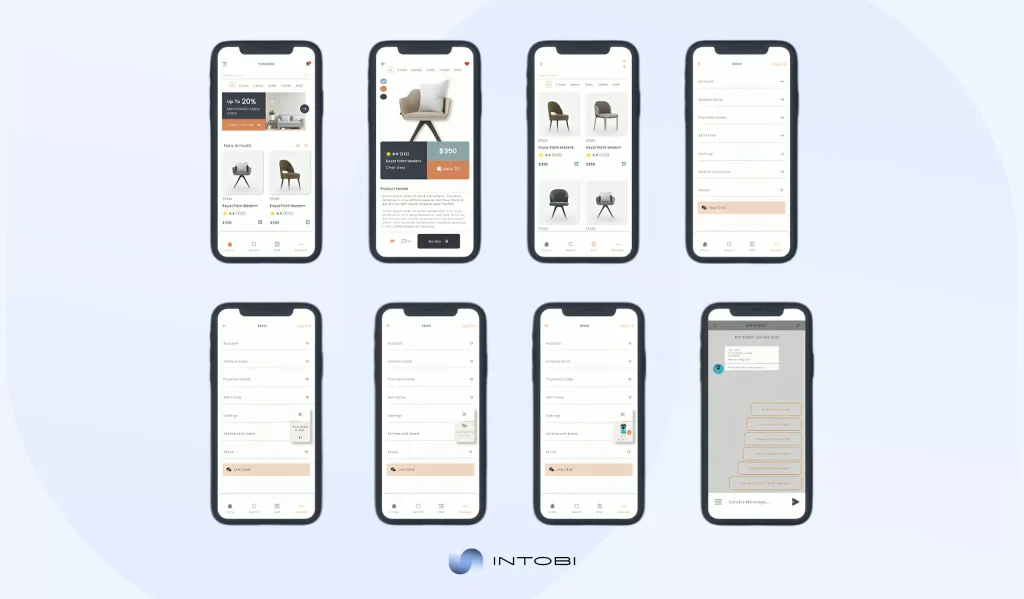
example of poor ux design

If an unmistakable ux solution is required, Intobi experts are at your disposal. 

Skipping research in the ux process

Skipping research in the UX design steps may cause loss of substantial information. It may result in insufficient raw data and negligence of the most significant use needs.

Treating ux steps as linear instead of iterative

UX is a cyclical process. Due to such a cyclical approach, it becomes iterative, able to provide users with products that can meet their expectations and align with business objectives. Treating it as a linear model may underrate vital user requirements.   

Ignoring the ui in the ux ui design process

Unlike visual design, the UX one is not about pure aesthetics, but about the way the product works and creates opportunities. However, UI creates a comfortable visual design that facilitates use flows.

Want a UX process that validates ideas early?

Get in touch

Final thoughts on the UX design process

Overall, the UX design process enables businesses to offer user-friendly solutions and provide a positive user experience. Whatever product is being developed, be it a mobile app, website, or even a SaaS platform, focus on the UX methodologies and strict rigidity in stages, decision-making, and idea validation ensure effective full-scale development.

Feel free to contact our team to get ux design solutions for your business. 

FAQ

What is the design process?

A problem-solving approach based on the research data, ideas, and testing is a design process. UX design stages are problem definition, insight collection, idea presentation, prototyping, and results assessment. Feedback is a basis for iteration, helping designers to offer user-centered ideas.

Why is ideation important in the design process?

Ideation is important due to its ability to encourage diverse thinking and offer various solutions based on the factors that go beyond the traditional vision. The generation of numerous concepts helps teams to uncover inventive directions and forecast risks. Ideation inspires creativity and collaboration.

What is usability in the UX design?

Usability of the design measures how easily and effectively users interact with the product and what flaws the product has. It highlights simplicity and clarity of use, focusing on areas that are confusing and frustrating. Usability ensures satisfaction, reduces deficiencies, and boosts positive experience.

Transportation Management Software: Efficiency and Cost Control

TL;DR

A transportation management system (TMS) gives logisticians the full picture: what is being transported, where, when, by whom, and under what conditions. This guide explains what a TMS is, how it streamlines logistics, the main types of systems, and how to tell whether your business needs one. It also covers what to consider when choosing a TMS and where the technology is heading.

Make a summary of this article with AI:

If you own a commodity business or are involved in such activities, you have heard of logistics transportation. Logisticians usually deal with transportation management solutions manually: searching for trucks, planes, and barges that can take goods in whole or in part. This approach becomes especially challenging without precise control over the process.

However, don’t worry if you find yourself in a similar situation. A special “pill” has long been invented that can solve logistics challenges, bringing transparency, cost efficiency, automation, and full control to transportation operations.

The topic of this article is about this “pill” named TMS or transportation management system. But what is TMS in logistics? Today, we will talk about individual transportation management systems and how they help solve logistics problems for B2B (business-to-business).

What exactly is a TMS transportation management system?

We are sure you have encountered such a problem as human error at work. Mistakes in numbers, incorrect reports, and fake presentations. And, most painfully for every entrepreneur, all this means a loss of potential profit. Moreover, this applies to any field. You have to admit, it’s quite annoying, isn’t it? 

Freight transport management systems or TMS software are a savior to most firms. Don’t mix it with CRM or ERP: TMS system operates on the logistics level, once the customer has made an order, but before the delivery.

  • CRM (customer relationship management) system focuses on customers and orders before the purchase.
  • ERP (enterprise resource planning) system manages internal resources, finance, and operations.
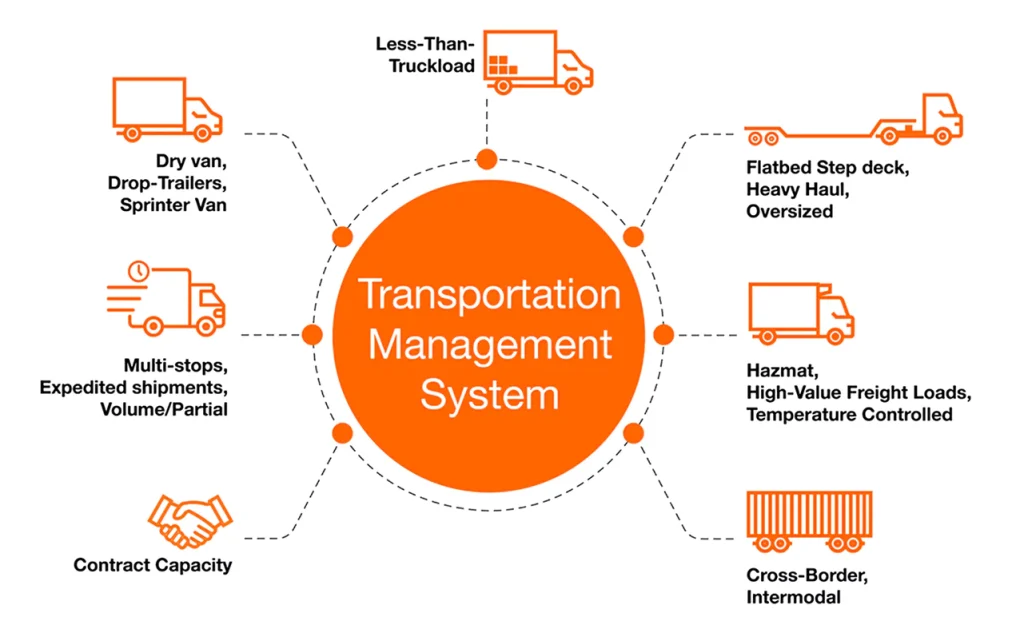
  • TMS transportation management system is between order confirmation and delivery. This system is used to manage carriers, routes, costs, and timelines.

For companies that need more control over carriers, routes, costs, and delivery timelines, logistics software development can help tailor TMS functionality to real transportation workflows.

Orange TMS infographic with 7 components

In the transportation field, curious situations like this happen. A truck arrives to pick up goods from the warehouse, but it can only hold 60% of what the paperwork indicates should fit. Why does this happen? 

The manager or driver mixed up the dimensions, and instead of the stated 1.2 m length of the part, they marked only one meter. That is, according to the documentation, 150 parts should fit, but in fact, not even a hundred fit. So, just 20 cm breaks the whole scheme of all other additional loads. 

This is a consequence of human work. No, this does not mean that logisticians, managers, and drivers have suddenly become public enemy number one. It is a simple fact that people make more mistakes than the TMS transport management system. Let’s take a closer look at the work and functions of these systems.

Features of TMS system that save money

Manual logistics operations can be quite costly. A transportation management system software helps to automate important logistics operations. It minimizes chances of errors, and ensures that every shipment is optimized. Here are the features that can help in cost savings in transportation management systems.

  • Automated carrier selection 
    Choose the most cost-effective carriers based on rates, capacity, and reliability.
  • Route optimization 
    Plan the shortest and fastest routes to cut fuel costs and transit times.
  • Freight cost comparison 
    Easily compare prices across carriers and transportation modes.
  • Load consolidation 
    Combine shipments to avoid paying for unused space.
  • Real-time shipment tracking 
    Prevent delays, missed deliveries, and penalty fees.
  • Data-driven analytics and reporting 
    Identify inefficiencies and areas for cost reduction.

For businesses that need deeper cost visibility and performance insights, supply chain analytics software can help identify inefficiencies across routes, carriers, and logistics operations.

How TMS streamlines your logistics

TMS management systems address numerous issues related to both sea and land transportation. But what is the point? This is how your conservative manager, who is used to standard tables, might respond. Is it really so popular that it is impossible to do without innovations?

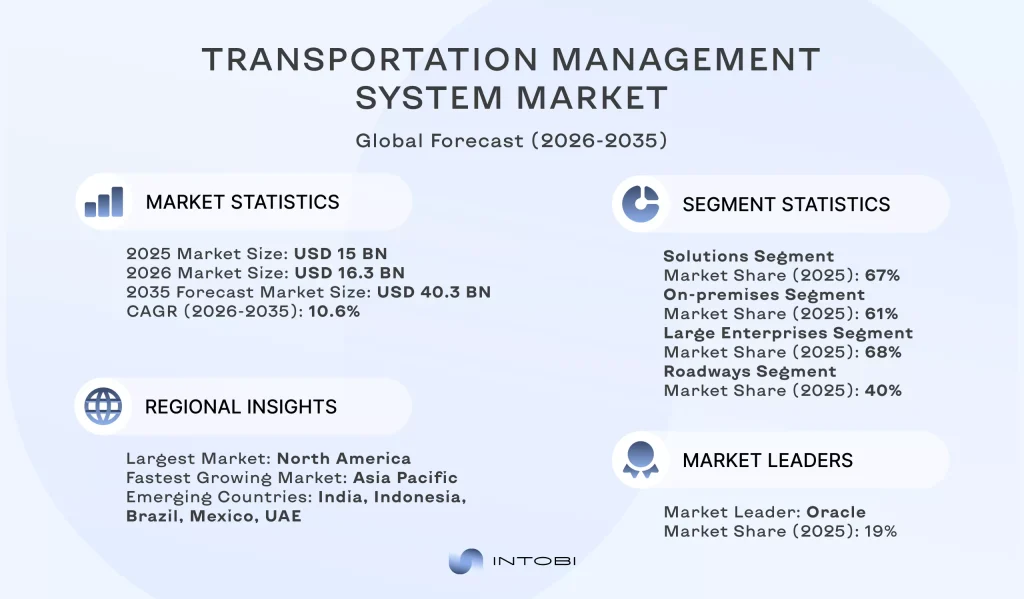
In 2024, the global transportation management system TMS market was worth $15.88 billion. It is expected to expand at a 17.5 percent rate between 2025 and 2030. 

The developments driving the global TMS management system industry’s expansion include the growth of the retail and e-commerce sectors, technological advancements, the introduction of new solutions to the market, and the improvement of trade relationships among nations worldwide.

The TMS is also required when manual accounting and Excel have outgrown their usefulness. Take, for example, a company that receives dozens or hundreds of transport requests per day, with complicated routes, a couple of warehouses, and dozens of carriers. 

Without centralization, everything begins to slip through their fingers. If the cargo is lost or the documents are not delivered, a customer calls, and the operator does not know where the vehicle is. All this is normal mayhem prior to TMS implementation.

The point of the system is to provide logisticians with a tool that presents them with the entire picture: what, where, when, by whom, and under what conditions it is being transported. 

With the transport management solution that may be developed by Intobi, you can make requests, choose carriers, compose routes, track performance, gather documents and invoices, do analytics, and inform all the participants of the transportation process within one window.

Interesting

TMS management minimizes the human error percentage, accelerates the order processing, and generates actual savings within the logistics.

Want full visibility over your logistics?

Let’s talk

The logistics are much easier with TMS functionality

An operator receives an order to transport cargo from Chicago to Portland. Previously, it involved opening a spreadsheet, contacting the carrier, manually entering the route, taking the route to the driver in person, and signing paper documents, all while hoping that everything would go through.

The red line on the map of the United States shows the route from Chicago to Portland

Everything is different with TMS. The operator adds the request to the system, or it comes automatically through an API (application programming interface) or CRM connection. The system is filled with immediate entries concerning such parameters as weight, dimensions, the nature of the cargo, and the loading/ unloading points. 

The logistics specialist will then select a carrier from the list of contractors. TMS platform: the history is dragged up; who shipped what when, at what rate, and with what lateness. It is not necessary to call and make a request; everything can be done in several clicks. 

The request appears to the driver. It is on the mobile application or web browser. The driver confirms it. Thereafter, he/she is given the route and other documents.

The system automatically marks the statuses in transportation: 

  • “departed”; 
  • “arrived”; 
  • “delivered”. 

Certain TMS logistics are connected to GPS or utilize the information provided by trackers. This enables logistics experts and customers to track the cargo’s position in real-time. People no longer have to make calls to inquire about the location of their goods; everyone can see it by looking at the system. 

Similar technological solutions are also used in consumer delivery services, such as food delivery apps. After delivery is complete, you have the option to automatically generate a report, scan and upload documents, issue an invoice, and save the route to your history. 

The customer also receives a notification, allowing them to provide feedback about the driver or carrier, which helps inform future contractor selections. The given process does not entail continual managerial control, and this is the primary advantage of transportation with TMS.

Types of transportation management systems

Transportation management systems come in different forms, each designed to meet the specific needs of a business. 

  1. On-premise TMS is deployed on your IT infrastructure: servers are placed in your office, and data is under your control. You sometimes have complicated logistics, your own certification or regulations, and then a local solution is the only possibility.
  2. Cloud-based or SaaS This is the form of TMS that operates via a browser or app: the vendor takes care of the infrastructure, upgrades, and security. The system will automatically upgrade itself, and operations will continue as normal.
  3. ERP with integrated TMS modules The flexibility and integration capabilities are not the greatest, yet there is no manual effort to “glue” a dozen programs together.
  4. SMB (small and medium-sized businesses) SaaS solutions Core features: tracking, rates, carrier acceptance, CRM / WMS integration. Their benefit lies in the fact that they can be put into effect within a few days and become effective instantly.

Let’s consider the brief table summarizing the pros and cons of each TMS type. 

TMS typeAdvantagesDisadvantagesBest suited for
On-Premise TMSFull control, advanced customization, strong securityHigh cost, requires in-house IT supportLarge enterprises with complex logistics
Cloud-based / SaaSQuick deployment, scalable, cost-effectiveSubscription-based, potential internet dependencyGrowing SMBs
Integrated ERP moduleUnified system, synchronized dataLimited flexibility, requires an existing ERPCompanies already using ERP
SaaS for SMBsSimple solution with minimal setupLimited functionality, unsuitable for complex operationsSmall businesses with simple delivery routes

Does your business need a TMS?

Once spreadsheets or disparate systems become inadequate to your growing business, it is time to explore TMS. What tells you that your business needs a revolution?

  1. A great number of orders When daily orders are 100-200 or more, and employees waste hours planning the routes manually.
  2. The routing needs are complicated Stops on the way, different modes of transportation, and international deliveries. Manual coordination is subject to error.
  3. Tracking and documentation problems Constant telephone calls with the question “where is my order?”, misplaced paperwork, or missed delivery times.
  4. Carrier management issues Carrier management becomes cumbersome when dealing with many carriers and negotiating rates.

Recognize yourself? That’s why TMS is a must for reliable growth and operational control.

The right TMS: Considerations and possibilities

Can a TMS operate completely on its own? In reality, no system can replace human planning entirely. Even with automation, logistics still require oversight, decision-making, and proper setup. The effectiveness of your TMS in 2026 will depend on how it is integrated, which processes it supports, and the quality of the data and management behind it. 

Integration with other business systems

In a vacuum, transportation management refers to a collection of systems that track the product as it travels to the client. Is this actually true? To accomplish this, let’s examine in the table below the major components that every trucker is familiar with.

Logistics stepsCheckpoints
WarehouseProduct receiving, percentage of defects, balances, expiration dates, surplus, checking labels, writing off goods.
TransportationTraffic congestion, communication delays, loading, unloading, refueling, changing tires, and changing the route.
ClientFinal checking, possible detection of external damage, reconciling quantity and quality with documentation, and analyzing the condition of the cargo after delivery.

It’s difficult to conceive how many spaces had to be rented 100 years ago to hold all the bills. Their reconciliation may have been terrible. In the twenty-first century, the automation of business activities has consolidated data flows into a single system – CRM.

The WMS system, which uses RFID tags, sensors, or other location tracking technologies, offers you real-time information about stock as it moves into, around, and beyond the warehouse. The ERP system’s flexibility enables easy integration with a diverse range of software products via connectors or bespoke adapters, such as APIs. 

Other ERP integration solutions incorporate Enterprise Service Bus (ESB) and an Integration Platform as a Service (iPaaS). Transportation management can be merged entirely into the CRM, ERP system, or as a modular solution in the CRM that runs alongside the WMS database.

​​Struggling with visibility and logistics?

Contact us

The future of TMS

The transportation management software development industry is undergoing a substantial transformation, reshaping logistics and supply chain management. For businesses with complex logistics networks, custom supply chain software can connect transportation, warehouse, and ERP data into one scalable ecosystem. An imperative trend is the growing adoption of cloud-based technologies.

According to GM Insights statistics, the transportation management market is expected to rise at a 9.9% CAGR between 2024 and 2032. The acceleration of e-commerce has resulted in higher shipping volumes, demanding sophisticated transportation management systems for efficient logistics management.

transportation management system market forecast for 2035

Companies are migrating from on-premise systems to cloud TMS responses, which provide greater flexibility, scalability, and reduced IT costs. These cloud solutions allow businesses to streamline operations and provide remote access, resulting in better collaboration across teams and geographies. 

Geolocation devices and real-time monitoring are being used to facilitate management. Furthermore, huge trucks used for intercity transportation (such as rolled metal) are outfitted with tracking equipment on both the truck and the cargo.

The widespread deployment of AI has resulted in the maturation of TMS into an intelligent management system (IMS). Dedicated Short Range Communication (DSRC) is the “firstborn” that communicates using Wi-Fi at 5.9 GHz. DSRC does not currently support instant connection and request processing, which is required for corporate needs. 

CV2X is an updated technology that integrates cellular networks, including 5G, to supply an even wider ecosystem. However, it is still insufficient to serve an extensive array of consumers. This is where AI/VR comes in: TMS integration, such as autonomous CAD models, mobile SaaS servicing, Tesla’s “Fleet Learning”, and AI PriceOptimizer.

Stay on track with Intobi

Intobi is a development team with whom unknown paths will become routes on the map, complete with all necessary marks! We rely on robust technologies such as PHP, ReactJS, Node.js, and C# to build reliable, scalable digital solutions that are ready for real-world logistics challenges.

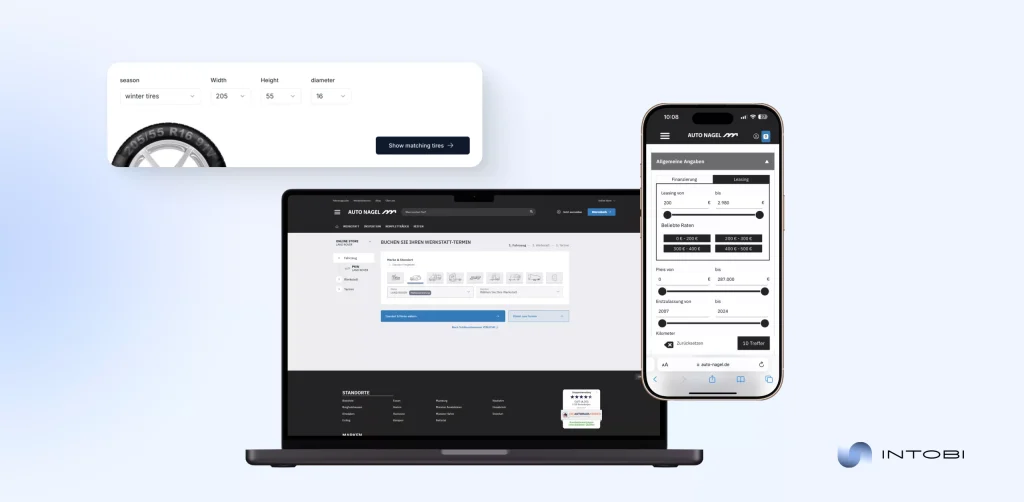
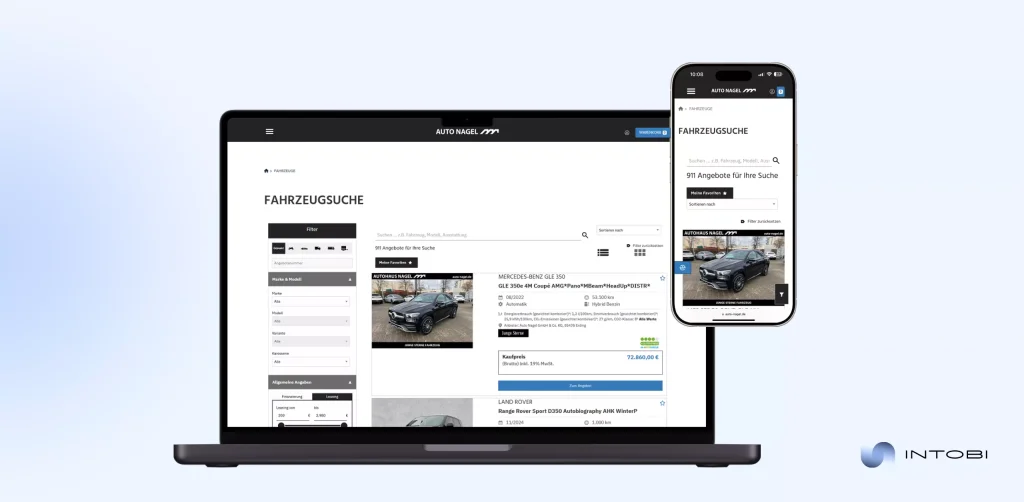
Case study: Auto Nagel

Auto Nagel project for automative industry developed by Intobi company

Challenge: Auto Nagel, an automotive industry leader, needed a logistics-focused SaaS platform to streamline eCommerce, driver management, and document workflows.

Our solution: We developed modules for logistics and driver tracking, integrated eCommerce functionality, user roles, built-in accounting, and a flexible document designer.

Results: Operations became more efficient, document errors decreased, driver management improved, and business processes were seamlessly integrated. And all this thanks to a logistics-first approach.

Auto Nagel software project for automative industry developed by Intobi crew

Final words

Transportation management systems are no longer a luxury but an absolute need for efficiency, cost-effectiveness, and transparency in business logistics. TMS streamlines processes by automating them, consolidating the control points, and providing real-time visibility to the organization to reduce errors, optimize routes, and make informed decisions. 

Regardless of whether one has to manage a handful of shipments or hundreds every day, the right transport management software transforms logistics from being a manual nightmare into an automated, data-intensive function.

If you’re ready to discuss a tailored solution for your logistics or transport business, contact us. Our team is here to take your project from planning to production, without downtime or detours.

FAQ

How does transportation management system software work?

It helps a company effectively manage all aspects of transport logistics, from planning to execution. Intobi’s products automate processes, optimize routes, reduce costs, and boost control over cargo movement.

How much does a TMS software cost?

The price depends on the level of functionality. For small businesses, the cost might start at $15,000. For major organizations creating with broad networks, up to $30,000 or more. Contact us, and you’ll know the cost of development.

What is the difference between TMS and EDI?

TMS focuses on route planning and shipment tracking. EDI automates the interchange of business documents between multiple systems, such as purchase orders and invoices, leading to fewer errors. Intobi’s developers can combine TMS with EDI if you need both functions.

Portals Software: A Complete Guide to Building Digital Experiences

TL;DR

A software portal brings information, processes, and interactions into one centralized platform for teams, partners, and customers. This guide explains what portal software is, its main types and components, the key benefits, and the common challenges of implementation. It also covers best practices, what custom portal development costs, and the trends shaping software portals.

Make a summary of this article with AI:

Looking to enhance productivity across teams, enhance workflows, streamline communication, and improve customer experiences? A software portal is your ultimate tool for this.  

These portals are essential tools for managing information, processes, and interactions in one convenient centralized platform. But what exactly is a portal software? How can it benefit your business? 

We wrote this article to provide you with important knowledge about the software portal development. We’ll discuss how features like scalability, enhanced data security, and improved user experiences set these tools apart. You’ll learn about best practices for software portal implementation, understand their types, see case studies, and future trends shaping the industry.

We are sure that the right software portal will empower your team, delight your customers, and unlock new opportunities for business growth.

Software portals: Definition, types, and components

Software portals’ popularity is only set to grow. With a strong 6.6% compound annual growth rate (CAGR) projected from 2024 to 2030, the rising demand for scalable and adaptable solutions that provide seamless user experiences is undeniable. 

Are you searching for online customer portal software development? This guide will equip you with the insights and strategies needed to make informed decisions.

Definition and concept

A software portal goes beyond being a mere digital platform. It acts as a centralized hub that streamlines access, improves communication, and equips users with tools and information tailored to their needs.

Interesting

Unlike static websites, portals offer dynamic, role-based features, delivering customized solutions for teams, businesses, and customers.

What makes portals so unique is their versatility: from optimizing workflows and simplifying customer interactions to driving collaboration and enhancing overall productivity and satisfaction. 

As organizations increasingly require flexibility and scalability, portals come to the fore as the perfect complement that can integrate tools, data, and processes into one seamless framework.

The exponential growth of the portals software market indeed shows that the tools are not just some kind of temporary trend but forge ahead to shape the future when it comes to scale and frictionless digital experiences. Understanding what a portal is and how it works is just the beginning of using them to enhance your processes, streamline your time, and boost your revenue.

Types of software portals

​​Each type is uniquely designed to address specific business needs, from internal workflows to external customer engagement. How to choose the right portal? It depends on your goals, target users, and operational requirements. Below is an overview of the main types of software portals. 

TypePurposeUse case
Customer portalsEnhance customer interactions, provide resources, and streamline support.Customer portal software for support teams.
Employee portalsCentralize company tools, communication, and workflows for employees.Intranet systems for HR and productivity.
Business-to-business (B2B) portalsFacilitate business-to-business transactions and communications.Partner and vendor management systems.
Learning portalsProvide educational tools and resources for employees or customers.E-learning platforms for training and certifications.
Document portalsOrganize, share, and manage secure document storage and retrieval.Document software for sensitive files.
Community portalsBuild and engage online communities around shared interests or goals.Social or interest-based forums.
E-commerce portalsPersonalize the shopping experience for customers.Online marketplaces with tailored recommendations.

Each type of portal solution serves a unique function, and many businesses opt for hybrid solutions to cover multiple needs effectively.

Need a portal that makes a long-lasting impression?

Contact us

Components of a software portal

An effective web portal software shall be based on a blend of critical elements that not only ensure usability and efficiency but also security.

For businesses that need a secure and scalable portal, web development services can help turn these requirements into a reliable digital platform.

1. Customizable user interfaces

The strong point of portals is that they allow individual experiences. A personalized interface allows users to access particular tools, information, and features relevant to their needs. From customers managing accounts to employee tracking projects, customization makes it all smooth.

2. Robust security measures

Security is the core of any portal, which includes some salient features: advanced encryption, multi-layer authentication, permission-based access, and the like, which set a secure environment. This would make sensitive information fearless to deal with. 

3. Effortless system integration

They will be able to establish fabulous communication with the least effort inside already existing company tools, which may be CRM, ERP systems, analytics platforms, etc. Alone, the integration will assure smooth workflows, eradicating data redundancies and reducing information silos.

4. Scalability for future growth

Portals should be ready to evolve. When business demands increase, the system should handle increasing traffic, new functionalities, or users without losing speed or reliability. Scalable portals accommodate growth with ease.

5. Insightful reporting and analytics

Having the data when you need it is priceless. Analytics-enabled portals can track user activity, system performance, and levels of engagement. From here, businesses can understand what changes to make, which would keep the portal continually improving.

6. Intuitive and accessible design

First, to make the portal successful, for example, a customer web portal, there has to be a clean and intuitive design. A portal will be responsive to every screen size, from mobile to desktop. Inclusion for all users involves screen reader support and easy navigation modes.

Putting all these together, the software portal will provide a robust backbone for business growth, operational efficiency, and exceptional user experiences.

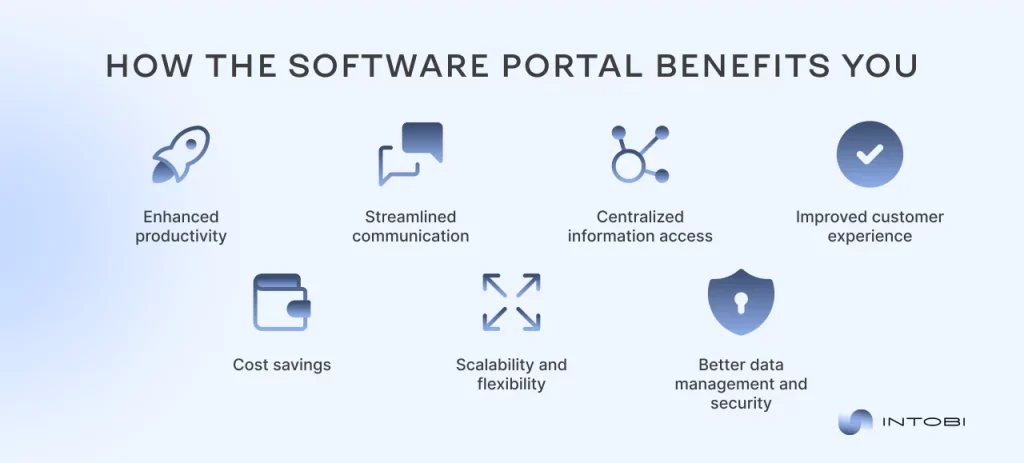
Benefits of using a software portal

With the right portals software, your organization can unlock benefits that go far beyond efficiency, creating a seamless ecosystem where productivity and satisfaction thrive. Let’s dive into what makes these portals indispensable:

Benefits of using software portal

Enhanced productivity

That’s the promise of a software portal. By automating tedious processes and integrating workflows, these platforms free your team to focus on meaningful work. With innovations like customer support portal software, even the most complex issues are resolved faster, giving you time to innovate rather than troubleshoot.

Streamlined communication

Goodbye to endless email threads and fragmented updates. Portals create a centralized space where teams, clients, and partners can communicate in real-time. From instant messages to project updates, everything flows seamlessly. It’s a smooth collaboration, no matter where your people are.

Centralized information access

Tired of digging through a maze of folders and platforms for what you need? A software portal eliminates the chaos by consolidating all your data, tools, and resources in one place. Whether it’s reports, customer records, or project timelines, everything is right where it belongs—saving time, reducing errors, and restoring your sanity.

Improved customer experience

Every interaction matters, and portals make each one count. With intuitive interfaces and personalized features, customers can find answers, track progress, or make requests effortlessly. With a client portal software, your customers feel heard, valued, and eager to return for more.

Cost savings

When we talk about efficiency, this includes cost savings. By automating processes, reducing redundant tasks, and empowering users to self-serve, portals trim overhead costs without sacrificing quality. With tools like customer support portals, businesses can reduce dependency on large support teams while still exceeding customer expectations.

Scalability and flexibility

Portals aren’t static – they grow as you do. Need to onboard 100 new employees? Launch a global service? Add advanced analytics? Or maybe launch an effective client portal app? A well-designed portal scales perfectly. It adapts to challenges and opportunities without missing a beat. Its flexibility meets foresight, ensuring you’re always a step ahead.

Better data management and security

High-quality portals keep data secure and accessible. From encryption to real-time backups, these platforms need to protect sensitive information like a digital fortress. At the same time, smart organization tools make it easy to harness your data for insights, decisions, and innovations that drive success.

With the right tools, the benefits go beyond the tangible, empowering you to achieve more, connect better, and grow faster. Why settle for the ordinary when the extraordinary is just a portal away?

Challenges in the implementation of portal software

Here’s how we at Intobi tackle the most common issues that arise in the process of software portal development:

Integration with legacy systems

The problem is that most organizations have different systems: ERP, CRM, or internal databases developed at different times and by different people, and these systems are not designed to work together. Direct interconnections can cause data duplication, slowing, or conflicts between these systems.

We implement custom API layers and middleware to bridge new portals with old systems. Thus, we reduce the manual updates, resulting in a reduction in errors.

User adoption 

Resistance to change can reduce a portal’s effectiveness even if it’s technically optimal.

How do we deal with that? We adopt role-driven interfaces, rollout strategies, and support within the portals. For the financial services case, we employed a two-step rollout strategy for the initial employees and then the customers. The use of training sessions and feedback helped boost the usage of the portal from 15% in the first week to 85% in a month.

Confidentiality and authentication requirements 

As the number of users increases, portals tend to become slow or insecure, and security is an utmost priority with regard to confidential data. 

At Intobi, we develop scalable architecture through load testing and real-time monitoring, and security aspects such as multi-level authentication, encryption, and audit trails. This helped the enterprise portal we developed support over 10,000 concurrent users without an interruption in service, along with adhering to the GDPR and ISO norms.

Best practices for implementing software portal

To ensure your software portal is efficient, user-friendly, and scalable, it’s essential to follow a set of proven best practices. Below are five straightforward yet impactful strategies to guide the implementation process:

1. Define clear objectives

Before starting the development process, clearly state the purpose of your portal and what kind of problems it should solve. Ask questions like: Who will use this portal? What features are critical? For example, a sales portal software must emphasize lead tracking, analytics, and secure communication tools. Clear goals help ensure every decision, from design to functionality, supports your business needs.

Besides objectives, define some key performance indicators to measure success. Whether it is reducing the response time in the customer service portal or increasing team productivity, these benchmarks will keep your project focused and results-oriented.

2. Choose the right tech stack

The tech stack forms the foundation of your portal’s functionality, scalability, and user experience. Below is a simple table to illustrate a sample tech stack:

ComponentExample toolsPurpose
Front-end frameworkReact, AngularCreate responsive and user-friendly interfaces.
Back-end frameworkNode.js, DjangoHandle data processing and server-side logic.
DatabaseMySQL, MongoDBStore and manage data securely and efficiently.
Hosting/cloud servicesAWS, AzureEnsure reliability, scalability, and uptime.
APIs and integrationsREST, GraphQLFacilitate seamless communication between systems.

These tools ensure your portal is fast, scalable, and capable of integrating with existing systems like CRMs and ERPs, allowing it to grow with your business.

3. Prioritize user experience (UX)

Success, for any portal, lies in how the users are going to interact with it. Design intuitive interfaces to ensure clear navigation and a responsive layout. Make sure every feature is highly accessible and oozes convenience for the audience in mind. 

Website portal software, for example, should be mobile-friendly since most of the interaction with portals happens on the go.

Run periodic usability tests, gather feedback, and iterate to fine-tune the design. Even small changes, like simplifying navigation or improving page load time, can make a significant difference in the overall user experience.

4. Ensure robust security

The best portal software needs security. It will apply role-based access controls so users see just what they need to see. Data encryption and multi-factor authentication (MFA) block sensitive data from being breached.

Also, periodic vulnerability assessment and compliance with relevant data regulations, such as the General Data Protection Regulation (GDPR) or the Health Insurance Portability and Accountability Act (HIPAA) for healthcare software, should be done. A secure portal not only protects user information but also builds trust and credibility for your business.

5. Plan for scalability and maintenance

A portal is long-term – it is built to grow with the needs. It has to use cloud hosting solutions for scaling, AWS, and Azure. With the use of such a scalable design, adding new features is quite easy at any given point in time without changing the whole setup.

Equally critical are updating and proactive maintenance. Address bugs promptly, optimize performance, and ensure that features keep in step with evolving user expectations. A well-looked-after portal remains both relevant and valuable for years to come.

If you follow these best practices, your software portal will no longer just be functional and secure. Rather, it will act as a driver of long-term growth and success for your growing company.

Have questions about the software portal?

Contact us

The cost of custom software portal development 

The custom software portal development cost can vary widely depending on the portal’s complexity, features, integrations, and design requirements. We also can’t leave behind the development team’s location and expertise. 

For instance, a very simple portal with basic user authentication and a limited set of functionalities will cost way less compared to an enterprise solution that requires advanced integrations, real-time analytics, and multilayer security features.

Custom portals, in turn, have considerations such as scalability and maintenance. Large user bases or frequent updates require more resources, which may raise the development cost. The technology stack used, compliance with different regulations like already known GDPR or HIPAA, and hosting solutions also add to the budget.

Below, we’ll review the range of costs of the most popular software portal types:

Portal typeEstimated cost rangeDescription
Basic portals$5,000–$20,000Simple solutions with limited features, such as user authentication and basic content management.
Customer portals  (b2c)$15,000–$50,000Personalization experience, account management, and status of orders for consumers.
Business portals (b2b)$50,000–$150,000Business vendor-oriented, managing, communicating, and automating workflows.
Partner portals$30,000–$100,000Built to support collaboration: co-branded materials, real-time tracking, and resource sharing.
Enterprise portals$50,000–$200,000High-end, integrated systems with CRMs, ERPs, and analytics for enterprise-wide use.
E-commerce portals$30,000–$100,000Designed for online sales, product catalogs, payment gateways, and inventory management.
Community portals$20,000–$75,000Platforms for increasing engagement, hosting forums, and creating communities based on interests.
Learning portals$20,000–$60,000Learning platforms for course delivery, tracking, and student collaboration.
Patient portals$50,000–$120,000Healthcare-oriented portals that offer secure medical record access and doctor communication.
Employee portals$25,000–$75,000Centralized platforms for internal communication, resource sharing, and workforce management.

This comprehensive breakdown highlights the range of costs and features associated with different portal types, so that you can align your needs with budgets effectively.

Future trends in software portals

There are several key trends that redefine how businesses and users will interact with portal platforms.

Future trends in software portals

AI-augmented development

Artificial Intelligence (AI) is revolutionizing software development, enhancing efficiency, and automating complex tasks. In 2026, AI technologies, such as generative AI and machine learning, are expected to be integrated into the majority of new software applications by 2030, streamlining the development process and reducing time-to-market.

Increased adoption of SaaS models

Software as a Service (SaaS) continues to dominate as the preferred software delivery model due to its superior economics and service. The SaaS market is projected to grow at a CAGR of over 10% through 2027. This trend is leading to a gradual transition from traditional on-premises solutions to customer portal SaaS services.

Emphasis on cybersecurity and data privacy

Cybersecurity and data privacy in software will gain the required momentum due to the further use of AI and data analytics. In 2026, disruption-resistant systems and the security of sensitive information will fall within the focus of creating the highest value for an organization.

Intobi’s case study as a reason to trust

Who are we? Positioned as leaders among portal software vendors, we pride ourselves on tailoring every portal platform to meet the unique needs of our clients. Our expertise spans from building intuitive interfaces to robust, scalable back-end systems. 

In case you’re looking for enterprise portal software or customer-focused solutions, we ensure that your portal operates flawlessly, aligns with your goals, and exceeds your expectations. Our portfolio is the main proof of our software expertise. 

One of our hallmark projects is MyRunResults, a platform that redefined how runners and event organizers interact. This dynamic portal enables real-time race tracking, personalized video highlights, and advanced event management features. Seamlessly integrating tools like Strava and Stripe, the platform creates a unified, efficient, and user-friendly experience.

MyRunResults's interface

Challenges we addressed

  • Eliminated performance slowdowns during high-traffic race events.
  • Enhanced the administrative interface of MyRunResults for more effective event management.
  • Automated manual workflows to minimize errors and maximize efficiency.
  • Tackled the absence of integrations with third-party tools, unlocking advanced capabilities.
  • Designed personalized features for MyRunResults to engage users and elevate their experience.
MyRunResults portal's interface

How we delivered outstanding value

  • We engineered a reliable platform capable of handling peak user traffic effortlessly.
  • Our team developed a powerful admin panel to simplify event planning and execution.
  • We also implemented automation to streamline workflows and reduce operational bottlenecks.
  • Strava (a popular mobile app and online platform for sports) was integrated for precise activity tracking, and Stripe (a payment processor) for secure, seamless payments.
  • Also, we introduced unique features like customized race highlight videos and detailed analytics dashboards.

MyRunResults project is a testament to our ability to transform challenges into opportunities and deliver solutions that support long-term growth and deliver value for organizations.

A few final words

A high-quality portal gives you access to all key business tools in a single hub, tailored to the roles of users (employees, clients, or partners). With this portal, you’ll increase productivity, work speed, and process transparency. Moreover, communication will no longer be chaotic.

At Intobi, we create robust software portals that scale with your business. This means you can add new modules, integrations, and features without rebuilding the entire system.

No matter whether you need a tool for a startup or a large-scale enterprise focused on a specific field, partner portal software, customer portal SaaS software, or any other custom software, you can be calm about your platform with Intobi. 

Let us craft the best portal software that surpasses your expectations. Contact us today!

FAQ

What is portal software?

A digital solution that centralizes access to tools, information, and resources for users. Unlike standard websites, portals deliver personalized experiences, enabling efficient workflows, communication, and collaboration tailored to user roles and business needs.

How to create a сustomer portal?

To create a client portal software, turn to an experienced software customer portal development company. A professional team will implement a scalable architecture, secure authentication, proper user role management, and integration with CRM, ERP, and payment systems.

How much does a customer portal cost?

The cost of customer service portal software varies widely. Basic portals start from $5,000, while comprehensive enterprise portals cost around $50,000. It all depends on the features and scalability you need.

What is the difference between a portal and a gateway?

A portal is a dynamic platform offering personalized tools and resources based on user roles. A gateway is simpler – this tool acts as an entry point to networks or systems. While portals software engages users with functionality, gateways focus on secure, controlled access.

What is the difference between a website and a portal?

A website provides static information to a broad audience. A portal, like a customer portal website, offers personalized, role-based access to tools, content, and resources. Portals integrate user-specific features like dashboards and secure logins.

Vue vs React: Which Framework Should You Choose in 2026?

TL;DR

React and Vue are two of the most popular tools for building web interfaces, and the choice shapes how your team works day to day. This comparison covers how each one works, their key differences, developer experience, ecosystems, best use cases, future outlook, and job market demand. In short: React offers more flexibility through its huge library of components, while Vue is easier to approach and gives you more structure out of the box.

Make a summary of this article with AI:

Before the advent of frameworks, frontends were written primarily in pure HTML, CSS, and Vanilla JS. Developers had to manually update the Document Object Model (DOM) every time something changed on the page. Today, the frontend relies on three pillars, which are now considered the most popular libraries and frameworks for developing website and application interfaces: Angular, React, and Vue. 

This review mainly focuses on Vue js vs React, but we will occasionally mention Angular for additional context. We will examine the main characteristics of each and compare their productivity, ease of learning, ecosystems, and job-market demand.

Our article is made to help readers in programming, so we will avoid detailed code examples for each framework. Throughout the article, we’ll refer to React and Vue as “frameworks” for simplicity, even though React is technically a library.

What is React?

Before going into comparing Vue js vs React, let’s briefly go through each framework. React is an open-source JavaScript library developed and maintained by Meta (formerly Facebook) that focuses on creating user interfaces with reusable components. ReactJS was initially designed to ensure the speed and efficiency of the interfaces for the world’s largest social network (Meta). 

In addition to Meta products, ReactJS has built interfaces for well-known applications and platforms such as Shopify, PayPal, Airbnb, The New York Times, Khan Academy, and many other large projects.

React uses a special syntax called JSX (JavaScript Extended), which looks like HTML but actually runs inside JavaScript. Every React component is a function that takes input (called “props”) and returns what you want to display on the screen.

The main challenge when learning React is that reaching its full potential involves installing many additional libraries. With so many options available, their quality can vary, so developers will need to spend time searching for and evaluating trustworthy libraries. It can feel overwhelming at first, but once developers get the hang of it, they will learn to choose the optimal solutions for any project.

What is Vue?

The name “Vue.js” originates from the French word “vue,” which means “view,” and it’s pronounced the same way as “view.” Creator Evan You developed Vue after working at Google with Angular, seeking to extract the best parts (such as its view layer) into a simpler, progressive framework. 

Unlike React, Vue isn’t backed up by a big tech company. Instead, it grows through community contributions and open-source collaboration. In its early years, businesses were hesitant to adopt it. Still, this allowed Vue to evolve on its own terms, as reflected in the creator’s attitude. There are currently over 20 versions of Vue updates. Each version is named after manga and anime titles, except for the very first ones.

Vue is intuitive and user-friendly. If you’re already strong with basic HTML knowledge, many of Vue’s syntaxes will be familiar to you. If you compare a simple “Hello World” code written in Vue.js vs React.js, the latter will seem much more straightforward. There is a clear separation between the template, script, and style components.

Vue vs React: Hello World code

The Vue framework’s features fit naturally within its design.

Interesting

At the same time, this simplicity comes with a trade-off: Vue is slightly less flexible than React when building highly specialized or experimental architectures.

Vue js vs React: Key differences explained

Sometimes it can be difficult for beginners who want to develop in frontend to choose their first framework. Alas, there is no simple answer to “which is better.” When comparing Vue vs React, the main differences come down to their core structures and day-to-day coding flow.

ReactJS is about freedom. It doesn’t tell you how to organize your files or which tools to use. Experienced developers appreciate React’s open-ended nature with limitless customization, but newcomers might find it overwhelming at first. 

The library itself is simple to learn and work with, but if those struggling to navigate its libraries and prefer more structure, consider trying Vue. Once you feel confident, learning React will be much easier, and you’ll strengthen your case with both skills in your toolkit.

A comparison table showing the key features of VueJS and ReactJS

Developer experience: Vue.JS vs React.JS

Many sources emphasize that React is a library, while Vue is a progressive framework. In truth, React is a library that can be used as a framework. It’s like asking, “Why is a tomato a fruit?” The technical classification may be accurate, but it doesn’t always reflect how people actually perceive it.

React has a massive library of tools and components that you can implement in your project, but it’s never a turnkey solution. You can assemble your project however you like, though for beginners, it’s similar to choosing furniture before the house is even built.

On the contrary, an out-of-the-box framework like Vue will provide a basic skeleton or templates for what you’re likely trying to develop once you start a project. Out-of-the-box refers to a ready-made framework that provides developers with a preconfigured structure and templates. It saves time on routine setup, allowing specialists to focus on the application’s unique logic from the start.

Which framework is best to learn first?

Anything you build with React can be built with Vue, and vice versa. Some discussions in the frontend community suggest that once you’ve worked with React and switched to Vue, you’ll never return to React. Of course, this joke is exaggerated, but it perfectly demonstrates how much easier it is to adapt to Vue. Let’s take a look at where that came from.

Mastering your first JavaScript framework takes time, usually about a year before you feel truly confident. But once you understand the concepts like components, props, state, and rendering, picking up the second framework becomes much easier. Most developers can switch in a few months. However, this transition differs depending on your first framework. Moving from Vue to React is much harder than the other way. 

Vue JS vs React JS: Ecosystem

When we compare the ecosystems of React JS vs Vue JS, we’re really looking at the tools, libraries, and official support surrounding each.

React’s ecosystem is massive. It has existed long enough to accumulate thousands of extensions created by companies, individual developers, and open-source communities. As a result, React offers multiple ways to solve a single problem.

 A list of key tools across the React ecosystem

Vue tends to evolve more predictably. The official team oversees many core tools, such as routing and state management, which maintain consistency. Many beginners appreciate how cohesive the official Vue toolkit feels when deciding between ReactJS vs VueJS.

A list of key tools across the Vue ecosystem

Best use cases: Vue.js vs React

ReactJS is best used to create fast, interactive, and scalable single-page applications (SPAs), complex user interfaces for large websites, and mobile applications, thanks to its component-based approach, virtual DOM, and flexibility that enables you to build interfaces from reusable components.

What about Vue?

It’s almost the same because Vue was inspired by both Angular and React when it was created. Vue is a versatile tool that works great for both small interactive add-ons and complex, full-fledged web applications, adapting to different needs and project scales. 

For companies choosing between React and Vue for a new product, web development services can help turn framework decisions into scalable websites and web applications.

Many believe Vue only works best with small-scale projects, but that’s not true. Vue powers some of the world’s highest-traffic websites. Over 4.5 million sites have been built on Vue, including Behance, Xiaomi, UpWork, Grammarly, and Alibaba. Its simplicity in no way limits its capabilities.

How will ReactJS and VueJS perform in the future?

During the development of both frameworks, Vue proved more effective for high-traffic sites. However, currently, there is little difference between React and Vue, as developers and the community continue to optimize with each update. 

Looking ahead, for most teams, performance differences are unlikely to be the key factor. While very large, complex, or data-heavy applications might exhibit some subtle differences, these are typically driven more by the architecture than by the framework itself.

Both ecosystems are stable, actively supported, and evolving with a focus on speed, scalability, and developer experience. As long as JavaScript remains the foundation of the web, React and Vue will continue to deliver performance that meets the demands of both small projects and enterprise systems.

React vs VueJS: Job market overview

To understand why React and Vue have been rising to the top over the past few years, you need to analyze the difference between Vue and React compared to Angular. The key distinction is that Angular uses TypeScript, whereas React and Vue are primarily based on JavaScript.

Now let’s look at how this difference impacts the career growth of a front-end developer. 

Competition among front-end developers

Angular positions itself as a framework for large enterprise applications. This does not mean it is impossible to build something simpler with it; it will just be much more difficult. Angular has its own ecosystem with a complex architecture. In this regard, the minimalist frameworks of Vue js vs React have a greater advantage.

Due to the demanding nature of maintaining internal modules and work processes, it has a very high entry threshold and steep learning curve. However, this also means that the demand for Angular specialists is greater. 

The simplicity of VueJS vs React has one main but clear drawback: because they are easier to learn, the job market is highly competitive. For a visual example, we’ve included the current number of vacancies on Glassdoor at the time the article was published.

Active job postings for React.js and Vue.js developers on Glassdoor

In the context of Vue js vs React, the statement “React is more in demand” is accurate but somewhat misleading. What’s actually in demand are developers who can deliver quality work regardless of the framework. Companies hiring for front-end roles prioritize the quality of portfolio, problem-solving skills, and UI/UX expertise over the specific framework mentioned in the resume.

Need a polished, high-performing frontend?

Contact us

Pros and cons: React vs Vue

To summarize, both VueJS vs React are popular JavaScript frameworks for building user interfaces, and each has its own strengths and weaknesses. Finally, we’ve briefly outlined the advantages and disadvantages of each framework.

Pros of ReactJS

1. Huge ecosystem and community

React has the largest ecosystem in modern frontend development. The library has accumulated so much knowledge that the chance that your query will go unanswered is critically low.

2. Flexible architecture

React doesn’t force a specific project structure. Developers have a lot of creative freedom because they can code in many different ways.

3. Strong performance for large-scale apps

React tools are optimized for apps with complex logic and heavy UI updates.

4. Backed by big tech

React benefits from corporate support, regular updates, and years of production use on massive products like Facebook and Instagram.

5. Powerful meta-frameworks

Tools like Next.js, Remix, and Astro make React especially strong for full-stack apps, server rendering, routing, and SEO-heavy projects.

Cons of ReactJS

1. Steep learning curve for beginners

React seems simple at first, but mastering state management, hooks, routing, and external libraries takes time and can overwhelm newcomers.

2. Requires many third-party tools

React doesn’t include things like routing, forms, or state management by default. Beginners must choose from dozens of options, which can slow down learning.

3. JSX can feel unintuitive at first

The mix of JavaScript and HTML is unique in a way. It has its own structure that takes some getting used to.

4. Fast-moving ecosystem

React updates are stable, but the tools around it change all the time. What was “best practice” last year may be yesterday’s news.

5. Inconsistent project structure

Each developer creates their own library base. This often leads to disputes within teams due to differences in front-end development.

Pros of VueJS

1. Very beginner-friendly

Vue feels natural if you know basic HTML, CSS, and JavaScript. Its single-file components provide a clear, organized structure from the start.

2. Out-of-the-box framework

Vue has many built-in features, so you don’t need to install extra libraries for common tasks.

3. Predictable development experience

Vue encourages consistent patterns and project structure. This reduces confusion and encourages smoother collaboration.

4. Tight integration with tooling

Vue, Vue Router, Pinia, and Vite work together seamlessly. The ecosystem feels like one unified platform rather than a collection of separate tools.

5. Excellent documentation

Vue’s official docs are widely praised for being clear, friendly, and easy to follow.

Cons of VueJS

1. Smaller job market compared to React

Vue is popular, but React dominates in the U.S., Canada, and many parts of Europe. Beginners who focus solely on a job search may face more competition.

2. Less flexibility for unconventional architectures

Vue is more opinionated, which is great for clarity, but limits freedom when building highly experimental or non-traditional setups.

3. Fewer large-scale enterprise adopters

It would be a lie to say that Vue is only suitable for startups and small projects, but most Fortune 500 companies prefer React over Vue.

4. Smaller ecosystem

Everything in Vue works great until something is missing or hasn’t been added yet. If a tool doesn’t meet your needs, there may not be many alternatives.

VueJS vs React: Which one should you choose in 2026?

React remains relevant due to its widespread use in industry, but the ecosystem is evolving toward more comprehensive solutions that make development easier, even if they add some complexity, prompting some developers to seek alternatives or new approaches.

Choose React if you:

  • Enjoy flexibility and customizing your setup.

Vue is also developing rapidly. In September 2024, Vue 3.5 was released with significant upgrades to its reactivity system. These improvements significantly boosted performance and reduced memory usage, especially when working with large arrays and deeply nested objects. 

The update also enhanced how computed properties behave during server-side rendering (SSR), making Vue apps more efficient and consistent in production environments.

Choose Vue if you:

  • Want the easiest introduction to modern front-end development.
  • Prefer structure and clarity.
  • Want quick results and a clean learning curve.

Conclusion

There’s no clear winner between Vue.js vs React. Both frameworks were released around the same time in the early 2010s. They are highly flexible and offer many templating tools that help developers create products with complex logic. Finally, both are appropriate for building single-page applications, though they employ different methods.

UI development with React will be much more flexible due to the huge library of components. However, to unlock the full capabilities, you will have to install additional libraries, which take some time to learn. In terms of usability, Vue is much approachable.

Intobi developers adapt to market demands and client needs. We don’t engage in React vs Vue debates; we build frontends with both. See examples of our developments in our portfolio.

FAQ

What is the main difference between Vue and React?

Both frameworks enable the creation of interactive websites, though they approach this goal through different methods. Vue feels more “ready out of the box,” while React is more flexible but requires more tool choices.

Is Vue easier to learn than React?

Many beginners find Vue easier because of its simpler structure and familiarity for those who know basic HTML and JavaScript. React is also suitable for beginners, but requires more time to become comfortable with.

Which is better for beginners: VueJS or ReactJS?

Vue generally offers a smoother experience for newcomers, while React provides more job prospects. For the simplest learning journey, go with Vue. To enhance your career options, opt for React.

Is React faster than Vue in 2026?

Both are incredibly quick, and for most projects, you probably won’t see much of a difference. React might have a slight edge in very large apps, but both are well-optimized for today’s websites.

CRM Migration Made Easy: A Step-by-Step Guide for Businesses

TL;DR

Sooner or later, an old CRM stops keeping up – it lacks integrations, speed, or analytics – and the business has to move to a new system. This guide explains what CRM migration is and why it matters, the key challenges to expect, and a step-by-step project plan. It also covers moving your CRM to the cloud and the tools that make the migration simpler.

Make a summary of this article with AI:

CRM migration strategy is among the most significant phases in a company’s evolution, as it focuses on managing customer information, sales activities, and marketing campaigns. 

In the long run, the former system does not serve the business’s purpose: it lacks integration, speed, and analytical capabilities. That is why a change to a new CRM is not merely a technical process, as it is a strategic decision that influences the productivity of the whole team. 
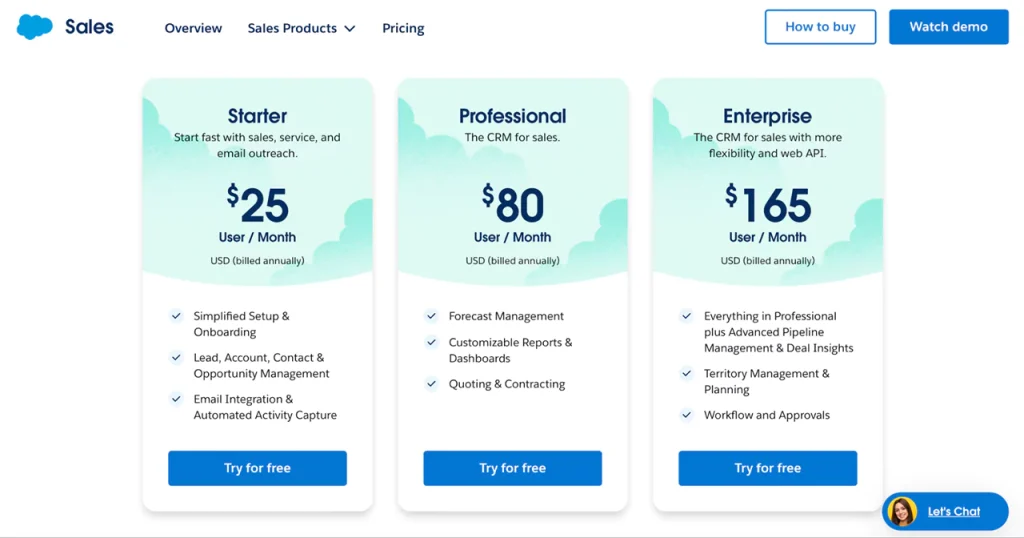
Properly planned CRM data migration allows you to retain customer history, prevent data loss, and continue working with the updated processes simultaneously. Conversely, impatience or the absence of a well-laid strategy may lead to a mess within the database, mistakes, and breakdowns in the careers of departments.  

What is CRM migration, and why does it matter

CRM migration is the process of transferring data, settings, and business operations from one Customer Relationship Management (CRM) system to another. Technically, it can appear to be nothing more than a duplication of a database of contacts or deals. 

Nevertheless, the real migration of CRM is a far more comprehensive process that encompasses adjustments to working conditions, the maintenance of interaction history, and business continuity. 

There are several reasons the company decides to switch CRM systems. There is the possibility that the old system does not maintain the required integrations, cannot report, or just fails to cope with the increasing business size. 

New CRM systems offer new interfaces, configurable automation options, powerful analytics, and mobile access – all of which will help the team work more quickly and precisely. Hence, it is not only a technical upgrade but also a strategic move to become more efficient when switching to a new system. 

Below, we will consider the main benefits of CRM migration.

How to ensure a successful CRM migration

Optimization of the data is the primary benefit of migration. Otherwise, any CRM will store duplicated contacts, irrelevant leads, and out-of-date deals. Any migration to a new system gives a good reason to perform a general tidy of the database: delete some of the unnecessary data, modernize the structure, normalize the fields. Such a strategy provides accurate analytics and makes the further application of the data to sales and marketing easier. 

The other reason is to enhance communication between departments. With a new CRM integrated with other corporate systems (ERP, email platforms, support services), the firm has a single location to manage customer data. This will enable you to save time in transferring information among teams, eliminate mistakes, and adopt a holistic approach to clients. 

The quality of customer service is also directly affected by CRM data migration. Due to new analytics, personalization and automation tools, businesses are capable of gaining a better insight into the needs of their customers and quicker reaction to their needs. This enhances the satisfaction, loyalty rates and repeat sales. 

Simultaneously, it is also worth knowing that CRM migration does not only mean uploading files into a new system. It is a complicated process, which involves proper planning, experimentation and employee education. The successful migration is a step-by-step process that includes a data audit, backup preparation, agreement on the field structure, integration testing, and a system launch in test mode. 

In case the migration is done professionally, the company is offered a robust, scalable CRM, which is prepared to drive the business expansion in the years to come.

Interesting

Conversely, a disordered or rushed change may cause information waste, process interruptions, and time waste in the process of rectifying mistakes. 

Overall, a CRM migration tool can help businesses work with data more effectively, build stronger customer relationships, and establish a sustainable development base.

Key challenges in CRM migration

CRM migration strategy appears to be an easy process, as it involves transferring information from an old system to a new one. However, in practice, this step is often complicated and risky. 

Even a slight error can result in the loss of vital customer information or the interference with the work of the sales or marketing department. This is a list of the primary challenges that companies have when migrating to CRM, and why they cannot be underestimated. 

What makes CRM migration difficult

Partial or imprecise data transfer

The main issue that is most widespread is that certain information is lost in the process of transfer. Old CRMs also tend to have their own set of fields, formats, and entity-relationships. Unless the new system would be able to work with the same parameters, not all data would be shown incorrectly or not imported altogether. 

Consequently, the company ends up with holes in the database – an empty contact, no history in deals or unclean data. 

Low quality of source data 

There is a great deal of redundant data in CRM over the years: duplicates, typing mistakes, and irrelevant contacts. All these issues will be brought into the new system unless you clean up first. It makes further work more complicated, distorts all reports and creates mistrust toward information in the team. 
Incompatible integrations

CRM is a central node to which many companies are linked to promote marketing instruments, accounting, support services, analytics, etc. When switching to a new system, problems with the restoration of such integrations are usually observed – some of them do not always work together or have to be configured further. This improves the speed and may result in a temporary work stoppage. 

Framing the complexity of the process downwards

In other instances, companies understand CRM migration project plan as a technical issue that can be accomplished in a day or two. As a matter of fact, it is a strategic project, which needs to be analyzed, tested, trained the team and results checked. 

Devoid of a sensible strategy and a sensible attitude, the process is soon plunged into a state of chaos – losing time, resources and trust of the user. 

Team resistance to change 

Any new modifications in the work tools lead to some opposition. The employees are accustomed to working under the old system, they have their working patterns and the change to a new CRM may be seen as a new burden. 

Even the best system will not provide the expected effect without proper training and support, as the team will not use its potential to the full extent. 

Security and confidentiality of data

In the process of the shift in the customer base, information leakage or loss is possible. This is critical to businesses that deal with personal data and where laws like GDPR (General Data Protection Regulation) apply. As such, one should observe the standards of security, utilize secure data transmission channels, and generate backups. 

Miscalculated costs of migration

Other companies only do the technical planning with no regard to the training, testing, integration and staff training costs. Consequently, the budget is multiplied a few times, and the implementation is postponed. 

Thus, the CRM migration process should be guided by a proper plan, and coordination of the team and detail. These challenges are what one needs to know about in advance and be able to prevent mistakes and make the transition as safe and efficient as possible.

Let’s move your CRM data safely!

Contact us

Step-by-step CRM migration project plan

The custom CRM migration is not an event to be carried out once, but it is a well-thought-out process that will pass through various logical steps. They all have their purpose; those who have to be responsible and take risks must therefore make a consistent movement. 

Here is a step-by-step plan to ensure a migration without data loss and with minimal disruption to business activities.

The ultimate CRM migration roadmap

Step 1. Evaluating the existing system

You must know the reason why you are migrating something before you migrate it. At this point, the business determines the key aspects of the outdated CRM that were the problems: the absence of integrations, poor performance, sophisticated analytics or low automation. 

Simultaneously, the objectives of the new system take shape – such as enhanced reporting, greater convenience for salespeople, and integration with marketing platforms. One should also inquire about a data inventory: what sort of records are there (contacts, deals, leads, tasks, communication history) and what of them actually will be required to move. 

Step 2. Choosing a new CRM platform

Price and popularity are not the only factors to consider when determining which platform to use. The point is that the system is aligned with the business processes of the company. It is important to evaluate:

  • the opportunities of field and funnel customization;
  • the existence of integrations with existing services;
  • the malleability of the automation;
  • support for mobile version;
  • the potential of scaling further down the line.

It is advised to test 2-3 CRMs in the demo mode to test the interface and functionality and then decide on the final choice. 

Step 3. Preparing data before migration

This is regarded as one of the most crucial as well as the most challenging phases. In the old CRM, you need to: 

  1. Clear the database of duplicates, old-fashioned or unfinished contacts;
  2. Uniform formats (such as phones, dates, addresses);
  3. Verify the accuracy of entity relationships (contact – deal – company);
  4. Make a copy of the whole database.

Quality data preparation minimizes the chances of errors in the migration CRM process as well as making the subsequent work with the new system easier. 

Step 4. Creating a data mapping

A data map document is one that describes the relationship between the fields of the old CRM and the new one. As an example, the old system can have the Company Name field that can be called Account in the new system. Failure to do this in advance risks some of the data being in the wrong place or being lost. 

You must also pre-consent on the fields that you want added manually and those that should be combined or renamed. 

Step 5. Conducting test migration 

It is a necessary process to perform a test migration CRM on a small sample before the entire database is migrated (say, 5-10 % of the information). It will enable you to verify whether everything was imported properly, and no relationships were lost, and how the system would work post-migration. 

Any mistakes at this point, such as duplicates, missing data, display failures, etc should be noted and fixed to prevent them during the primary migration. 

Step 6. Considering full data migration 

Once testing is successful, the primary migration CRM is initiated. Automation (through special tools or APIs) or manuality (based on the amount and complexity of the data) can be used in the process. 

Before starting, you need to: ensure that everyone has turned out of the old system; save a final backup copy; migration schedule: do it during after-hours so as not to interrupt the ongoing work. 

Step 7. Cross validating the results

Once the CRM migration process is over, you must ensure that all the data is transferred properly. This includes: balancing records between the old and new systems; validating key fields (names, phones, deals, funnel stages); reporting and automated testing.

In case the new CRM possesses analytical tools, it is recommended to draw the first test dashboard – it will assist to determine missing or misplaced data. 

Step 8. Installing integrations and automations

The second phase is to integrate all the external services: mail, telephony, marketing platforms, messengers, calendars, etc. Then, automations are configured – notifications, prompts, sending leads, triggers. The period can easily be as long as the migration itself, but it is during this period that it is defined how well the team will be able to work in the future. 

Step 9. Training the team

Even the best CRM, when not trained, will not perform to its full potential. All users, from salespeople to marketers, should be trained. Demonstrate new features, modified working conditions, and convenient features. The second suggestion is also to designate the internal CRM ambassador, who will assist the colleagues initially.

Step 10. Optimizing and monitoring

It is important to closely monitor the functioning of a new system in the initial weeks after its launch. Get user feedback, document errors, and assess the speed and accuracy of processes. Constant control will assist in making the timely changes – insert required fields, streamline the funnel, and set up reports. 

In conclusion, an adequately developed CRM migration project plan enables you to migrate CRM to become an orderly journey, in terms of the data and staff efficiency. This strategy would convert a technical process into a strategic upgrade that will provide access to new business opportunities and reinforce the basis of the further development.

Plan your CRM migration with experts.

Contact us

CRM migration to cloud: The modern approach

Nowadays, companies are increasingly adopting cloud solutions, leaving on-premises CRM systems behind. This is not a mere technological movement, but a strategic move that presents new opportunities for scalability, security, and flexible team working. 

CRM migration to cloud enables you to access data wherever you are in the world, add new services rapidly, and operate with growing information volumes at a stable level. 

The primary benefit associated with the custom CRM migration is the rejection of heavy infrastructure. The company is no longer reliant on physical servers, elaborate maintenance and the costs of updating equipment. 

All information is stored in secure data centres, and the system provider keeps it operational, backs it up, and updates it regularly. This enables companies to invest in development rather than maintaining the IT environment. 

Scalability and flexibility are also important aspects. Cloud CRM can support any business requirement with ease: you can add new users, integrate with other systems, or add new functionality without any complicated technical processes. It is particularly significant in firms that are actively expanding or those with a distributed workforce. 

There is no lesser importance on data security. The current cloud security providers operate with multi-layered security: encryption, multi-factor authentication, and access control. This makes sure the customer base and commercial information are under trusted control, even in the case of working with very large amounts of data. 

The steps of the movement to cloud CRM involve the following important measures: 

  • Analysis of the existing system and choice of a platform. The comparison is made in terms of functionality, security, API support, and integrations. 
  • Data preparation. Cleaning of the databases and standardization of the fields and making backups. 
  • Test migration. Movement of a little portion of the data in order to verify correctness and accuracy. 
  • Main migration. Transfer of contacts, agreements, tasks, files and interaction history fully.
  • Setting up of integration and automation. Integration of email services, marketing, analytics systems.
  • Training, monitoring and testing. System testing/adaptation to new processes by team. Practically, cloud migration enables not only to get more efficient, but also to reinvent the logic of the business. 
At Intobi, this is validated through one of our projects, the KATO Real Estate Platform. We migrated their CRM to a cloud platform, integrated the system with the marketing tools and real-time customer management module. The outcome is a centralized database, fast access analytics and the speed of application processing is substantially reduced. 
Kato CRM platform

Cloud migration is a new model of CRM that integrates technological dependability and business elasticity. It provides businesses with the liberty to grow, high performance and the assurance of safety – all they want to achieve stable growth in the digital world.

Tools and resources to simplify CRM migration

Data migration CRM can be a complicated task, but with the right tools and resources, it can be completed quickly, without data loss and with minimal disruption to staff. Modern solutions, such as database exports and entity association verification, now automate the most common activities. 

Automated migration platforms include Trujay, Data2CRM, and Import2, which are among the most popular options. They can be used to copy data between various CRMs (e.g., HubSpot, Salesforce, Pipedrive, Zoho) without manually copying it. These services are easy to use, support field mapping, and allow a test import before the actual launch. 

For firms with more complex structures, API tools are worth trying. They enable you to develop your own migration scripts, automations and interoperability across several systems. For example, in the case of massive migrations, APIs can be used to move not just contacts, but also interaction history, files, deals, or tasks, without losing their logic. 

Data-cleaning and data-validation tools such as OpenRefine, Talend Data Preparation, or Excel Power Query are no less important. They assist in standardizing formats, eliminating duplicates and ensuring the correctness of all records before migration. 

Moreover, CRM platform documentation, training courses and user communities should be used. They help prevent common errors and identify the best solutions for a particular business model. 

Thus, a well-chosen CRM data migration tool will reduce migration time, minimize risks, and ensure the new CRM is stable from the outset.

Conclusion

CRM migration project plan is not a one-time project, but an investment in the future of the business. It demands a lot of planning, engagement of key teams and paying attention to every step – data preparation, staff training, etc. 

An effective CRM data migration helps the company streamline work processes, reduce time spent on routine tasks, and gain a clearer global overview of customer interactions. Intobi will bring a new system to your business – an effective tool for its development that enhances productivity and lays the groundwork for sustainable growth. 

FAQ

How do I migrate to a new CRM?

The first step is the analysis of the existing system and determination of the transferred data. Then, a specific plan is developed: what fields should be similar, which one should be changed and which one should be left out. Before making any action, create a backup copy of the database.

How long does a CRM migration take?

The time of a CRM migration is dependent on the quantity of data, structure complexity and integrations. It takes an average of several days to several weeks. Careful examination of every step decreases the chances of losing data and makes the work of a new CRM stable after its launch.

What are some common challenges in CRM migration?

Loss or duplication of data, incompatibility of the format, integration errors and team resistance are the most prevalent challenges during the CRM migration. In many cases, the lack of preparation leads to the emergence of problems.

Software as a Service Billing: Develop an Effective Pricing Model

TL;DR

Choosing the right pricing model can make or break a SaaS product. This guide gives a comprehensive overview of SaaS pricing, explains 10 leading software pricing models – from per-user and tiered to freemium, usage-based, and hybrid – and covers advanced pricing strategies. It also walks step by step through selecting the right pricing strategy for your own SaaS business.

Make a summary of this article with AI:

SaaS industry has not only become a disrupter, but also a core enabler of business in different industries. SaaS solutions have transformed the way we work, communicate, and simplify the processes and present an amazing flexibility and convenience. The market of SaaS is still thriving, which is why the need to prepare an effective SaaS billing strategy is also growing.

Living in a world where companies prefer using cloud-based software to fulfill their requirements, it is the most important to know the fundamentals of SaaS billing. The challenges of choosing an appropriate SaaS price, settling the frequency of payment, and controlling the expectations of consumers may make, or break, the economic well-being of a startup.

Stay with us as we uncover the key considerations, strategies, and best practices for SaaS pricing model, ensuring your startup’s financial stability and the delivery of outstanding value to your customers. Let’s get started!

SaaS pricing model: A comprehensive overview

Software as a service (SaaS) has transformed the software business and today we have a solution that is flexible and scalable to businesses and individuals who require software applications. SaaS talks all difference with the conventional software because the software is provided through the Internet and, as such, requires neither installation nor maintenance on the premises.

Thus, users are able to use SaaS applications everywhere so long there is an Internet connection hence this makes it a good option to the current more mobile and remote workforce.

How SaaS business model works

Building a SaaS product can be a good business idea, as it capitalizes on the ever-growing demand for cloud-based solutions.

Recent statistics underscore the overall SaaS market is expected to continue growing as organizations around the world adopt SaaS solutions for a variety of business functions. Among these are solutions for customer resource management (CRM), enterprise resource planning (ERP), web hosting, and ecommerce.

On the other hand, the SaaS pricing model is at the heart of how SaaS providers monetize their services. Unlike one-time software purchases, SaaS is typically billed on a subscription basis or through usage-based SaaS fees.

The pricing model contains how a SaaS product is priced, the frequency of billing, and the multi-level plans or features offered to customers. It’s a critical element of a SaaS business plan and plays a pivotal role in its success.

SaaS model pricing depends on a large number of internal and external factors. On the inside, the cost of the software development, maintenance and support, and profit margins will have to be taken into consideration. 

Outside, the competition in the market, the demand of the customers and the general state of the economy are very important in determining the pricing environment. A clear-cut pricing strategy needs to strike the balance between these aspects at the same time making the product competitive and profitable.

The significance of a proper pricing strategy in the field of SaaS is difficult to overestimate. A great pricing model can not only make revenue but also create the value of your software. It will be able to attract and keep customers, maximize lifetime value, and ultimately make your SaaS project a success overall.

Interesting

Excessive pricing will scare away potential buyers and excessive low pricing will reduce the profits and sustainability.

Therefore, it is crucial that a SaaS provider should know the fundamentals of the  SaaS pricing model. Your SaaS product will be able to succeed in the competitive market by taking into account both internal and external factors and creating an appropriate pricing strategy. 

As the SaaS market continuously gains momentum, creating a SaaS product could be a lucrative opportunity, and it could also be good to take advantage of the changing preferences of both business and individual users towards cloud-based and subscription-based products.

Now, we move to the primary article sector. Let’s consider the most common pricing models for SaaS.

10 leading software pricing models

Software as a service pricing models have been developed to meet the diverse needs of SaaS providers and customers. In the SaaS business, pricing strategies play a critical role in determining the acquisition of customers, retention, and revenue generation. Choosing an appropriate pricing model can be the key to a successful SaaS company and one that cannot find a niche in the market.

We will examine each SaaS pricing model individually.

1. Per-user SaaS pricing model

SaaS pricing model per-user is among the simplest and common models used in the SaaS industry. This model would charge the customers per user of the software. Basically, the larger the number of users a customer subscribes to, the greater they pay.

Per-user SaaS pricing model
ProsCons
Predictable revenue: per-user pricing provides a steady and predictable income stream for SaaS providers.Potential for resistance: customers might be hesitant to adopt the software if they expect a substantial cost increase as they add users.
Scalability: customers can easily adjust their costs based on their needs and the number of users.Administrative complexities: managing and tracking users can be challenging, especially for larger organizations.
Fairness: users pay only for what they use, making it a transparent and equitable pricing model.

Slack: SaaS pricing model template

It is the well-known team collaboration tool, and its pricing structure is the per user pricing model. They have a free version with small teams and their paid plans are based on the number of users. This model lets the teams increase their Slack usage with their growth and Slack can enjoy a greater user acceptance.

Slack example of SaaS pricing model

2. Tiered SaaS pricing model

The tiered pricing model provides various plans each having various features and SaaS price plans. The customers are able to select the plan which fits them best since the more advanced the plan is, the more functions and typically the more users it can support.

Tiered SaaS pricing model
ProsCons
Flexibility: customers can choose a plan that aligns with their specific requirements and budget.Complex to manage: as SaaS providers offer multiple plans, it can become challenging to manage and maintain all the different features.
Upsell opportunities: tiered pricing encourages customers to upgrade as their needs grow, increasing revenue.Customer choice overload: having too many tiers can confuse customers and lead to decision paralysis.
Clear product differentiation: it’s easy for customers to understand the value and features offered in each plan.

HubSpot: SaaS pricing model template

It has CRM and marketing software and users are charged by tier on this platform. They provide different plans among them being a free version, premium plans with advanced features. The pricing strategy will enable both small and big businesses to use the services offered by HubSpot and upgrade according to their own needs.

HubSpot example of SaaS pricing model

3. Freemium SaaS pricing model

The freemium pricing strategy brings together the aspects of free and high-end. The software is also free in this model with the basic version to enable a user to have a taste of the product without spending a penny. The high-end features and features can be purchased at a cost.

Freemium SaaS pricing model
ProsCons
User acquisition: freemium models attract a large user base quickly due to the low entry barrier.Monetization challenge: converting free users into paying customers can be a significant hindrance.
Upsell opportunities: once users appreciate the value of the software, they are more likely to upgrade to the premium version.Resource-intensive: providing free access to a large user base can strain resources.
Viral growth: users may recommend the free version to others, leading to organic growth.Customer support: free users may require support, which can increase operational costs.

Dropbox: SaaS pricing model template

It has a freemium model of its cloud storage service. Users are given a free storage of a certain quantity of data and are urged to upgrade to paid plans in order to have higher storage and functionality.

Dropbox example of SaaS pricing model

4. Flat rate SaaS pricing model

The flat rate pricing model is where the customers are charged a fixed, constant amount of money in order to use the SaaS product irrespective of other reasons such as the number of users or level of usage.

Flat rate SaaS pricing model
ProsCons
Simplicity: flat rate pricing is straightforward for customers to understand.Potential for less profit: if a customer uses the software heavily, the provider may receive less revenue than other pricing models.
Predictability: customers have a clear idea of their monthly costs, making budgeting easier.Limited scalability: flat rate pricing doesn’t provide incremental revenue as users or usage increases.
No usage limitations: customers can use the software without worrying about exceeding usage limits.

Buffer: SaaS pricing model template

It is a social media management service that has a flat-rate pricing system. Customers pay certain fee every month, and they can plan and control their posts on the social media without concerns of using and the number of social media accounts.

Buffer example of SaaS pricing model

5. Per-feature SaaS pricing model

The per-feature pricing model is used to charge customers per feature/modules of a software product, so that customers can customize their subscriptions by only including the features they require.

Per-feature SaaS pricing model 
ProsCons
Cost-efficiency: customers can tailor their subscriptions to match their needs, potentially reducing unnecessary expenses.Complex billing: managing multiple feature-based subscriptions can become complicated for customers and providers.
Scalability: as their needs evolve, customers can add or remove features.Potential for customer frustration: if customers frequently add and remove features, it can create confusion and frustration.
Clear cost allocation: customers can allocate costs directly to the features they use, making budgeting precise.

Salesforce: SaaS pricing model template

It is one of the top CRM platforms, which have a feature pricing system. To design a tailored CRM solution, customers are offered a number of modules, including sales automation, marketing, or customer service.

Salesforce example of SaaS pricing model

6. Usage-based SaaS pricing model

The Pay As You Go (also known as the usage-based pricing model) pricing model charges the customers in accordance with the actual usage of the SaaS product. The most common usage metrics are the number of API (application programming interface) calls, data storage, or data volume processed.

Usage-based SaaS pricing model
ProsCons
Cost-efficiency: customers only pay for what they use, making it a cost-effective option.Unpredictable costs: monthly bills can vary, making budgeting more challenging for customers.
Scalability: the model easily adapts to varying usage levels, allowing customers to grow without excessive upfront costs.Potential for “Bill Shock”: customers may be surprised by unexpectedly high bills if usage spikes.
Transparency: usage-based pricing is transparent and aligns with actual consumption.

Amazon Web Services (AWS): SaaS pricing model template

It uses a usage-based pricing model. Customers are charged based on the computing capacity, data storage, and data transfer they use. This approach allows businesses to scale their cloud resources according to their needs.

Amazon Web Services example of SaaS pricing model

7. Credit-based SaaS pricing model

In a credit-based pricing model, customers purchase credits, and each action or feature they use is deducted from their credit balance. This model offers flexibility and adaptability.

Credit-based SaaS pricing model
ProsCons
Flexibility: customers can use their credits for various actions or features, customizing their experience.Credit management: customers must monitor and manage their credit balance, which can be cumbersome.
Predictable costs: users have control over their spending since they pre-purchase credits.Potential overspending: users may lose track of their credit usage, leading to unexpected costs.
Scalability: businesses can easily manage their costs as their needs change.

LinkedIn: SaaS pricing model template

This social network uses a credit-based model for its Talent Solutions. Recruiters purchase job postings and InMails using LinkedIn Recruiter credits. This approach offers flexibility in reaching candidates on the platform.

LinkedIn example of SaaS pricing model

8. Per-storage SaaS pricing model

In a per-storage pricing model, customers are charged based on the amount of data they store within the SaaS platform. This is common for cloud storage and data management services.

Per-storage SaaS pricing model
ProsCons
Cost-efficiency: customers pay for the storage they use, avoiding overpayment.Data management challenge: managing and organizing data to optimize storage can become complex.
Scalability: users can scale their storage needs as their data requirements grow.Potential cost spikes: large data storage needs may result in higher costs that can be hard to predict.
Transparency: costs are directly linked to the amount of data stored, ensuring transparent pricing.

Google Drive: SaaS pricing model template

It uses a per-storage pricing model for its cloud storage service. Users pay based on the data they store, allowing them to expand their storage capacity as needed.

Google Drive example of SaaS pricing model

9. Free SaaS pricing model

The free (ads-supported) pricing model offers users access to the SaaS product at no cost. Instead of paying for the software, users are exposed to advertisements within the application.

Free SaaS pricing model
ProsCons
Wide adoption: this model attracts a large user base due to the absence of financial barriers.User experience: ads can disrupt the user experience and be seen as intrusive.
Low entry cost: users can access valuable software without any monetary commitment.Limited functionality: free versions may have reduced features compared to paid alternatives.
Monetization: advertisements generate revenue for the provider, allowing free access to the product.Ad-blockers: users may employ ad-blockers, reducing the effectiveness of this model.

Viddyoze: SaaS pricing model template

It is a SaaS web-based video editing tool that lets anyone create impressive professional animations with just a few steps. Intobi has revolutionized the landscape of video editing with its cutting-edge SaaS platform. The primary goal of Viddyoze is to provide an all-encompassing solution for end-to-end content creation, eliminating the need for users to rely on multiple video editing software.

Key features:

  • Comprehensive content creation:

Viddyoze stands out by offering a complete suite of tools for video editing, ensuring that users can seamlessly guide the process from the inception of an idea to the final polished video. Whether it’s basic edits or complex post-production work, Viddyoze has it covered.

  • Objective-driven platform:

One of Intobi’s pivotal project goals with Viddyoze is to focus on the user’s underlying objective. The platform is designed with a user-centric approach, minimizing distractions and streamlining the editing process to help users achieve their goals efficiently.

  • Productivity enhancement:

Viddyoze doesn’t just stop at basic video editing. The platform introduces an automatic video creation and scheduling feature, eliminating the need for users to start compositions from scratch. This productivity-centric approach enables users to plan and schedule content seamlessly, saving time and effort.

Thus, Viddyoze by Intobi emerges as a landmark of efficiency, offering a focused, goal-oriented, and productivity-enhancing platform for amateur and professional content creators.

Viddyoze SaaS web-based video editing tool by Intobi

10. Hybrid SaaS pricing model

The hybrid pricing model combines elements of different pricing strategies, offering customers a mix of pricing options. Providers often use this model to cater to diverse customer needs.

Hybrid SaaS pricing model
ProsCons
Flexibility: customers can choose the pricing structure that best aligns with their unique requirements.Complexity: managing multiple pricing models can be challenging, requiring additional administrative effort.
Broad customer reach: a hybrid model can attract cost-conscious customers and those willing to pay for premium features.Potential customer confusion: it may be difficult for customers to choose the proper pricing structure from multiple options.
Upselling potential: hybrid models allow providers to upsell customers from one pricing tier to another.

Adobe Creative Cloud: SaaS pricing model template

It employs a hybrid pricing model. Users have the option of subscribing to single Adobe software products or the entire Creative Cloud platform, which has several applications available based on the needs of the single-app user and more advanced creative professionals with a broad set of tools.

Adobe Creative Cloud example of SaaS pricing model

Finally, the SaaS pricing schemes are not universal. The pricing model used is determined by the product nature and target market in the SaaS product and the strategic goals of the SaaS firm.

With the knowledge of the sophistication of each model, as well as their weak and strong sides, the SaaS companies may be able to make informed choices to stimulate customer acquisition, retention, and long-term revenue growth. Similarly, consumers are able to understand how the SaaS services are priced and choose the solutions that fit the needs and budgets of the consumers.

Want to optimize your SaaS prices?

Contact us

Advanced pricing strategies for SaaS business success

The software as a service industry is a field that requires pricing as a key cornerstone of success. It is all about developing a plan that would maximize earnings, capture and maintain clients and adapt to the evolving market environment. And thus we will venture into advanced pricing strategies for SaaS which can help in propelling your SaaS business to the next level.

SaaS pricing strategy based on values

This approach makes the price of your SaaS-based business model match the perceived value of that product to customers. Instead of putting your energies on production costs or competitor prices, you find out what your product is the worth of to your target audience. This is a progressive method since it involves having a profound knowledge of your customers and their aches.

Key steps:

  • Customer research: At this stage, do a thorough research to learn the needs, pain points, and readiness of your customers to pay money on the solution.
  • Segmentation: Segment your customers into groups according to their requirement and their value with your product.
  • Value metrics: Determine the main metrics that describe the value that your product provides. This may be time, more revenue or efficiency.
  • Tiered pricing: Develop various pricing levels which graduate to different classes of customers and each level has features and value metrics that are specific to this group.

SaaS dynamic pricing model

This is a strategy of adapting your prices on the fly depending on the market demand, or customer behaviour or other things. It enables you to get the maximum revenue as you can charge higher prices when the demand is high and lower when it is low.

Key steps:

  • Data analytics: Find and interpret data to learn how customers behave, the demand and the market dynamics.
  • Pricing algorithms: Build algorithms or apply pricing software which is capable of making real time pricing changes.
  • Customer segmentation: Segment your customers and offer different segments dynamic pricing.
  • A/B testing: Keep optimizing your dynamic pricing policies to discover the best criterion of pricing.

Perceived SaaS pricing strategy

This is a strategy of adding value to your SaaS product such that you can earn more money. You are able to pay high prices by enhancing quality perception.

Key steps:

  • User experience: (Invest in) a user-friendly interface and a seamless user experience.
  • Customer support: Customer support is of high quality and fast issue resolving.
  • Quality of content: Provide content, educational materials, and webinars that demonstrate your proficiency.
  • Brand positioning: Oh, make your brand a leader in your industry.

Customized pricing approach of SaaS

One-to-one pricing uses prices based on the needs and budget of individual customers. It is a hi-tech approach that involves the evaluation of data and an in-depth insight of your customers.

Key steps:

  • Data collection: Gather customer information about what and how they use it and their willingness to pay.
  • Segmentation: Therefore, group customers in terms of their behaviour, preferences and properties.
  • Dynamic pricing: Vary the prices of each customer segment based upon their needs.
  • A/B testing: Testing and optimization of personal pricing strategies on an ongoing basis and maximising revenue.

Price anchoring SaaS pricing strategy

SaaS price anchoring is an approach whereby a more expensive option is introduced at the beginning to establish a point of reference that a customer would think of a product as highly priced and therefore more appealing to the cheaper priced product. This is a very powerful pricing method in SaaS model pricing since it acts on human psychology.

Key steps:

  • Offer cheaper version first: In presenting the pricing plans, one should begin with the most expensive plan.
  • Emphasize the intermediate: The software will be marketed as the most and the most popular choice.
  • Dollar value: Express the dollar value of features and benefits of each plan.
  • Limited time offers: Develop a sense of urgency by making limited time offers.

SaaS bundle pricing strategy

The pricing strategy involves a combination of two or more products or features within a single product, which provides a customer with a convenient method of accessing several products at an affordable price. This model will motivate the customers to purchase a package that is more inclusive ultimately raising the average value of the transaction.

Key steps:

  • Find complementary products: Choose products or features that are complementary and that can generate value when combined.
  • Tiered bundles: Use various bundles at different levels of prices of SaaS to serve a customer segment.
  • Effective communication: Inform about the savings and the value of having a bundle package.
  • Customization: Customers have some freedom to customize their bundles to the extent that they need.

Everlasting licensing SaaS pricing model

It is a complex pricing mechanism wherein the company will provide clients with the choice to buy a lifetime subscription to their SaaS product rather than joining the subscription. This is able to attract a particular group of customers who will like to make a single payment.

Key steps:

  • Licensing flexibility: Provide perpetual and subscription licensing.
  • Price point analysis: Evaluate your expenses and how the customer is willing to pay to get a perpetual license.
  • Support and upgrades: Spell out what is covered in the perpetual license, such as support, and software upgrades.
  • Marketing and education: Educate customers on the advantages of perpetual license, like long term savings in costs.

SaaS pricing strategy (psychological)

Psychological pricing employs the psychology of the human being to affect the behavior of customers. It concerns shopping a product a few cents under a round number, the importance of savings, and the ability to make certain that they create a sense of worth.

Key steps:

  • Price under rounding: SaaS price is set lower than the round price (i.e. 9.99 rather than 10.00).
  • Focus on savings: Promote the savings as compared to a higher non-discount price.
  • Be specific with numbers: Remember to use specific and non-rounded numbers to suggest accuracy and worth.
  • Price structure: Design your prices to elicit some behavior, e.g. the middle-level plan.

SaaS firms need to adopt cutting-edge pricing models in order to succeed and the models need to be in tandem with their product, target market and business objectives. With these pricing strategies in mind, the businesses based on SaaS are able to maximize revenue and attract and keep customers, as well as stay competitive on the constantly changing market. 

Advanced pricing is an ongoing process of analysis, testing and adaptation, which makes sure your SaaS business is agile and responsive to the constantly changing needs of your customers and the market place.

The next question is now, what are the steps to take when selecting a SaaS pricing strategy?

Learning to select the appropriate SaaS pricing strategy

Choosing the appropriate pricing strategy of your SaaS product is a very important choice that can have a great influence on the success of your business. An effective pricing plan not only can make your product profitable but also it can affect your customer acquisition, retention and general growth. 

The following are the steps to take to make the correct choice of SaaS pricing strategy to use in your product:

Step 1: Understand your costs

It is critical to be informed about your SaaS price structure before getting into the issue of pricing strategy. Work out your production and maintenance and support costs these will be the core component in ascertaining the floor SaaS price at which you cannot sustain your business.

Step 2: Market research

Conducting proper market research is also essential in the knowledge of your competition, target market, and price environment. Dissect the pricing models of your competitors, features at various SaaS price tiers and customer reviews. Span gaps and market opportunities to differentiate your price.

Step 3: Customer segmentation

Customers are not all the same, and they differ in terms of needs, budget and pain points. Divide your target audience according to their needs, actions and their disposable income. The knowledge of these segments enables you to sell to certain segments at a specific price.

Step 4: Value assessment

Identify the differentiated value your SaaS product will deliver to customers in every segment. What is the problem that your product addresses in their issues? What is the value of such a solution to them? This is an important move towards matching pricing with the perceived value.

Step 5: Selecting of pricing model

The first step is to choose a pricing model that fits your product best and matches with the value that it produces. Popular models of SaaS pricing are per-user pricing, tiered pricing, usage based (Pay As You Go), freemium, flat rate, per-feature pricing, and so on. All the models possess the necessary benefits and fit various kinds of SaaS products and consumer preferences.

Step 6: Tiered pricing deliberations

In selecting a tiered pricing model, you will have to determine the amount of pricing levels and what is contained in a level. You should make sure that the functions present in each level are in line with value metrics that your target customers ascribe to.

Step 7: Testing and experimentation

In order to identify the best pricing strategy, run A/B tests and provide free trials to have real-life customer responses. The use of testing enables you to assess the reaction of customers and their willingness to pay and areas that require improvements.

Step 8: Competitive positioning

Compare your pricing with that of competitors. Although you must not base on the prices that other people have, it is possible to understand the competitive environment and position your product well and to get a chance to differ.

Step 9: Open line communication

After making a decision on how to price, inform your customers about it. Price transparency is essential as it helps increase trust and confidence in your product. Make sure that customers know what they are paying and what value they would receive.

Find a dependable SaaS development company?

Let's chat

Step 10: Monetization strategy

Look beyond the first sale of your product. Research on the upsell opportunities, potential of cross-selling, and long-term customer retention methods to optimize customer lifetime value.

Step 11: Legal and compliance issues

Make sure that your pricing policy is in line with the law and the industry. Customer trust requires transparency, impartiality, and confidentiality of data.

Step 12: Customer support

Provide an outstanding customer service to respond to questions and price concerns. Customer loyalty can be achieved by a favorable customer support experience.

Step 13: Continuous evaluation

Periodically review your pricing policy and take into account such aspects as the feedback of customers, the changes in your competitors, the changes in the market, and the development of your product. It is important to be ready to make changes.

Step 14: Flexibility to adapt

The SaaS market is dynamic and the changing expectations of the customers vary with time. You should be able to adjust your pricing strategy in accordance with the changing customer needs and market conditions.

Therefore, to select the appropriate SaaS pricing strategy, it is necessary to understand your product, customers, and competitors well. It is a tactical move which is to be based upon a well-defined evaluation of cost and a correlation to the perceived value that your product offers.

Testing, customer feedback, and flexibility are the keys to the optimization of your pricing strategy over time so that it can remain able to make your SaaS business successful.

Effective psychological SaaS pricing approaches

In the world of SaaS, pricing isn’t just about numbers; it’s about human psychology. Clever pricing tactics can influence customer behavior, maximize revenue, and create a perception of value. We should look at some of the psychological pricing strategies that are prevalent in SaaS business:

Charm pricing

Where the prices are set slightly below a round number e.g. 9.99 rather than 10. It is the psychological effect of the difference that one cent difference creates, which makes the price appear to be much lower, despite it being only a penny.

Charm SaaS pricing model

Odd-even pricing

This strategy is regarding the application of particular figures in order to establish a sense of value. To illustrate, when you charge SaaS at 79 but not 80, it becomes associated with accuracy and the assumption that the price has been calculated with care and it can lead to the interest of cost-sensitive consumers.

Odd-even SaaS pricing model

High-low pricing

This form of pricing is based on the differences between high starting price and a discounted one. This strategy is recurrently applied to time-sensitive discounts or promotions, which forms a feeling of urgency and makes customers utilize the lower SaaS price.

High-low SaaS pricing model

Trial pricing

The promise of a trial period is a free or low-cost one is also an effective psychological trick. It enables customers to try your product and get emotionally attached to the product, and they will become more willing to become paid users after becoming a trial user.

Trial SaaS pricing model

Center-stage pricing

In center-stage pricing, the most popular or suggested tier will be in the middle and the lower and higher tier will be on both sides. The middle price is also a way of attracting customers because it represents moderate value.

Center-stage SaaS pricing model

Decoy pricing

This pricing strategy goes by placing a third pricing choice, the so-called decoy, and makes the other choices look better. The deception seeks to direct the customers to make specific decision by manipulating their perception about value.

Decoy SaaS pricing model

Analytical paralysis (paradox of choice)

In some cases, excess choice will saturate the customer and they will not be able to make a decision. The simplification of your pricing structure and the emphasis of the recommended option can assist the customers in making faster decisions and minimizing the threat of losing them because of having too many options.

Analytical paralysis paradox of choice

In conclusion, these are the psychological SaaS pricing strategies that make use of our cognitive biases and tendencies. They eventually affect the perceived value of your SaaS product by the customers and increase the chances that they will approve to subscribe or even make a purchase.

Final thoughts

To sum up, the development of an effective SaaS model pricing is an essential aspect of the success of a startup on the constantly changing environment of the SaaS sector. It is not a one sized fits all project but a strategic process which entails knowing the value of your product, market forces and customer demands.

The right SaaS pricing model can help you set your revenue targets in line with the readiness of your customers to pay, to make your SaaS business competitive, profitable and sustainable. It is a dynamic process that needs constant assessment, ability to change with situations in the market and also a conviction to deliver value that makes customers come back.

Your pricing strategy as a startup founder or a product manager is one of the key vehicles of the prosperity of your business. With careful consideration, testing, and adaptation, your SaaS pricing model can evolve with your product, ensuring that your startup survives and thrives in the competitive world of SaaS.

If you want assistance in custom software development or to discuss implementing a winning SaaS pricing strategy, please contact us. We specialize in crafting tailored software solutions to help your startup thrive in the SaaS industry. 

FAQ

How to price your SaaS product?

Effective pricing of your SaaS product is a strategic move. It is concerning knowing costs, market research, segmentation, value-based pricing, testing, pricing levels, iteration, competitive positioning, effective communication, and monetization strategy.

What is the SaaS pricing model?

The strategies that SaaS companies apply to charge their customers are SaaS pricing models. Some of the common pricing models are per-user, tiered, freemium, flat rate, per-feature, usage-based (Pay As You Go), credit-based, per-storage, free (ads supported), hybrid and others.

How to calculate SaaS pricing?

To calculate SaaS pricing, you should pay special attention to cost analysis, market research, customer segmentation, value assessment, pricing model, tiering, testing, competitive comparison, iteration, communication, and more.

What is Intobi’s expertise in SaaS?

Intobi builds and scales SaaS: discovery, monetization design, secure cloud-native development, Stripe/Paddle billing, integrations, analytics, A/B testing, GDPR/SOC2 practices, CI/CD, onboarding/activation optimization, churn reduction, and data-driven iteration post-launch to grow revenue.

MVP Development for Startups: Build Smart and Launch Fast

TL;DR

Building something worthwhile fast without overbuilding or overspending is a challenge for many startups, and a well-planned MVP solves it. This guide explains what an MVP is and why it matters, how to plan it – from target audience and core pain to feature priorities and measurable goals – and the steps to build, launch, and analyze it. It also covers the pitfalls to avoid along the way.

Make a summary of this article with AI:

Do you have a fantastic business concept but don’t know how to launch it without wasting resources? We got you. Building something worthwhile rapidly without overbuilding or overspending is a challenge for many companies. 

For this reason, it’s useful to have a comprehensive minimum viable product (MVP). You can use MVP solutions for startups as a springboard for getting real feedback, attracting investors, and rapidly iterating without putting all your money in the first version of a product.

This guide will teach tech companies the tiny details of MVP for startups creation. Discover the ins and outs of building MVP for startups, including how to plan it out well, and the tips to produce one as soon as possible. Also covered will be the typical mistakes to avoid, post-launch outcome analysis, and scaling best practices.

Lastly, we’ll dispel some of the most common misconceptions about MVPs and demonstrate how Intobi can assist you in rapidly transforming your idea into a ready solution.

If you want to design something lean, focused, and significant – stay tuned! This post will provide you with the knowledge and framework to create a winning MVP in startup. Let’s begin!

What is MVP in startup and why does it matter

An MVP, or minimum viable product, is the simplest, most focused version of your product that nonetheless addresses a real problem for your target audience. It offers the essential elements required to provide value, gather feedback, and validate assumptions. MVP development services for startups are mostly about learning quickly and minimizing risk before spending extensively on full-scale development.

The main startup MVP development objective is to put your idea to the test with actual users. Instead of spending months (or years) constructing a complete product based on assumptions, you launch immediately with a solution that performs just enough. 

From there, you gather information about what people actually desire, how they utilize it, and where the gaps are. This feedback loop is crucial because it informs your future steps and enables you to make better judgments based on data rather than intuition.

Startups frequently fail not because the technology is vague, but because they design the wrong product. MVP development for startups helps you stay focused on your users, market, and value proposition. It provides an opportunity to pivot early if necessary, test multiple monetization strategies, and potentially attract early-stage investors with a functional prototype. 

In general, your MVP is your startup’s first actual interaction with the market. When done correctly, it serves as the foundation for all that follows, including your product roadmap, customer base, investor pitch, and, ultimately, growth. That’s why knowing how to process an MVP development for startup is necessary.

Planning your MVP smartly

You need a clear plan before you write a single line of code or draw your first mockup. When you plan your custom software MVP, you need to narrow your focus, get your team on the same page, and make decisions based on measurable goals. 

It’s important to get rid of the noise and focus on what’s important to prove your idea. Not only is a well-planned MVP development for tech startup easier to build, but it also has a much better chance of succeeding because when based on strategic thought. So, how should you plan your MVP?

Planning out MVP development for startups

1. Identify your target audience

Who are the people who need their problem to be fixed right away? Make clear, focused user profiles to learn about their situation, what they want, and what exactly bothers them. And! Don’t try to please everyone. Broad targeting dilutes your impact. The more specific your audience, the more meaningful your MVP will be.

2. Define the core audience’s pain

Ask yourself: What problem are we trying to fix? Give a clear and specific description of it. If the problem isn’t clear, you’ll waste time and energy trying to figure it out. You’re not building something just for yourself—get real user study, feedback, interviews, or observations to help you understand. Your goal is to solve an urgent pain.

3. Map the user journey

Think about how the people you want to buy your product will connect with it, from the first time they see it to the time they feel like it’s useful. What are they going to do? What do they need to feel, see, or do for things to go well? Making a map of this journey helps you figure out which parts are necessary and which ones can wait. It clarifies the experience for the user and finds possible problems early on.

4. Prioritize features 

What is the very least that needs to be done to provide worth and learn something useful? Not every idea should be included in the first draft. To decide what to do first, use the MoSCoW method (Must have, Should have, Could have, Won’t have). Pay attention to only the “must haves” that get to the root of the issue.

Interesting

Keep it simple—every feature should earn its place by supporting your goal of providing clear value.

5. Set measurable goals

Plan ahead for how you’ll know if your web MVP is working. Pick 1–3 important measures that have to do with your problem. Some of these are new users, daily active users, feature use, and job success rates. Focus on the metrics that really show if you’re meeting user wants and solving the problem. Set clear goals for success before you start, that way you can evaluate results without rejoicing too soon or guessing.

6. Outline assumptions to test

Startup founders tend to believe things like, “Users will care about this,” “They’ll use it this way,” and “This solution is better.” Write down those beliefs, and think of them as theories you need to test with startup MVP development. You’ll know right away if you’re on the right track or if you need to change direction when you test your ideas quickly.

7. Assess technical feasibility

Even when you’re just planning, make sure that your core features can be built with the tools and resources you already have. It means making sure that your MVP is not only something that people want, but also something that can be done. An MVP for startup companies should be quick and practical. It doesn’t matter how great your idea is if you can’t put it into action. 

A purposeful MVP is different from a rushed experiment due to the strict planning. You set the stage for useful learning and agile execution by making the problem clear, getting to know the user, and describing what success looks like now. To find product-market fit faster, make sure your plan covers all of it. This will help you build more precisely and get a bigger outcome.

Want to test your idea with real users?

Contact us

Steps to build your MVP

Now that you have planned it strategically, it’s time to develop your MVP.  Remember, you don’t have to just make something work—you should create the leanest version of your product that delivers real value and lets you learn fast. Not perfection, but validation, that is the aim. 

Instead of constructing a fully functional freeway, picture yourself constructing some kind of a bridge that will connect your idea to the user. Every action should be deliberate, efficient, and centered around your main selling point.

MVP development for startup steps

1. Start with a prototype (not code)

Before jumping into development, go through the project discovery phase. Create a quick prototype or wireframe. Visualize the product experience and align your team on what you’re actually building. It’s also a great way to test the concept with early users—without writing a single line of code.

Your prototype can be:

  • A clickable mockup using tools like Figma or Sketch
  • A simple storyboard or flowchart of user interactions
  • A paper prototype or even a slide deck simulating the user flow

Prior to beginning any major work, these low-fidelity tools will help you identify usability problems, misaligned expectations, and unclear flows.

2. Define tech stack and architecture

Choose your construction method now that you know what you’re making. If you want to scale your project quickly, you should use technologies that facilitate iteration.

Consider:

  • Frontend. Simple frameworks like React, Vue, or even no-code tools.
  • Backend. Lightweight backends (Node.js, Firebase, Django) that support rapid prototyping.
  • Database. Start with scalable but easy-to-use options (e.g., PostgreSQL, MongoDB).
  • Hosting. Use platforms like Heroku, Vercel, or AWS for quick deployment.

During MVP app development for startups, set yourself up for speed and flexibility, not long-term perfection. Intobi expert MVP development services can help you stick to the right path, avoiding adding too much unnecessary features and spreading at the wrong audience. 

3. Build only the core features

The MVP revolves on this. Make sure your assumptions are well-founded by developing just the minimum required to address the user’s main issue.

For this step:

  • Maintain adherence to the “Must-Have” list derived from your MoSCoW priorities.
  • Keep your attention on a single primary user action (such as scheduling a meeting, uploading a file, or sending a message).
  • Make the user interface work, but don’t worry about the animations or aesthetics.
  • Consider whether the MVP would still address the primary issue if the particular feature was omitted. Ignore that if that’s the case.

It’s the time when narrow thinking may be useful. Save time on polish and extras by delivering a functional solution that users can test.

4. Integrate feedback loops and analytics

Install metrics to monitor user actions and sentiment as soon as your MVP is live. This way, you can be confident that your early adopters will teach you as much as possible.

Make sure to include:

  • Analytics: Use tools like Mixpanel, Google Analytics, and Hotjar to keep tabs on important events like signups, clicks, and completions.
  • Basic questions: Incorporate questions like “Was this helpful?” onto feedback forms. or brief surveys.
  • Tracking bugs: A basic issue tracker or a tool like Sentry can help you find problems quickly.

During the fourth step of building an MVP for startups, your aim is to ensure that every interaction with users is a chance to learn something new and useful.

5. Start small and see how real users react

Hold off on waiting for the big reveal. Tease a small subset of your target users with a stealth launch. You will learn more quickly after it becomes online.

Do this:

  • Invite a small group of people who were involved in your user research or were early adopters.
  • Specify exactly what you want evaluated and what you intend to test.
  • Keep tabs on actions and gather quantitative and qualitative comments.

Bonus tip: Have people participate in live interviews or observation sessions to see how they use your minimum viable product.

When you discover what your users care about most and validate your assumptions, there appears to be a perfect opportunity to identify usability flaws and significantly advance the product.

Striving for perfection is a natural behaviour of entrepreneurs. However, for the startup MVP development, you should keep in mind that in MVP vs POC (proof of concept),  MVP isn’t supposed to be an ideal, everyone-pleasing product, but rather a test that can be used to create that ideal solution. 

Asking whether this solution addresses a real issue for actual users should be your goal at every stage. To avoid making a product that nobody wants, it’s important to start low, launch early, and learn regularly. This will help you produce a product that matters.

Looking for a technical partner to make an MVP?

Contact us

Launching & analyzing your MVP

When your MVP works and has the most important features, it’s time to release it in a planned and controlled way. It’s best to be quiet and careful with your start.

Start by getting in touch with people on your beta waitlist or early study list. See it as a request to work with you to find a better answer. Make it clear what you want them to look into and what kind of comments you’d like to get. Stay in touch and be ready to answer questions, offer help, and make proper changes. 

Tips for analyzing your MVP

As soon as people start using your MVP, stop making it and start watching it. This is where the real verification (or denial) takes place. You’re not looking for praise but for problems, misunderstanding, unmet expectations, and hints. 

Here are some practical tips for analyzing your MVP:

MVP development startup analysis

Remember, the MVP phase is about getting answers, not admiration. The faster you learn, the faster you can build something that truly earns love.

Pitfalls to avoid during MVP development for tech startup

In the early stages, building MVP for startups is both a crucial and risky endeavor. Ensure that every action you take gets you closer to understanding your consumers’ needs, especially with limited time, cash, and attention. In spite of this, teams frequently make mistakes that hinder progress, waste resources, or mislead the MVP’s original intent. The first line of protection is awareness.

Some typical issues and techniques to avoid them are as follows:

1. Building for scale too early

One of the easiest ways for startups to waste time and money is to optimize too soon. It’s not a good idea to design something for thousands of users before you’re sure that even a dozen people want it. Scaling should come after you’ve worked on usefulness and feedback loops.

2. Overloading with features

Adding “just one more” function is tempting, but it takes away from the main point of your product. Stick to your “Must-Have” list and ask yourself before adding something else: does this directly help us solve the main problem? It can wait if not.

3. Ignoring user feedback

Your MVP is something that listens and informs. You’re flying blind if you don’t actively seek out, read, and act on comments. Don’t think you know what your users want—look around, ask them, and change things as needed.

4. Polishing too much and too soon

It’s a mistake to spend weeks on pixel-perfect design or smooth movements before making sure they work. A clean, easy-to-use interface is important, but you shouldn’t worry about how nice it looks until you know the idea really does fix a problem.

5. Using complex tools unnecessarily

Your tech stack for MVP development for startup doesn’t have to be the newest or coolest. Pick tools that are quick, easy to use, and adjustable. When you’re sure that your product and market fit, don’t add complicated connections and microservices.

6. Launching without a learning goal

Each launch of an MVP should be based on a different theory. Are you checking core usability, user interest, or how sensitive people are to price? You’re missing the reason and the chance to learn if you just launch to see what happens.

7. Not setting clear success metrics

You won’t know when you’ve reached success or missed it if you don’t say what it looks like. Choose 1-3 key measures that will help you figure out if your MVP is working. For example, the number of sign-ups, daily active users, and completed tasks are all such metrics.

MVP development for startups should be short, clear, and have a clear goal. Every hour you spend should help you learn more about your people and offer. Your team will stay flexible and on the same page if you avoid these common mistakes.

It will also give you the best chance of making something people want. So, your goals should be clear, your vision should be strong, and your product should be light enough to move quickly.

Ready to see how your idea performs in the real world?

Contact us

Intobi as your go-to MVP developer

At Intobi, we build MVPs with accuracy, speed, and a strong commitment. Our method is based on creating simple, scalable solutions that quickly test ideas without affecting the ability to grow in the future. You can be a founder with a new idea or a business that needs some technical help. We’ll work with you to take your product down to its most basic parts and make a version that solves your users’ main problems. 

What makes Intobi unique is that we have already worked across many industries and can think strategically in terms of yours. Our team can make lightweight, functional, and future-ready MVPs with a lot of technical knowledge in stacks like.NET, Angular, Node.js, and cloud-based frameworks. 

We know how to turn ideas into real-world solutions that people love and that investors trust, doing everything from fast prototyping to making systems that are ready for production.

MyRunResults MVP development for startups

For instance, Intobi turned MyRunResults from a simple website into a complex environment for runners and event organizers. What started out as a simple home page and a basic admin panel has grown into a platform with many features that can handle thousands of users, race results, and real-time event data.

This change was made possible by our development team’s full-stack knowledge, UX/UI design, and long-term technology strategy.

MyRunResults MVP development for startup

Important value given:

  • Architecture for high-performance systems. Rebuilt infrastructure so it can handle a lot of traffic and data during busy times without slowing down.
  • Advanced admin capabilities. Added more admin tools, like a dynamic event management panel that lets you see changes in real time and handle participants easily.
  • Automation and efficiency. Race results and video highlights are uploaded automatically, which cuts down on mistakes and saves time for managers.
  • Third-party integrations. Services like Strava and Stripe are easily linked so that you can track your success and make safe payments.
  • Engaging user features. Added personalized race videos, data dashboards, and a streamlined registration site to improve the runner experience and keep them coming back.

Intobi helped MyRunResults become a leader in its field through strategic planning, hands-on teamwork, and constant new ideas. We are still helping their platform grow and make sure it changes to meet user wants and stay ahead of the competition.

Conclusion

Making a carefully planned MVP app development for startups is the greatest way to get a tech startup off the ground. Reduce inefficiencies, increase knowledge acquisition, and pave the way for long-term success by focusing on a specific problem to solve.

If you want to validate an idea, learn more about your industry, or test out a new concept before scaling, well-executed MVP development services for startups are the way to go.

With Intobi’s assistance, you can transform your concept into a practical, appealing product that people adore. We have the technical tried-and-true method, and a list of satisfied customers to quickly realize your idea. Take action with purpose rather than waiting for perfection. Contact us today to schedule a free consultation and create a superb solution!

FAQ

What is MVP for my startup?

An MVP is the most basic form of your product that helps real people. You can use MVP development for startup to try things out, learn from them, and make changes without spending time or money on full-scale builds before you know what works.

How much does it cost to develop an MVP?

Based on features and tech, an MVP development startups can cost anywhere from $10,000 to $50,000. Intobi helps startups stay lean by letting them focus on just what they need to do to quickly test ideas and keep development smart and flexible.

Why is MVP development important for startups?

Startups use MVPs to make sure they don’t build the wrong product. These tests show if your ideas are actually great, help you make quick choices, and learn early on. This way, you can stay focused on what users really need.

How to build an MVP?

Pick simple tech to start with, and only build the most important functions on top of that. Quickly launch, learn from people, and make changes. The MVP experts at Intobi help you take your idea from concept to launch quickly and bring valuable feedback.

Mobile App Security: Top 12 Strategies To Secure Your Apps

TL;DR

As people trust their phones with more sensitive data, mobile app security has become a top priority. This article explains what mobile app security is and the most common vulnerabilities – from server-side weaknesses and insecure data storage to man-in-the-middle attacks. It then walks through 12 practical strategies to secure your apps, including encryption, code signing, pen testing, strong authentication, and tamper detection.

Make a summary of this article with AI:

From banking and shopping to social networking and health monitoring, mobile apps have transformed the functionality of our daily lives. However, with this immense convenience comes a significant challenge: mobile app security. As we entrust more sensitive information to our mobile devices, ensuring the security of these apps is paramount. 

This article delves into the mobile app security best practices, exploring potential threats, the importance of safeguarding user data, and more. Let’s explore the landscape of mobile app security to protect personal and corporate data from evolving cyber threats.

What is mobile app security?

Mobile app security guards the digital interactions of our daily lives. In essence, it covers the protective measures employed to safeguard mobile applications from potential threats and vulnerabilities. As smartphones and tablets become indispensable tools for communication, commerce, and entertainment, the security of the apps running on these devices becomes increasingly paramount. The global number of smartphone users was forecast to increase by 1.5 billion (+30.6 percent) between 2024 and 2029.

Smartphone users worldwide from 2014 to 2029

Mobile app security addresses many concerns at its core, ranging from unauthorized access to sensitive data and malicious attacks aimed at disrupting functionality to exploiting software vulnerabilities. These threats can originate from various sources, including cybercriminals seeking to steal personal information, manipulate financial transactions, or compromise organizational networks.

Ultimately, pursuing robust mobile app security is a collaborative effort that spans developers, organizations, and end-users. By prioritizing security throughout the app lifecycle—from design and development to deployment and maintenance—we can facilitate a safer digital ecosystem where innovation thrives securely.

Most common vulnerabilities in mobile applications

Below, we explore some of the most general vulnerabilities in mobile apps. By understanding these vulnerabilities, developers can proactively strengthen security for apps and protect user data from potential threats.

Server-side vulnerabilities

Server-side vulnerabilities are among the most critical risks facing mobile applications today. These vulnerabilities typically arise from insecure server configurations, inadequate data validation practices, or flawed server-side code. Attackers exploit these weaknesses to gain unauthorized access to sensitive data or manipulate server functionality.

Developers can reduce server-side vulnerabilities by implementing robust authentication mechanisms, enforcing strict access controls, and regularly auditing server configurations. Secure mobile application security best practices, such as input validation and parameterized queries, also play a crucial role in preventing attacks like SQL injection and cross-site scripting (XSS).

Storing data insecurely

Improper storage of sensitive data poses a significant threat to mobile app security. This vulnerability often occurs when developers store sensitive information in plain text or inadequately encrypted formats, such as passwords or financial details. Insecure mobile app security best practices can expose data to unauthorized access if the device is lost, stolen, or compromised.

To address this vulnerability, developers should adopt robust mobile app encryption algorithms to protect sensitive data at rest and during transmission. Utilizing secure storage APIs provided by mobile operating systems ensures that data is stored in encrypted containers inaccessible to unauthorized apps or malicious actors.

The data exchange process and man-in-the-middle attacks 

The data exchange process between mobile apps and servers is susceptible to attackers’ interception through man-in-the-middle (MitM) attacks. During a MitM attack, malicious actors eavesdrop on communications between the app and server, potentially gaining access to sensitive information or injecting malicious content.

Man-in-the-middle attacks

To reduce MitM attacks, developers should implement secure communication protocols such as HTTPS or TLS (Transport Layer Security) to encrypt data transmitted over the network.

Interesting

Verifying server certificates and using certificate pinning strengthens the authentication process, preventing attackers from impersonating legitimate servers.

How can you improve your app’s security?

Contact us

Top 12 strategies to secure your apps 

Securing mobile applications is essential to safeguarding sensitive data, protecting user privacy, and maintaining the integrity of your business operations. As cyber threats evolve and become more sophisticated, developers and businesses must adopt comprehensive mobile application security best practices to fortify their mobile apps against potential vulnerabilities.

Here are twelve essential techniques to secure your mobile applications effectively, ensuring resilience against a wide range of cyber risks.

1. Encrypt your source code

Encrypting your mobile app’s source code is essential to protect your intellectual property and prevent unauthorized access or reverse engineering. By using robust mobile app encryption algorithms like AES (Advanced Encryption Standard), you ensure that even if someone gains access to the code files, they cannot decipher its contents without the decryption key. This measure not only safeguards your proprietary algorithms and business logic but also enhances the overall security posture of your application.

AES algorithm

Encrypting source code is particularly crucial for apps dealing with sensitive information or proprietary algorithms, ensuring that your app remains secure against malicious actors attempting to exploit vulnerabilities in unencrypted code.

2. Use a code-signing certificate

Deploying a code-signing certificate verifies the authenticity and integrity of your mobile app. When you digitally sign your app’s executable files with a certificate issued by a trusted Certificate Authority (CA), users can verify that the app has not been tampered with since it was signed. This builds trust among users that they are downloading a legitimate and secure application, accessible from malicious modifications or unauthorized alterations.

Illustation of Certificate Authority

Code signing protects your app’s reputation by ensuring users are not exposed to counterfeit or modified versions that could compromise their security or privacy. It’s a fundamental step in-app distribution and establishes credibility while safeguarding against potential risks associated with unverified software.

3. Implement file-level & database encryption

Encrypting sensitive data stored locally on devices and in databases adds a critical layer of security to your mobile app. File-level mobile app encryption ensures that files containing sensitive information, such as user credentials or financial data, are encrypted using robust cryptographic algorithms. This protects the data from unauthorized access in case of device theft or compromise. Similarly, encrypting data at the database level ensures that information stored in backend databases remains secure against unauthorized queries or breaches.

Implementing file-level and database mobile app encryption decreases the risk of data breaches and ensures compliance with data protection regulations. It’s a proactive measure that safeguards sensitive information and maintains user trust by prioritizing the confidentiality and integrity of data stored within your mobile app.

4. Utilize the latest cryptography techniques

Staying abreast of advancements in cryptography is crucial for maintaining robust security for apps. Modern cryptography techniques, such as elliptic curve cryptography (ECC), provide more robust security features for key exchange and digital signatures than traditional methods. Utilizing algorithms like SHA-256 for hashing sensitive data enhances the integrity and authenticity of information processed by your app.

Elliptic curve cryptography

By incorporating the latest mobile app security techniques, you bolster your app’s defenses against evolving cyber threats and ensure compliance with industry standards for data security. These techniques protect sensitive user information and safeguard critical business data, ensuring that your mobile app remains resilient against malicious attacks and unauthorized access attempts. Embracing modern cryptography techniques is essential for maintaining data confidentiality, integrity, and availability within your mobile app ecosystem.

5. Leverage pen testing

Penetration testing, or pen testing, is a proactive approach to identifying and addressing vulnerabilities in security for apps. By simulating real-world cyber attacks, pen testing helps uncover potential weaknesses in your app’s defenses before malicious actors can exploit them. Regularly conducting pen tests throughout the development lifecycle allows you to identify and prioritize security vulnerabilities for remediation, minimizing the risk of security breaches and data compromises.

Addressing these vulnerabilities promptly enhances your mobile app’s overall security posture and instills users’ confidence regarding its reliability and resilience against cyber threats. Penetration testing is essential to proactive security measures, ensuring that your app meets the highest security standards and protects sensitive information from unauthorized access or exploitation.

6. Secure data in transit

Securing data during transmission between your mobile app and backend servers is critical to preventing interception by unauthorized parties. Utilize secure communication protocols such as HTTPS/TLS to encrypt data in transit, ensuring that sensitive information remains confidential and protected from eavesdropping or man-in-the-middle attacks. Implementing robust mobile app encryption algorithms and validating server certificates enhances the authenticity and integrity of data exchanged between your app and servers.

Moreover, securing data in transit safeguards user credentials, financial transactions, and other sensitive information from unauthorized access or manipulation. It’s a foundational security measure that establishes trust with users by prioritizing the confidentiality and security of their data during communication with your mobile app.

7. Only use authorized APIs

Validating and authorizing APIs (application programming interfaces) used by your mobile app is crucial for maintaining security and protecting user data from potential risks associated with unauthorized or malicious API calls. Implement strict authentication mechanisms to verify the legitimacy of API endpoints and ensure that they adhere to secure mobile application security best practices. By using authorized APIs, you mitigate the risk of exposing your app to vulnerabilities or data breaches caused by unverified third-party services. 

Secure integration of APIs enhances the reliability and integrity of your mobile app, providing users with a safe and seamless experience while protecting their sensitive information from unauthorized access or misuse. Prioritizing the use of authorized APIs is essential for maintaining the trust and confidence of users in the security measures implemented within your app’s ecosystem.

8. Ensure high-level authentication

Implementing robust authentication mechanisms is essential for verifying the identity of users and protecting their accounts from unauthorized access or malicious activities. Consider integrating multi-factor authentication (MFA), biometric authentication (e.g., fingerprint or facial recognition), or strong password policies to strengthen authentication security. By requiring users to provide multiple forms of verification, you enhance the mobile app security against credential theft or account takeover attempts.

High-level authentication measures instill confidence among users regarding the security of their personal information and transactions your mobile app processes. Prioritizing robust authentication mechanisms establishes a secure environment for user interactions, ensuring that sensitive data remains protected from unauthorized access or compromise.

9. Secure the backend

Securing backend systems and infrastructure is essential for maintaining the integrity and availability of data accessed and processed by your mobile app. Apply mobile app security patches promptly, use firewalls to monitor and control network traffic, and implement intrusion detection and prevention systems (IDPS) to detect and respond to potential security threats. Protecting backend servers and databases from unauthorized access or malicious activities enhances the overall security posture of your mobile app and mitigates the risk of data breaches.

Intrusion detection and prevention systems

By implementing robust backend mobile app security measures, you safeguard sensitive information and ensure compliance with industry regulations governing data privacy and security. Secure backend infrastructure supports the reliability and resilience of your mobile app, providing users with a safe and seamless experience while protecting their data from unauthorized access or exploitation.

For apps that rely on secure backend infrastructure, cloud app development can help build scalable, protected systems that support safe data processing and reliable performance.

10. Be careful with third-party libraries

If not vetted thoroughly, integrating third-party libraries into your mobile app can enhance functionality and introduce security risks. Before integrating third-party dependencies, conduct comprehensive mobile app security assessments to identify and mitigate potential vulnerabilities or weaknesses. Regularly update and monitor third-party libraries to address known security issues and ensure compatibility with your app’s security requirements.

By carefully selecting and managing third-party dependencies, you minimize the risk of exposing your app to security threats or data breaches caused by insecure or outdated libraries. Prioritizing third-party integrations’ security enhances your mobile app’s reliability and integrity, providing users with a secure and trustworthy experience while protecting their sensitive information from unauthorized access or exploitation.

What security strategies will you adopt in your app?

Contact us

11. Deploy tamper detection

Implementing tamper detection mechanisms is essential for detecting and responding to unauthorized modifications to your app’s code, binaries, or configuration settings. Monitor critical files and components for changes or anomalies that may indicate tampering attempts by malicious actors. Immediate detection of unauthorized modifications allows you to take proactive measures, such as notifying users or disabling compromised functionality, to reduce potential mobile app security risks.

Tamper detection enhances the overall security posture of your mobile app and ensures the integrity and reliability of its code and configurations. By implementing robust tamper detection mechanisms, you safeguard your app against unauthorized modifications or manipulations that could compromise its security or functionality. Prioritizing tamper detection measures supports the trust and confidence of users in the security measures implemented within your app’s ecosystem.

12. Minimize storage of sensitive data 

Minimizing the storage of sensitive data within your mobile app reduces the risk of exposure and mitigates the impact of potential data breaches. Avoid storing unnecessary or excessive amounts of sensitive information and implement data minimization mobile application security best practices to retain only essential data required for app functionality or business operations. Securely delete data that is no longer needed to reduce the likelihood of unauthorized access or misuse. By minimizing the storage of sensitive data, you protect user privacy and ensure compliance with mobile application protection regulations governing personal information collection, storage, and processing.
Prioritizing mobile application security best practices enhances your mobile app’s overall security posture and supports users’ trust and confidence in protecting their sensitive information. Minimizing the storage of sensitive data establishes a secure environment for user interactions, ensuring that personal information remains confidential and protected from unauthorized access or exploitation.

Let's discuss

Contact Us

How can Intobi help your business with mobile app security?

At our software development company, we specialize in strengthening mobile applications against evolving cyber threats. We help businesses to innovate confidently and protect their most valuable assets—customer data and brand reputation. Our team brings extensive expertise in mobile app security, containing the latest industry standards and best practices.

We understand that every business faces unique challenges and compliance requirements. That’s why we offer tailored security solutions to meet your needs. Whether you’re developing a new app or enhancing an existing one, we collaborate closely with your team to implement robust security measures aligned with your business objectives.

For companies with unique security, compliance, and app architecture needs, custom software development can help build secure mobile solutions around specific business requirements.

Chaumet

For example, we’ve successfully secured the jewelry e-commerce app – Chaumet. We implemented mobile app encryption strategies, secure APIs, and stringent authentication protocols to safeguard sensitive customer information and transactions.

Chaumet jewelry e-commerce app

Conclusion

As we continue to integrate apps into every aspect of our lives, the responsibility to prioritize security measures cannot be overstated. Developers must adopt robust coding practices, regularly update software, and implement mobile app encryption protocols to fortify against potential breaches. Equally, users also play a crucial role by practicing vigilance in app permissions and updates. 

At Intobi, we understand the critical importance of secure mobile applications. Our team is dedicated to delivering robust, scalable solutions that prioritize the integrity and privacy of user data. Contact us to discuss how we can strengthen your mobile app security strategy and protect what matters most.

FAQ

How to secure mobile apps?

Implement strong authentication and authorization mechanisms, such as multi-factor authentication (MFA). To protect sensitive information, use encryption for data storage and transmission. Regularly update your app to address vulnerabilities and employ secure coding practices.

What are some best practices to protect the data in your mobile apps?

Protect mobile app data by encrypting it in transit and at rest, using secure APIs, implementing strong authentication, regularly updating and patching the app, minimizing data collection, and educating users about security practices like avoiding public Wi-Fi for sensitive transactions.

What is application security strategy?

An application security strategy is a comprehensive plan designed to protect applications from security threats throughout their lifecycle. It includes identifying and mitigating risks, implementing security controls, and continuously monitoring and improving security measures.

What are 3 pillars of application security?

They are confidentiality (sensitive information is accessible only to authorized users and processes), integrity (maintaining the accuracy and consistency of data by preventing unauthorized modifications), and availability (applications and data are available to authorized users when needed).

How to secure an application?

Securing an app involves key steps: adopt secure coding practices to prevent vulnerabilities, use strong authentication/authorization, encrypt sensitive data in transit and at rest, regularly update the app, conduct security assessments, and enforce logging/monitoring to respond to incidents.

What are the three phases of application security?

The three phases of app security are design and development (security through threat modeling and secure coding), testing and deployment (conduct security testing), and maintenance and monitoring (apply patches, monitor for incidents, respond to threats, and perform regular security audits).

What are the key elements of application security?

Key elements of application security include authentication and authorization, encryption, secure coding practices, security testing, incident response, security training and awareness, regular updates, and patch management.

25 SaaS Application Ideas for a Profitable Product in 2025

TL;DR

SaaS applications offer flexibility, scalability, and cost-effectiveness, which makes the field a great place for new product ideas. This article explains why developing a SaaS product is a good idea – from faster time-to-market to the network effect – and shares 25 of the best SaaS business ideas, from micro-SaaS and e-learning to CRM, marketing automation, and cybersecurity.

Make a summary of this article with AI:

SaaS (software as a service) applications, with their cloud-based accessibility and subscription-based models, offer exceptional flexibility, scalability, and cost-effectiveness. The potential for innovation within this domain is tremendous, making it a center for creative and impactful application ideas. 

Whether you’re an entrepreneur or a developer, analyzing new SaaS app ideas can be a gateway to creating solutions that drive efficiency, enhance productivity, and deliver exceptional user experiences.

In this article, we’ll discover unique SaaS ideas 2025 that have the potential to transform industries and change the way we interact with technology.

Reasons why developing SaaS is a good idea 

As businesses increasingly turn to SaaS ideas to make money, it’s essential to understand the diverse benefits of this approach. SaaS app development presents a compelling value proposition for organizations looking to enhance operational efficiency and drive growth. Below, we prepared critical advantages of SaaS app development.

Benefits of creating SaaS app

Cost-effectiveness

Traditional software development requires significant upfront infrastructure, licensing, and maintenance investments. In contrast, SaaS models operate on a subscription basis, eliminating the need for hefty initial expenditures. This pay-as-you-go approach allows businesses to manage their budgets better, reducing financial risks and improving cash flow.

Additionally, SaaS providers handle maintenance and updates, lowering user operational costs. This cost-efficient model democratizes access to advanced software, enabling small and medium-sized enterprises (SMEs) to employ powerful tools that were once exclusive to more giant corporations.

Scalability

It is another significant advantage of SaaS ideas development. Traditional software solutions often require substantial reconfiguration and investment to scale up or down, making them less adaptable to changing business needs. SaaS applications, on the other hand, are designed to be highly scalable. The cloud-based infrastructure allows businesses to easily adjust their usage based on demand without additional hardware or extensive reconfigurations. This flexibility is particularly beneficial for growing businesses or those with fluctuating workloads.

With SaaS, companies can quickly expand their operations or scale down during slower periods, ensuring they only pay for what they use. This dynamic scalability supports business agility and helps maintain optimal performance levels without unnecessary costs.

Accelerated time-to-market

The accelerated time-to-market SaaS app development offers a crucial benefit to the business environment. Traditional software development can be a lengthy process involving extensive planning, coding, testing, and deployment phases.

In contrast, SaaS business ideas are typically faster to develop and deploy. Using cloud infrastructure and pre-built components, developers can streamline the development process, reducing the time required to bring a product to market. This speed is a competitive advantage, allowing businesses to respond swiftly to market demands, launch new features, and stay ahead of competitors. Rapid deployment also enables companies to gather user feedback sooner, facilitating continuous improvement and innovation.

Network effect

The network effect is a unique advantage inherent to many SaaS business ideas. As more users adopt a SaaS solution, the value of the application often increases for all users. This is particularly evident in collaborative and social SaaS platforms, where a more extensive user base enhances functionality and engagement. For instance, a project management tool becomes more valuable as more team members join and collaborate within the platform. 

Similarly, SaaS solutions that rely on user-generated data, such as analytics or CRM (сustomer relationship management) systems, benefit from larger datasets, providing more accurate insights and improving overall performance.

Interesting

The network effect not only boosts user engagement but also drives organic growth, as satisfied users are likely to recommend the application to others.

Timely updates and support  

Timely updates and robust support are critical benefits of SaaS ideas development. Traditional software often suffers from fragmented update cycles, requiring users to install patches and upgrades manually. This can lead to inconsistencies and vulnerabilities.

On the other hand, SaaS providers deliver updates automatically, ensuring all users have access to the latest features and security enhancements. This continuous delivery model improves the user experience and minimizes downtime.

SaaS providers typically offer comprehensive support services, assisting users with technical issues and ensuring smooth operation. This proactive approach to updates and support helps maintain high user satisfaction and system reliability levels.

Have a SaaS concept in mind?

Contact us

25 best SaaS business ideas 

Innovation continues to drive growth across various sectors in the SaaS field. From micro-SaaS solutions to robust platforms serving global enterprises, here are 25 exciting examples of SaaS products that harness technology to meet evolving market needs.

Micro-SaaS 

These applications cater to specific niche markets, offering specialized solutions that larger platforms may overlook. Within various micro SaaS apps, Mailshake revolutionizes email outreach with personalized automation, which is ideal for small businesses and freelancers seeking efficient communication strategies.

Mailshake main page

NFT marketplaces

With the surge of interest in digital assets, OpenSea stands out as a leading NFT (non-fungible token) marketplace, facilitating digital collectibles’ creation, buying, and selling. Among different SaaS company ideas, this platform focuses on NFT marketplaces that can streamline transactions and enhance user experience in this burgeoning space.

OpenSea main page

Investing tools

Platforms like Robinhood have democratized investing, offering intuitive interfaces and commission-free trading. This SaaS idea in this realm could integrate advanced analytics, real-time market data, and personalized investment strategies to further empower retail investors.

Robinhood main page

E-learning and training

As one of the most popular SaaS applications, Teachable enables educators to create and sell online courses effortlessly. A SaaS platform targeting e-learning could enhance engagement through interactive content, assessments, and analytics, catering to individual instructors and institutions.

Teachable main page

Video rendering and editing

Our Intobi team employed robust SaaS development services to create Viddyoze, a video editing software that disrupts traditional video animation. Within multiple SaaS software ideas, Viddyoze democratizes access to professional-quality animations and motion graphics globally for businesses and content creators. Utilizing cloud-based technology and intuitive design tools, Viddyoze helps users craft captivating visual content that enhances brand storytelling.

Viddyoze main page

Podcast hosting platform

Profitable SaaS ideas like Buzzsprout simplify podcast hosting, distribution, and analytics. A SaaS solution in this space might focus on enhancing discoverability, monetization options, and audience engagement through tailored features for podcasters.

Buzzsprout main page

CRM for freelancers and enterprises

As one of the best ideas for SaaS, Salesforce dominates CRM with its robust sales, marketing, and customer service automation features. A specialized CRM SaaS could satisfy freelancers or small enterprises, offering scalable solutions tailored to their unique needs.

Salesforce main page

Personal habit tracking

Among common SaaS applications, Habitify helps users track and build productive habits. A SaaS application in this niche could use AI-driven insights, goal tracking, and motivational features to promote sustained behavior change and personal growth.

Habitify main page

OKR tracking

As one of the top software as a service ideas, Weekdone simplifies OKR (objectives and key results) tracking for teams. A SaaS platform here could enhance transparency, alignment, and progress monitoring, fostering a culture of accountability and strategic execution.

Social media management

Buffer offers tools for scheduling posts and analyzing social media performance. This SaaS idea could expand on this by integrating AI-driven analytics, competitor insights, and engagement automation to maximize social media ROI (return on investment).

Buffer main page

Marketing automation

Our specialists developed Referbi, an innovative referral marketing service to enhance customer acquisition and bolster brand loyalty. This SaaS idea enables customers to effortlessly promote your services to their network while rewarding both referrers and new customers with discounts and bonuses, fostering mutual benefits and strengthening brand engagement.

Referbi main page

Content planning

CoSchedule simplifies content planning with collaborative calendars and workflow automation. Among different SaaS business ideas, CoSchedule could enhance content strategy with SEO (search engine optimization) insights, content performance analytics, and team collaboration tools.

CoSchedule main page

Employee engagement

Within remarkable examples of SaaS products, Culture Amp focuses on employee feedback and analytics to improve engagement. A specialized SaaS platform might offer pulse surveys, sentiment analysis, and action planning tools to foster a positive workplace culture.

Culture Amp main page

Chatbots

As one of the leading SaaS product ideas, Chatfuel helps businesses create AI-powered chatbots for customer support and marketing. A SaaS application could offer advanced natural language processing, integration with CRM systems, and multilingual capabilities.

Chatfuel main page

Email delivery

SendGrid provides scalable email delivery solutions with analytics and API (application programming interface) integrations. This SaaS idea could enhance deliverability with AI-driven spam detection, personalized content recommendations, and real-time engagement tracking.

SendGrid main page

Password manager

Bitwarden secures passwords and sensitive information across devices. This SaaS idea could integrate biometric authentication, encrypted file storage, and enterprise-grade security features for individuals and businesses.

Bitwarden main page

Cybersecurity and data privacy

Among top SaaS startup ideas, Okta offers identity and access management solutions to safeguard data. A cybersecurity SaaS platform might focus on threat detection, compliance management, and secure communication protocols to reduce risks.

Okta main page

Remote sensing and environmental monitoring

SkyWatch enables access to satellite data for environmental monitoring. This SaaS idea could provide analytics for climate impact assessments, disaster response planning, and natural resource management.

SkyWatch main page

Supply chain visibility and optimization

Within the best niche SaaS ideas, FourKites improves supply chain visibility with real-time tracking and predictive analytics. A SaaS platform could optimize inventory management, route planning, and supplier collaboration for seamless logistics operations.

FourKites main page

Accounting and financial transactions

Daxko offers SaaS solutions for membership management and payments. This finance SaaS idea could automate accounting tasks, provide real-time financial insights, and ensure compliance with regulatory standards.

Daxko main page

Fleet management and logistics optimization

Among top SaaS business ideas, Motive streamlines fleet operations with vehicle tracking and maintenance scheduling. A SaaS platform could enhance logistics with predictive analytics, route optimization, and fuel efficiency monitoring for cost savings and operational efficiency.

Motive main page

What SaaS app have you been dreaming of?

Let’s chat

Telehealthcare

Teladoc connects patients with healthcare providers via virtual consultations. This SaaS idea in telehealth could integrate EMR (electronic medical record) systems, AI-driven diagnostics, and secure video conferencing for remote patient care.

Teladoc main page

Auto parking

ParkMobile is one of the most effective examples of SaaS products, which simplifies parking payments through a mobile app. A SaaS platform in auto parking could enhance user experience with real-time availability updates, automated payments, and integration with navigation systems.

ParkMobile main page

Property management

AppFolio offers SaaS solutions for property management and tenant screening. This SaaS idea could automate rent collection, maintenance requests, and lease management, enhancing efficiency for property managers and landlords.

AppFolio main page

Low code platform

Nixon enables rapid application development with minimal coding. This low-code SaaS idea could offer customizable templates, drag-and-drop interfaces, and integration with popular APIs, empowering users to build and deploy applications quickly.

Nixon main page

How to validate your SaaS idea?

Bringing SaaS startup ideas to life is an exciting experience, but it’s crucial to validate your concept before investing significant time and resources. Validation ensures that there is a market need for your product and that your solution manages real problems potential users face. Let’s check the key steps to validate your SaaS business ideas effectively.

Validating your SaaS idea

1. Market research

In fact, market research is the foundation of SaaS idea validation. It involves gathering and analyzing data about your industry, competitors, and target audience to understand the demand for your proposed solution. Start by identifying your target market segments. These groups of potential users share common characteristics, such as demographics, industry, or behavior.

Next, analyze the competitive landscape. Identify existing solutions that address similar problems. Study their features, pricing models, customer reviews, and market positioning. This will help you understand what works, what doesn’t, and where there are gaps in the market that your SaaS business ideas can fill.

Use online tools like Google Trends, industry reports, and market research databases to gather data on market size, growth trends, and potential demand. Look for patterns and insights that validate the need for your SaaS solution. Additionally, joining relevant forums, social media groups, and online communities can provide firsthand insights into the challenges faced by your target audience.

2. Surveys and interviews with customers

Direct feedback from potential customers is invaluable in validating your SaaS business ideas. Surveys and interviews are two effective methods to gather this feedback.

Surveys

Design a survey asking potential users about their current challenges, how they address them, and what features they would like to see in a new solution. Use platforms like SurveyMonkey or Google Forms to distribute your survey. Ensure your questions are clear, concise, and focused on gathering actionable insights. Offer incentives, such as discounts or free trials, to encourage participation.

Interviews

Conducting one-on-one interviews allows more profound insights into customer needs and pain points. Prepare a list of open-ended questions that prompt detailed responses. Interviews can be conducted in person, over the phone, or via video. Pay attention to the specific language and terminology interviewees use, as this can help you better understand their needs and effectively communicate your value proposition.

By combining survey data with interview insights, you can validate assumptions, identify critical features, and refine your SaaS business ideas to meet the needs of your target audience better.

3. Proof of your concept

A proof of concept (PoC) is a prototype or minimal version of your SaaS application demonstrating its feasibility and potential. Developing a PoC allows you to test your idea in a real-world scenario and gather user feedback.

For startups that want to test core functionality before full-scale development, MVP development services can help validate SaaS ideas faster with a focused, user-tested product.

Start by identifying the core functionality that addresses the primary problem your SaaS business ideas aim to solve. Focus on developing this core feature set without getting bogged down in additional features or polish. The goal is to create a working prototype that users can interact with and provide feedback on.

Share your PoC with a select group of potential users or early adopters. Encourage them to use the product and provide feedback on its usability, functionality, and overall value. This feedback is crucial for identifying areas of improvement and ensuring your SaaS solution meets user needs.

Tracking user interactions with your PoC can also provide quantitative data on how users engage with your application. Use analytics tools to monitor usage patterns, feature engagement, and user satisfaction.

4. Landing page  

Creating a landing page is an effective way to gauge interest in your SaaS business ideas before fully developing the product. A landing page is a single web page that provides an overview of your SaaS solution, highlights its key features, and includes a call to action (CTA) for visitors to sign up for more information, join a waitlist, or request a demo.

For SaaS founders testing demand through a landing page or early web product, web development services can help create a clear, scalable, and conversion-focused online experience.

To create a compelling landing page, follow these steps:

  • Headline and value proposition: Start with a clear and compelling headline that captures the essence of your SaaS solution. Follow this with a brief value proposition that explains how your product solves a specific problem.
  • Key features and benefits: Highlight your SaaS application’s main features and benefits. Use bullet points, images, or videos to make this section engaging and easily understood.
  • Social proof: Include testimonials, case studies, or endorsements from potential users or industry experts to build credibility and trust.
  • Call to action: Use a strong CTA that encourages visitors to take the next step. This could be signing up for a newsletter, joining a waitlist, or requesting a demo.
  • Analytics and feedback: Use tools like Google Analytics, Hotjar, or Crazy Egg to track visitor behavior on your landing page. Monitor metrics such as page views, bounce, and conversion rates to assess interest and gather insights for further refinement.

Promote your landing page through social media, email campaigns, online communities, and relevant forums. The level of interest and engagement can help you determine whether there is sufficient demand for your SaaS product ideas and validate your conception before moving forward with full-scale development.

Ready to take your ideas to the next level?

Contact us

Why choose Intobi to develop your own SaaS platform? 

Choosing the right partner for your SaaS development project is a vital decision that can significantly impact the success of your platform. Our software development company is an excellent choice for several reasons. With our extensive experience, commitment to innovation, and customer-centric approach, we are dedicated to bringing your SaaS business ideas into reality.

Here’s why you should choose us to develop your SaaS platform:

Expertise and experience

Our team comprises experienced professionals with extensive experience developing SaaS applications across various industries. We have successfully delivered numerous SaaS business ideas, each tailored to meet the unique needs of our clients. Our expertise spans the entire development lifecycle, from initial concept and planning to deployment and maintenance. This extensive experience ensures we can handle any challenges during development and deliver a high-quality, reliable SaaS platform.

Customer-centric approach

At our company, the customer is at the heart of everything we do. We take the time to understand your specific needs, goals, and challenges to ensure that the final product aligns perfectly with your vision. Our collaborative approach involves regular communication and feedback loops, ensuring that you are always informed and engaged in the development process. By prioritizing your requirements and incorporating your feedback, we create a SaaS platform that meets and exceeds your expectations.

Innovative solutions

Innovation is a cornerstone of our development philosophy. We stay abreast of the latest technological advancements and industry trends to incorporate cutting-edge features and functionalities into your SaaS platform. Whether using artificial intelligence, machine learning (ML), or advanced data analytics, we ensure that your platform is equipped with the latest tools to provide a competitive edge. Our innovative approach helps you stay ahead of the curve and deliver exceptional value to your users.

Scalable and flexible architecture

We design SaaS platforms with scalability and flexibility in mind. As your business grows, your platform must accommodate increasing user numbers and data volumes without compromising performance. Our solutions are built on robust, scalable architectures, allowing seamless expansion. Additionally, we prioritize flexibility, enabling your platform to adapt to changing market conditions and evolving business needs. This forward-thinking approach ensures that your SaaS platform remains relevant and effective over the long term.

Proven track record of success

Our portfolio speaks for itself. We have a proven track record of delivering successful SaaS business ideas that drive business growth and operational efficiency. Our clients have consistently praised our ability to deliver on time and within budget while maintaining the highest quality standards. By choosing us, you join a long list of satisfied clients who have benefited from our expertise and commitment to excellence.

Comprehensive support and maintenance

Our commitment to your success doesn’t end with the launch of your SaaS platform. We offer comprehensive support and maintenance services to ensure your platform continues operating smoothly and efficiently. Our dedicated support team is always available to address issues, implement updates, and provide technical assistance. This ongoing support helps you maintain high user satisfaction and ensures that your platform remains secure and up-to-date.

Transparent and collaborative process

Transparency and collaboration are critical to our development process. We believe in building strong, trusting relationships with our clients through open communication and transparency at every project stage. Our project management tools and regular updates inform you about progress, milestones, and potential challenges. This collaborative approach fosters a productive partnership and ensures the final product aligns perfectly with your vision.

Competitive pricing

We understand that budget considerations are crucial for any project. Our competitive pricing models are designed to provide maximum value without compromising quality. We offer flexible pricing options tailored to your needs and budget constraints, ensuring you receive the best possible return on investment. By choosing us, you get a high-quality SaaS platform at a price that makes sense for your business.

Strong emphasis on security

We prioritize the security of your SaaS ideas, implementing robust measures to protect your data and ensure compliance with industry standards. From secure coding practices and encryption to regular security audits and vulnerability assessments, we take every precaution to safeguard your platform against potential threats. This commitment to security gives you and your users peace of mind, knowing that sensitive information is protected.

Tailored solutions

Every business is unique, and a one-size-fits-all approach won’t suffice. Our solutions are tailored to meet your specific needs and objectives. We take the time to understand your business model, target audience, and market dynamics to develop a SaaS platform that delivers optimal results. This personalized approach ensures that your platform perfectly aligns with your strategic goals and provides a superior user experience.

Conclusion

The unique SaaS product ideas we’ve explored highlight just a fraction of the potential within this dynamic domain. By employing the latest technologies and staying attuned to emerging trends, entrepreneurs and developers can create applications that meet current demands and anticipate future requirements. The key to SaaS idea success lies in identifying pain points, fostering creativity, and adopting a user-centric approach.
With our expertise in creating advanced SaaS solutions, we can guide you through every step of the development process, from concept to launch. Don’t hesitate to contact us to start creating a SaaS application that will elevate your business to new heights.

FAQ

How to come up with SaaS ideas?

Examine your pain points in daily tasks, observe inefficiencies in various industries, and consider how technology can streamline processes. Engage with potential users to understand their needs and look for gaps in existing solutions. Keeping an eye on emerging trends can also spark creative ideas.

Where to find SaaS ideas?

SaaS ideas can be found by exploring online forums, industry blogs, and social media groups where professionals discuss their challenges. Platforms like Reddit, Quora, and LinkedIn are great for discovering common pain points and unmet needs. Also, attend industry conferences and networking events.

How to generate SaaS ideas?

To generate SaaS ideas, brainstorm problems within specific industries or domains you know. Use techniques like mind mapping or the SCAMPER method (Substitute, Combine, Adapt, Modify, Put to another use, Eliminate, Reverse) to think creatively about how software could solve these problems.

What is an example of a SaaS app?

An example of a SaaS app is Slack. It is a cloud-based collaboration tool that helps teams communicate more effectively through channels, direct messages, and integrations with other services. It streamlines project management, making it easier for teams to stay organized and productive.

What are the best SaaS niches?

The best SaaS niches have a clear demand for solutions and low competition. Some profitable niches include healthcare (telemedicine and medical practice management), finance (accounting and expense tracking), real estate (property management and CRM), and education (e-learning platforms and LMS).

How to write a SaaS application?

Start by defining the problem you aim to solve and outlining your application’s features. Choose a suitable technology stack. Develop a scalable architecture. Implement essential security measures to protect user data. Finally, test the application thoroughly and gather user feedback.

What is the most profitable SaaS?

The most profitable SaaS applications typically address critical business needs and have a large user base. Examples include customer relationship management (CRM) software like Salesforce, enterprise resource planning (ERP) systems like Oracle NetSuite, and cloud storage solutions like Dropbox.