
How Much Does It Cost to Develop a Website in 2025?

TL;DR

There is no single answer to how much a website costs – it depends on many factors. This guide explains the benefits of a well-developed website and the main factors that influence the price: website type, team size and location, design complexity, and features. It also covers common hidden costs such as marketing and maintenance, and shares practical strategies to optimize your website development budget.

Make a summary of this article with AI:

A robust online presence is crucial for businesses, entrepreneurs, and creatives. One of the foundational steps to establishing this presence is developing a website. However, one common question arises: “How much does it cost to create a website?” The answer isn’t straightforward, as the cost can vary significantly based on several factors. In fact, the website development costs can range $5,000 to $120,000.

Here’s a breakdown of typical price levels:

  • Template-based sites on the website builder cost up to $1,500
  • Custom websites with minimal features run $10,000-$20,000
  • Average sites with more advanced capabilities are $40,000-$100,000
  • Complex, high-end sites with custom designs and features can cost over $150,000

Below, we’ll explore the different elements that influence the cost of website development, providing you with a comprehensive understanding of what to expect when budgeting for your new website. Understanding these cost components will help you make informed decisions and ensure you get the best value for your investment.

The benefits of having a well-developed website

A website is a central hub for your online presence, allowing you to reach a global audience and showcase your products, services, or personal brand. However, the benefits of a well-developed website extend far beyond mere visibility. Let’s explore the advantages of having a high-quality website and how it can significantly impact your success.
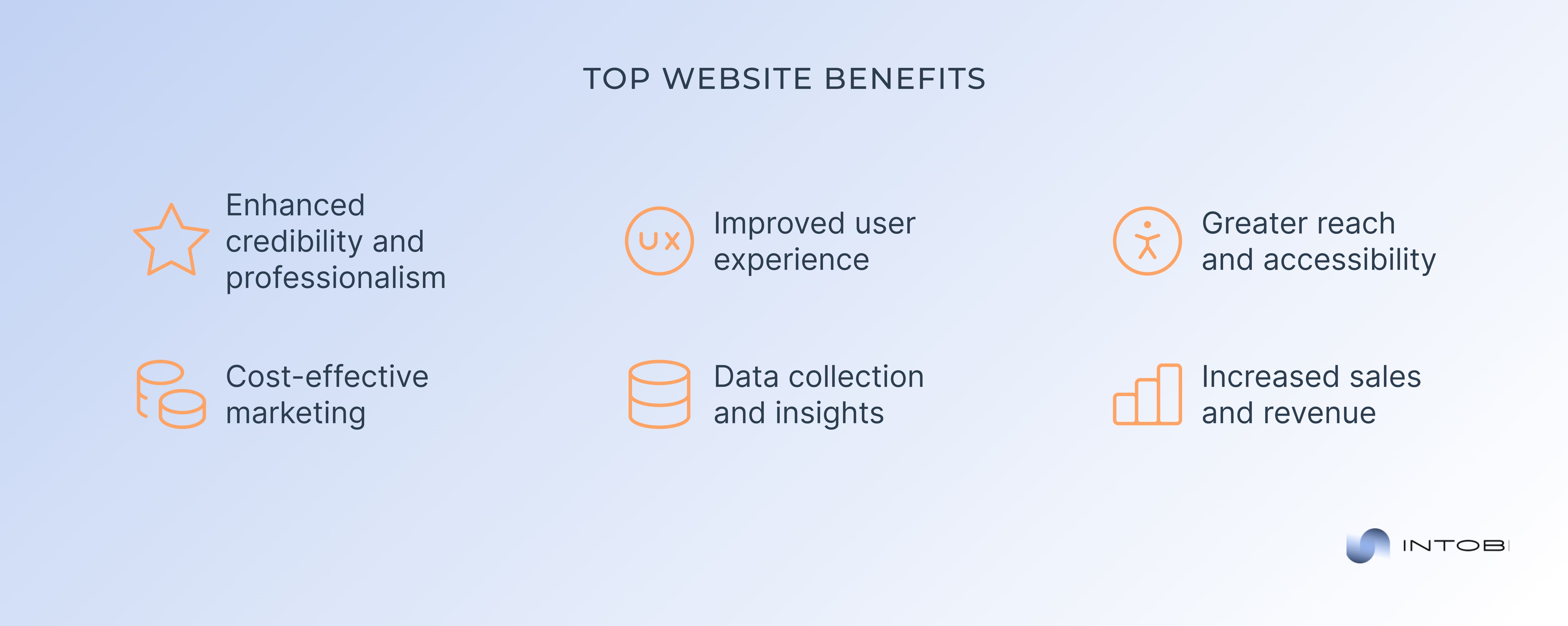
Crucial advantages of creating a website

Enhanced credibility and professionalism

One of the primary benefits of having a well-developed website is the enhancement of your credibility and professionalism. In today’s competitive market, consumers often research businesses online before purchasing. A polished, user-friendly website signals potential customers that you are a legitimate and trustworthy entity. It gives them confidence in your brand, products, or services, which can decide their choice to engage with you.

Improved user experience

A well-designed website focuses on providing an exceptional user experience (UX). This includes intuitive navigation, fast load times, and mobile responsiveness. When users can easily find the information they need and navigate your site without frustration, they are more likely to stay longer, explore more pages, and ultimately convert into customers. Additionally, a positive user experience encourages repeat visits and referrals, further expanding your reach.

Greater reach and accessibility

The Internet is a global marketplace, and a well-developed website allows you to tap into this vast audience. Unlike a physical store with geographical limitations, a website is accessible to anyone with an Internet connection, 24/7. This means you can reach potential customers from different time zones and regions, significantly increasing your market potential. Furthermore, implementing multilingual support and accessibility features can make your site inclusive and appealing to a broader audience.

Cost-effective marketing

A website is a cost-effective marketing tool. Traditional marketing methods, such as print ads and direct mail, can be expensive and have limited reach. In contrast, a website allows you to leverage various digital marketing strategies, such as search engine optimization (SEO), content marketing, social media integration, and email campaigns. These methods often have lower costs and can be highly targeted, ensuring that your marketing efforts reach the right audience.

Data collection and insights

A well-developed website provides valuable data and insights about your visitors. Analytics tools can track user behavior, such as how they found your site, which pages they visit, and how long they stay. This information is crucial for understanding your audience’s preferences and optimizing your site and marketing strategies. Data-driven decisions enable you to continuously improve your online presence and better meet your customers’ needs.

Increased sales and revenue

Ultimately, one of the most significant benefits of a well-developed website is its potential to increase sales and revenue. You can effectively guide visitors through the sales funnel by providing a seamless user experience, clear calls to action (CTAs), and easy-to-navigate product or service pages. Moreover, integrating secure payment gateways and optimizing the checkout process can reduce cart abandonment and boost conversions. Your revenue will grow as your website attracts more traffic and converts more visitors into customers.

Main factors that influence the website development costs

Developing a website involves various elements that collectively influence the overall website pricing. Understanding these factors can help you budget effectively and make informed decisions about your web development project. Let’s check these components together!

Website type

One of the most significant cost drivers is the type of website you want to develop. Different website types have varying complexity and functionality levels, directly impacting the cost.

Personal blogs

These are typically simpler sites with basic layouts and minimal functionality. They often use pre-designed templates and require less development time, making them more affordable.

Corporate websites

These sites usually feature a more sophisticated design, custom content management systems (CMS), and additional functionalities like contact forms and service listings. Consequently, they cost more than personal blogs.

E-commerce websitesThese are complex websites that include product listings, shopping carts, payment gateways, and sometimes inventory management systems. Developing an e-commerce site involves extensive backend work and integration with third-party services, leading to higher website development costs.

Amazon website home page

Web applications

These sites are highly interactive and often require custom functionalities, user accounts, real-time data processing, and other advanced features. Due to their complexity, web applications are typically the most expensive to develop.

Team size

The size of the development team also plays a crucial role in determining the website development costs.

Interesting

Larger teams can handle more extensive projects and deliver them faster, but they come with higher costs.

  • Freelancers: Hiring a single freelancer or a small group of freelancers can be cost-effective for smaller projects. However, the development timeline may be longer compared to larger teams.
  • Small development teams: These teams consist of 3-5 members and can handle moderate-sized projects efficiently. They strike a balance between cost and development speed.
  • Large development teams: These teams with 10 or more members are ideal for large, complex projects. Due to specialization, they can deliver projects faster and with higher quality, but they also come with a higher price tag.

Team location

The geographical location of your development team significantly affects the website development costs due to varying labor rates across different regions.

North America and Western Europe

Teams in these regions generally charge higher rates due to the higher cost of living and demand for skilled developers. However, they often offer high-quality work and excellent communication.

Eastern Europe and South America

These regions offer a good balance of quality and cost. Developers here are skilled, and their rates are more affordable compared to North America and Western Europe.

Asia (India, Philippines, etc.)

Asian development teams tend to have the lowest rates. While you can save significantly on costs, it’s essential to ensure the team has the necessary expertise and can meet your quality standards.

How can your website better perform?

Contact us

Design complexity

The complexity of the website design dramatically influences the development cost. A well-designed website attracts and retains users, but the web design cost can vary.

Basic design

Simple and clean designs with minimal custom graphics and animations are more affordable. These designs often use standard templates and require less development time.

Intermediate design

This level of design includes custom graphics, moderate animations, and a unique layout. It requires more time and expertise, increasing the cost.

Advanced design

The most expensive designs are highly customized, with complex animations, interactive elements, and unique layouts. These designs often involve extensive collaboration between designers and developers.

Upperquad website home page

Website features

The specific features and functionalities you want on your website are critical cost determinants. More features mean more development time and higher website development costs.

Basic features

Simple contact forms, social media integration, and basic SEO (search engine optimization) optimization are essential for most websites and do not significantly increase costs.

Advanced features

These include e-commerce functionality, user registration and login systems, custom content management systems, and advanced SEO features. They require more development work and thus increase the cost.

Specialized features

Real-time data processing, complex user interactions, API (application programming interface) integrations, and custom-built functionalities. These features demand a high level of expertise and significantly impact the development budget.

For businesses that need advanced functionality beyond standard website features, custom software development can help create scalable solutions tailored to specific workflows.

Common hidden web development costs

When planning to develop a website, many people focus on the initial design and development costs. However, several hidden expenses can significantly impact your budget over time. Two of the most significant hidden website development costs are marketing and maintenance. Let’s analyze these aspects now.

Marketing

It is essential to drive traffic to your website and ensure it reaches your target audience. However, the costs associated with marketing are often overlooked in the initial budgeting process. Here are some common marketing expenses you might encounter:

Search engine optimization (SEO)

It is crucial for improving your website’s visibility on search engines like Google. Effective SEO involves keyword research, on-page optimization, link building, and content creation. Hiring an SEO expert or agency can be costly, but it’s essential for attracting organic traffic.

Pay-per-click (PPC) advertising

PPC advertising, such as Google Ads or social media ads, can quickly drive targeted traffic to your site. However, it requires a continuous investment, and costs can add up, especially if you’re in a competitive industry. Setting a budget and closely monitoring your campaigns is essential to ensure a good return on investment (ROI).

ROI formula

Content marketing

Creating high-quality content, such as blog posts, videos, infographics, and eBooks, is essential for engaging your audience and improving your SEO. Content creation often involves hiring writers, designers, and videographers, which can be a significant expense.

Social media marketing

Managing your social media presence involves creating and sharing content, engaging with followers, and running paid promotions. You might need to hire a social media manager or agency to handle this, which will add to your ongoing website development costs.

Email marketing

It is an effective way to nurture leads and retain customers. Costs include email marketing software, list management, and content creation. A graphic designer might also be required to design visually appealing and engaging emails.

Maintenance and quality assurance (QA)

Once your website is live, ongoing maintenance is crucial to ensure it continues to function smoothly, remains secure, and stays up-to-date. Maintenance costs can vary depending on the complexity of your site and the level of support you require. Here are some common maintenance expenses:

Hosting and domain renewal

Web hosting and domain name renewals are recurring costs. Depending on your hosting plan, these can range from a few dollars a month to hundreds of dollars for dedicated servers or managed hosting services.

Security updates and monitoring

Keeping your website secure from cyber threats is vital. Regular security updates, SSL certificates, and monitoring services are essential to protect your site and user data. Hiring a security expert or subscribing to a security service can add to your ongoing website development costs.

Software and plugin updates

Websites built on platforms like WordPress rely on various themes and plugins. These require regular updates to ensure compatibility and security. Some premium themes and plugins also come with annual renewal fees.

Bug fixes and troubleshooting

No website is immune to occasional bugs and technical issues. Addressing these promptly is crucial to maintaining a good user experience. Having a developer on retainer or an ongoing support contract can help manage these issues efficiently but will add to your costs.

Performance optimization

Regular performance optimization is necessary to ensure your website loads quickly and runs smoothly. This can involve image optimization, database management, and server performance tuning. Hiring a specialist to handle these tasks can be an additional expense.

Content updates

Keeping your website’s content fresh and relevant is essential for SEO and user engagement. This may involve adding new products, updating blog posts, or refreshing old content. Depending on your setup, you might need to hire content writers or editors for these updates.

Design and functional enhancements

As your business grows, you may need to add new features or redesign parts of your website to better serve your customers. These enhancements often require the expertise of web designers and developers, contributing to ongoing website development costs.

Top strategies for cost optimization

Developing a website can be a significant investment, but there are several strategies you can employ to optimize costs without compromising on quality. Here are some effective strategies for website development costs optimization:
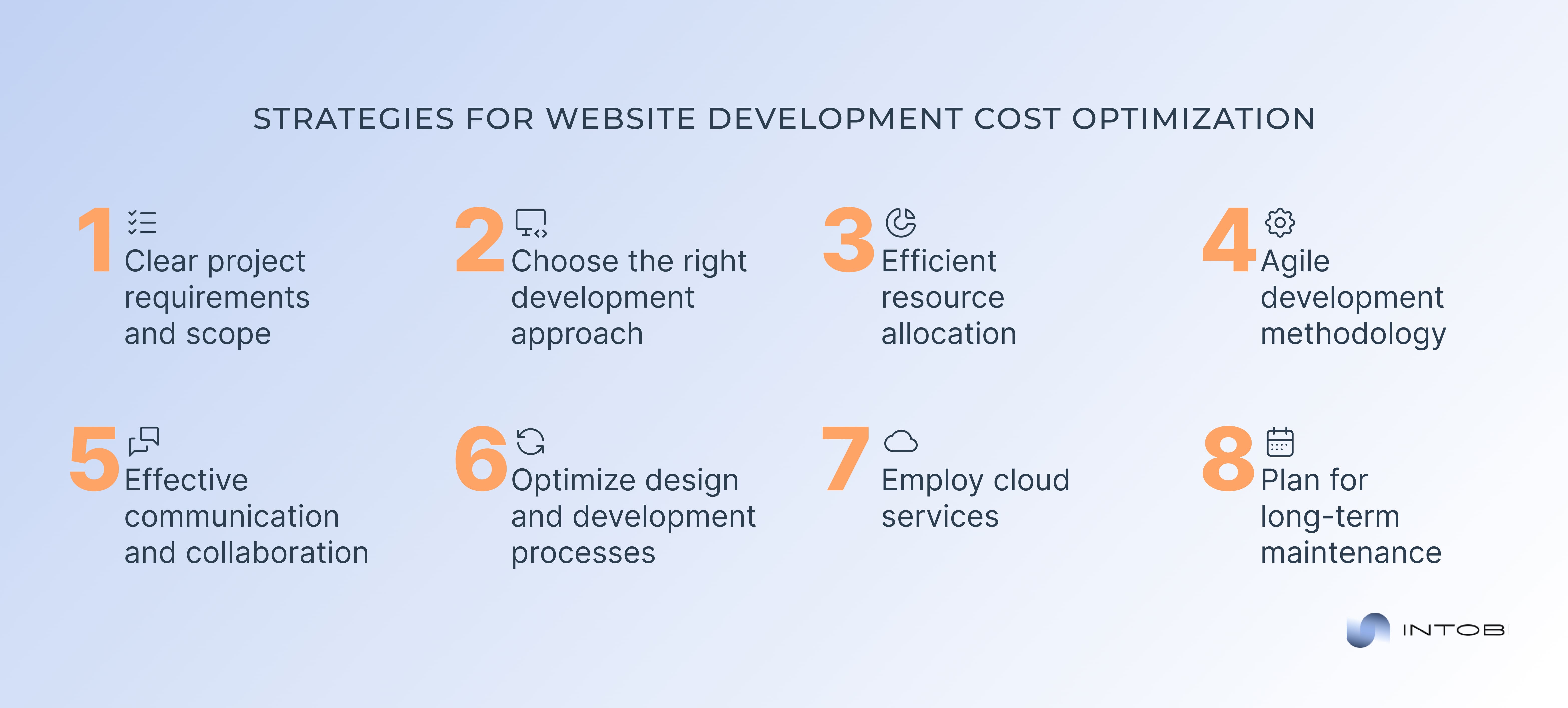
Effective tactics for website success

1. Clear project requirements and scope

Define your goals and requirements

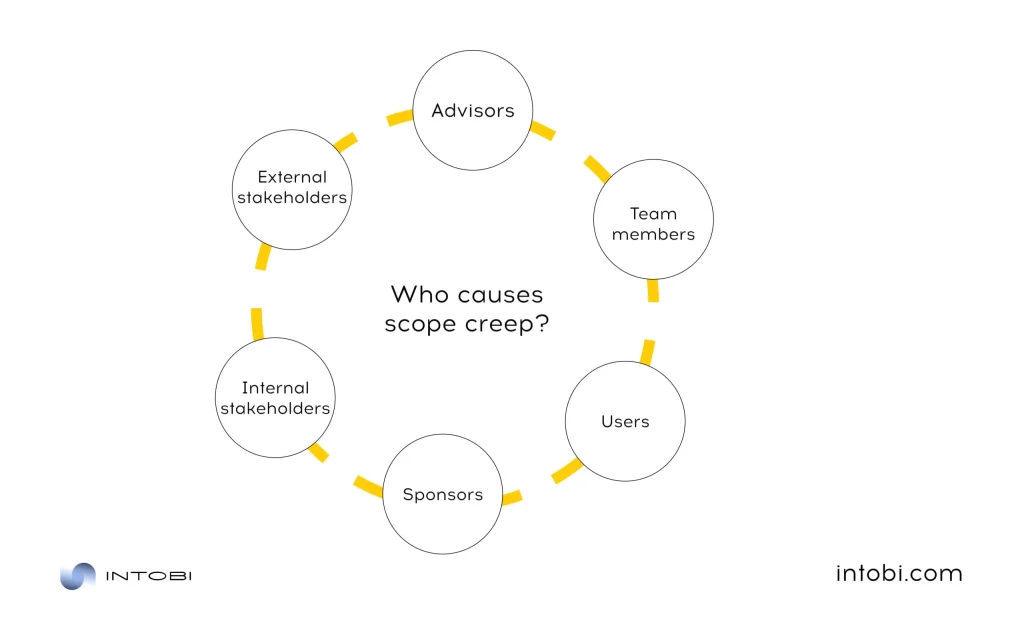
Start by clearly defining your website’s goals and requirements. Understand what you need in terms of features, design, and functionality. This clarity helps avoid scope creep, which can lead to additional website development costs and delays.

Create a detailed project plan

A detailed project plan outlines the steps involved in the development process, timelines, and deliverables. This plan can help keep the project on track and within budget. It also serves as a communication tool between you and the development team, ensuring everyone is aligned.

2. Choose the right development approach

Use open-source platforms

Use an open-source CMS like WordPress, Joomla, or Drupal. These platforms are free and have a large community of developers and resources, reducing the need for custom coding.
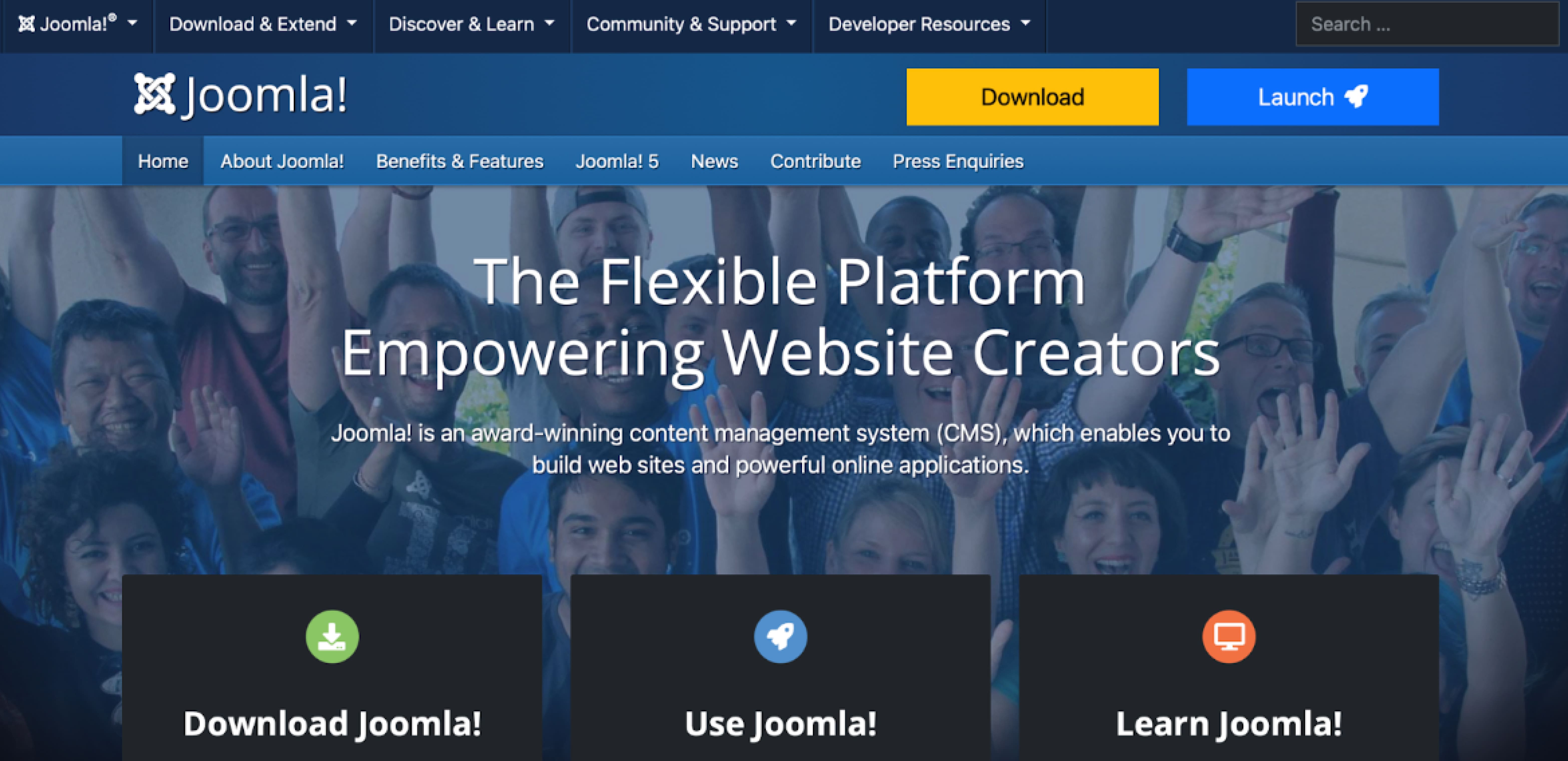
Joomla website home page

Opt for pre-built themes and templates

Pre-built themes and templates can save significant time and money compared to custom designs. Many high-quality themes are available for popular CMS platforms, which can be customized to meet your needs.

Utilize existing plugins and extensions

Consider using existing plugins or extensions instead of developing custom functionalities from scratch. Many features, such as contact forms, SEO tools, and e-commerce capabilities, are available as plugins that can be easily integrated into your site.

3. Efficient resource allocation

Hire the right team

Choosing the right development team is crucial. To reduce website development costs, consider freelancers for smaller projects or specific tasks. Hiring a small but skilled team for larger projects can be more cost-effective than hiring a large agency.

Outsource wisely

Outsourcing to regions with lower labor costs, such as Eastern Europe, South America, or Asia, can significantly reduce expenses. Ensure you get the developers or agencies thoroughly to maintain quality.

4. Agile development methodology

Implement Agile practices

Using Agile development methodologies allows for iterative progress and regular feedback. This approach can help identify issues early, reduce rework, and ensure the project stays aligned with your goals, ultimately saving time and money.
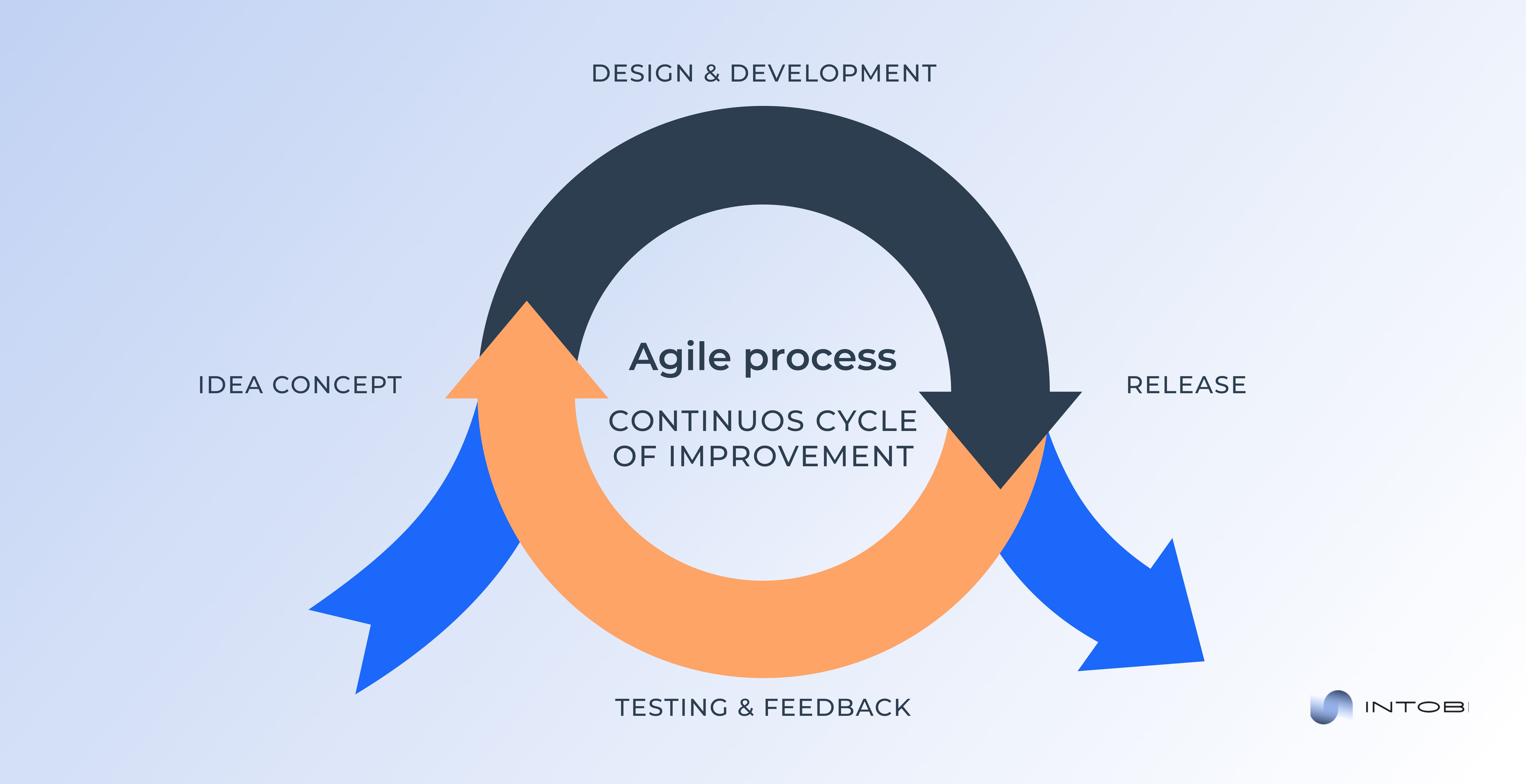
Agile web development

Prioritize features

Focus on developing the most critical features first. This prioritization ensures that the core functionality is built and tested early, allowing you to launch a minimum viable product (MVP) and add more features later as needed.

5. Effective communication and collaboration

Regular communication

Regularly communicate with your development team through meetings, progress reports, and collaboration tools. Clear communication helps prevent misunderstandings and costly mistakes.

Use project management tools

Utilize project management tools like Trello, Asana, or Jira to keep track of tasks, deadlines, and responsibilities. These tools enhance collaboration and ensure everyone knows the project’s status and next steps.

Asana home page

6. Optimize design and development processes

Streamline design process

Adopt a lean design approach by creating wireframes and prototypes before the development begins. This step helps visualize the end product, gather feedback early, and make necessary adjustments without costly rework.

Automate testing

Implement automated testing tools to identify bugs and issues early in development. Automated testing can save time compared to manual testing and ensures a more reliable end product.

Want to create a profitable website?

Let’s chat

7. Employ cloud services

Use cloud hosting solutions

Cloud hosting solutions like AWS, Google Cloud, or Azure offer scalable and cost-effective hosting options. You can adjust your resources based on your website’s traffic and needs, avoiding the website development costs associated with maintaining physical servers.

Utilize SaaS solutions

Software as a service (SaaS) solutions can provide necessary functionalities such as email marketing, CRM (customer relationship management), and analytics at a fraction of the cost of developing these systems in-house.

8. Plan for long-term maintenance

Regular updates and maintenance

Plan for regular updates and maintenance to avoid costly fixes in the future. Keeping your website’s software, plugins, and security measures up-to-date prevents potential vulnerabilities and performance issues.

Budget for ongoing costs

In your initial planning, include a budget for ongoing maintenance and support. This foresight ensures you have the resources to keep your website running smoothly without unexpected website development costs.

How much does it cost to build a website at Intobi?

The cost of building a website at our software development company varies based on several factors, including the website’s complexity, the features and functionalities required, the design intricacies, and the overall scope of the project. 

Below is a cost table providing a detailed website development cost breakdown for different projects at Intobi.

Website typeEstimated cost
Basic website$1,000 – $5,000
Corporate website$5,000 – $15,000
E-commerce website$10,000 – $50,000
Web application $20,000 – $100,000+

Case study: SpeakerMatch

SpeakerMatch is the only service that matches speakers and offers speaking opportunities. It reaches emerging professional speakers, business leaders, technical gurus, educators, and other subject-matter experts who want to communicate what they know. SpeakerMatch is available for event organizers who need to reach this diverse group of experts who speak.

SpeakerMatch home page

At Intobi, our specialists rewrote all the engines using Laravel and designed a new UI (user interface). We then redeployed the site on Microsoft Azure, which resulted in more success and the ability to handle any number of users. 

Conclusion

In general, the website development costs can vary widely based on numerous factors such as design complexity, functionality requirements, platform choice, and the development team’s expertise. By clearly defining your needs and expectations and working closely with your development team, you can ensure that your investment results in a website that meets your goals and provides a solid return on investment. 

If you are ready to turn your vision into reality, contact our software development company today for a personalized consultation. Let our team of experts help you develop a website that meets your needs and exceeds customers’ expectations.

FAQ

How much does a website cost?

The cost of a website can vary significantly depending on the complexity of the design, the number of features, the type of website, and more. Generally, a basic website with minimal features might cost anywhere from $1,000 to $5,000. A more complex website can range from $5,000 to $100,000 or more.

How long to amortize website development costs?

The amortization period for website development costs typically ranges between three to five years. This period aligns with the expected useful life of the website, during which it remains current and effective.

How Much Does It Cost to Build an App in 2026?

TL;DR

App development costs depend on far more than the idea itself. This guide explains how a mobile app is made – from product discovery and UI/UX design to development, QA, and support – and the main factors that affect the price: complexity, platform, development approach, design, developer location, and feature scope. It also covers the hidden costs that often catch businesses off guard.

Make a summary of this article with AI:

As mobile technologies grow, the question of app development costs remains as relevant as ever. Where innovation sets the pace and user expectations to grow, understanding the sophistication of application development becomes crucial for businesses and entrepreneurs alike.

So, how much does it cost to start an app in 2025? The cost of developing an app can range from $10,000 to $300,000. But it all depends. So, let’s analyze the latest trends, factors, and estimations shaping the financial landscape of app development in this dynamic era.

Let’s get started with our app development estimation!

Understanding app development: definition and current market landscape

In fact, mobile applications have become an integral part of daily life for billions of users worldwide. From social networking to productivity tools, entertainment to e-commerce, the diversity and utility of mobile apps continue to expand, driving innovation and transforming industries. At the heart of this digital revolution lies app development, a process that combines creativity, technical expertise, and market insight to bring ideas to life in the palm of our hands. 

App development refers to creating software applications for mobile devices such as smartphones and tablets. It covers a broad spectrum of activities, including conceptualization, design, coding, testing, and deployment, each crucial in shaping the final product’s functionality, usability, and success.

The app development landscape constantly evolves, shaped by technological advancements, consumer preferences, and market dynamics. As of 2025, several trends and factors are influencing the industry’s trajectory:

  1. Rise of AI and ML: Artificial intelligence (AI) and machine learning (ML) are increasingly integrated into mobile apps to enhance personalization, predictive analytics, and automation. From virtual assistants to recommendation engines, AI-powered features redefine user experiences and drive engagement.
  2. Focus on privacy and security: With growing concerns over data privacy and security breaches, app developers prioritize robust security measures and compliance with regulations such as GDPR (General Data Protection Regulation) and CCPA (California Consumer Privacy Act). Encryption, biometric authentication, and data anonymization are becoming standard practices to safeguard user information.
  3. Emergence of low-code/no-code platforms: Low-code and no-code development platforms are gaining traction. These platforms allow non-technical users to build custom apps with minimal coding knowledge. These platforms democratize app development, empowering businesses and individuals to create tailored solutions rapidly and cost-effectively.
  4. Integration of AR and VR: AR (augmented reality) and VR (virtual reality) technologies are being increasingly leveraged to deliver immersive and interactive experiences in gaming, retail, education, and other domains. From AR-enhanced shopping apps to VR-based training simulations, these technologies offer new avenues for innovation and engagement.
  5. Cross-platform development: With the proliferation of devices and operating systems, cross-platform development frameworks such as React Native, Flutter, and Xamarin are gaining popularity. These frameworks enable developers to write code once and deploy it across multiple platforms, streamlining development efforts and reducing time-to-market.

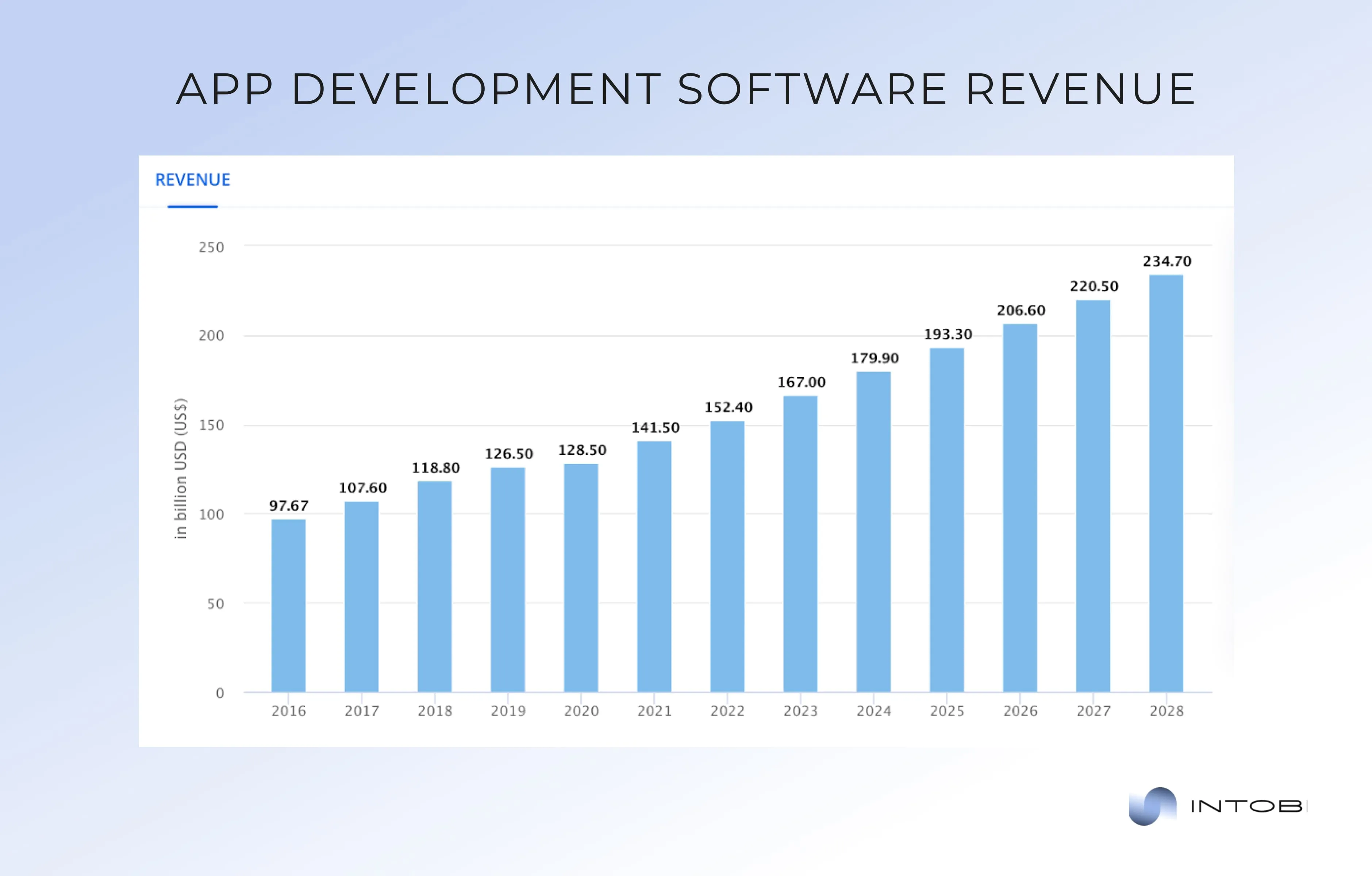
The forecasted revenue for the application development software market is expected to hit $193.30 billion in 2025.

Revenue from app development software

Thus, by staying abreast of the latest trends, adopting innovation, and fostering collaboration, developers can unlock the full potential of app development and create transformative solutions that enrich lives and drive positive change in society.

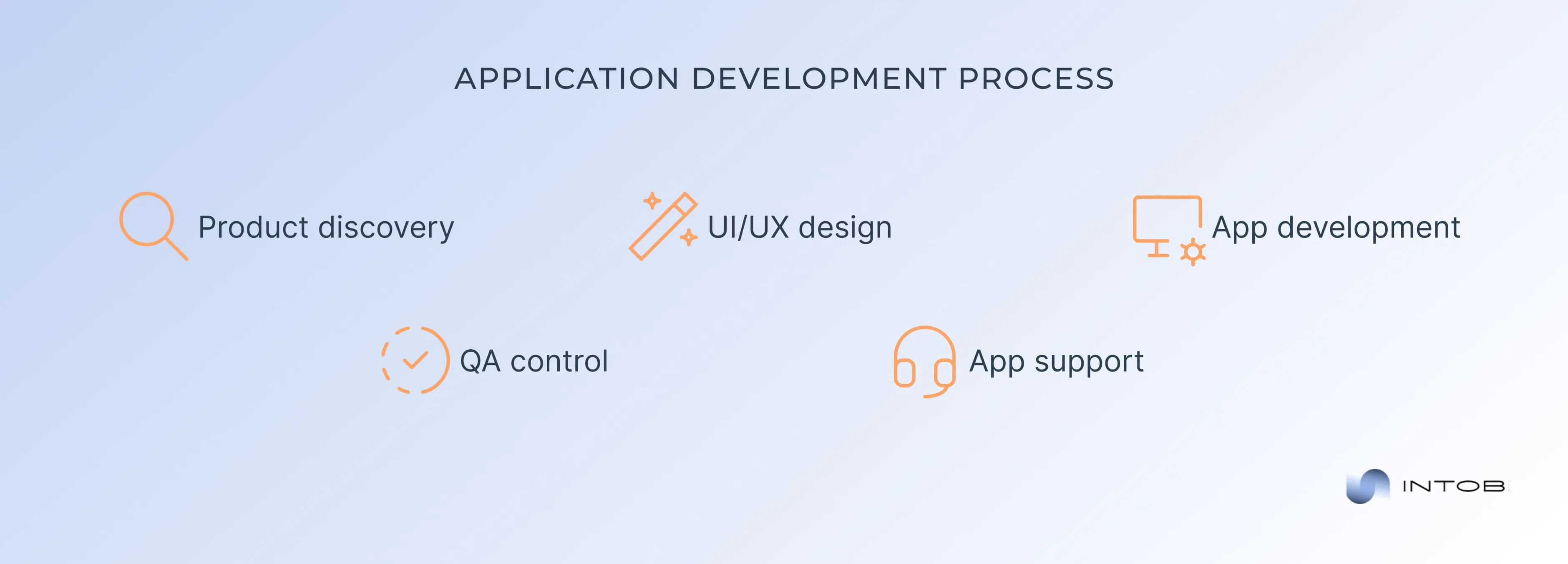
How to make a mobile application?

Before estimating the app development cost, it is essential to understand what you will include in this process. Our specialists have prepared a detailed guide to the application development. Let’s check it together!

How to build an app

Product discovery

The creation of a successful mobile application begins with product discovery. This phase involves researching the market, identifying user needs, and conceptualizing your app idea. Here are some critical steps to consider:

  • Market research. Analyze existing apps in your niche, study their features, user reviews, and ratings. Identify gaps or pain points that your app can address.
  • Define your target audience. Understand your potential users’ demographics, preferences, and behavior patterns. This will help you tailor your app to meet their specific needs.
  • Idea validation. Test your app idea through surveys, focus groups, or prototype testing. Gather feedback from potential users to validate demand and refine your concept.

UI/UX design

Once you clearly understand your app’s purpose and target audience, it’s time to design the user interface (UI) and user experience (UX). A well-designed UI/UX is essential for engaging users and ensuring a seamless interaction with your app. Below is what you need to consider:

  • Wireframing. Make wireframes or mockups of your app’s screens, outlining the layout, navigation flow, and visual elements. This helps visualize the app’s structure and functionality.
  • Visual design. Create your app’s graphical interface, including color schemes, typography, icons, and imagery. Aim for a clean, intuitive design that reflects your brand identity and resonates with users.
  • Prototyping. Build interactive prototypes to simulate the app’s user experience. Test the prototype with real users to gather feedback and iterate on design improvements.

App development

With the design finalized, it’s time to bring your app to life through development. This phase involves writing code, implementing features, and integrating third-party services. Here’s an overview of the app development process:

  • Choose a development approach. Decide whether to develop a native app (specifically for iOS or Android), a hybrid app (using web technologies like HTML, CSS, and JavaScript), or a cross-platform app (using frameworks like React Native or Flutter).
  • Set up a development environment. Install the necessary software development kits (SDKs), tools, and libraries for your chosen platform(s). This may include Xcode for iOS development, Android Studio for Android development, or cross-platform frameworks.
  • Coding and implementation. Write the backend and frontend code for your app’s features, functionality, and interactions. Follow best practices for coding standards, documentation, and version control to ensure maintainability and scalability.
  • Testing. Conduct thorough app testing to identify and fix bugs, glitches, or performance issues. This includes functional testing, usability testing, compatibility testing, and security testing.
  • Deployment. Prepare your app for release by configuring app store listings, generating signing keys, and adhering to platform guidelines. Submit your app to the Apple App Store and/or Google Play Store for review and approval.

QA control

Quality assurance (QA) is a critical aspect of app development, ensuring that your app meets the highest performance, reliability, and usability standards. Below, you can discover some QA practices to follow:

  • Automated testing. Implement automated tools and scripts to streamline the testing process and identify regressions or errors early in the development cycle.
  • Manual testing. Conduct manual testing by simulating real-world usage scenarios and evaluating the app’s functionality, usability, and user experience.
  • User feedback. Gather feedback from beta testers and early adopters to uncover issues, gather insights, and prioritize improvements for future updates.
  • Continuous improvement. Iterate your app based on user feedback, analytics data, and emerging trends. Release updates regularly to address bugs, introduce new features, and enhance the overall user experience.

App support

Even after your app is launched, the journey continues. App support is essential for maintaining and optimizing your app’s performance, addressing user feedback, and keeping up with platform updates. We prepared some tips for app support:

  • Monitor performance. Track key performance metrics such as app crashes, user retention, and engagement metrics. Use analytics tools to gain insights into user behavior and identify areas for improvement.
  • Provide customer support. Provide timely and responsive customer support to address user inquiries, troubleshoot issues, and resolve technical problems. Maintain multiple communication channels like email, live chat, and social media.
  • Update regularly. Stay proactive in updating your app to fix bugs, patch security vulnerabilities, and add new features. Communicate updates to users through release notes, app store listings, and push notifications.

Stay current. Keep abreast of platform updates, industry trends, and user feedback to adapt your app strategy accordingly. Continuously innovate your app to stay competitive in the ever-changing mobile landscape.

Searching for a robust app development partner?

Let’s chat

Main factors affecting the mobile app development cost

Mobile app development has become a crucial component of business strategy across various industries. However, the cost of developing an app can vary widely depending on numerous factors. Understanding these factors is essential for making informed decisions and optimizing investment in app development.
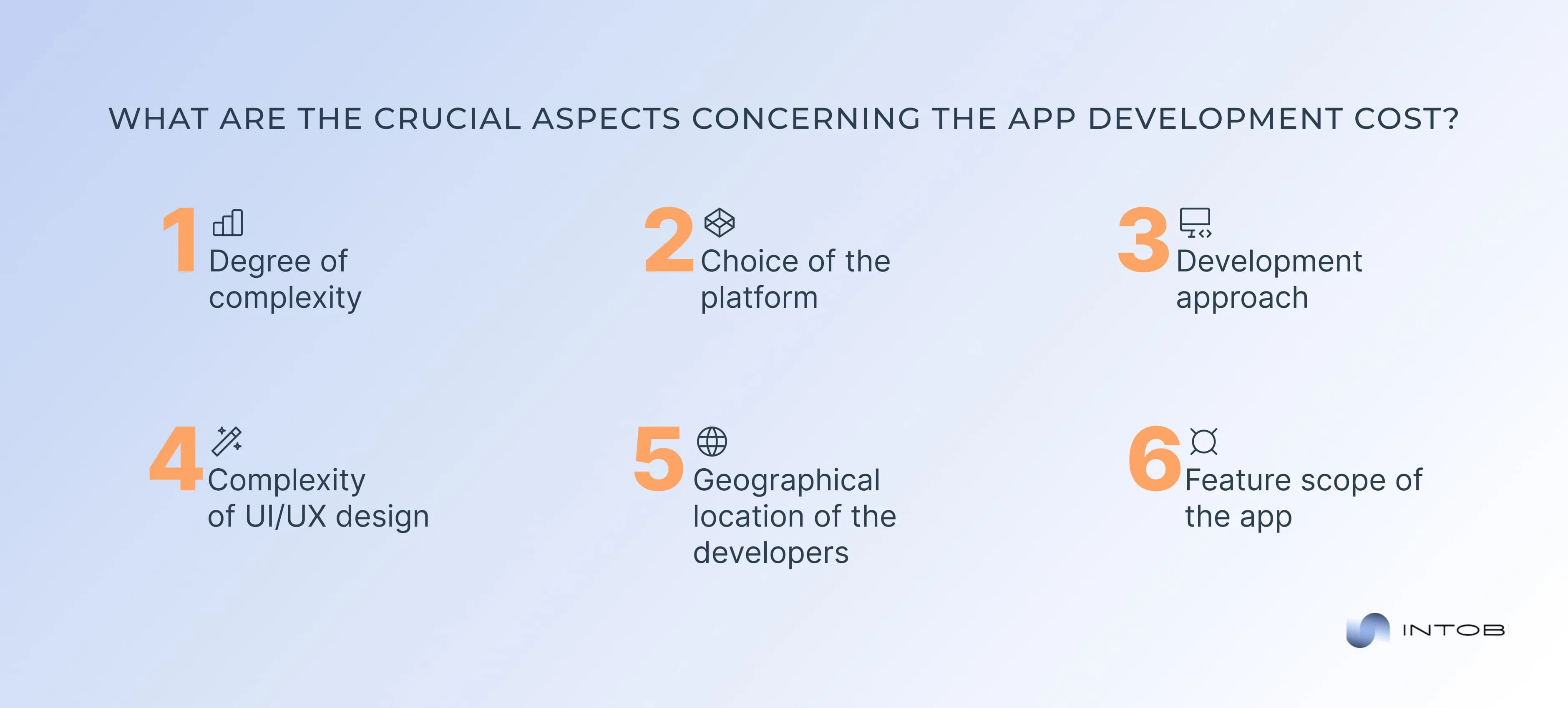
Below, we will explore the primary aspects affecting the app development price.

Common aspects concerning the app development cost

1. Degree of complexity

The complexity of an app significantly influences its development cost. Apps can generally be categorized into three levels of complexity: simple, moderate, and complex.

Simple apps

These apps typically have basic functionalities and a limited number of screens. Examples include a basic calculator, a simple to-do list, or a news reader app. Developing simple apps requires less time and fewer resources. 

Moderate apps

Such apps have more features and integrations compared to simple apps. They might include user authentication, social media integration, in-app purchases, and basic backend infrastructure. Examples include fitness tracking or e-commerce apps with a catalog and payment gateway. 

Complex apps

These apps are feature-rich and require advanced technologies and integrations. These apps might include real-time user interactions, advanced backend with cloud infrastructure, extensive third-party integrations, and custom animations. Examples include social media platforms, on-demand services like Uber, and large-scale e-commerce platforms. 

2. Choice of the platform

In fact, the choice of platform—whether to develop for iOS, Android, or both (cross-platform)—significantly impacts app development costs.

Android

Developing an Android app can be more complex and time-consuming due to the wide variety of devices and screen sizes that need to be supported. Testing and optimization across different devices can increase development time and costs. However, Android has a larger global market share, which can be advantageous for reaching a broader audience.

iOS

This app development is generally faster and more straightforward due to the limited number of devices and standardized operating systems. However, iOS users tend to have higher expectations for design and performance, which can increase the development effort in these areas. iOS apps are known for generating higher revenue per user, primarily through in-app purchases.

Cross-platform

These development frameworks like React Native and Flutter allow developers to write a single codebase that runs on iOS and Android. This approach can reduce app development costs and time-to-market. However, cross-platform apps may face limitations in performance and accessing native device features compared to native apps. The cost of developing a cross-platform app typically falls between the costs of developing separate Android and iOS apps.

3. Development approach

Interesting

The approach to development—whether in-house, freelancers, or outsourcing—plays a critical role in determining the overall app price.

In-house development

Building an in-house development team provides complete control over the development process and fosters better communication and collaboration. However, it involves significant costs, including salaries, benefits, equipment, and infrastructure. In-house development is usually more expensive than other approaches, especially for startups and small businesses.

Freelancers

Hiring freelancers can be cost-effective for small projects or when specific expertise is needed temporarily. Freelancers often charge lower rates than development agencies, but managing multiple freelancers can be challenging and affect the project’s continuity and quality.

Outsourcing

This app development for a specialized agency can be a cost-efficient solution. Agencies offer comprehensive services, including project management, development, design, and testing. They also bring extensive experience and expertise to the table. Outsourcing costs vary widely depending on the agency’s location and reputation but can provide a balance between price and quality.

4. Complexity of UI/UX design

The complexity of the user interface and user experience design significantly impacts app development costs. A well-designed app with intuitive navigation and an appealing interface enhances user satisfaction and engagement.

Basic design

The basic design involves simple layouts and standard UI elements. It requires less design effort and is suitable for apps with limited features.

Moderate design

This design includes custom UI elements, standard animations, and a more polished look. Creating a visually appealing and functional interface requires more design and development effort. 

Advanced design

Such design involves highly customized UI elements, complex animations, and interactive features. It provides a unique user experience and often requires extensive user research and testing.

5. Geographical location of the developers

The geographical location of the development team significantly affects the app cost due to varying rates across different regions.

North America

Developers in North America (U.S. and Canada) charge the highest rates, typically ranging from $100 to $250 per hour. This region’s quality, experience, and advanced technological expertise justify the higher cost.

Western Europe

Western European countries, such as the UK, Germany, and France, have slightly lower rates than North America, ranging from $70 to $200 per hour. These countries offer high-quality development services with a strong focus on innovation and design.

Eastern Europe

Eastern Europe, including countries like Poland and Ukraine, offers competitive rates ranging from $30 to $80 per hour. This region is known for its skilled developers and high-quality work at a more affordable app cost.

Asia

Asian countries, particularly India and China, provide the most cost-effective development rates, typically ranging from $20 to $50 per hour. While the cost is lower, ensuring the quality and communication standards meet your project’s requirements is essential.

6. Feature scope of the app

The features and functionalities of an app are among the most significant factors influencing app development costs. More complex and feature-rich apps require more development time, expertise, and resources.

Basic features

These features include user authentication, simple navigation, and standard content display. Developing these features is straightforward and less costly.

Intermediate features

These features involve more complex functionalities such as push notifications, social media integration, in-app purchases, and basic data storage. These features require additional development effort and resources.

Advanced features

Such features include real-time chat, video streaming, geolocation services, advanced data analytics, and machine learning capabilities. Developing these features involves significant technical expertise, testing, and integration efforts, leading to higher app costs.

Custom integrations

These integrations with third-party services, such as payment gateways, customer relationship management (CRM) systems, and cloud services, add to the development complexity and cost. Ensuring seamless integration and maintaining data security and compliance increases the investment required.

In general, businesses can create successful mobile applications that meet user expectations and drive growth by carefully considering each aspect and working with a skilled and experienced development team.

Common hidden app development costs

When planning to develop a mobile application, it’s crucial to consider not just the obvious app costs but also the hidden expenses that can significantly impact your budget. These hidden mobile app development costs often arise during different phases of the development lifecycle, from initial planning to post-launch maintenance and updates.

Here are some of the most common hidden app development costs:

Detailed requirement analysis and project planning

Before the coding starts, much time and effort is required for detailed requirement analysis and project planning. This phase involves:

  • Business analysis: Understanding business goals, target audience, and app functionality.
  • Market research: Analyzing competitors, market trends, and user preferences.
  • Project management: Developing a detailed project plan, timeline, and resource allocation.

These activities are essential for laying a solid foundation for your app but often incur additional app costs that are not initially apparent.

Backend infrastructure and cloud services

Many apps require robust backend infrastructure for data storage, user authentication, and server-side logic. Hidden application development costs associated with backend services include:

  • Server costs: Purchasing or renting server space to host the backend.
  • Database management: Setting up and maintaining databases.
  • APIs: Developing and integrating application programming interfaces (APIs) for various functionalities.
  • Cloud services: Utilizing cloud platforms like AWS, Google Cloud, or Azure for scalability and performance.

These backend services are critical for the app’s functionality but can add significantly to the overall development cost.

Third-party integrations

Integrating third-party services and APIs can enhance your app’s functionality and introduce hidden application development costs. Common integrations include:

  • Payment gateways: Services like PayPal, Stripe, or Apple Pay for in-app purchases.
  • Analytics tools: Tools like Google Analytics or Firebase for tracking user behavior.
  • Social media: Integrating social media platforms for login or sharing features.

These integrations often have usage fees or require custom development to work seamlessly with your app.

Marketing and user acquisition

Launching an app requires a robust marketing strategy to attract users. Hidden marketing application development costs may include:

  • Digital marketing: Investing in social media ads, search engine marketing, and influencer partnerships.
  • App Store Optimization (ASO): Optimizing the app’s listing to improve visibility and downloads.
  • Promotional campaigns: Running campaigns to generate buzz and drive user acquisition.

Marketing is crucial for the app’s success but often overlooked in initial budget planning.

Legal and compliance fees

Legal and compliance-related expenses can also add to the hidden application development costs. These may include:

  • Privacy policies: Drafting and updating privacy policies and terms of service.
  • Copyright and trademark: Securing intellectual property rights and trademarks.
  • Compliance audits: Ensuring ongoing compliance with relevant laws and regulations.

Neglecting legal aspects can lead to costly penalties and reputational damage, so it is essential to allocate a budget for these expenses.

Development costs of the world’s most popular apps

The rapid rise of mobile applications has revolutionized how we communicate, travel, and share our lives. These apps have become household names, each with a unique value proposition and an immense user base.

However, behind their success lies a significant investment in development. Understanding the app development costs of these popular apps provides valuable insights into the resources and strategic planning required to create world-changing digital products.

Let’s break down the factors that contributed to their financial requirements.

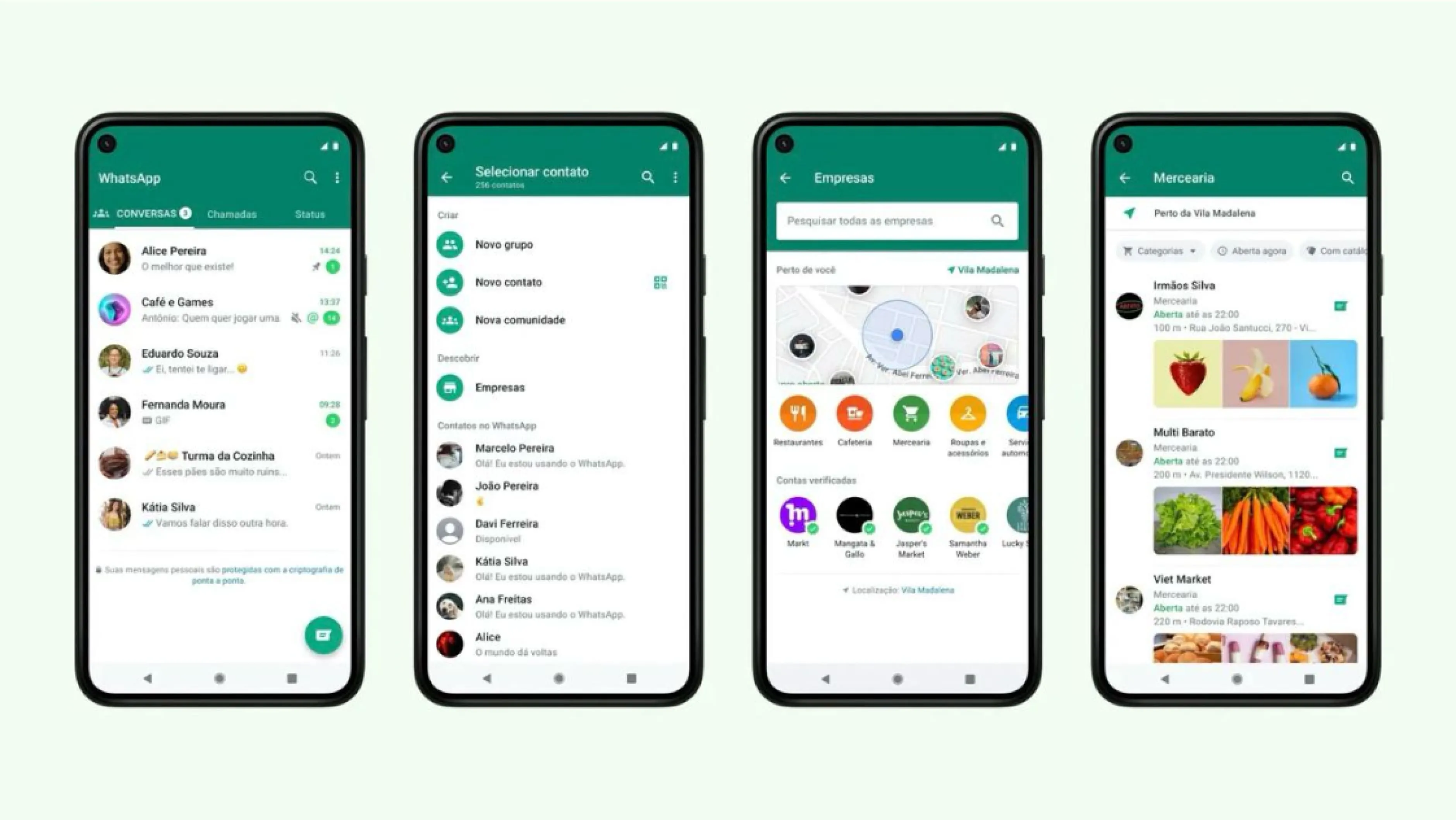
WhatsApp

WhatsApp mobile app

WhatsApp, founded in 2009 by Jan Koum and Brian Acton, started as a simple messaging app. The initial development phase was relatively modest compared to its later stages. This included:

  • Core messaging functionality: Developing the fundamental messaging feature required robust backend infrastructure to ensure reliable and instant communication.
  • Cross-platform compatibility: Ensuring the app worked seamlessly on iOS and Android platforms added complexity and cost.
  • UI/UX design: Creating an intuitive and user-friendly interface required considerable design and testing efforts.

As WhatsApp’s user base grew, so did its development costs. Scaling to support millions of users required substantial investment in server infrastructure and security enhancements. Additionally, implementing features like voice and video calls, group chats, and multimedia sharing increased app costs.

WhatsApp continues to invest heavily in development to introduce new features and enhance security and privacy. End-to-end encryption, for instance, was a significant development undertaking. Today, maintaining and evolving such a widely used app likely involves an ongoing budget of several million dollars annually.

Average cost to develop an app like WhatsApp: $30,000-$70,000

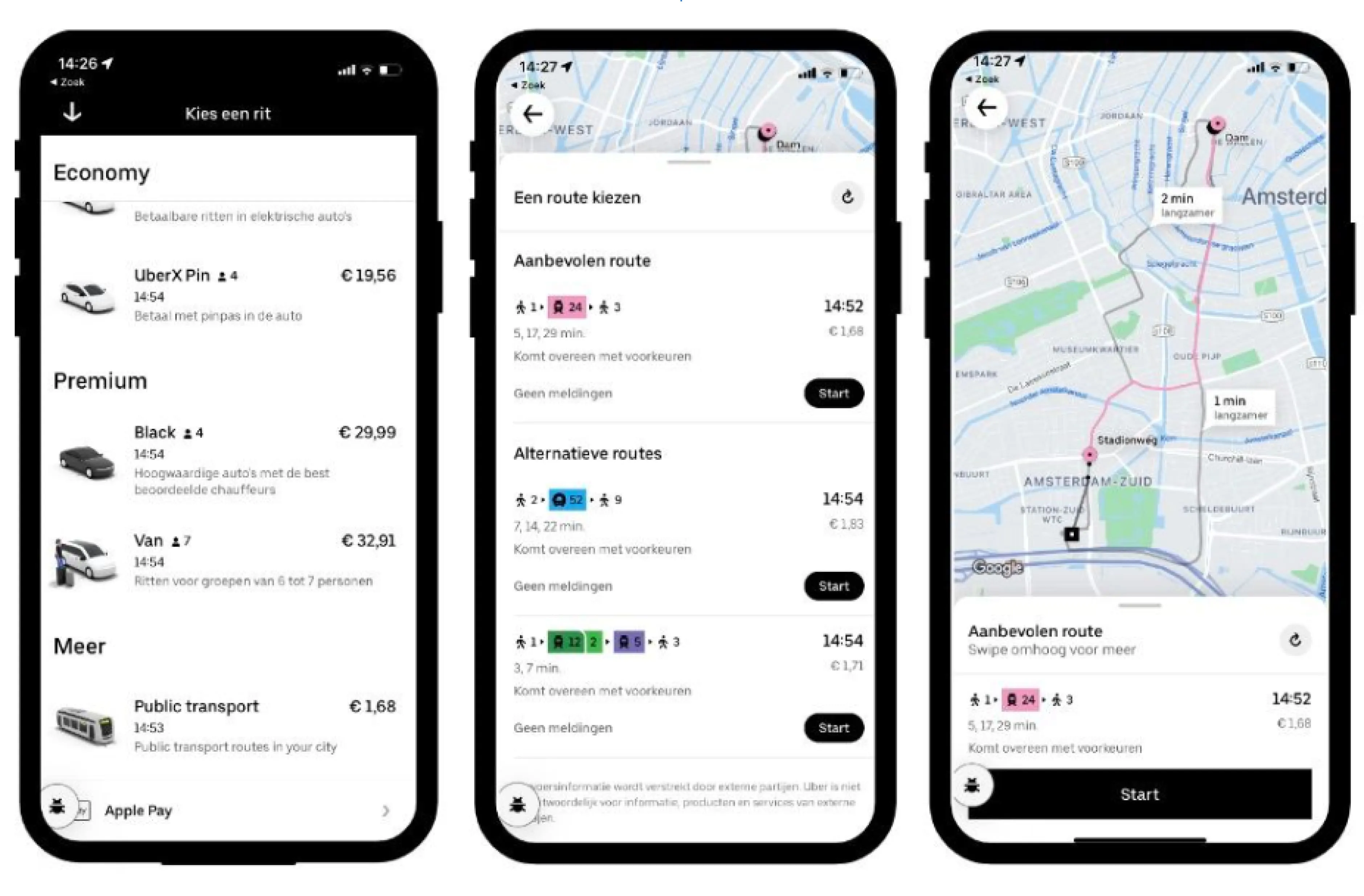
Uber

Uber mobile app

Uber, launched in 2009 by Garrett Camp and Travis Kalanick, transformed urban transportation with its ride-hailing service. The initial app development cost factors included:

  • Core functionality: Building the core features, such as user registration, ride booking, GPS integration, driver and passenger matching, and fare calculation, required substantial technical expertise.
  • Backend infrastructure: Developing a robust backend to handle real-time data processing and transactions was crucial.
  • Payment integration: Implementing secure payment processing and multiple payment options increased complexity and cost.

Uber’s rapid expansion necessitated significant additional investment. Scaling the platform to new cities and countries involved adapting to local regulations, languages, and payment systems. The cost of scaling also included enhancing server capacity and ensuring high availability and reliability.

Today, Uber continues to innovate with features like Uber POOL, Uber EATS, and autonomous vehicle technology. The ongoing development and maintenance costs are substantial, estimated at several hundred million dollars per year, reflecting the complexity and scale of the platform.Average cost to develop an app like Uber: $30,000-$100,000

Snapchat

Snapchat mobile app

Snapchat, launched in 2011 by Evan Spiegel, Bobby Murphy, and Reggie Brown, introduced ephemeral messaging to the social media landscape. The initial app development costs covered:

  • Core features: Developing the core features of disappearing messages and multimedia sharing required innovative technical solutions and a unique UX design.
  • Backend infrastructure: It was critical to ensure the app could handle a high volume of multimedia content and provide real-time delivery.
  • Security and privacy: Implementing robust security measures to protect user data and maintain privacy added to the development complexity.

As Snapchat’s popularity surged, so did its development costs. Introducing new features such as Stories, Discover, and AR filters required significant R&D and server infrastructure investment.

Snapchat’s commitment to innovation necessitates continuous investment in development. Features like Snap Map, Spectacles, and ongoing improvements to AR capabilities reflect the company’s significant R&D expenditure. Today, Snapchat’s growth and operational costs are estimated to be several hundred million dollars annually.

Average cost to develop an app like Snapchat: $45,000-$100,000

Thus, understanding these app development costs provides valuable insights for aspiring app developers and businesses looking to enter the competitive mobile app market. Investing in robust development, scalable infrastructure, and continuous innovation is essential to achieving long-term success and user satisfaction.

What features are vital for your app?

Contact us

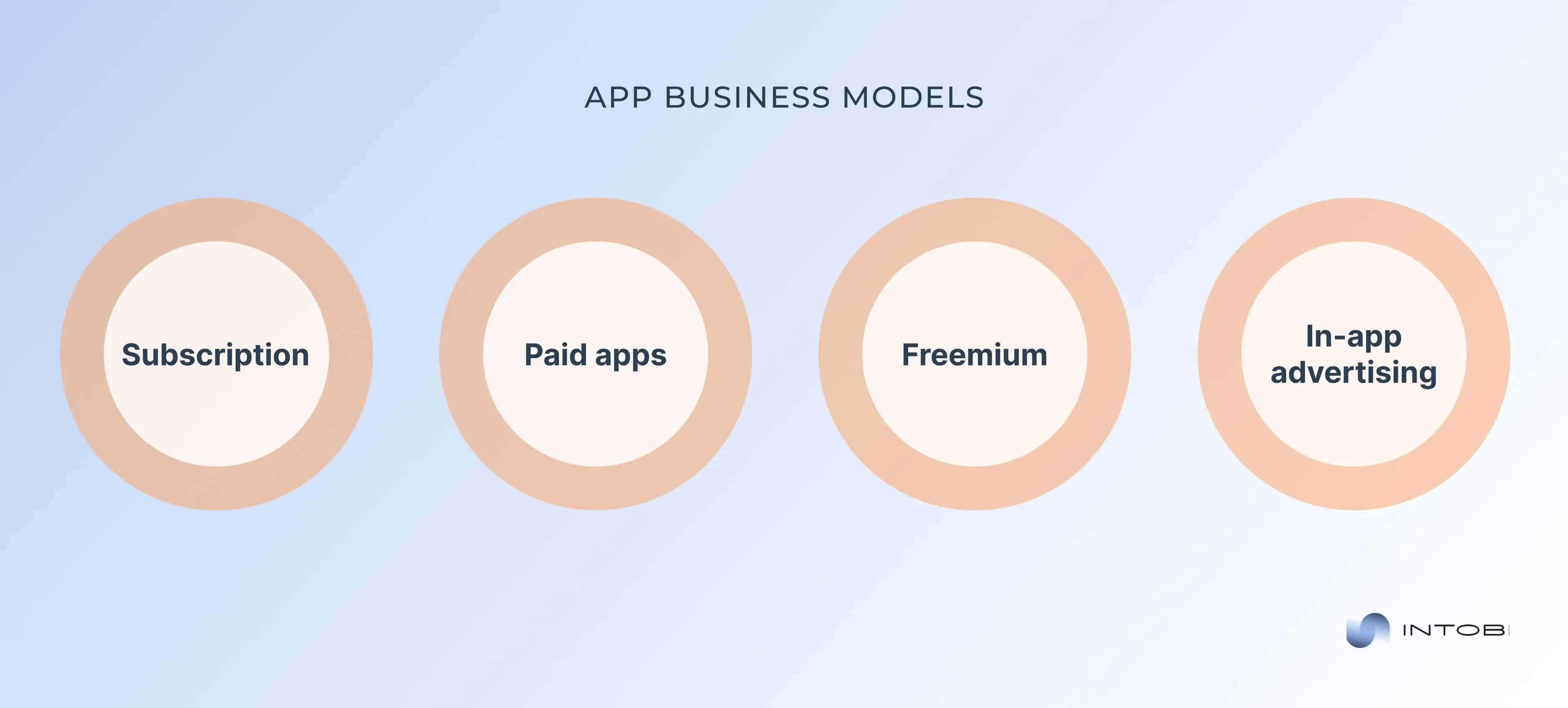
Maximizing returns: choosing the right business model

Choosing a suitable business model is crucial for maximizing returns and ensuring the long-term success of your app. The choice of business model affects your revenue streams and influences user engagement, retention, and overall satisfaction. Let’s explore popular business models, analyzing their advantages, challenges, and suitability for different types of apps to help you make an informed decision.

Selecting the right app business model

Subscription

This business model has gained significant popularity in recent years, particularly among apps that provide ongoing value through content, services, or features. Under this model, users pay a recurring fee (monthly, quarterly, or annually) to access the app’s premium features or content.

Advantages:

  • Steady revenue stream: Subscriptions provide a predictable and recurring revenue stream, enhancing financial stability and allowing for better planning and resource allocation.
  • High customer lifetime value (CLTV): With continuous engagement, the customer lifetime value tends to be higher compared to one-time purchases, as users consistently pay over time.
  • User commitment: Subscription models encourage long-term user commitment, as users are likely to stay engaged and loyal when they invest regularly in the app.

Challenges:

  • High expectations: Users expect continuous updates, improvements, and value additions to justify recurring payments.
  • Churn management: Retaining subscribers can be challenging, as users may cancel their subscriptions if they perceive a lack of value.

Use cases:

Ideal for apps that offer ongoing services such as content streaming (e.g., Netflix), productivity tools (e.g., Microsoft Office 365), health and fitness programs, and news or magazine subscriptions.

Paid apps

Under the paid app model, users pay a one-time fee to download and access the app. This model can be straightforward but requires a compelling value proposition to convince users to pay upfront.

Advantages:

  • Immediate revenue: Each download generates revenue upfront, providing instant financial returns.
  • High perceived value: Users often perceive paid apps as higher quality than free alternatives, potentially leading to higher satisfaction and fewer support issues.
  • No ads: Paid apps typically do not include ads, offering a cleaner and more focused user experience.

Challenges:

  • High barrier to entry: Convincing users to pay for an app without a trial can be difficult, especially in a market dominated by free apps.
  • Limited revenue growth: Revenue is capped by the number of downloads, without the potential for recurring income unless additional in-app purchases are offered.

Use cases:

Best for niche apps with a unique value proposition, games with a strong reputation or franchise, and apps with significant utility or productivity benefits.

Freemium

This business model combines free and premium elements, allowing users to access basic features for free while offering advanced features, content, or virtual goods through in-app purchases (IAPs).

Advantages:

  • Wide user base: By lowering the barrier to entry, freemium apps can attract a large user base quickly.
  • Monetization opportunities: Offering premium features or content allows for multiple monetization opportunities and higher potential revenue per user.
  • User testing: Users can test the app for free before investing in premium features, reducing the risk of dissatisfaction and refunds.

Challenges:

  • Conversion rates: A small percentage of users typically convert to paying customers, requiring a large user base to achieve significant revenue.
  • Balance: Striking the right balance between free and premium features is crucial to avoid frustrating free users or undervaluing the premium offering.

Usu cases:

Suitable for apps offering a meaningful experience for free users while enticing them to upgrade, such as mobile games, productivity apps, social networking apps, and education platforms.

In-app advertising 

The in-app advertising model generates revenue by displaying ads to users within the app. This can include banners, interstitials, videos, and native ads.

Advantages:

  • Accessibility: Users can access the app for free, lowering the barrier to entry and expanding the user base.
  • Scalability: Revenue potential scales with user growth and engagement, as more users and higher engagement translate to more ad impressions and clicks.
  • Diversification: Ads provide a revenue stream that doesn’t rely on user payments, diversifying the app’s income sources.

Challenges:

  • User experience: Ads can disrupt the user experience if not implemented thoughtfully, potentially leading to dissatisfaction and churn.
  • Revenue dependence: Revenue depends on ad network performance, user engagement, and geographic factors, which can be unpredictable and fluctuate.

Use cases:

Ideal for apps with high user engagement and frequent use, such as social media apps, news apps, and casual games where users are accustomed to seeing ads.

In general, by aligning your business model with your app’s strengths and user expectations, you can maximize returns and build a sustainable revenue stream that supports your growth and innovation efforts.

Let's discuss

Contact Us

A guide to selecting the right app development company

Finding the right partner to bring your vision to life can be challenging within app development companies. The cost of developing an app depends on its features and functionality and the expertise and reliability of the development team behind it.

Now, we’ll explore the key points to consider when selecting an app development company, ensuring you make an informed decision that aligns with your project goals and budget.

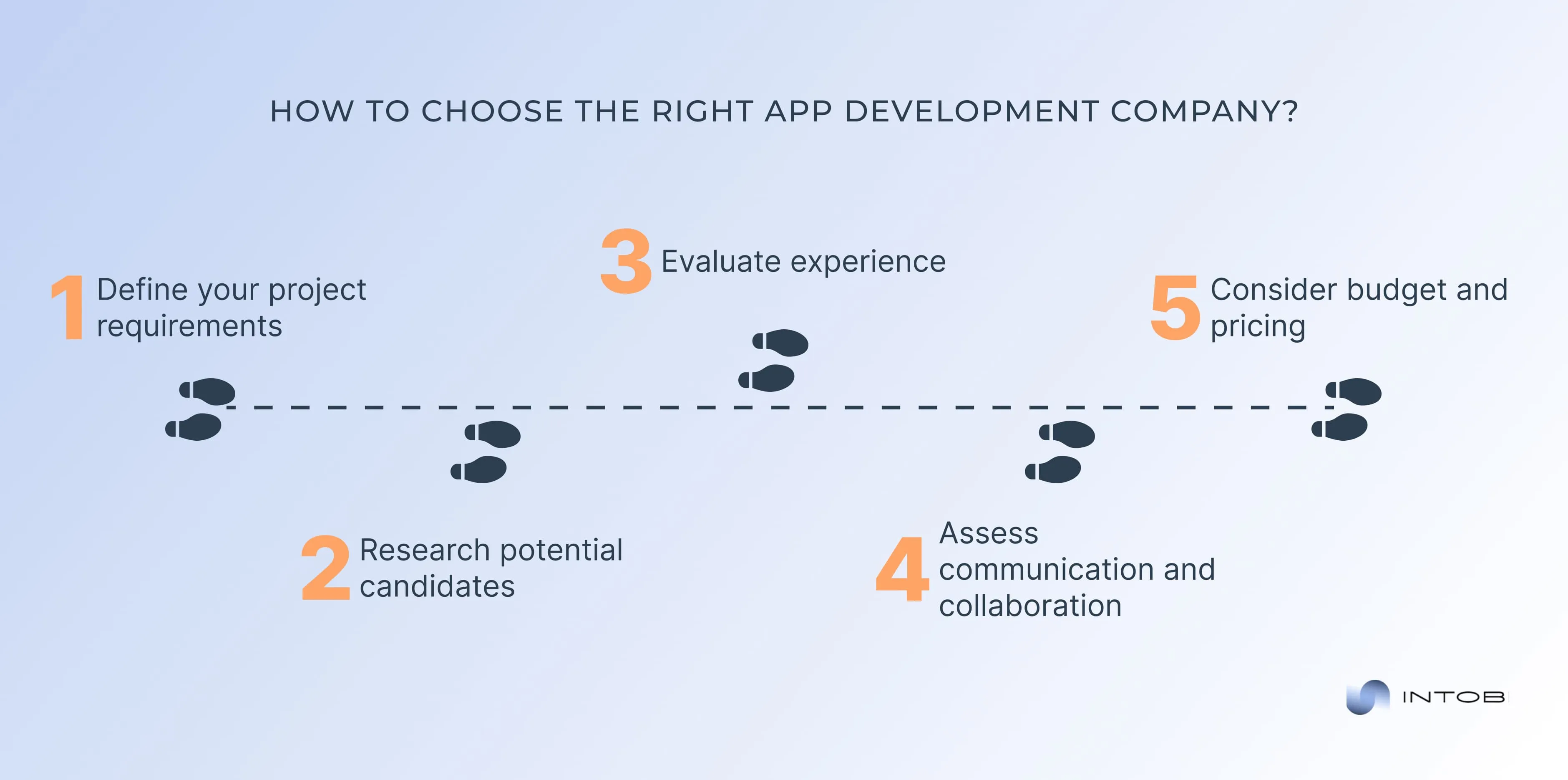
Choosing the appropriate app development partner

1. Define your project requirements

Before launching your search for an app development company, you must clearly understand your project requirements and objectives. Consider the following questions:

  • What is the purpose of your app?
  • Who is your target audience?
  • What features and functionality do you require?
  • Are there any technical specifications or platform preferences?
  • What is your budget and timeline for the project?

Having a well-defined project brief will help you communicate your needs effectively and enable prospective development companies to provide accurate estimates and recommendations.

2. Research potential candidates

Once you’ve defined your project requirements, it’s time to research potential app development companies. Start by exploring their websites, portfolios, and client testimonials to gain insights into their expertise, experience, and past projects. Look for companies with a proven track record of delivering high-quality apps within your industry or niche.

Additionally, consider factors such as:

  • Size and scale: Determine whether you prefer to work with a boutique agency, a mid-sized firm, or a large-scale development company. Each has advantages and drawbacks, so choose based on your project’s scope and requirements.
  • Technology stack: Evaluate the company’s technologies and frameworks to ensure they align with your project needs. Whether you require native development for iOS and Android or cross-platform solutions, ensure the company has the expertise to deliver.
  • Communication and collaboration: Assess the company’s communication channels and project management processes. Clear and open communication is crucial for a successful partnership, so look for companies that prioritize transparency and collaboration.

3. Evaluate experience

When selecting an app development company, expertise and experience are key. Look for companies with a team of skilled professionals with the technical knowledge and industry insights to execute your project effectively. Analyze the following aspects:

  • Portfolio: Review the company’s portfolio of past projects to gauge the quality of their work and relevance to your project requirements. Pay attention to their apps’ design, functionality, and user experience.
  • Industry experience: Determine whether the company has experience working within your industry or niche. Familiarity with industry-specific challenges and best practices can streamline the development process and ensure a successful outcome.
  • Client references: Contact past clients or references provided by the company to get firsthand feedback on their experience. Ask about the company’s professionalism, communication, and ability to meet project deadlines and objectives.

4. Assess communication and collaboration

Effective communication and collaboration are essential for the success of any app development project. Look for companies that prioritize clear, open communication and foster a collaborative working environment. Consider the following aspects:

  • Project management: Inquire about the company’s project management processes and tools. Look for companies that use agile methodologies and provide regular updates and progress reports throughout the development lifecycle.
  • Communication channels: Determine the communication channels used by the company, such as email, phone, video conferencing, or project management platforms. Ensure that communication channels are accessible and responsive to promptly address any issues or concerns.
  • Team collaboration: Assess the company’s approach to collaboration and client involvement in the development process. Look for companies that encourage client feedback and participation at every project stage.

5. Consider budget and pricing

While app cost should not be the sole determining factor when selecting an app development company, it’s essential to consider your budget and ensure that the company’s pricing aligns with your financial constraints. Here are some tips for evaluating pricing:

  • Request quotes: Obtain quotes from multiple app development companies to compare pricing and services. Ensure that quotes are comprehensive and include all relevant costs, including design, development, testing, and ongoing support.
  • Consider value proposition: Evaluate each company’s value proposition in relation to its pricing. While it may be tempting to opt for the lowest bid, consider factors such as expertise, experience, and quality of service to determine the best overall value for your investment.
  • Flexible pricing models: Look for companies that offer flexible pricing models, such as fixed-price, time-and-material, or milestone-based billing. Choose a pricing model that aligns with your project requirements and provides cost transparency and predictability.

At our app development company, we are committed to delivering innovative and cost-effective solutions that meet our clients’ unique needs. Contact us today to learn more about our services and how we can help bring your app idea to life.

How much does it cost to create an app at Intobi?

At our robust software development company, we offer transparent and competitive pricing for app development projects tailored to our clients’ unique requirements and budgetary constraints. Our app development cost structure is based on the following principles:

  • Customized solutions. We understand that every app development project is unique, with its challenges and objectives. That’s why we offer customized solutions specifically tailored to meet each client’s individual needs and preferences.
  • Fixed price or time and material. Our experts offer fixed-price and time-and-material pricing models depending on the client’s preference and project requirements. Fixed-price projects provide clarity and predictability regarding costs, timelines, and deliverables, while time-and-material projects offer flexibility and scalability to accommodate evolving requirements and priorities.
  • Transparent estimates. We provide transparent and detailed estimates for app development projects, outlining the breakdown of costs associated with design, development, testing, and other project phases. Our goal is to ensure that clients clearly understand the investment required to bring their app to market and achieve their business objectives.
  • Value-driven approach. Our specialists believe in delivering value-driven solutions that maximize our clients’ investment returns. Our experienced team of developers, designers, and project managers works collaboratively to optimize project efficiency, minimize costs, and deliver high-quality results that exceed client expectations.

Below, you can see the average cost to make an app.

App typeEstimated costTimeline
Simple app development$10,000 to $60,0001-3 months
Basic app development$60,000 to $150,0003-6 months
Complex app developmentfrom $300,0009+ months

Now, let’s discuss an all-in-one mental wellness care app our specialists delivered.

Case study: MindTales

This is an AI-enabled mental health mobile app that provides patients with wellness activities and connects them with mental health counselors.

MindTales mobile application

Our main task was to develop a mobile solution that solves users’ pain and meets business goals. So, we provided a full design cycle from MVP (minimum viable product) to launching an updated product. Our scope of work covers UX research, building UX strategy, wireframing, testing, and visual design.

Conclusion

Understanding app development costs in 2025 demands a mix of strategic foresight, budgetary prudence, and a keen eye for emerging trends. From the complexities of coding to the nuances of user experience design, every aspect plays a crucial role in determining the final app price. While the costs may rock with technological advancements and market demands, the potential rewards of a well-crafted application continue to attract entrepreneurs and businesses toward the horizon of innovation. 

At Intobi, our experienced team is ready to transform your vision into a reality. With a wealth of expertise and a commitment to excellence, we’re here to guide you through every stage of the app development, from conceptualization to deployment.

Contact us to release your idea’s full potential and drive your business into the digital forefront. Your app awaits, and so do we!

FAQ

How much does it cost to build an app?

The cost of developing an app can vary widely based on complexity, features, design, platform, and the development team’s location. On average, a simple app can cost $10,000-$60,000. More complex apps range from $60,000 to $150,000. For enterprise-level apps, costs can exceed $300,000.

How long does it take to create a mobile app?

A basic app with limited features might take 1-3 months to develop. Medium complexity apps, which include more robust functionality, generally require 3-6 months. Highly complex apps with intricate backend systems, real-time features, or extensive user interactions can take 9 months or longer.

Software Development Plan (SDP): What, Why and How

TL;DR

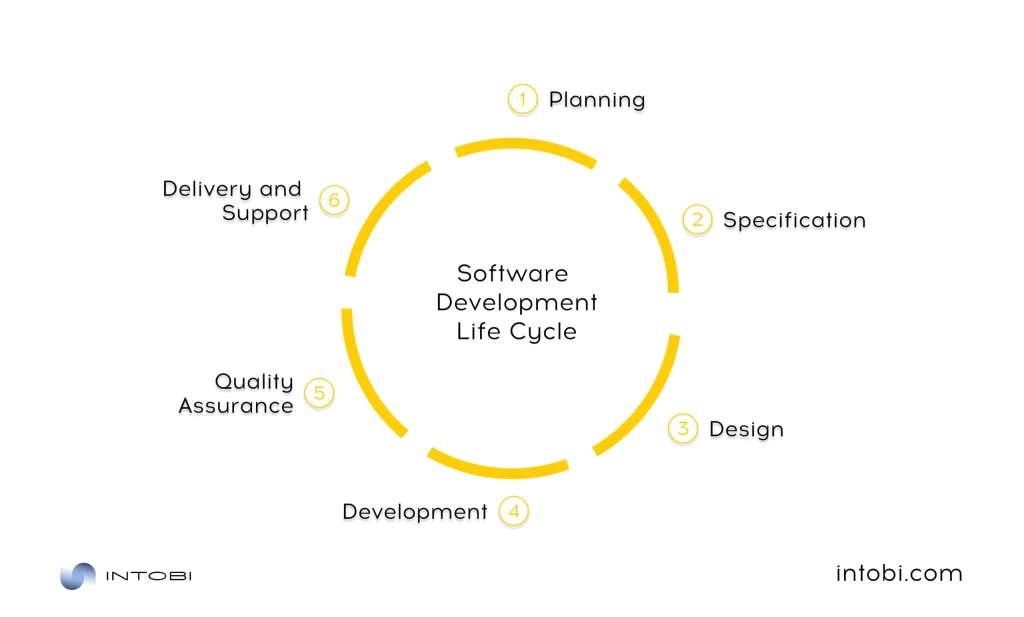
A software development plan (SDP) is the first and most important step of any software project. This guide explains what an SDP is, the main software development methodologies, and the critical components of a development project plan. It also walks through the software development life cycle from planning to support, the main risks to account for, and real software development plan examples.

Make a summary of this article with AI:

Planning is the first and most significant stage of the development process. Based on the system of plans created by the company, planned work, staff stimulation, control of the results of the team’s activities, and their evaluation from the point of view of planned indicators are carried out in the future. In modern management, planning is prediction. It is one of the “fathers” of modern management.

To manage is to predict, and to predict is to perform. But how exactly do you perform? SDP (software development plan) will help you in this regard. It is the compass that charts your course, the blueprint that shapes your journey, and the roadmap that leads you toward successful software creation.

In this comprehensive guide, we’ll delve into the complex details of the software development plan, exploring its significance, components, development steps, risks, and examples. So, let’s launch on this informative journey into the heart of software development planning, where detailed foresight transforms into outstanding performance.

Now, we’ll start with the basics!

Essence of a software development plan (SDP)

A software development plan (SDP) serves as a foundational document, offering structure, clarity, and direction to what can otherwise be a complex and multifaceted process. When thoughtfully composed, an SDP lays the groundwork for a successful software project by defining its essence, purpose, and objectives.

In this comprehensive exploration, we’ll dive deep into the fundamentals of an SDP, shedding light on its essence, purpose, and the critical objectives it seeks to conduct.

At its core, a software development plan is a meticulously composed document that outlines the strategy and approach for managing and executing a software development project.

Interesting

The SDP is not only a piece of paperwork; instead, it is a dynamic blueprint that shapes the course of software development.

This comprehensive document is crafted thoroughly, as it operates as the glue that binds the diverse elements of software development work. It defines the scope, sets the timeline, allocates resources, and establishes the processes that will govern the project. An effective SDP predicts challenges, mitigates risks and ensures alignment with project objectives.

One of the critical essences of a software development plan is clarity. It provides an unambiguous path for everyone involved, from developers to project managers and stakeholders. Defining roles, responsibilities, and the scope of work leaves no room for ambiguity or misunderstanding.

Moreover, an SDP embodies accountability. It sets forth a structure for who is responsible for what, fostering a sense of ownership among team members. This accountability extends to timelines, resources, quality, and more.

The essence of an SDP also encapsulates adaptability. While it sets out a plan, it’s not a settled framework. It acknowledges the need to shift in response to unexpected developments, emerging trends, or changing requirements. Flexibility within the confines of a structured plan is a hallmark of effective software development.

There are the following objectives of a software development plan:

  1. Project scope definition: One of an SDP’s primary objectives is clearly defining the project’s scope. It outlines what the software will and won’t do, preventing scope creep that can derail a project.
  2. Timeline and milestones: An SDP establishes a timeline with key milestones. This helps in tracking progress and ensures that the project stays on schedule.
  3. Resource allocation: It outlines how resources, both human and material, will be allocated throughout the project, making sure that everything needed is available when required.
  4. Risk management: An SDP identifies potential risks and outlines strategies for managing and mitigating them, reducing the impact of unexpected challenges.
  5. Quality standards: Setting quality standards is essential. The software development plan defines the quality assurance processes and criteria that the software must meet.
  6. Roles and responsibilities: It clarifies the roles and responsibilities of team members, ensuring everyone knows their part in the project.

Thus, a software development project plan is the cornerstone of a successful software development project. Its essence lies in clarity, accountability, and adaptability.

By adhering to the principles and guidelines outlined in an SDP, software development projects can guide the complexities of their journey with precision and purpose.

Various software development methodologies

It is critical to analyze various software development methodologies, each with unique characteristics and suitability for different project types. So, let’s check the diverse methodologies, understanding their essence and how they fit into software development.

Agile: embracing change and collaboration

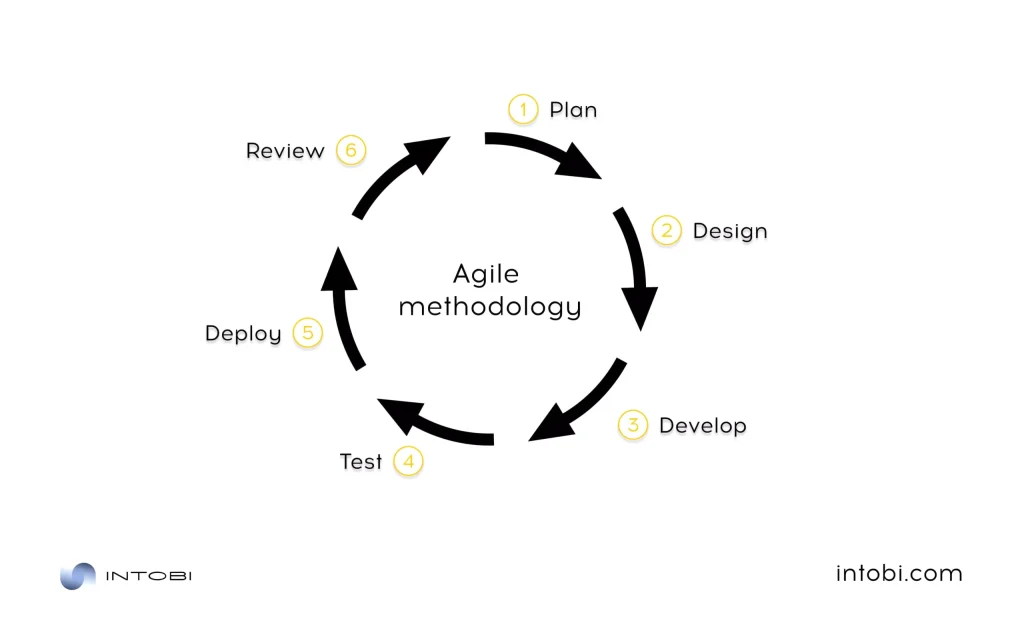
It is a flexible and iterative approach that prioritizes adaptability, collaboration, and delivering functional software increments quickly. Agile software development project plan template emphasizes frequent feedback from stakeholders, allowing teams to respond to changing requirements in a highly dynamic environment. Its iterative cycles, often called sprints, foster continuous improvement and the ability to pivot as needed.

Agile software development methodology

Scrum: a framework for collaboration

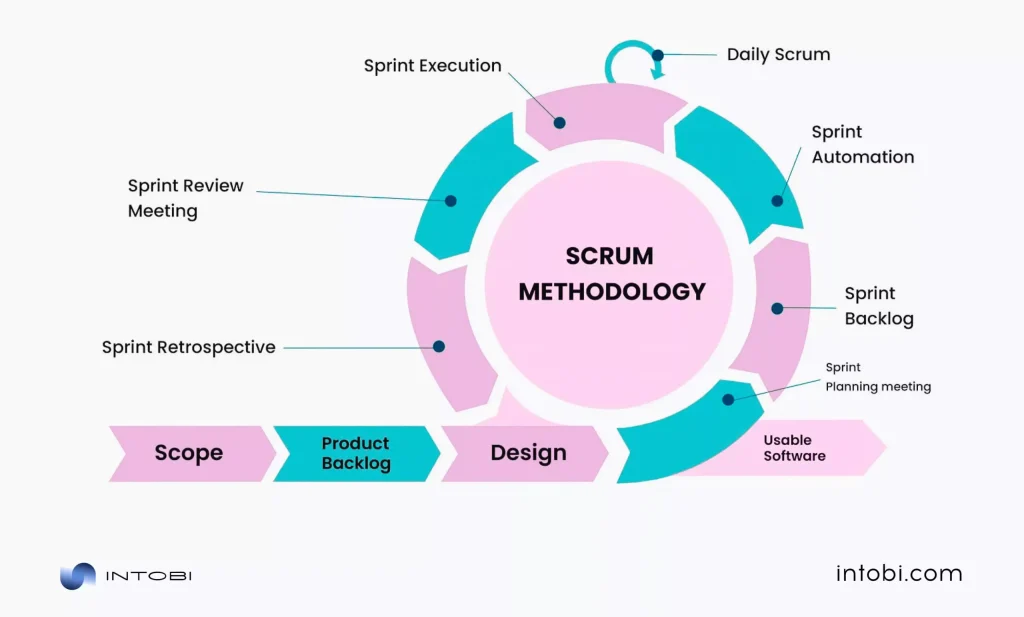
It is a specific framework within the Agile methodology. Scrum structures work into short iterations, known as sprints, with defined roles (e.g., Scrum Master, Product Owner) and ceremonies (e.g., daily stand-up meetings, sprint planning). It encourages teams to work closely and empowers them to self-organize, facilitating transparency and adaptability.

Scrum software development methodology

Waterfall: sequential and structured

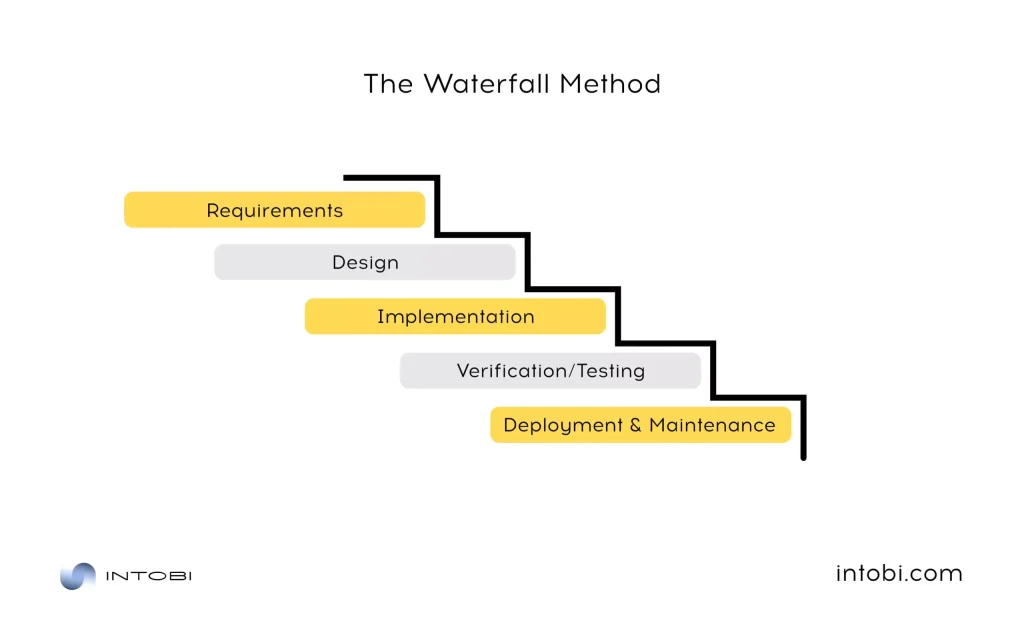
The Waterfall methodology is a gradual approach where each phase must be completed before the next one begins. It’s known for its rigorous planning, making it suitable for projects with well-defined requirements and limited changes expected. While it lacks the adaptability of Agile, Waterfall offers clear project structure and traceability.

Waterfall software development methodology

Extreme programming (XP): coding-centric agility

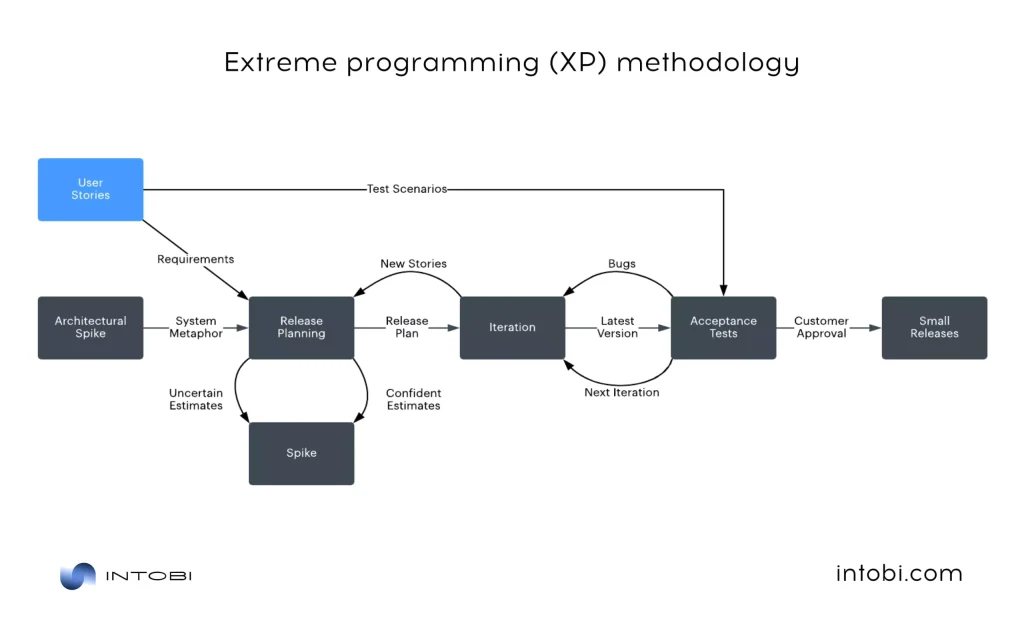
It strongly emphasizes technical excellence and customer collaboration. Also, it promotes practices like pair programming, continuous integration, and test-driven development (TDD). XP benefits small to mid-sized teams working on projects with rapidly evolving requirements.

Extreme programming software development methodology

Spira: managing the software development lifecycle

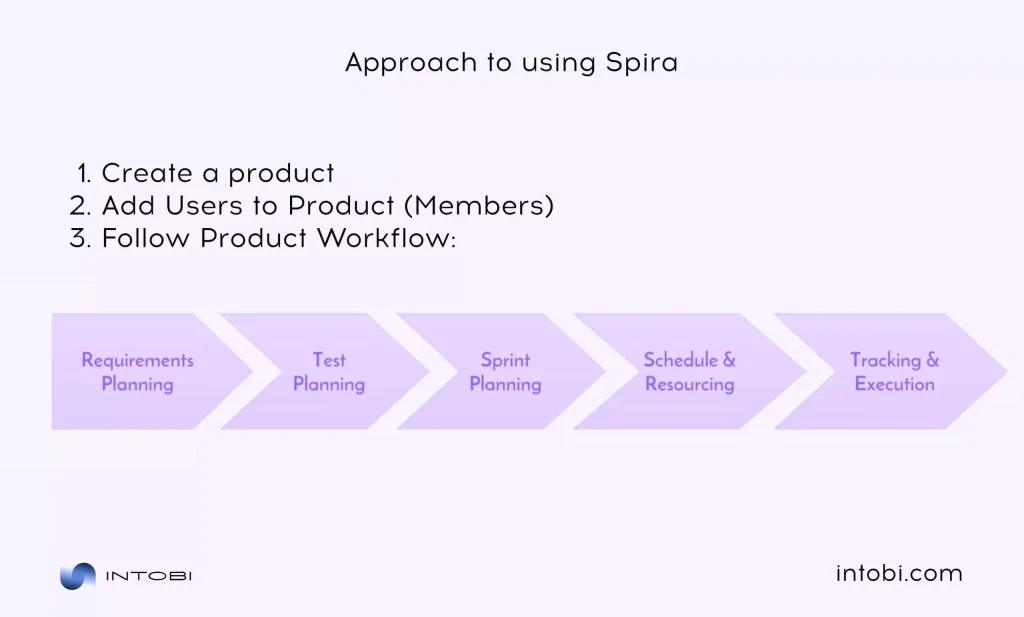
It is a comprehensive application lifecycle management (ALM) system containing various software development phases. Spira provides requirements management, testing, defect tracking, and project management tools. It aids in organizing and tracking a project from ideation to deployment, ensuring transparency and accountability.

Spira software development methodology

Kanban: visualizing workflows

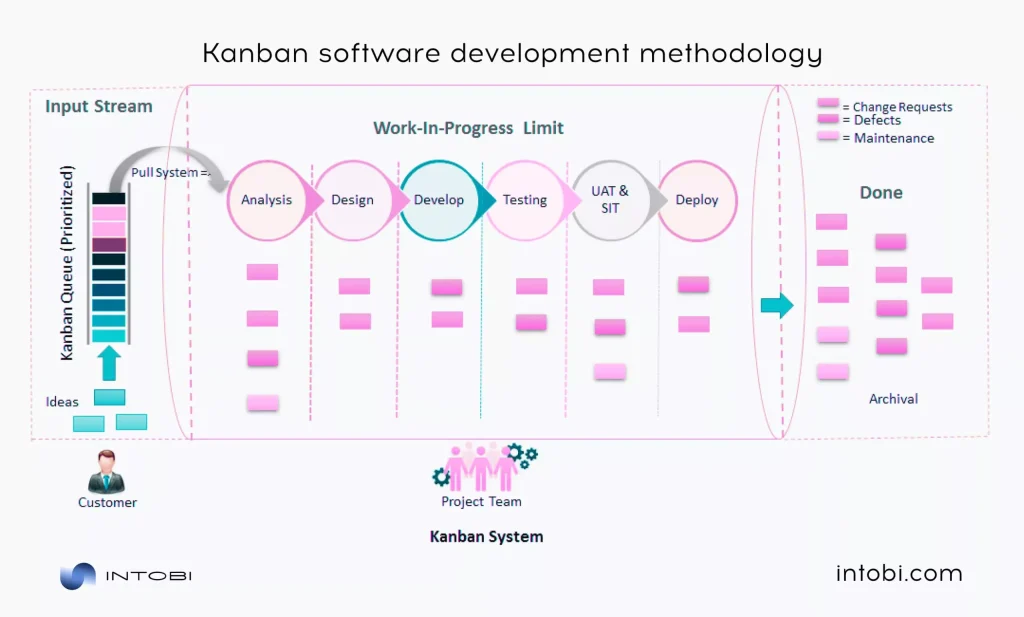
It is a visual project management approach focusing on visualizing work in progress and optimizing workflow. Kanban is often depicted as a board with cards representing tasks moving from one column to another. Kanban’s flexibility allows for the efficient management of tasks and team capacity, making it suitable for projects with changing priorities.

Kanban software development methodology

Incorporating these methodologies into your software development plan requires a deep understanding of your project’s specific needs and the goals you aim to achieve. Each method offers a unique set of principles and practices that can be tailored to suit different projects. The key to a successful SDP is aligning the chosen methodology with the project’s scope, requirements, and limitations.

Unveiling the answers within your software development plan

Your software development plan holds the keys to addressing critical questions, decreasing risks, and ensuring the success of your software project. Let’s discover the depths of your SDP to unveil the answers it covers.

  1. What are our goals and objectives?

Your SDP is the starting point for clearly defining the goals and objectives of your software project. It answers the fundamental question: What are we trying to achieve? By establishing specific goals, you create a shared vision for your team, ensuring everyone is moving in the same direction.

  1. How will we get there?

The software development project plan summarizes the strategies and methodologies guiding your project from inception to completion. It reveals the chosen software development methodology, whether it’s Agile, Waterfall, or a hybrid approach, and the path you’ll take to bring your project to life.

  1. What is the scope of the project?

One of the critical questions your SDP answers is the scope of your software project. What features and functionalities will be included, and what will be excluded? By defining the scope, your team avoids scope creep and maintains focus throughout the project.

For teams that want to validate core features before scaling, MVP development services can help define a focused first version and reduce unnecessary project scope.

  1. Who is responsible for what?

Effective collaboration and clear role assignments are crucial for a successful project. Your software development plan spells out who is responsible for various aspects of the project. It outlines roles and responsibilities, ensuring everyone knows their part in the journey.

  1. How will we manage risks?

Unpredictable challenges are an inherent part of any software development project. Your SDP includes a risk management plan outlining potential risks and mitigation strategies. Having these answers in advance makes your team better prepared to navigate unexpected obstacles.

  1. What is the timeline?

Time is of the essence in software development. Your software development plan template sets a clear timeline with milestones and deadlines, enabling your team to track progress and adhere to schedules. It answers the critical question: When will the project be completed?

  1. What are the quality standards?

Quality assurance is at the heart of your software project. Your software development project plan defines the quality standards, testing procedures, and benchmarks that the software must meet. It ensures that the final product aligns with the desired quality level.

  1. How will we communicate and collaborate?

Communication is the lifeblood of any project. Your SDP includes a communication plan summarizing how team members and stakeholders interact. It addresses questions like: How often will meetings be held? What tools will be used for collaboration? How will feedback be collected and addressed?

  1. What is the budget and resource allocation?

Financial and resource management are integral components of your project’s success. Your software development project plan provides answers regarding budget allocation and resource management, ensuring you have the necessary assets to proceed without hindrance.

  1. How will the project close out?

The end of a project is as crucial as its beginning. Your SDP outlines how the project will be formally closed, including post-project evaluation and reporting. It ensures that all loose ends are tied up, and conclusions learned are documented for future reference.

Regularly referring to your SDP ensures that you remain on course and that your project develops according to strategy. In fact, your software development plan is the compass that guides you through the often complicated and unexpected journey of software development, offering the answers you need to navigate with confidence and reach your destination successfully.

Looking for expertise in development?

Let’s chat

Critical components of software development project plan

As we mentioned, the software development plan is the foundational document outlining the project’s scope, objectives, and strategies employed throughout the development lifecycle. A well-structured SDP acts as a guide and a means of communication and coordination among the project team members and stakeholders.

Essential parts of software development project plan

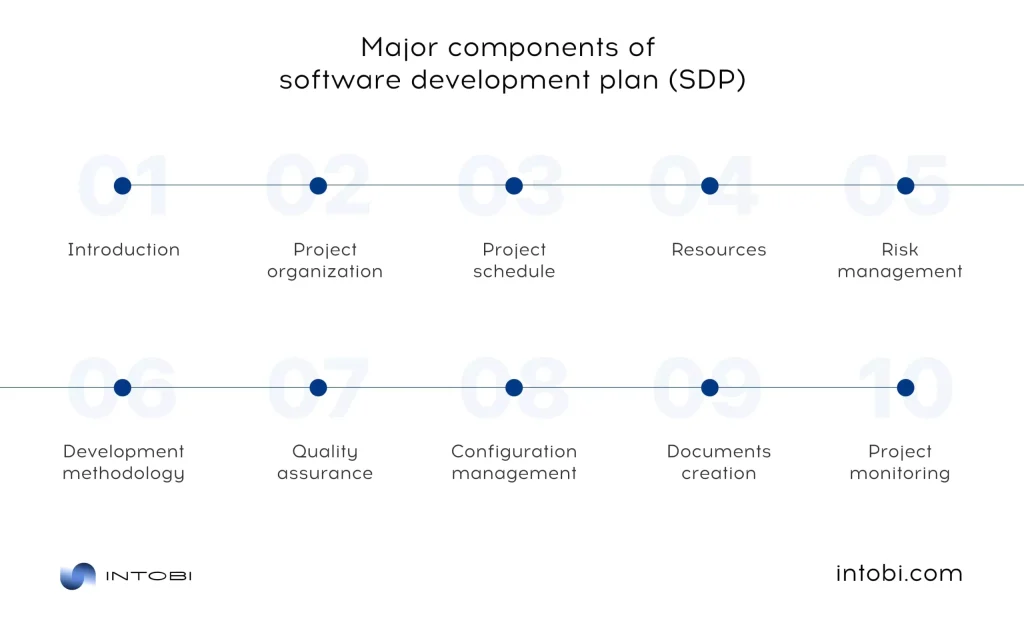
Let’s analyze major software development plan components:

  • Introduction

The introduction section of the SDP provides a clear and concise overview of the project, its purpose, and its significance. It sets the stage for the subsequent components and serves as a reference point for all stakeholders.

  • Project organization

The software development plan defines the roles and responsibilities of all team members, including project managers, developers, testers, and stakeholders. It outlines the hierarchy of authority, communication channels, and the delegation of tasks. By establishing a well-defined project organization, the team can work cohesively, ensuring everyone understands their role in the project’s success.

  • Project schedule

It offers a timeline that breaks the project into manageable segments. It includes milestones, deliverables, and deadlines. This detailed schedule helps in resource allocation, progress tracking, and risk assessment. By setting realistic timelines and contingency plans for potential setbacks, the project can maintain its course and meet its objectives.

  • Resources

This section of the SDP specifies the resources required and the means to acquire them. It includes hiring processes, obtaining hardware and software, and budgetary considerations. Proper resource management guarantees that the project has the essential elements for success.

  • Risk management

Risks can vary from technical challenges to external factors like scope changes or market shifts. The software development project plan outlines strategies for managing risks, thereby minimizing the probability of project disruptions and budget overruns.

  • Development methodology

It describes the practices, tools, and processes aligned with the methodology and justifies why it’s the best fit for the project’s objectives. A well-defined development methodology ensures a structured and efficient development process.

  • Quality assurance (QA)

The software development plan outlines the quality assurance and testing strategies, including testing types, success criteria, and defect management processes. A robust quality assurance plan guarantees the software is thoroughly tested and refined before release.

  • Configuration management

The SDP addresses how configuration management will be handled, including version control, change management procedures, and the tools and practices that will be used. Proper configuration management preserves the software’s stability, traceability, and reliability as it evolves.

  • Documents

The software development project plan establishes a comprehensive documentation strategy, outlining the required documents, including requirements, design, code documentation, user manuals, and more. A well-maintained documentation repository ensures transparency and facilitates future maintenance.

  • Project monitoring

The software development plan specifies the metrics and key performance indicators used to measure progress. It also outlines how issues and changes will be identified, reported, and managed. This section ensures that the project remains aligned with its objectives and can adapt to unpredictable challenges.

Each essential component described here plays a unique and vital role in ensuring the project’s success. By carefully addressing these components, development teams can enhance their project’s chances of delivering high-quality software within the defined scope, budget, and timeline. 

Eventually, we can move on to the software development steps.

From concept to creation: software development life cycle project plan

The journey from concept to a fully functioning software product is a complex and dynamic process, and it all begins with a comprehensive software development plan. The SDP is a blueprint that guides the project through its various phases. Let’s take a closer look at each stage within the SDP, outlining their significance and how they contribute to developing successful software.

Software development life cycle project plan

Planning

The inception of any software development project initiates with planning and analysis. It is the phase where the seeds of an idea are sown, and the groundwork for the entire project is laid. Here, the project’s purpose and goals are defined, and initial feasibility studies are conducted to evaluate the project’s viability.

This phase is of paramount importance as it is where the initial concept evolves into a well-defined project plan. This means that a clear understanding of the project’s objectives, scope, and requirements is established. It is the time to assess the resources needed, potential risks and constraints, and the strategies for addressing them.

The output of this phase is often a project initiation document outlining the project’s rationale, objectives, and initial project plan. This document provides a clear direction for the project team and stakeholders and ensures everyone is on the same page.

Specification

Once the project is initiated, the next phase involves gathering and specifying the software requirements. During this stage, the project team works closely with stakeholders, including end-users, to document the software’s functional and non-functional requirements. This comprehensive understanding of what the software should do and how it should do it is the foundation for the entire project.

A well-documented software requirements specification (SRS) is essential at this stage. The SRS is a detailed document that outlines the project’s scope, objectives, and requirements in a structured manner. It acts as a reference point for the development team, ensuring they build the software according to the specified requirements.

The SRS results from detailed analysis and communication with stakeholders, and it plays a vital role in preventing misunderstandings, scope creep, and changes in requirements that can lead to project delays and budget overruns.

Design

The design phase is where the software’s blueprint is meticulously drawn. The SRS is the reference point for creating detailed designs for the software’s user interface (UI), databases, and system architecture. The purpose is to visualize how the software will function and how it will meet the specified requirements.

Designs can be both high-level and low-level. High-level design focuses on the overall structure and architecture of the software, defining the components, modules, and their interactions. Low-level design, on the other hand, gets into the nitty-gritty details, specifying the algorithms, data structures, and database schema.

The output of the design phase is a set of design documents that act as a roadmap for the development team. These documents provide a clear technical direction, ensuring the development process is well-structured and efficient. They also enable a shared understanding of the software’s architecture among the development team members.

Development

The development phase is where the software begins to take shape. It involves coding and programming to transform the designs and specifications into a functioning reality. Developers use various programming languages and tools to write the code that forms the software’s core.

In this phase, developers work closely with the design documents and the SRS to ensure they build the software according to the specified requirements. It is essential to maintain code quality, follow best practices, and conduct regular testing and code reviews to identify and rectify any issues within the code.

The development methodology chosen for the project comes into play in the development phase. Whether Agile, Waterfall, or a hybrid approach, the preferred method defines the processes, practices, and tools that guide the development process.

QA

Quality assurance (QA) is a continuous process that runs parallel to the development phase. It is a critical component of the software development life cycle (SDLC) project plan, ensuring that the software functions correctly, meets the defined requirements, and delivers value to end-users. Quality assurance contains various types of testing, including unit testing, integration testing, system testing, and user acceptance testing.

Unit testing involves testing individual components or modules of the software to ensure that they function as expected. Integration testing focuses on verifying that different parts work together seamlessly. System testing evaluates the entire system to ensure it meets the requirements. User acceptance testing is conducted with end-users to ensure the software meets their expectations.

Defects and issues identified during testing are reported and fixed during this phase. A comprehensive quality assurance process helps deliver a high-quality software product and prevents critical issues from reaching end-users.

Support

Software development doesn’t end with the deployment of the product. The support phase is integral to the SDLC, enclosing user training and ongoing support post-deployment.

User training ensures end-users are well-prepared to use the software effectively. Training can include user manuals, training sessions, or online resources. The goal is to empower users with the knowledge and skills they need to make the most of the software.

Ongoing support is equally essential. Software may encounter issues, require updates, or face evolving user needs. The support phase involves providing assistance, troubleshooting, and updates to ensure the software continues functioning efficiently.

By following these phases within the SDLC and maintaining clear communication and documentation throughout, software development teams can enhance the likelihood of project success. They can deliver a software product that aligns with requirements, functions correctly and meets end-users needs.

But what about risks in each software development project plan? Let’s discuss them!

Main risks in software development project plan

A well-structured software development plan is essential for project success. However, no matter how thorough your plan may be, it’s crucial to recognize and address the main risks that can derail your project.

Below are the primary risks associated with SDPs and ways how to reduce them.

Scope creep

This occurs when additional features or changes are introduced after the project’s scope has been defined. Such changes can lead to delays, increased costs, and a complicated project path. To manage this risk, maintain a straightforward change management process within the SDP. Ensure that any scope changes are documented, analyzed for impact, and approved by relevant stakeholders before implementation.

Main factors contributing to scope creep

Unclear requirements

Inadequate or unclear requirements are a breeding ground for errors and project delays. Invest a great time in requirement elicitation and documentation to decrease this risk. Engage stakeholders, end-users, and the development team to understand comprehensively what needs to be built.

Resource constraints

Resource limitations, including insufficient budget, personnel, or infrastructure, can hinder project progress. To address this risk, perform thorough resource planning in the software development plan. Identify potential resource bottlenecks early on and work on securing necessary resources.

Technology risks

Rapid technological advancements can introduce risks related to the compatibility and longevity of chosen technologies. Reduce this risk by keeping up-to-date on technological developments, conducting feasibility studies, and ensuring that your software design allows for adaptability.

Team collaboration issues

Effective teamwork is essential in software development. Conflicts among team members, miscommunication, or lack of collaboration can disrupt the project. Foster a collaborative work culture and use agile methodologies that encourage regular communication and feedback.

Security vulnerabilities

In an age of increasing cyber threats, security vulnerabilities pose a significant risk. Address this by incorporating security measures into the design and development stages of the software development plan, conducting regular security audits, and staying informed about the latest security best practices.

By recognizing and addressing the main threats, software development teams can enhance their project’s chances of staying on track, within budget, and meeting or exceeding stakeholder expectations. Adaptability, communication, and diligence are vital in navigating the complex landscape of software development risks.

And now, let’s move on to consider the software development plan in practice.

Want to boost software operations?

Contact us

Vivid software development plan examples

Some examples offer unique insights into how companies manage their software projects efficiently. Let’s check them together.

Infinity Loop software development plan template

The Infinity Loop approach to SDP embodies a dynamic and iterative strategy. It embraces the idea that software development is a continuous loop of planning, execution, monitoring, and adaptation.

Infinity Loop software development plan template

In the Infinity Loop SDP, the following stages are emphasized:

  • Test: Rigorous testing, including unit testing, integration testing, and user acceptance testing, is integral to the development process. Quality assurance measures are continuously monitored.
  • Build: Here, the developed components are integrated and tested to ensure compatibility and functionality. The software’s architecture takes shape during this phase
  • Code: This is the coding and implementation phase based on the initial plan. Continuous communication, feedback loops, and regular stakeholder check-ins ensure that development aligns with project goals.
  • Plan: At the outset, establish the high-level project goals and objectives, aligning them with the organization’s strategic vision. Identify initial resources and critical team members.
  • Release and deployment: When the software is stable, it is released to end-users. Continuous deployment practices may be applied, allowing for regular updates and bug fixes.
  • Monitor: Continuous monitoring is vital. Gather data on performance, usage, and user feedback. This data informs further development decisions and refinements.
  • Operate: Transition the software into an operational state. Ensure that all systems and processes are in place to support ongoing use.

Also, let’s discuss another fascinating software development plan example.

Gantt Chart PPT software development plan template

Gantt charts provide a visual representation of a project’s schedule. When integrated into an SDP, they offer a clear, timeline-based overview of tasks, milestones, and dependencies.

Gantt Chart PPT software development plan template

In a Gantt Chart-based SDP, you’ll find the following elements:

  • Task breakdown: The project is divided into specific tasks or work packages. Each task has a start date, end date, and duration.
  • Dependencies: Gantt charts display task dependencies, showing which tasks must be completed before others can start.
  • Milestones: Major project milestones, such as project initiation, design completion, and testing phases, are marked on the chart.
  • Resource allocation: Gantt charts often include resource allocation, indicating who is responsible for each task.
  • Timeline: A horizontal timeline shows the duration of the project. This timeline may be adjusted as the project progresses to reflect any changes in the schedule.
  • Progress tracking: Gantt charts are ideal for tracking progress. As tasks are completed, they are marked as such on the chart.

Now, let’s look at one of our team’s projects.

Samporten

Intobi also has a lot to brag about. For example, with our robust software development services, we have developed Samporten. It is a web portal for coordination between maintenance companies, contractors, and infrastructure owners. This project is created with sophisticated functions for planning, risk management, and direct communication.

A web portal for coordination by Intobi

Objectives:

  • Enhance coordination: Facilitate seamless communication and coordination among various stakeholders in the maintenance and infrastructure sector.
  • Efficient planning: Provide tools for efficient planning, scheduling, and resource allocation for maintenance and construction projects.
  • Risk management: Integrate robust risk assessment and mitigation features to enhance project safety and compliance.
  • User-centric interface: Develop an intuitive and user-friendly interface for all users, regardless of their technical expertise.

Scope:

  • Development of the Samporten web portal.
  • Integration with third-party systems, such as maintenance scheduling software and document management systems.
  • Advanced planning and scheduling tools.
  • Risk assessment and mitigation features.
  • Secure user authentication and role-based access control.
  • Real-time communication tools.

These remarkable examples illustrate that SDPs can be tailored to suit the unique requirements and constraints of a project. The choice of development methodology, project size, regulatory requirements, and industry standards influence the structure and content of a software development project plan. Ultimately, an effective SDP should provide clear guidance, facilitate communication, and ensure that the project progresses smoothly from concept to completion.

Create your unique work plan for software development

In conclusion, a well-structured software development plan serves as the compass that guides a project from inception to realization. It’s a dynamic roadmap that aligns teams, resources, and objectives, paving the way for success in the ever-evolving landscape of technology.

This article has highlighted the crucial role of a software development plan, emphasizing that it’s not a one-size-fits-all approach. It’s the tool that ensures developers, project managers, and stakeholders are on the same page, and it’s the bridge that connects vision to reality.

If you’re ready to launch your next software development journey, our experienced team at Intobi is here to help. We specialize in creating custom software development plans tailored to your unique needs and objectives.

Contact us today to discuss how we can turn your vision into reality.

FAQ

How do you plan a software development project?

Plan a software project: define objectives, form a team, choose methodology, create a timeline, manage risks, design, develop, test, deploy, maintain, and evaluate. These steps are typically part of a software development plan (SDP), which acts as a roadmap throughout the project’s lifecycle.

What is a software development plan?

A software development plan (SDP) outlines a software development project’s strategy, objectives, scope, timeline, resources, and processes. The SDP includes details about project management, development methodologies, quality assurance, risk management, and other vital aspects.