
How Much Does MVP Development Cost in 2026? A Complete Breakdown

TL;DR

Building an MVP in 2026 is one of the most effective ways to test a business idea without major investment or unwarranted risk. This breakdown explains how much an MVP costs, what influences the final price – from team location and platform to product type and design – and which hidden costs startups often overlook. It also shares practical ways to reduce MVP development cost without sacrificing quality.

Make a summary of this article with AI:

Producing an MVP (minimum viable product) in 2026 will be one of the most effective ways to test a business idea without significant investments or unwarranted risks. Businesses are no longer willing to take months to ensure that they come up with a full-fledged product without knowing whether it is going to meet the demand. 

This is why MVP has become the norm for launching new startups and even companies that test new directions. Simultaneously, the matter of the development cost concerns nearly all founders. The prices may differ considerably based on the difficulty of functions, team, technologies and region of developers.

Our article will focus on the extent to which it is indeed costly to produce MVP in 2026, the factors that constitute its budget, and ways of minimizing MVP costs without compromising quality. 

How much does it cost to build an MVP in 2026?

An MVP in 2026 would be far cheaper than a full-fledged product, yet the budget may range widely depending on the solution, its functionality, and the development strategy. The primary idea behind an MVP is to validate a business assumption with the least time and money; therefore, the proper definition of the scope of work will directly influence the final budget. 

Average MVP cost range for startups

How much does it cost to build an MVP? The average MVP pricing in 2026 is between $20,000 and $70,000 in the majority of startups. A simple product with minimal functionality (user registration, personal account, basic service logic) may cost as low as $15,000-$25,000, especially when you either utilize ready-made infrastructure or no-code solutions. 

MVPs with more complicated designs, integrations with third-party services, or apps are typically priced at $40,000-$80,000. One should realize that the price is highly influenced by the region of the team. 

Eastern European or Asian developers may offer lower rates than US or Western European developers, yet the quality may be the same.

For startups with unique workflows, custom software development can help shape an MVP around specific business needs while keeping the initial scope focused.

MVP сategoryDescriptionEstimated cost in 2026
Simple MVP (minimal functionality)Often built using ready-made infrastructure or no-code solutions.$15,000 – $25,000
Standard MVP (Typical for Startups)The most common price range for startups with essential functionality and moderate complexity.$20,000 – $70,000
Advanced MVPCustom design, third-party integrations, mobile applications, or more complex product logic.$40,000 – $80,000
Complex / High-tech MVPComplex architecture, AI features, real-time analytics, enhanced security requirements, or scalability needs.$80,000+

MVP price by product type

One of the major factors in the budget determination is the kind of product. Applications that run on mobile typically range between $25,000 and $60,000 on a single platform (iOS or Android). In case it needs cross-platform development or individual native applications for two items, it can get to $50,000-$90,000. 

SaaS will be more costly because they have more complex back-end logic, subscription models, and user roles. They usually have MVPs of between $40,000 and $100,000 based on the functionality. Marketplaces are considered to be among the most costly forms of MVPs, since they need to have two-way logic (sellers and buyers), payment integrations, and content management systems. 

Budgets may range from $60,000 to $120,000 and beyond. Simple web services or internal enterprise tools are frequently less expensive, $20,000-$50,000, because they do not need design and scaling engineering. 

How much does MVP cost compared to full-scale development

A full-scale product is very costly, and that is the primary drawback of MVP. MVP is also only 20-40 percent of the price of complete development on average. 

For example, when developing a large-scale platform, an MVP can cost $30,000-$80,000. An MVP minimizes financial risks in addition to saving budget. 

The team would have the chance to test demand, understand how people would act, and make product changes without major investments. It is particularly relevant to startups that intend to raise capital: the presence of a functional MVP will go a long way in making investors feel more confident about that specific operation. 

Interesting

An MVP is therefore not a less expensive product, but a strategic instrument a business can use to make decisions based on facts, not opinions.

MVP cost for startup teams: What influences the final price

Not only does the number of development hours determine the final cost of an MVP. The budget is affected by a wide range of factors, including the complexity of the functionality, the technical architecture, and the integration of external services. Startups should also be aware of which elements account for the largest share of costs to properly set priorities and avoid spending too much money in the initial stages. 
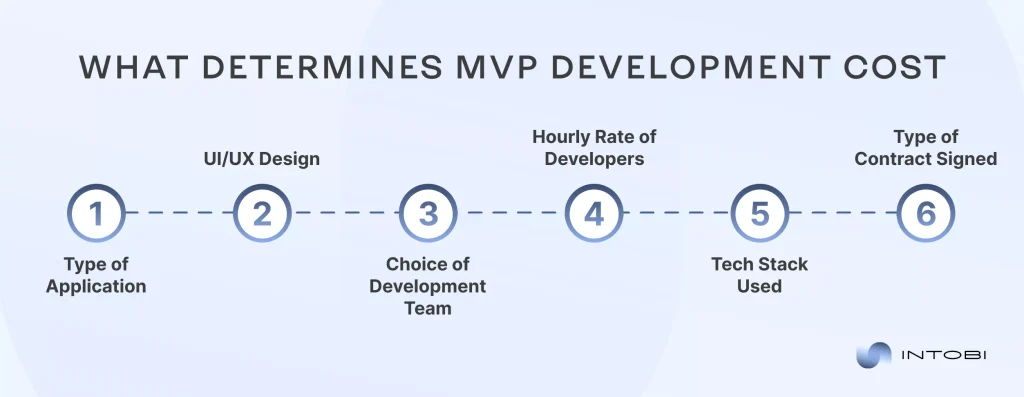
MVP cost for startups: Key factors

Feature complexity and its impact on MVP costs

The features are the primary parameter that defines the MVP cost for a startup. The less standard logic, access control, algorithms, or automation, the less it takes to develop and test. Simple features like registration, authorization, user profile, or simple control panels are not expensive. 

Conversely, the more complicated aspects – the recommender systems, selection algorithms, processing with big data, AI functions, or real-time work may contribute significantly to the budget. The most common mistake that startups commit is the desire to implement numerous features simultaneously. 

However, with an MVP, one should cap the product’s essential value. Reduced functionality implies reduced launch time and reduced costs. 

UI/UX design and prototyping expenses

Another huge MVP cost is design. It is priced based on the magnitude of customization, screens, and the complexity of situations to be used by the user. A basic interface with pre-made elements can be rather affordable, whereas a custom-branded design with intricate animations and microinteractions takes more time and finances. 

Costs are also influenced by prototyping. Interactive prototyping helps prevent errors during development, but it requires more work hours from designers. Nevertheless, an effective UX can be cost-effective in the long term, as it minimizes post-launch rework. 

With an MVP, the best way would be a middle ground – a design that is not too serious that the user cannot comfortably interact with the product, yet one that does not contain too much detail.

Backend infrastructure and integrations

Digital products are built upon the backend, and the complexity of the latter has a significant impact on the budget. If the product requires an intricate architecture, intensive data processing, or high performance, prices rise. 

Scalability is also a consideration. There are startups that invest in complex infrastructure immediately to be ready to grow fast, although this is not always required at the MVP level. A simple architecture is sometimes cheap to construct and then to optimize once demand has been established. 

Payments, CRM, analytics platforms, or third-party service integrations are also cost-adding items that require further development and testing. The third-party services and APIs improve integration with the platform.

Third-party services and APIs

The third-party services and APIs provide a better involvement of third-party services in the platform. 

Outsourcing is a service that may decrease or increase the MVP price. Ready-made solutions enable you to add features in a shorter period of time without having to develop a feature from scratch, such as authorization, payments, geolocation, or notifications. This is time-saving for the developers and saves initial costs. 

Nonetheless, most services have paid subscription or tariff plans based on the number of users, which incur ongoing expenses after launch. Moreover, API integration occasionally requires further development, particularly when the documentation is complex or discreet. 

In the case of startups, the most appropriate approach would be to deploy third-party solutions whenever possible to get the product to market sooner, at the same time look ahead to the absence of important services.

Want robust MVP service?

Contact us

Hidden MVP costs startups often overlook

When preparing an MVP budget, a startup tends to focus on design and development. Nevertheless, these costs have several hidden costs that are not considered during the initial stages or are undervalued. Such expenses may have a substantial impact on the ultimate budget and initiation schedule. The big picture will also help prevent financial surprises and use resources properly.

Product discovery and market research

Through this method, the marketing team gains insights into customer needs and preferences, key competitors, and market frameworks. Under this approach, the marketing department will be informed about the customer’s wants, likes, and dislikes, the main competitors, and the market structure. 

The product research phase is usually seen as optional, though in practice it is cost-saving. Product discovery involves assessing the market, competitors, and target audience, and developing the value proposition and technical concept. In the absence of this phase, teams are likely to include features that users do not require. 

Consequently, they are forced to invest more finances in redoing or even changing the entire product once it is launched. Discovery is a cost that may take a few or tens of thousands of dollars, depending on how much research is done, but it is an investment that helps to mitigate the risks of failed launches.  

Testing, QA, and iteration costs

Another expenditure that startups tend to be inaccurate about is testing. The first impression users have of the MVP directly affects their trust and experience, leading to loss of trust and negative experiences caused by skimming on QA. Testing involves functional, security, performance, and cross-device compatibility testing. 

Also, refinements are often required after the initial release, based on user feedback. The way product development is, iterations demand more budget. Companies that fail to invest in changes after the release can face financial problems in the initial months after launch. 

Post-launch maintenance and scaling

The introduction of an MVP is not the end. There are post-release costs for maintaining servers, updating the software, fixing bugs, and providing personal technical support to software users. 

If the product begins to expand exponentially, more resources will be required to expand the infrastructure. This involves performance optimization, architecture upgrades, and server capacity upgrades. 

Startups tend to budget for launch, and costs continue throughout the product’s lifecycle. On average, the monthly support may be as high as 15-25 percent of the initial development cost per year. 

Legal, compliance, and security costs

One of the most neglected categories is the legal and security costs. Nevertheless, they may be demanding, particularly when dealing with products that handle personal data, payments, or health data. 

Legal expenses are used for privacy policies, terms of use, license agreements, and compliance with regulatory requirements in other countries. It is also possible that the intellectual property will require consultations with a lawyer. 

Another aspect is security. It might mean spending more money to protect users’ data, including encryption, security audits, and standards compliance, but it is much more dangerous to leave it unnoticed in the future. 

These hidden costs should be taken into account from the very start, enabling startups to structure their budgets more realistically and to prevent serious problems once an MVP is launched.

How to reduce MVP development cost without sacrificing quality

Making an MVP less expensive does not imply that quality is compromised. Indeed, an effective planning process can enable you to cut costs considerably and, in addition, produce a product that successfully puts the business concept to the test. It is important to focus on the user’s key value and avoid unnecessary expenditures in the initial phases.
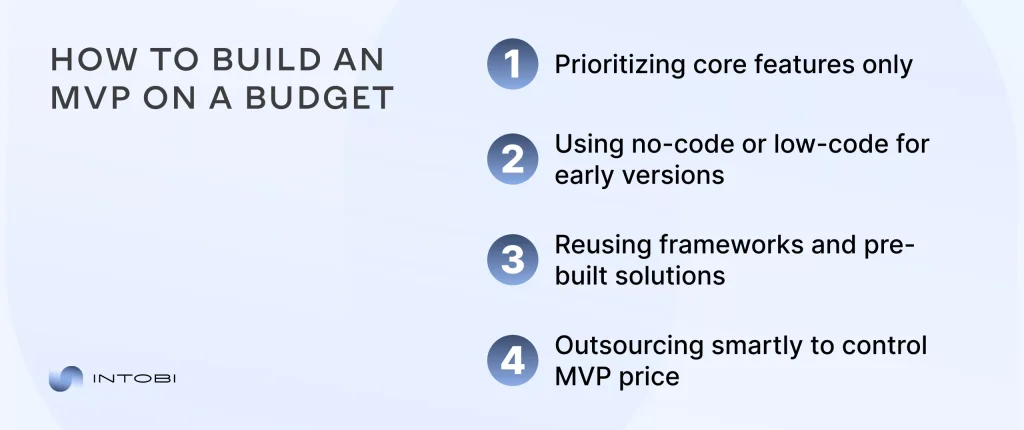
Cost-effective MVP development strategies

1. Prioritizing core features only

The best way to save on costs is to make the functionality include only the minimal features possible. Not all ideas should be represented in an MVP. Its work is to test the main product’s hypothesis and determine the market response. 

Startups tend to include features that are irrelevant to the product’s value but have a major impact on the budget and development time. Such methods as feature prioritization or a roadmap can be used to understand what is actually necessary at the initial stage of development and what may be introduced later on after feedback is received.

2. Using no-code or low-code for early versions

No-code and low-code platforms are now far more powerful in 2026 and enable you to develop basic versions of products at a cheaper and quicker rate. This may be the best solution when early testing of an idea is needed, particularly if the product does not require complex custom logic. 

This will enable you to test the demand with minimal investment, acquire the first users, and proceed to full-fledged development only at that point. Although you may even need to implement the system in the future, it is frequently worth saving time and money by doing so in the first place.

3. Reusing frameworks and pre-built solutions

Libraries and templates greatly minimize the MVP development cost, using ready-made structures. Several processes already contain tested solutions that do not need to be developed in-house, among them, authorization, payments, notifications, analytics, and others. This saves on costs and enhances the product’s reliability, as the ready-made components are typically well tested. 

Also, code reuse accelerates launch, which is of principal concern to a startup that wants to be in the market fast.

4. Outsourcing smartly to control MVP price

The budget is also largely affected by the team chosen. Cost reduction can be achieved by outsourcing to areas where developers are cheaper, provided the team has the relevant experience and procedures.

The hourly rate is not the only aspect to be evaluated; expertise, speed, and communication should also be considered. A more experienced team can be more expensive on an hourly basis, but will complete the project more quickly and with fewer chances of rework.

An intelligent combination of in-house facilities and out-of-house contractors will usually enable you to strike the best balance of quality, pace, and cost. At Intobi, our specialists are ready to help.

Final thoughts on MVP development cost in 2026

There is no universal price of creating an MVP in 2026 – it will always depend on the purpose of the product, the range of functions, and the method of development. 

The reduction of the budget should not be taken to the extreme at all, but it should be calculated in a proper way: what functions are absolutely necessary to test the idea, and which can be delayed to the following phases. MVP planning will enable you to enter the market sooner and gather product feedback and investment, which, in the end, will not be an expense but a strategic investment in product development.

Contact our expert team to get expert MVP development services for your business idea. 

FAQ

How much does it cost to build an MVP in 2026?

An MVP would cost approximately between $20,000 and $70,000. The ultimate cost is determined by the required product nature (mobile application, web platform, SaaS), the team structure, the design, the developer’s geographic location, and the technology stack.

What factors increase MVP development costs the most?

The complexity of the functionality and the number of integrations with external services are the most vital factors. One-on-one UI/UX design, high security standards, and multifunctional development are all being done simultaneously. The experience and geography of the team are also important.

How long does it take to build an MVP?

On average, MVP development is normally 3-5 months (from discovery to launch).

Cloud-Based Software Transforming Logistics and Transportation

TL;DR

Cloud-based logistics software helps transportation businesses cut costs, plan more accurately, and serve customers better – without installing anything on local machines. This article explains what cloud logistics software is, its main benefits, and how it affects day-to-day operations. It also looks at market growth, emerging trends, and how to choose the right cloud solution for your company.

Make a summary of this article with AI:

Every modern logistics and transportation business needs helpers in the form of innovative solutions, such as cloud based supply chain management software. This is what will help a company to reduce costs, increase planning accuracy, and improve customer service several times over. 

In this article, we will explore what cloud based logistics software is, its main benefits, how it affects a company’s operations, and how to choose the best software option for you.

What exactly is cloud logistics software?

According to the PW Consulting report, 75% of logistics organizations are planning to adopt cloud-based systems to enhance their operations. Cloud-based logistics software is a digital platform that automates and centralizes all major supply chain processes:

  • Demand planning,
  • Procurement management,
  • Production logistics,
  • Warehouse management,
  • Transport logistics,
  • Returns management,
  • Customs management,
  • Customer service,
  • Analytics and optimization.

It is cloud-based for a reason, because all data is stored and processed on remote servers. Accordingly, it does not require installation on a local PC, which is what distinguishes it from traditional systems.

There are different types of cloud software for different needs, such as TMS (transportation management system), warehouse management, SCM (supply chain management), fleet management solutions, and inventory management systems. 

Want a cloud logistics solution?

Contact us

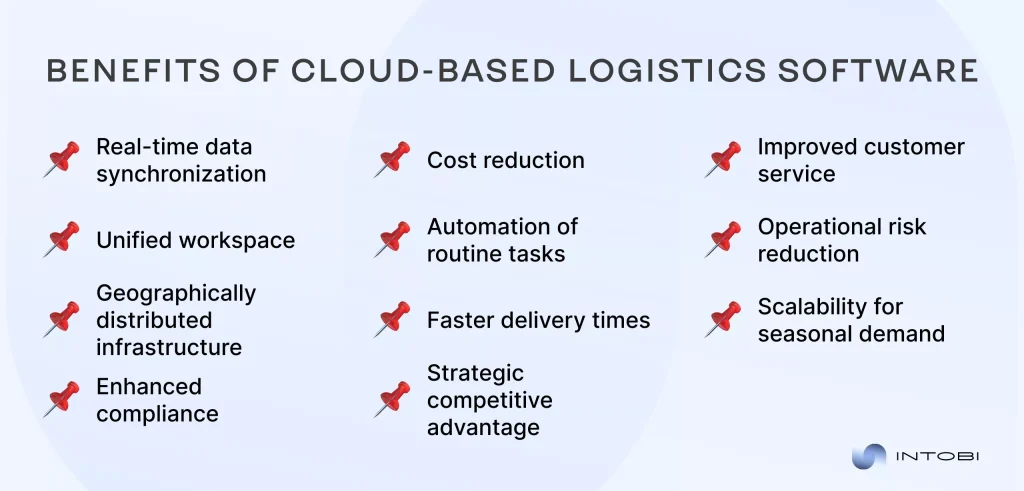
Benefits of cloud-based logistics software

Cloud-based logistics platform enables all participants (suppliers, carriers, and warehouses) to work in a unified space where data is synchronized in real-time. Meanwhile, AI algorithms automatically optimize routes and inventory. For example, when one truck’s route changes, the system instantly recalculates schedules for all linked vehicles. 

In addition, cloud-based logistics software is geographically distributed, which improves system resilience and performance – data is processed closer to the user, ensuring faster response times and reducing the risk of regional outages.

The main tasks that cloud based supply chain software solves are reducing logistics costs, shortening delivery times, and improving customer service through the automation of 90% of routine tasks. The latter includes the generation of delivery notes, calculation of imposed payments, and transportation load planning – all of which contribute to faster and more reliable service for customers.

In general, the cloud-based transport and warehouse integration is your strategic asset that reduces operational risk, makes your supply chain transparent, and keeps you ahead of the competition.

But who will especially need the help of cloud technologies? Cloud logistics solutions for supply chains are especially valuable for online stores, as they will help to reduce the cost of delivery. 

For manufacturers, it is the control of raw materials and finished products. For international companies, it will simplify customs clearance. For seasonal businesses, it is a quick scaling of logistics.

Key benefits of cloud-based logistics software

Cloud-based logistics software cost breakdown

As for pricing, it all depends on the scale of the business, functionality, and vendor. There are several types of cloud solutions for different needs, such as transportation, warehouse, or complex.

Type of solutionAverage cost
TMS (transportation)$300-$3,000/month
WMS (warehouse)$500-$10,000/month
Full supply chain management suiteFrom $15,000/year (for small and medium-sized businesses)

In addition to the costs of your cloud-based logistics software, it is worth considering the additional costs of integration, training, customization, and data migration. Integration includes connecting the cloud software to your company’s existing systems, setting up API or EDI data exchange, and automation processes.

Training employees to work with the interface also requires cost and time. This includes case studies on what to do in case of system failures. Customization is refining the interface, creating unique reports or dashboards, setting up specific business rules, for example, special conditions for VIP clients.

Data migration involves transferring information from old systems, cleaning data (removing duplicates and correcting errors in product codes), and verifying the accuracy of the transfer.

How software affects the real world

The benefits of cloud-based logistics software extend to real-life applications. Here are a couple of examples of how different types of cloud software will play out in different case studies.

Type How it worksBeforeAfter
TMSThe system connects to GPS trackers, fuel sensors, and order data.The AI analyzes traffic jams, weather, driver schedules, and carrier rates.The AI analyzes traffic jams, weather, drivers’ schedules, and carriers’ tariffs.Drivers planned their own routes — 30% of the mileage was “idle”.Automatic calculation of routes taking into account cargo weight and road restrictions — fuel saving.
WMSEach product is assigned a QR code and coordinates in the shelving system.Storekeepers receive tasks on smart terminals: “Pick up 3 boxes of A-12-4”. The system suggests the optimal path through the warehouse.Automatically moves expiring items forward (FIFO/FEFO).It took up to 15 minutes to find an item.The time was reduced to 3 minutes.Counting error — 0.2% (was 8%).
SCMSuppliers, see your stock balances.The factory automatically orders raw materials when the minimum is reached.Analyzes sales for 3 years, seasonality, and market trends.If one supplier is delayed, instantly look for alternatives.Manually coordinated deliveries — delays of up to 2 weeks.Automatic orders from suppliers — lead times reduced to 3 days.

So we can see how cloud supply chain software affects the entire company with real-life examples. Why can it be very profitable? For small businesses, cloud rental is often more cost-effective than traditional services. For corporations, it is the visibility of the entire supply chain from raw materials to the customer. For logistics companies, speed is a competitive advantage.

Future prospects in cloud-based logistics and transportation

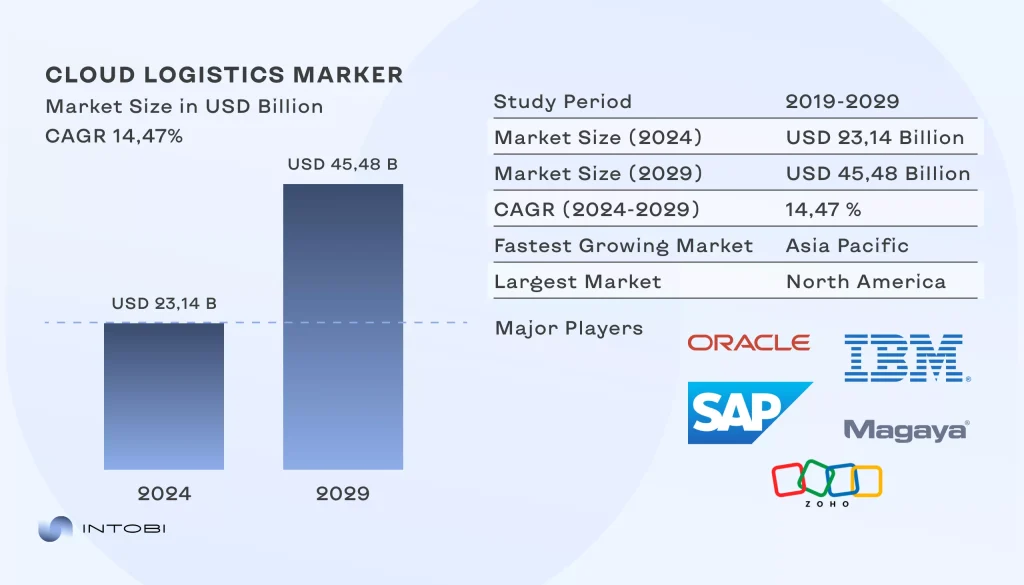
Cloud-based logistics software has promising prospects, as demonstrated by various statistics. Below is an image of one of the charts showing that the market is growing rapidly. In 2024, it was valued at $23.16 billion, and by 2029, it is expected to grow to $45.48 billion (almost twice the current value).

Cloud logistics market growth 2024-2029

North America (USA, Canada) has the largest market, and Asia (China, India, etc.) has the fastest-growing market. 

The demand for cloud-based logistics software is increasing, and CAGR forecasts it to grow at a CAGR of 14.47% from 2024 to 2029.

Interesting

The main aspects driving this growth are the shift to the cloud, the need for real-time data and analytics, and the drive for efficiency and cost reduction.

Want to create cloud-based software?

Contact us

Emerging trends in cloud based logistics software

Let’s consider some of the trends that are projected to become the main drivers for change in the future of logistics.

Artificial intelligence in warehouses

AI-enabled systems have the potential to significantly affect warehouse management, as these systems can automatically manage picking, packing, and inventory processes. These systems also help in forecasting and optimizing logistics processes in real time.

Sustainability and emissions tracking

The use of the cloud and analytics solutions has become widespread in real-time monitoring of energy consumption and carbon emissions related to transport and storage activities. 

Cloud-based IoT integration

More cloud platforms will connect the IoT sensors installed on warehouses, vehicles, and shipments, which enable the monitoring of temperature, humidity, and cargo conditions in real time. This ascertains better control and reduces losses, thereby allowing for proactive decision-making along the supply chain.

Collaborative platforms/portals

Cloud-based visibility portals bring together suppliers, carriers, warehouses, and customers within one workspace. They enable smooth communication and coordination of activities, sharing of data for enhanced efficiency, and visibility of all logistics operations.

Choosing the right cloud-based logistics software

Cloud based freight forwarding software is not an easy choice, because it is your future strategic assistant. Below, you will find a brief list of points to consider. Write down your answers so that you can choose the best option later on.

  1. Define processes that should be automated Transportation, warehouse, or supply chain?
  2. Evaluate the size of the business Small, up to 50 employees, or large.
  3. Check the key features Real-time operation, mobile app for drivers/warehouse workers, API to connect to your CRM/ERP.
  4. Check adaptability and integration A good solution should scale with your business, offer customization where needed, and connect easily with your current systems.
  5. Get hands-on experience Test the software in real conditions — see how it performs under load, how your team interacts with it, and how quickly support responds.
  6. Calculate the return on investment (ROI) The effect will be positive if transportation downtime is reduced and the loss of goods is reduced.

To properly calculate ROI, use this formula: 

(Annual Savings — Software Cost) / Software Cost × 100%. 

For example, if a company saves $100,000 per year and the software costs $30,000, the ROI is:

($100,000 − $30,000) / $30,000 × 100% = 233%ld and how to choose the right system for you.

Build scalable and efficient cloud software solutions with Intobi 

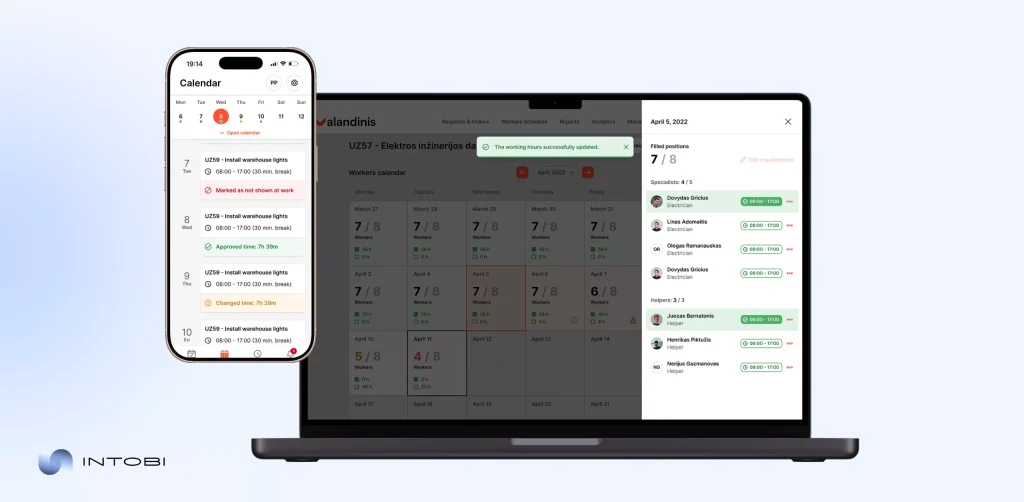
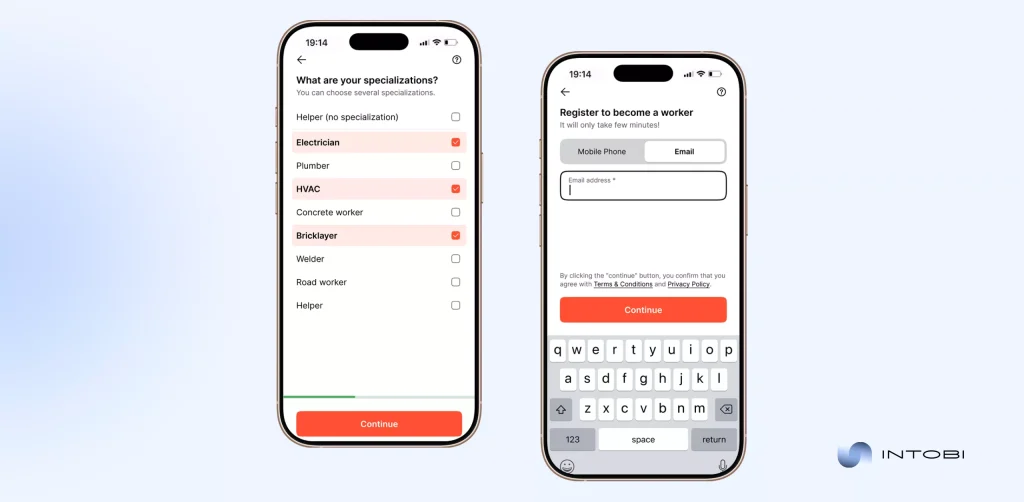
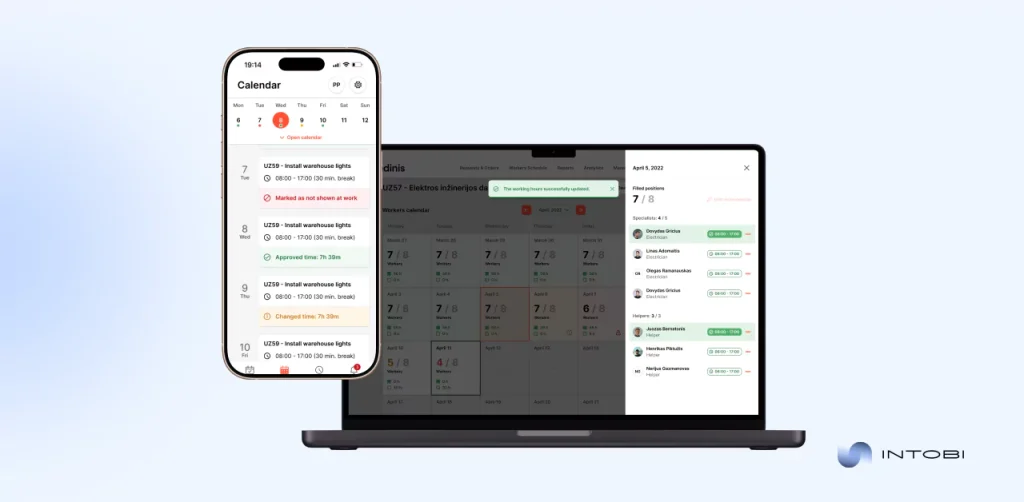
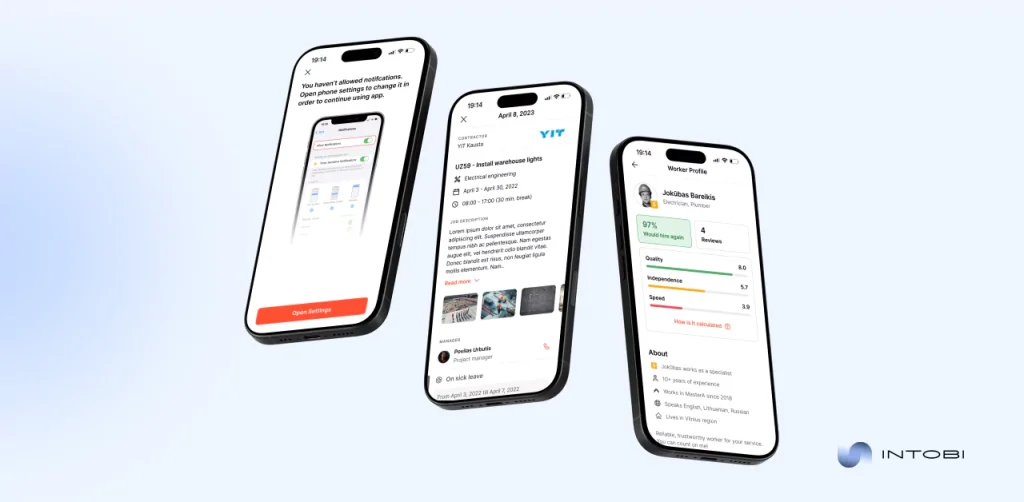
At Intobi, we build cloud-based solutions that simplify complex workflows and boost productivity. For logistics teams that need scalable tools beyond ready-made platforms, cloud app development can help create secure, flexible software around real supply chain workflows. One of our key projects is Valandinis – a robust SaaS (software as a service) platform that was created to help construction companies manage workers and projects efficiently.

Valandinis cloud platform

What we delivered for the Valandinis project

  • End-to-end SaaS platform with web (React.js) and mobile apps (iOS/Android)
  • Automated task assignments, scheduling, and work hour tracking
  • Integrated project planning, budgeting, and facility management
  • Real-time updates and role-based dashboards for managers and workers
  • Seamless communication and notifications via Twilio, OneSignal, SendGrid
  • Cloud storage and data management through AWS S3 and Google Drive
Valandinis cloud software platform developed by Intobi team

Results of our work

  • 30% increase in team productivity
  • 40% reduction in manual errors
  • Faster decision-making and smoother project execution

This project is a statement that the Intobi team is a reliable partner to create scalable, intuitive cloud software that transforms operations and prepares businesses for future growth.

Embrace the cloud, embrace the future

Cloud logistics solutions for supply chains are a strategic enabler for your business to help keep you competitive. It is your direct path to saving money, increasing speed, scalability, and security of your data. 

Today, you have learned what cloud based logistics software is, and what its efficiencies are. How it impacts the world and how to choose the right system for you.
Contact us if you want to develop a scalable and secure cloud software for your business.

FAQ

What is cloud logistics software?

Web-based platforms are automating supply chains via real-time tracking, route optimization, and inventory management. Accessible anywhere, no physical servers needed.

How does cloud technology improve logistics?

This technology centralizes real-time data from warehouses, vehicles, and shipments. It helps optimize routes, predict demand, automate routine tasks, and reduce errors. The result: improved workflows and decision-making, and lower operational costs (25-30% in savings).

Why switch to cloud logistics software?

Cloud-based logistics software provides real-time visibility, optimizes routes, and improves collaboration across teams. It scales operations, reduces costs, and enables smarter, data-driven supply chain decisions.

What are the prospects of cloud based software in logistics?

The growth of the cloud software market for $45B by 2029, driven by growing adoption of digital platforms. Key trends include AI-powered warehouses, cloud IoT integration, collaborative portals, and emissions tracking, making operations more efficient, transparent, and scalable.

Patient Management Software: A Complete Guide for Modern Healthcare

TL;DR

Patient management software helps healthcare organizations handle patient data, scheduling, and administrative work in one system. This guide explains what it is and the key ways it improves care, compares it with traditional management methods, and covers the main implementation challenges. It also shares practical tips for adoption and the trends shaping patient management software next.

Make a summary of this article with AI:

Have you already heard much about medical patient management software? We’ll tell you more. 

Taking into account that 70% of healthcare organizations report improved efficiency after the adoption of these systems, the topic is more than worth delving into. 

Here, we’ll discuss what a patient management system is, take a deeper look at its key features, and examine the many ways it revolutionizes healthcare. We’ll discuss how this software is of immense benefit in the management of appointments, billing solutions, enhanced communication with patients, and even predictive analytics for informed decision-making. 

Along the way, we will also discuss the contrast between traditional patient management systems and the innovations of today, as well as challenges in implementation, and provide tips on how to make these solutions work for you.

What is patient management software?

Patient management software is an extended digital solution for the easy management of patient-related data and administrative tasks of any organization in the healthcare sector. 

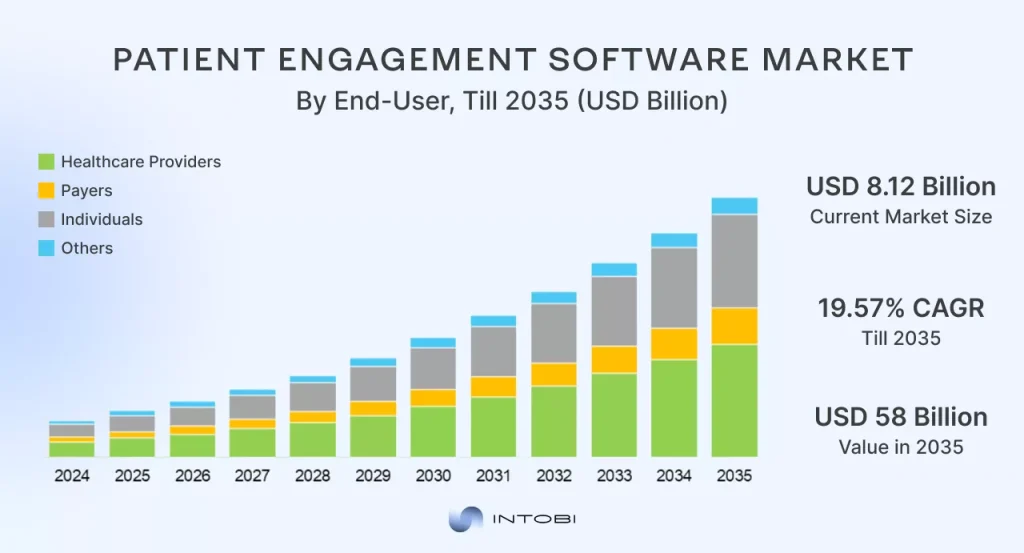
The global market for patient engagement software, according to projections, will reach 58 billion by 2035. 

Patient Engagement Software Market Forecast

Advanced technology integrates all sorts of functionalities that allow health professionals to access patient information, book appointments, and communicate with patients with ultimate ease on a single platform.

The patient information management software maximizes operational efficiency by significantly reducing paperwork and automating routine processes. It converts an otherwise complicated workflow into something much more manageable, enhancing the patient experience immensely.

With healthcare software development, everything from the patient’s history to treatment plans and demographics is just a click away. The system provides a clear, organized overview of the needs of each patient. In such a way, providers can deliver faster, more personalized care by simplifying information management. 

The result is shorter wait times and better use of resources, enabling healthcare organizations to offer higher service quality and increased transparency.

Key ways patient management software revolutionizes healthcare

Patient data management software is the force for change in healthcare, as it allows seamless operations and provides an enhanced experience to the patients. 

From smoother management to the other clear benefits of patient management software, this technology simplifies essential tasks and improves the way patient care is delivered. Here are some significant ways it impacts those who embrace it: 

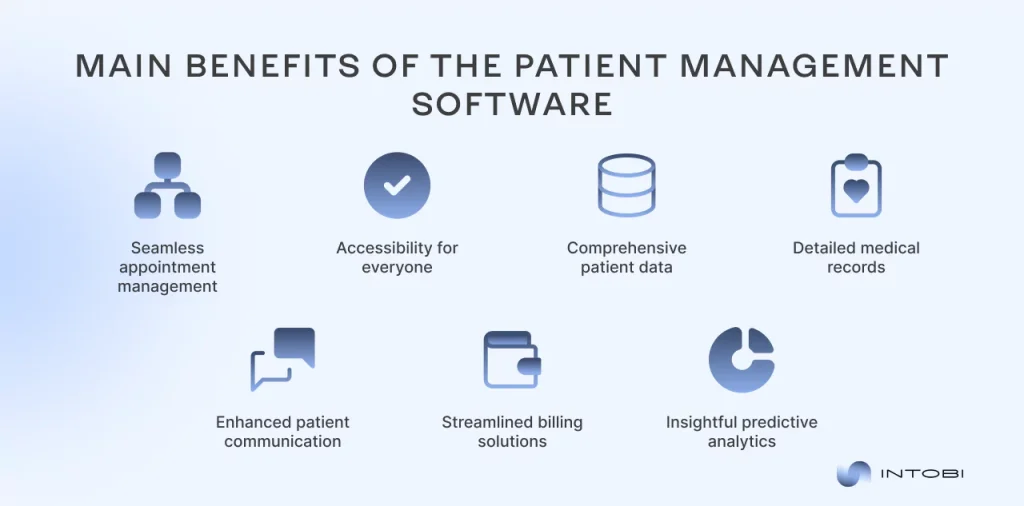
pros of patient management software

Seamless appointment management

An online patient management system lets appointments be scheduled easily, reducing the chances of errors and freeing the provider to attend to what is most important: patient care.

Interesting

Automated reminders and easy rescheduling options keep everyone on track. 

Patients can adhere to their appointments, while providers can optimize their schedules, which leads to a more organized and pleasurable practice.

Accessibility for everyone

A patient management app brings convenience to a whole new level by allowing access to health information with ease from any corner of the earth. The friendliness of the app inspires patients to engage in their own care, such as making an appointment, viewing lab results, and communicating directly with the healthcare team. 

For healthcare providers who want to improve patient access and communication, patient portal development can connect appointment scheduling, lab results, and secure messaging in one user-friendly system.

Comprehensive patient data

A patient management system software consolidates all critical patient information in a single platform, allowing each healthcare provider to have a complete perspective and view of every patient’s history. When the treatment provider can access well-organized patient records, they can respond in the best manner and timely manner, leading to positive treatment outcomes.

Detailed medical records

Patient care management software ensures that records of medical concerns are kept accurately. 

This precision level is critical to quality care. In this regard, providers have all the relevant information on the patient to monitor their progress much more easily and make changes in treatments where necessary. Continuity of care is also easy because each provider has insight into a patient’s medical history.

Enhanced patient communication

In a world of robust patient management features, communication between patients and providers is much easier. With secure messaging systems and automatic follow-ups, patients are much more conscious and engaged in interaction. 

Open lines of communication mean that patients feel more valued and supported, which results in better adherence to treatment plans, improved health outcomes, and an attracted clientele.

For clinics that want to centralize patient relationships and automate follow-ups, CRM development services can help extend these communication workflows into a tailored healthcare CRM.

Streamlined billing solutions

The billing solutions integrated into the patient management systems are among the features that add the most convenience. Automated billing processes reduce errors and clients’ confusion while increasing speed. 

This efficiency enhances cash flow and patient satisfaction over billing, hence giving healthcare providers time to address patient care rather than administrative issues.

Insightful predictive analytics

Finally, insightful predictive analytics provide healthcare organizations with valuable data insights that guide future patient software management. Providers can predict any upcoming challenges and take necessary measures in advance. 

This foresight brings strategic changes in care, resulting in improved health outcomes and data-driven resource utilization within the organization.

Now, you see that embracing patient management software is a huge relief for both healthcare providers and patients. Let’s compare it with the familiar management systems to observe its impact further.

Want a modern solution for your healthcare business?

Contact us

Comparison with traditional management systems

A modern patient data management system offers an innovative solution that resolves the accumulated pains of medical staff and clients. This comparison explores the key differences between traditional methods and contemporary patient management systems, highlighting how the latter stands out in effectiveness.

FeatureTraditional patient management systemsPatient management software 
Data managementOften, paper-based or limited digital data storageAll-inclusive online resource with real-time updates
Appointment schedulingManual scheduling leading to potential errorsAutomated scheduling with reminders and rescheduling options
Patient communicationPrimarily face-to-face or phone communicationSecure online messaging, automated follow-ups, and notifications
Record keepingFragmented records stored across various locationsCentralized patient data accessible from anywhere
Billing processesManual invoicing, prone to errorsAutomated billing and payment processing with detailed reports
AccessibilityLimited access due to physical recordsAnytime, anywhere access through online systems
Analytics and reportingBasic reporting capabilitiesAdvanced analytics for data-driven decision-making

The shift from traditional management systems to advanced healthcare management systems is imperative to ensure quality healthcare. This technology enables practitioners to devote more attention to what counts most: providing quality patient care. 

Challenges in implementing patient management software

Something new always calls for a bit of anxiety. Implementing patient management software brings significant benefits, but it also comes with challenges that healthcare organizations must overcome. 

These are some of the most pressing issues companies could encounter when implementing them, along with solutions.

1. Staff resistance

Resistance from employees to old procedures is one of the main obstacles. Transitioning to new software can be met with hesitation, as employees may feel overwhelmed by the learning curve or concerned about adapting to unfamiliar processes. Fostering a favorable attitude toward the new system requires addressing this opposition through efficient training and communication.

To acquaint the staff with the new system, extensive training sessions and demonstrations will be useful. To allay worries and demonstrate the advantages of the new program, communication should be transparent.

2. Cost and budgeting

Implementing patient management solutions often requires a significant investment in both software and hardware. Organizations must also account for recurring expenses like upkeep, upgrades, and training after the original purchase. Analyze the costs carefully before implementation to identify any and all possible expenses. 

3. Data migration

Migrating existing data from traditional systems to new patient management software poses a major challenge. Maintaining continuity of care requires precise data transfer that is free from loss or corruption. 

Additionally, integrating the software with other existing systems, such as billing or laboratory software, can complicate the process further and may lead to downtime during the transition.

The strategy for data migration will be well-planned, detailing the steps of migration regarding backup and validation. This calls for IT professionals who will ensure that the data is transferred from the old systems to the new platform with accuracy and efficiency.

4. Compliance and security

Healthcare institutions are subject to stringent laws governing the security and privacy of patient data.  Implementing a new patient management system requires careful consideration of compliance with laws such as the Health Insurance Portability and Accountability Act (HIPAA). 

Ensuring that the new software meets these regulatory standards while sufficiently protecting sensitive patient information can be a complex task.

Communicate with the compliance and legal departments to make sure the selected software satisfies all legal standards. Periodically audit data security measures and offer training to staff on best practices for maintaining patient confidentiality.

5. Ongoing support

Patient management software needs continuous support after it is put into operation in order to handle user concerns and technical problems. Businesses must be ready for any issues that may arise with software upgrades, system failures, or user issues. 

Establishing a reliable support system is crucial to ensure that staff can effectively use the software and that patient care remains uninterrupted.

After implementation, you can hire a specialized support staff to address user inquiries and technical problems. Create a feedback system to make sure staff members are comfortable using the program and to enhance the system continuously.

Patient management software incorporation tips

Apart from the mitigation strategies, there are some very valuable tips that can help you experience fewer hurdles while transitioning to the electronic version of patient entry software.

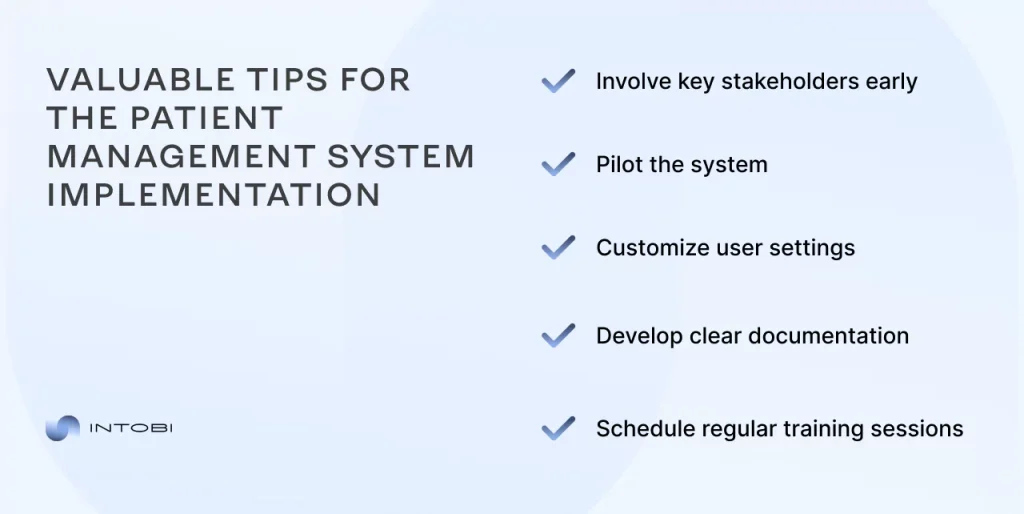
tips for successful patient management software implementation

Involve key stakeholders early

Engagement with the team members of every department at an early stage of implementation may bring insights into tailoring the features of the software toward their specific needs. This will make the transition easy and ensure maximum utilization of the patient administration system software.

Pilot the system

Prior to complete implementation, think about conducting a minimum viable product (MVP) with a small user base. This is a testing phase where you can highlight some problems and get feedback, ensuring that the patient entry software works well before releasing it for organization-wide use.

Customize user settings

Leverage the custom options afforded in the patient administration system software to customize user settings and workflows to your current processes for an easier transition by staff. This would minimize the problems that usually arise.

Develop clear documentation

Record detail-oriented procedures and tips throughout the use of new software, thus providing a great reference for your staff. A lot of the confusion often displayed during an adjustment to another system would be assuaged.

Schedule regular training sessions

Even after the initial implementation, plan for ongoing training sessions. The regularly scheduled training will ensure that all staff members are updated on new features and functionalities of the hospital patient management system. g and a focus on collaboration, your team can unlock the full potential of patient management software, achieving improved communication and a brighter future in healthcare.

Need a seamless integration of the patient management software?

Contact us

Future trends in patient management software

We have only just begun to envision the ways in which the patient care management system of the future will transform healthcare. We can expect patient care management systems to become more intuitive, personalized, and integrated than ever before. 

Imagine advanced artificial intelligence that can anticipate patient needs by offering tailored healthcare recommendations right at the point of care.

Also, the integration of telehealth functionalities will be seamless, allowing patients to engage their providers of choice from the comfort of their homes. You’ll be able to schedule an appointment with just a few taps on your smartphone or receive a video consultation that feels as personal as being in the office. 

This level of accessibility empowers patients, tears down barriers to care, and nurtures deeper relationships with their providers.

These trends will also be fed into the patient management systems by emerging technologies such as wearable devices and mobile applications for health, which collect real-time health data to enhance treatment plans. 

As patient care management systems harness this wealth of information, healthcare providers will have unparalleled insight into patient behaviors and trends, enabling improvements in preventive care and better disease management.

With all these developments, skepticism about patient management software can easily turn into excitement. The dream of a leaner, more compassionate, and more efficient healthcare system is not too far away – it is happening now and will change your experience both as a patient and a provider. 

Intobi’s expertise in software solutions for healthcare

At Intobi, we are dedicated to delivering software solutions that meet the highest industry standards. Our specialty is turning difficult problems into creative answers that help our clients succeed. 

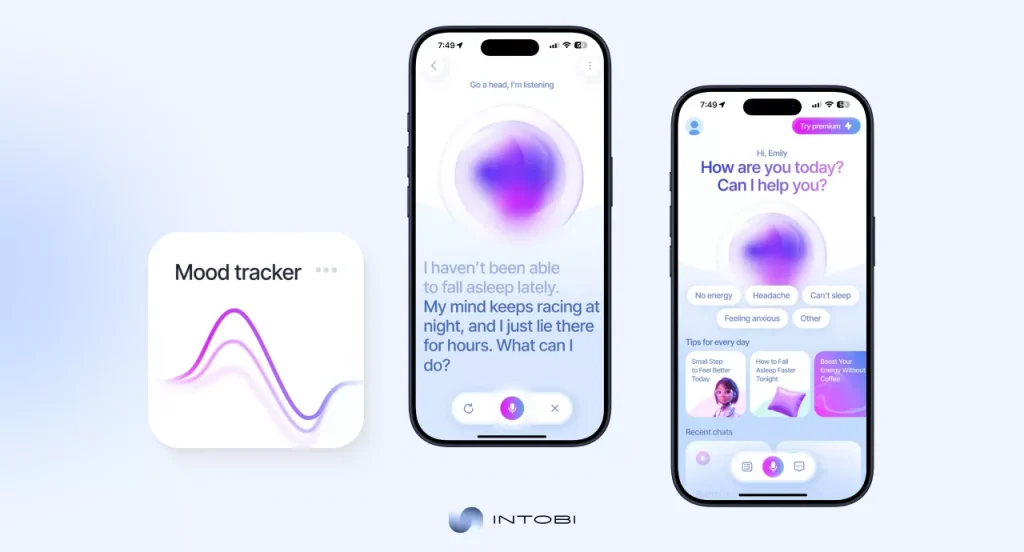
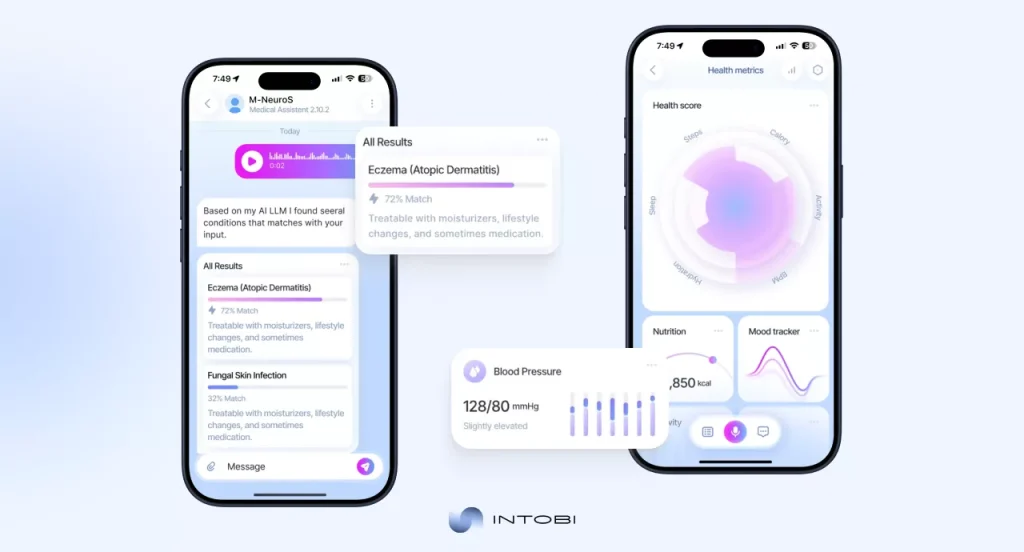
One of our recent projects for the healthcare field is M-NeuroS. It’s a platform with an advanced AI system that helps to deal with many problems in healthcare organizations. M-NeuroS helps to solve issues such as fragmented patient data, delayed risk detection, and operational inefficiencies. 

What makes this project unique? This AI-based solution provides actionable information without complicating healthcare workflows.hcare realm.

AI platform for predictive healthcare intelligence developed by Intobi

Challenges we handled

  • Fragmented patient data Scattered across multiple systems, limiting visibility into patient histories.
  • Delayed risk detection Manual processes identified risks too late.
  • Operational inefficiencies Limited real-time insights into staff, beds, and resources.
  • Complex data for non-technical users Clinicians needed clear, actionable insights.
AI platform for predictive healthcare intelligence created by Intobi

Value delivered

  • Earlier risk detection AI highlighted potential patient risks 25–35% sooner than manual reviews.
  • Improved clinical efficiency Automated summaries cut data review time by 30–40%.
  • Better operational visibility Predictive dashboards reduced bottlenecks and improved patient flow.
  • Reduced cognitive load Plain-language dashboards helped 78% of users make faster, clearer decisions.
  • Higher stakeholder confidence 82% of decision-makers rated insights as “clear and actionable.”

Our work with Neuro-S is a testament to the quality of customized software solutions that Intobi offers to solve real-world challenges, including the challenges in the healthcare realm.

Conclusion 

The patient data management software enhances communication between patients and providers by using patient management software. 

Automated reminders and notifications ensure that the patients are up to speed and engaged with their care, while providers are able to smoothly operate the workflow through streamlined data management. Therefore, it presents an accessible and efficient healthcare experience. 

Such a position makes medical patient management software a vital tool in reshaping the mode of delivering and managing care in the modern health environment. If you need a patient management software or any other kind of software portals development – reach out to us to get the solution that will help your business grow!

FAQ

What is patient management software?

The patient information management system is an e-solution designed to improve and simplify all healthcare operations. That means health professionals keep patient records, appointments, billings, and all communications on a single platform.

What is the best medical management software?

Though the best patient management software might vary with needs, some of the great solutions in the market are those developed by Intobi. Intobi introduces a robust patient management system: scheduling, billing, and communication on one platform.

What is the most used healthcare software?

Electronic health records and patient management software are often the most popular types of software for patient management. The most prominent and well-known brands are Epic, Cerner, and Athenahealth – health companies use them to expand their capabilities in improving care coordination.

What is the use of HMS?

The healthcare management system (HMS) helps the organization manage all operations of patient management software in healthcare. It keeps up administrative tasks, organizes patient data, and facilitates better provider-to-provider contact.

Web Development Process: A Step-by-Step Guide from Planning to Launch

TL;DR

Today a website is no longer just a business card – it is one of the key channels for attracting customers and growing sales. This guide walks through the website development process step by step: strategy, planning and requirements, design and UX/UI, development, testing, launch, and post-launch support. It also shows how to keep the team aligned and the project on schedule.

Make a summary of this article with AI:

In an era of rapid digitalization and technological advancement, both ambitious startups and established companies need a website to remain competitive and attract new audiences.

Today, a website is no longer just a company’s business card. It is one of the key marketing engagement channels, capable of attracting new customers and serving as a space where users become familiar with your brand and positioning. It is also an effective communication channel, where users can share feedback and stay informed about updates, news, or announcements related to your product or service.

The process of website development is a set of actions in which each stage directly influences the quality, performance, and usability of the final product.

In this article, we explain how to structure the web development process and successfully create a site that delivers real value for your business, covering all key stages along the way.

What is the website development process?

The web development workflow is a step-by-step plan for creating a website, agreed upon by the project team, that helps minimize chaos and inconsistencies from start to launch. This is a crucial stage for any business, requiring a systematic approach, clear division of tasks, project control practices, and involvement of all team members in the website development process.

Interesting

Consistent, high-quality execution of the stages of web development ensures transparent project implementation without unnecessary stress.

Web development strategy: Laying the foundation

The initial stage of website development lays the foundation before any code is written or design work begins. This is the stage where key strategic decisions are made.

Key Steps:

​Clarity and position your brand

Clearly define who you are and present this information on your website. Think like a website visitor and ask yourself the same questions. Stick to your clear branding. There are few crucial elements you should always include on your website`s pages.

Benchmark and analyze

Monitor your direct and indirect competitors. Track their web development steps. Identifying their strengths and weaknesses helps inform your own approach and reduce the risk of repeating common mistakes. Sometimes it’s enough to look at what others are doing.

Identify the target audience and their needs

“People buy from people” is a golden rule of marketing, and it applies to the website development process as well. That’s why you should first think about your target audience and tailor your website to their needs and behaviour.

Set goals & KPIs

Goals and KPIs set during the planning stage serve as a compass for the entire website project. They provide measurable benchmarks for evaluating performance after launch. Without them, it is impossible to determine whether the website is delivering tangible business results.

Stages of website development explained

​The stages of the web development process are closely connected. Skipping any step often leads to delays, rework, and unnecessary costs later in the project. Is this what business wants?

A successful website requires a structured, detail-oriented approach in which strategy, design, development, content creation, testing, and optimization work together toward a common goal. Only by treating website development as a cohesive, integrated process can businesses ensure predictable outcomes, maintain high-quality standards, and deliver a product that truly meets both user needs and business objectives.

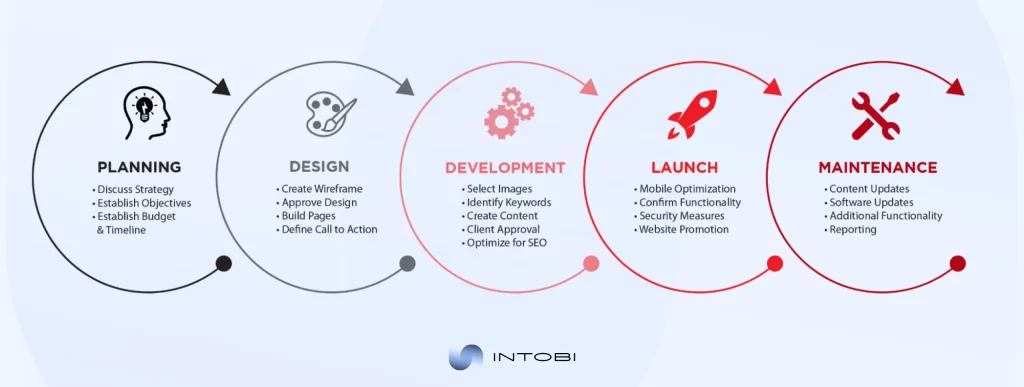
Illustration of stages of web development

​The sequence of web development stages may vary depending on the type of business, but the key points remain relevant.

Step 1: Planning & requirements gathering

​Successful projects start with understanding the brand vision and the company’s long-term strategic goals. The entire team of specialists should be involved in this process. During the website development stages they should clearly understand their tasks, KPIs, and business goals, and you should provide them with the necessary support.

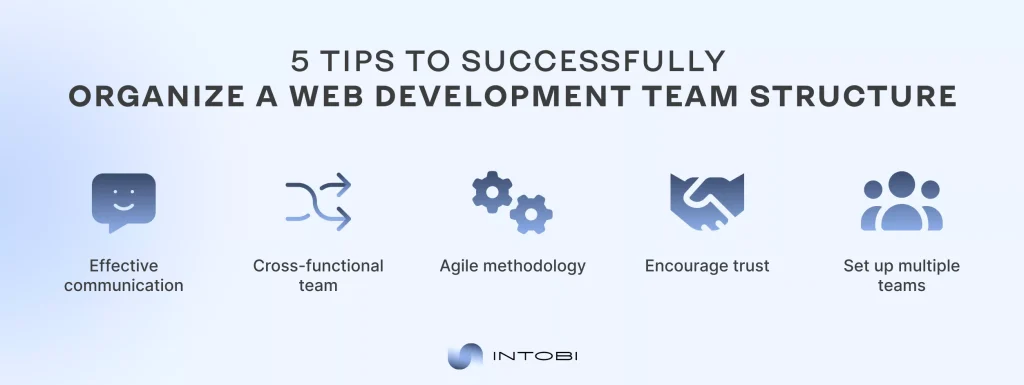
Web development team structure tips infographic

Involve all employees in the process

People need to know why they’re working on the project and what goals the team is striving to achieve. Hold regular calls and brainstorming sessions to discuss the project’s status and the next steps for the web development strategy. Team effectiveness and a productive ecosystem starts with quality management and strong leadership.

Best practices:

  • Regular calls and brainstorming sessions.
  • Discussing next steps with the team.
  • Strong leadership and management.

Clear communication

To complete a project, it is necessary to build clear communication across all team members to maximise the productivity of the website development process. Never ignore employees’ needs; provide them with the tools they need to complete their tasks. ​

Best practices:

  • No blockers in communication in the team.
  • Never ignore the needs of stakeholders.
  • Access to all the tools that you need to complete the task.

Division of roles and responsibilities

Each person on the web development team should have their own area of ​​influence and responsibility. While this seems straightforward, many startups forget it and often shift the entire project’s responsibility to a few individuals. It’s vital that this ecosystem has no weak points that would drag down all the results of the work.

Best practices:

  • Clear roles distribution.
  • The entire team is responsible.
  • Minimize weak points in your ecosystem.

Task structure formation

Set up an ecosystem where all tasks go through a logical life cycle: from creation to submission for approval. Use services that allow you to track individual tasks and the entire process of website development and set a deadline.

Best practices:

  • Logical task lifecycle.
  • Use task-tracking services.
  • Always set a deadline.

Step 2: Website design and UX/UI

The following stages of website development are creating a design and interface for your future site. At this stage, we move on to technical work, where designers will play a significant role.

The design itself should not just be “attractive” to our eyes. Instead, it should be convenient and understandable for the user, technically optimized, and not overloaded with unnecessary visual and text elements that can distract or reduce the performance of the website.​

Steps for designing a website should also be considered as a complex work that requires consistency.

UX research and user flow planning

The interface is formed even before the design is created, making UI/UX research a critical part of the website design and development process. At this stage, the focus is not only on creating decorative UI elements but also on conducting targeted research into the problems and needs of the target audience regarding the interface’s usability.

UI/UX research is about understanding your users and how they interact with digital products. By studying their actual behaviour, struggles, and expectations rather than making assumptions, you can create interfaces that feel intuitive and solve real problems. It’s the difference between designing what looks good and designing what actually works.

Wireframes and information architecture

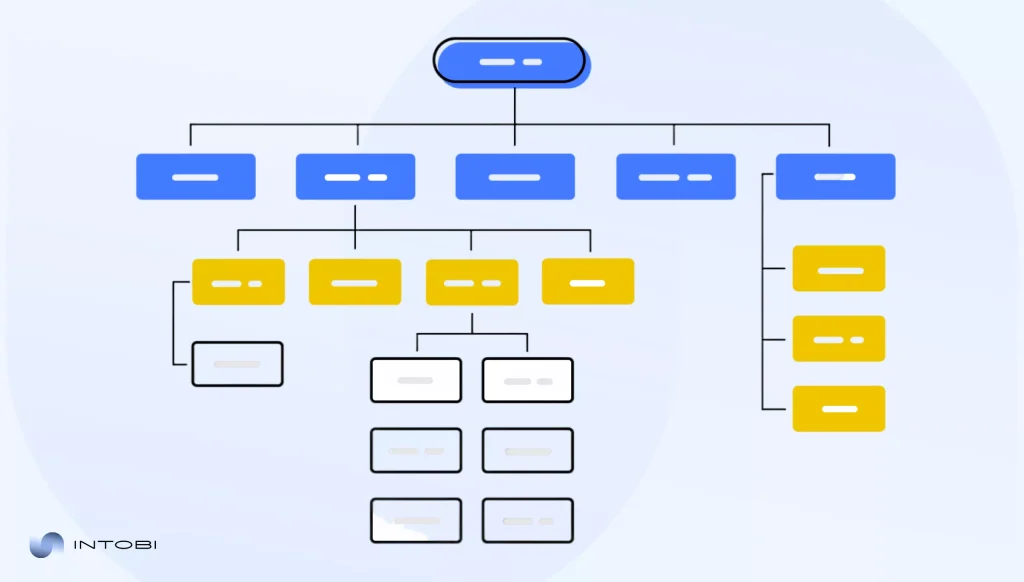
And again, this is not the time for visual design yet. Before a designer can begin creating the interface, it’s essential to define the site’s structure. This stage of the website development process steps focuses on organizing content, planning navigation, and building clear user flows that help visitors easily reach their goals.

Wireframes are used to sketch page layouts without colours or visual details. They help identify required elements, avoid clutter, and uncover usability issues early. Combined with solid information architecture, wireframes support a logical, easy-to-use UI/UX and reduce confusion later in the web site design and development lifecycle.

Website information architecture diagram

Visual design and branding

And finally, it’s time for design, one of the most visually impactful stages of website development. It’s time for truly creative work that will undoubtedly become a key visual brand asset for your company. That’s why it’s essential first to understand the fundamentals of branding and the crucial details related to it.

Your visual branding should be clear and expressive, and play a strategic role within the website design and development process. Anyone who visits your website should remember your colours, visual attributes, and unique features. All of this has one challenging yet straightforward goal: to recognise your brand. The client should recognise you, and this is the brand’s primary task.

To sum up, keep your design clean by avoiding unnecessary details that could become unintentionally associated with your brand.

Illustration of a well-done brand design job as part of an explanation of steps for designing a website

An example of a quality website design that incorporates visual elements of the brand.

Responsive and interface design

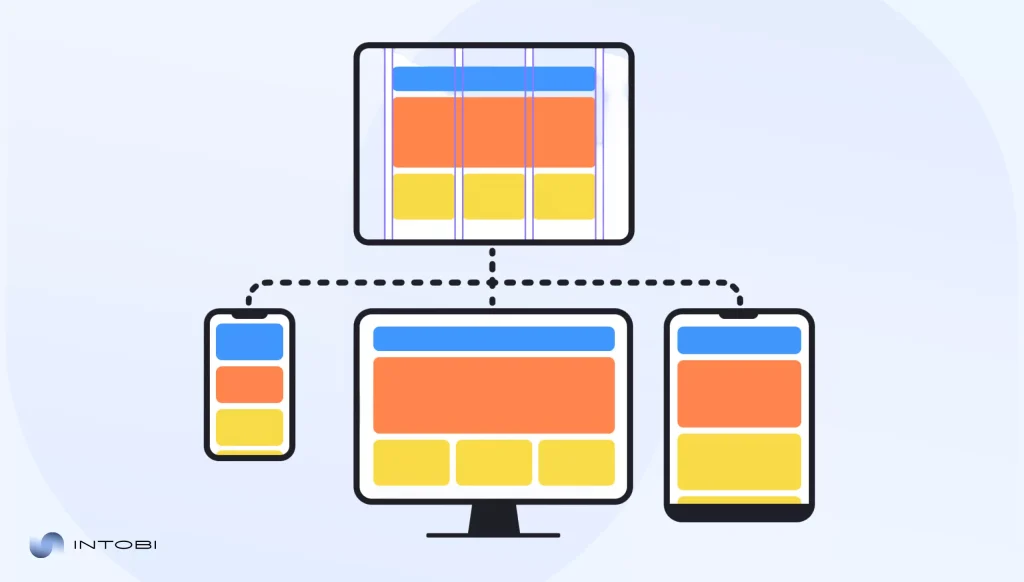
However, as we mentioned earlier, an attractive design isn’t enough.One of the key website development process steps is ensuring technical functionality across all devices and seamless adaptability to different screen sizes. This allows you to increase your site’s authority, both in the eyes of the search engine and in the eyes of users, which will increase the time users spend on the site. Test how your webpages look on different devices.

Illustration of a responsive website layout displayed on a tablet, desktop computer, and smartphone.

​A UI/UX designer must create an interface that works equally well on smartphones and desktops. And developers must establish technical adaptability. This is where the website design and development process comes together.

Design that keeps you on the website

An equally important function of design is keeping users on the website, which we have already touched on briefly but will discuss in more detail. User retention rate on the site will positively affect the authority of your domain in the eyes of search engines like Google, Bing, Firefox, etc., which in turn will contribute to a higher ranking of your site.

As you might have already understood, the world of web development is always structured, and all processes in it are interdependent. That’s why a well-planned web development strategy treats design not just as a visual layer, but as a systematic tool that directly influences how long users stay on the page.​

Performance and speed

The faster your images and graphics load, the better your design is optimized, and the longer it can make a positive impression on the user.​

Emotions that win over logic

Mostly, people make their decisions emotionally first. Create a design that makes people want to stay on your web page just by making it attractive and eye-catching. Don’t forget to constantly test different design options.

Microinteractions

High-level design keeps users engaged through subtle, interactive details such as hover effects, animated buttons, smooth transitions, etc. This is a complex and hard work that requires experienced experts, but it really works.

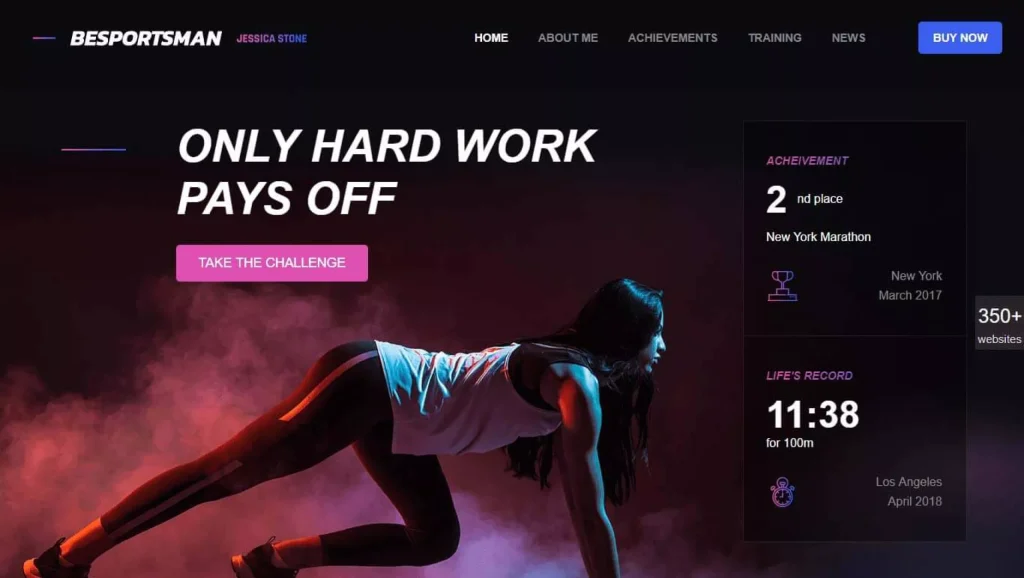
Stylish hero illustration demonstrating an ultra-cool modern website design with bold typography, dramatic lighting, neon accents, and a strong visual composition that emphasizes premium UI/UX quality

Design review and approval

Once the design work is completed, it should be tested with real users and formally approved. User testing helps identify usability issues and validate design decisions before development begins. As one of the final website development steps before coding, this stage allows the team to make informed adjustments and confidently move forward with the web development process.

How to test your website design?

To conduct an objective test of the initial web design, you need to find 7-10 real people from your target audience (preferably from different segments). Then you can create a checklist of specific questions you would like answered.

For example:

– What is the first thing that catches your eye when visiting the site?

– Are you satisfied with the page loading time?

– Does the website seem overloaded with visual elements?

– Can you identify the site’s product or service in the first 5-10 seconds?

– What is our brand associated with after the first 30 seconds of being on the website?

Step 3: Web development & coding

After the design work is done, the technical implementation begins. Depending on the types of software being developed, this may involve complex API integrations, database architecture, or specific front-end frameworks to ensure a seamless user experience.

For businesses that rely on CRMs, payment systems, analytics tools, or other third-party platforms, website integrations help connect these services into one smooth website experience.

The web development process is divided into several areas:

  • Front-end development: Development of the visible part of the site, that is, what we see when we visit any web page.
  • Back-end development: The part of the development that we cannot see, but which fully provides the website’s functionality.
  • Database Integration: Hidden storage that powers your site. It saves user data, remembers preferences, and retrieves information instantly.

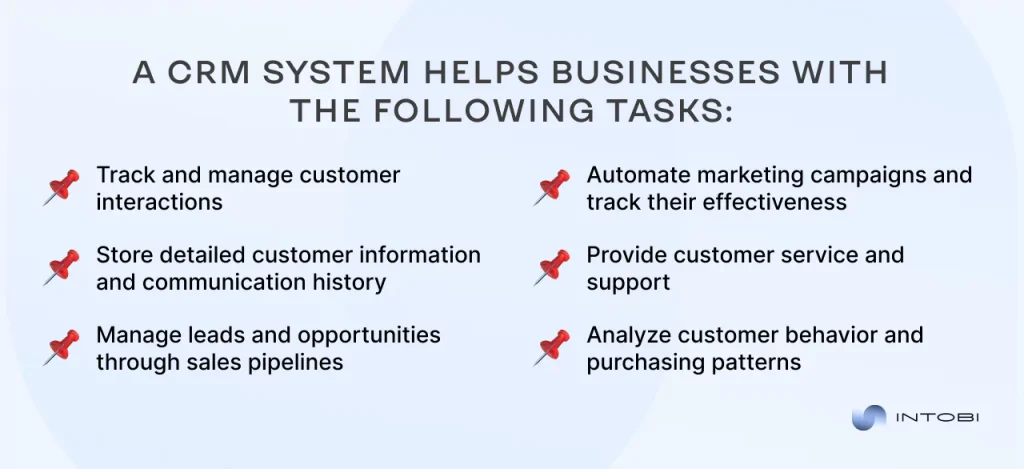
​Most companies use CRM systems to automate customer communication processes and provide transparent marketing analytics. Integration with an existing service does not always meet business requirements, so some businesses create their own CRM services.

How to deal with the website development process related to coding?

Traditionally, coding is handled by development specialists. But what if your team doesn’t have them? Instead, specialised web services, together with your team, come to the rescue to develop the site.

Turning to such agencies is always a smart move, especially for small businesses and startups with a limited budget. Such services bring together the best web admins who can easily and without unnecessary hassle work through all the website development stages.

Need a strong, quality website?

Contact us

Step 4: Content integration & optimization

The design is ready, and the code is written; the site can already function. Technically, yes, but it won’t attract visitors if you don’t consistently update your website with various content.

And now it is time to remember the most crucial rule that is taught in content marketing textbooks: “If you want to get something, you must give something in return.” That is, you’re now not just creating a landing page but providing your target audience with valuable, expert content.

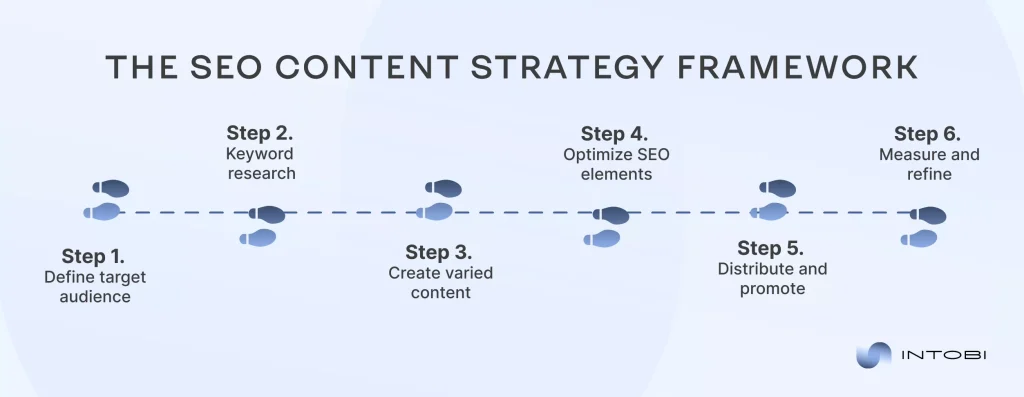
Minimal, well-structured infographic showcasing a stylish SEO framework

How does it actually work?

As soon as you cross the line from a website to a place that can demonstrate experience, expertise, authority, and trustworthiness (E-E-A-T content), you should get acquainted with Search Engine Optimization (SEO).

Search Engine Optimization (SEO) is a set of measures to improve a website’s position in Google search results and other search engines. This website process involves attracting more target visitors, increasing visibility, and boosting income without direct advertising. ​

This engagement channel is divided into three main areas:

On-page optimization:

Creating semantics for website pages, writing blog articles, creating titles and descriptions for web pages, constantly updating content, and working with internal hyperlinks to your website.

Off-page optimization:

Obtaining links to your website from other domains, crowd marketing, and working with reviews, building authority in the eyes of search engines.

Technical optimization:

Optimizing the technical side of the website, working on adaptability for all devices, creating a website structure, and files that allow search engines to index the entire website.

The better you work on each of these aspects, the better your chances are of ranking high in the search engine in your niche.

Working on content

Quality content is what brings visitors to your site and keeps them engaged. Without relevant, valuable content, even the most beautifully designed website won’t get traffic from Google. Search engines prioritise sites that consistently publish expert content, and users return to websites that provide answers, insights, or solutions to their problems and needs.

As always, it all starts with a deep understanding of your audience, their psychology, unresolved problems, and the questions they are looking for answers to. Create content to help them with this: blog articles on useful, relevant topics, guidelines, case studies, etc. At the same time, all these texts should include key phrases people type into search.

Consistency matters more than volume. Publishing one high-quality article per week beats posting mediocre content daily. Develop a content calendar to plan topics and maintain a steady publishing schedule.

Red flags in content creation

  • Content created entirely by artificial intelligence that lacks human expertise and perspective
  • Keyword stuffing that makes the text unreadable
  • Copy-paste from competitors that do not provide new and valuable information
  • Chaotic and unstructured text
  • Lots of words, but little substance and ways to solve the problem the user came with

Step 5: Testing & quality assurance

When the whole process of development is nearly complete, the next step in your digital web development strategy is to test the website process and keep testing until launch.

At this stage of the web development process, it is crucial to identify all bugs, unclickable buttons, non-working pages, interface issues, and anything else that could affect site performance.

Who should handle testing?

There are opinions that developers can independently conduct code testing, but this is not their main specialisation; developers focus on building features, not systematically hunting for edge cases and usability issues, and they do not know how to build a consistent process from identifying a bug to fixing it.

That is why QA specialists undertake this extremely responsible work. This is a specialised field of IT that focuses on testing and finding bugs. QA engineers work according to a specific methodology and checklist, which helps them minimize the number of possible bugs.

Step 6: Website launch & deployment

And finally, all the stages of web development are finished; now all the processes are combined into a logical mechanism, and it’s time to launch. You might think that this is the culmination, but again, it’s not.

Before real people see the results of your efforts, final checks of all previous website development steps are conducted. It is essential to check whether everything is working correctly, whether the website interface is optimized for different devices, and whether the site already has basic content and other details that need to be verified.

After all these steps have been completed, deployment takes place. This is the final process of website development, after which the site becomes public and real Internet users can contact it. This is the culmination of the entire web development strategy at the site’s initial stage.

The deployment itself is organised and controlled to quickly identify errors and track user behaviour, on the basis of which further decisions are made to optimize the website.

What does deployment involve in practice?

A website launch involves several technical tasks before the final release to the cloud.

Key processes:

  • Uploading code to a server or hosting: The web server, which is the computer that will deliver your website to users around-the-clock, receives all of your website files from the development environment.
  • Project assembly: Your developers bundle all of the website’s files, ensuring that nothing is missing. Each image, line of code, and style element must be prepared for transmission.
  • Connecting the domain: Binding the site address (mysite.com)
  • Server configuration: Configuring how the site is provided to users so that it opens quickly and stably.
  • Working with the database: Information stored on your website, such as user accounts, product catalogs, and blog entries, must be carefully transferred while maintaining all existing data.
  • Verifying that the site is working correctly: Post-publication control testing of its functionality and accessibility.

Step 7: Post-launch maintenance & growth

Launching a site marks the end of the web development process, but only at the initial stage of the entire project, where the foundation for long-term growth is laid. The first sample of a website does not always have to be perfect down to the smallest detail; it is essential to understand that most decisions are made based on data, not guesswork, so it is worth starting with the foundation. This will allow you to save the most valuable resources for the company: time and money.

Also, keep in mind that if you are not a world-famous company that suddenly entered the online environment, you won’t receive the attention, so you will be forced to squeeze the maximum out of your team’s capabilities. Overloading, chaotic work and communication with your employees during such a start can ruin a project that has not yet begun.

This doesn’t mean the website design and development process is ordinary or doesn’t require excessive effort. This means that first of all, it is worth distributing time and energy so that the final product is high-quality and at the same time uncomplicated.

This approach helps you scale more effectively and predictably. It helps you adapt faster to trends and realities of the current market and stay ahead of your competitors who chose the harder path at the beginning of the web development strategy.

The ideal solution for a business that wants to digitize?

A common mistake for those just starting their journey in the digital world is excessive perfectionism, which is not part of your style or brand. This is perfectionism that leads to burnout for you and your team. That is why a wise decision would be to use the Minimum Viable Product (MVP) Development service. This is a working principle that focuses on the main thing at the early stages of web development: it lays the foundation we mentioned earlier.

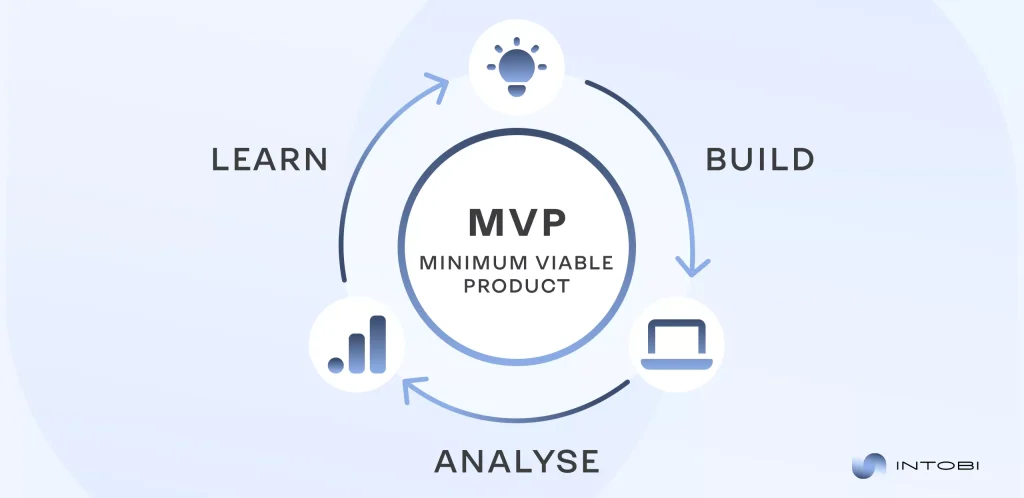
Modern illustration of the MVP cycle as a part of web development process

Conclusion

Summarising all the statements and research that were conducted in the framework of writing this article, the conclusion becomes not so difficult to form.

All web development steps are part of a structured process that requires a systematic approach and involvement. Its key goal is to create a base that will grow and scale in the future. Be careful, take essential details and the sequence of processes into account, establish communication within the team, and distribute responsibilities.

Remember that perfectionism can paralyse progress. Follow the website development steps we have described and adapt them to suit your needs. Test, innovate, and be a forward-thinking strategist.

At Intobi, we’ve helped numerous partners build web platforms that scale sustainably and grow. 

Book a free consultation to explore how we can help you create a website your users will value.

FAQ

How long does it take to build a website?

The timeline depends on the project’s complexity, the number of developers on your team, the scope, and the requirements. A simple landing page can take 2-4 weeks, while a corporate website or custom solution usually takes 3 months.

What information do I need to prepare before starting website development?

Before development begins, it’s essential to define your business goals, target audience, and expected outcomes. You should also prepare basic content, brand assets, references to websites you like, and any technical or functional requirements.

What are the 5 golden rules of web design?

While design principles may vary, these five rules apply to most successful websites: they prioritize users with intuitive navigation, focus on clarity, maintain visual and functional consistency, adapt seamlessly across devices, and deliver fast, accessible experiences for all users.

Svelte vs Vue: Pros, Cons, and Real-World Use Cases

TL;DR

Svelte and Vue are both popular for their simplicity, performance, and low entry point, but they take very different approaches. This comparison explains what each framework is, their main advantages and pitfalls, and the use cases where each one fits best. In short: Vue is more stable, with a larger ecosystem and established tools, while Svelte focuses on a newer compile-time approach.

Make a summary of this article with AI:

The selection of a framework in the modern realm of web development can result in the successful creation of the project, as well as its effectiveness. Svelte and Vue are among the trending front-end technologies with their simplicity, performance, and low entry point. 

Both Vue vs Svelte frameworks possess dynamic communities, loose structures, and a wide diversity of applications – ranging from small projects to large web applications. They differ greatly in their approaches to rendering, performance and developer experience.  

What is Vue.js?

Comparing React vs Vue vs Svelte, Vue.js is a progressive JavaScript library which is aimed at the creation of user interfaces and single-page applications (SPAs). It was created by Evan You, a former Google engineer, in 2014. The concept of Vue is to give developers a simple, lightweight, and intuitive tool that may be utilized to create small engagement factors and extensive web applications. 

Vue relies on the principle of reactive response to data, i.e., the interface is self-driven to react to changes in the state of the application. It renders the task of dealing with dynamic elements easy and intuitive. The fundamental design of Vue is a component-independent, reusable element of the interface which has its own HTML, CSS, and JavaScript. This style encourages a clear and rational style of segregating code and renders it simpler to maintain. 

Two-way data binding is a primary feature of Vue. This is because any modifications to the model would be automatically reflected in the view and vice versa. Due to this fact, Vue can be compared to such frameworks as Angular; however, it is simpler to work with. 

The framework also relies on the Virtual DOM (Document Object Model), which is an effective rendering model that only changes those portions of the page that actually change. This enhances the performance and decreases the burden on the browser. 

The syntax of Vue is declarative, and as such, the code can be followed even by novices. It is easy to incorporate into current projects because it does not require a complete rewrite of the site structure. Moreover, Vue also promotes the use of templates or JSX, allowing developers to select their preferred approach. 

In the context of Vue js vs Svelte battle, Vue architecture consists of a central part of libraries, which may be linked together according to the requirements. An example is Vue Router, which is used for routing pages, and Pinia or Vuex, which are used for managing application state. This can be scaled with such modularity, and the framework can be changed to suit various tasks. 

Vue.js has emerged as one of the most widely used JavaScript frameworks in the world due to its flexibility, easy-to-understand API, and vibrant community. It is applied to both small startups and big enterprise solutions where it is important to be stable, code clear, and develop speedily.

What is Svelte?

It is a new JavaScript framework (or compiler) that is aimed at creating dynamic web interfaces. It was written by Richard Harris, a journalist and developer with The Guardian, and was originally launched in 2016. 

Discussing Svelte vs React vs Vue, Svelte does not operate on the virtual DOM in the browser, but instead moves the majority of calculations to the compilation stage. This implies that when Svelte is being built, the components are translated into pure JavaScript code that is highly efficient, and it automatically detects DOM updates. 

The primary idea of Svelte is to simplify the development process – no unnecessary layers of abstraction are created, and there is no complicated configuration or a huge amount of dependencies. Each element of Svelte is a file with the extension .svelte that combines HTML, CSS, and JavaScript in one framework. In this way, the developers can write fewer codes and visualize the explicit logic behind each one. 

Regarding Svelte vs Vue discussion, Svelte is a reactive programming framework which operates differently. It just consumes the reactivity and assembles it into native JavaScript features instead of tracking changes using objects or special APIs.

Indicatively, the work of a variable is that when the value of a variable is altered, the component will automatically update the respective interface elements. This simplifies and predicts the code. 

The style sheet is also inbuilt into the framework, and you can declare CSS in the component itself. By default, such styles are automatically separated from the rest of the application to avoid conflicts and achieve a clean code structure. Also, Svelte facilitates the possibility to develop transition effects and reactive effects without any extra libraries. 

The other characteristic of Svelte is the minimalism of the architecture. The system of state does not have any branched form or multifaceted templating – all things are as simple as they can be. The developer only describes the page structure, reactive variables are defined, and optimized code is generated by the compiler itself. This renders Svelte not only convenient for creating SPAs, but also for integrating with existing sites. 

In larger projects, SvelteKit (an official metaframework) can be used to provide a pre-built environment for building an application based on routing, server-side rendering, and API support. It makes the deployment of projects much easier and Svelte more appropriate in large-scale web applications. 

Another feature of Svelte is its straightforward directory structure, which facilitates the development of new projects quickly. Svelte code is readable, and component logic is logically separated due to its declarative nature. This enables you to be function-oriented, not technical implementation-oriented. 

When we discuss Svelte or Vue, then Svelte has continued to grow in popularity among developers over the years as an alternative way to create interfaces – with no virtual DOM, no complicated libraries, and no unnecessary dependencies. It has now become a component of the modern JavaScript ecosystem, providing a clean, predictable and natural representation of dynamic behavior in web applications.

Discover the power Vue vs Svelte in action.

Contact us

Crucial advantages and pitfalls of Svelte and Vue

It is necessary to be aware of the strengths and weaknesses of the options before selecting a framework to use in your project. Both Svelte vs Vue have the same aim of simplifying the creation of dynamic interfaces, although they achieve this in different ways. Vue is more stable, provides a larger ecosystem and established tools, whereas Svelte concentrates on the novel approach and compilation of the code in a build. 

Let’s discuss the key strengths and weaknesses of Vue js vs Svelte below to get a clear idea of what approach is best to use. 

Pros of Vue

1. Easy to learn and use

Vue is not only easy to read due to its simple syntax, but it can also be learned by beginners. It is organised into HTML, CSS, and JavaScript, making it easy to learn. 

2. Reactive data binding

With the help of data binding, any changes to the model are reflected in the interface in real-time. This makes it easier to deal with forms, tables, and dynamic content. 

3. Component-based architecture

Vue is based on components, which are easy to reuse. This makes scaling of applications and maintaining code easier. 

4. Rich ecosystem

It is about several official and third-party libraries in Vue, including Vue Router for routing, Pinia/Vuex for state management, and Nuxt.js for server-side rendering. 

5. Long-term and active community support

The framework boasts a big community, well-documented, and consistent developer support. This has rendered it a dependable option in terms of commercial projects. 

6. Integration flexibility

Discussing Svelte vs Vue characteristics, Vue is compatible with existing websites or systems and can be integrated with them without requiring a total overhaul of the system or architecture. 

Cons of Vue

1. Limited scalability for very large teams

It might be challenging to uphold a one-sided approach in extremely large projects where dozens of developers can use Vue to implement the components in a variety of different styles. 

2. Larger ecosystem compared to React

The Vue ecosystem is relatively small in comparison to React, though it has more niche libraries or plugins. 

3. Migration as an inter-version problem

The change of significant versions (e.g., Vue 2 to Vue 3) can sometimes necessitate the reuse of part of the code or adaptation to new APIs. 

4. Virtual DOM performance overhead

Interesting

The virtual DOM introduces a minor overhead when rendering, which can be a problem in very large apps. 

Vue
ProsCons
Easy to learn and useLimited scalability for very large teams
Reactive data bindingSmaller ecosystem than React
Component-based architectureMigration challenges between versions
Rich ecosystemPerformance overhead from Virtual DOM
Active community and long-term support
Integration flexibility

Thus, Vue has good stability and supports a rich ecosystem, but other developers are interested in a more minimalist and productive style. In the context of the Svelte vs Vue battle, Svelte is a framework that alters the conventional concept of frontend functionality. It is a unique concept that shifts heavy logic off the browser and onto the compilation process, resulting in applications that are lighter, faster, and more efficient.

Compare Vue and Svelte in depth.

Contact us

Let’s discuss the main advantages and disadvantages of Svetle below.

Pros of Svelte

1. No virtual DOM

Svelte does not have a virtual DOM. Everything is built into pure JavaScript when building, and updating the interface is not done through the process, making the work faster. 

2. Simple reactivity

In Svelte, reactivity is created at the programming language level: simply, if a user updates a variable, the UI (user interface) automatically updates. Special techniques and extra structures are not necessary. 

3. Smaller bundle size

As Svelte transforms components into several lines of JavaScript code, files are lighter, positively influencing the speed of loading. 

4. Clean and concise syntax

Comparing Svelte vs Vue, Svelte is an HTML, CSS, and logic that is written in one file. Through this, the code can be read and comprehended, even in the presence of large projects. 

5. In-built movements and transitions

The framework includes the ready-to-use tools to produce smooth transitions and animations without linking to third-party libraries. 

6. Superior in performance applications

The absence of the virtual DOM and a remarkably optimized compilation make Svelte best suited to high-performance applications. 

Cons of Svelte

1. Smaller ecosystem

The Svelte ecosystem is a nascent one, which means that the choice of pre-packaged libraries and plugins is limited compared to Vue or React. 

2. Minimal integrations and tooling

Other tools, such as DevTools or UI libraries, are poorly supported or under development. 

3. The large teams have a steep learning curve

Comparing Vue vs React vs Svelte, the simplicity of the Svelte approach to reactivity may be alien to developers. This involves more training of the team. 

4. Less enterprise adoption

Svelte is not yet widely adopted among large businesses, and therefore, it is harder to find experts or long-term assistance when running projects for large enterprises. 

5. Durable support and migration

Since the framework is being rapidly developed, each update may require adapting the code. In the case of long-term projects, this may impose further pressure on the team.

Svelte
ProsCons
No virtual DOMSmaller ecosystem
Simple reactivitySteeper learning curve for large teams
Smaller bundle sizeLess enterprise adoption
Clean and concise syntaxMigration and long-term maintenance
Built-in animations and transitions
Great for performance-focused apps

Vivid use case scenarios

The skilled Intobi team applied a comprehensive automotive industry platform, featuring eCommerce, document management, and logistics capabilities, in the Auto Nagel project. We collaborated with front-end development teams that utilized Vue.js, as well as back-end teams on Symphony, Pimcore 10, and other platforms.

The primary assignment was to design a SaaS solution that addresses the requirements of Auto Nagel, including electronic parts and car trade, user access by role, driver and route management, and optimized document processes. 

The case describes a scenario in which Vue.js is well-suited for projects with a complex front-end that require dynamic interfaces, user roles, and regular updates and interactions. Vue satisfied the requirement of having a structured component code that is simple to maintain and extend as the functionality increases.

Conclusion

To sum up, Svelte and Vue are two frameworks that are strong and address interface creation in different ways. Vue is a suitable choice when considering stability, a broad ecosystem, and solutions that are tried and tested. Svelte, on the other hand, offers a distinct take on the front-end – one that eschews virtualisation and achieves the highest level of efficiency.

If you’re looking for a lightweight, rapid, and up-to-date style, Svelte can be your solution. Vue is a good alternative when it comes to scalability and support of a large community. 

Get in touch with us, and we will assist you in making the final decision based on your project and team’s work style.

FAQ

Which framework is suitable for mobile app development?

The Vue ecosystem is more developed in mobile app creation. When using NativeScript-Vue or the Quasar Framework, it is possible to create native mobile apps using a single codebase.

Can I migrate my Svelte code to Vue code for large applications?

It’s possible to move Svelte to Vue, although it would be quite a challenging task. Svelte compiles the code during build time, and Vue operates on a virtual DOM. Components cannot be migrated automatically. It is forced to be rewritten manually with logic, structure, and styles adjusted.

Vue vs Svelte: which is the best JavaScript framework?

The answer to this is not universal – everything is based on objectives. Vue is a stable framework with an extensive ecosystem, numerous libraries, and a community. A more recent style is Svelte, which uses components as pure JavaScript, which is both high-speed and has a smaller bundle size.

ERP vs CRM: Key Differences, and Which One Your Business Needs

TL;DR

ERP and CRM both aim to improve efficiency and profitability, but they solve different problems: ERP manages internal operations, while CRM focuses on sales, marketing, and customer service. This guide explains what each system is, the key differences between them, and the benefits each one brings, so you can decide which solution – or which combination – your business actually needs.

Make a summary of this article with AI:

Companies today are constantly trying to optimize operations, enhance customer engagement, and drive growth. Two solutions that can help with that are enterprise resource planning (ERP) and customer relationship management (CRM) systems. While both tools aim to improve business efficiency and profitability, they serve different functions and address distinct business needs.

In this article, we’ll explore the fundamental differences between ERP and CRM systems and their respective benefits. You’ll get the guidance on determining which solution might be most appropriate for your business requirements, or whether implementing both would be the optimal strategy.

We’ll also discuss integration possibilities for companies looking to leverage the combined power of these two systems. 

Unsure whether to prioritize internal efficiency or deepen customer connections? Let’s compare both systems in the CRM vs ERP battle and discover which solution is right for your business!

What is ERP?

ERP is one of the most comprehensive types of software for business management, designed to oversee and coordinate processes across an entire company. An ERP system connects various departments and functions through a shared database.

Interesting

ERP solutions enable businesses to gather, store, and manage data from different business activities.

ERP vs CRM business assistance

ERP systems offer an integrated perspective on business processes, allowing instant access to data for informed decision making. Modern ERP solutions typically operate on a modular basis. However, to truly align software with unique business logic, many organizations opt for custom ERP development to implement only the components relevant to their specific operations. 

The primary focus of ERP is operational efficiency and streamlining internal business processes. It eliminates data silos, reduces manual efforts, and improves coordination between different business units. Through workflow automation and business intelligence capabilities, ERP systems help organizations optimize resource utilization and enhance overall productivity.

What is CRM?

In ERP versus CRM, the second one is a tool for managing the relationship between a company and its customers. Unlike ERP, which primarily focuses on internal operations, CRM systems are externally oriented on sales, marketing, and customer service functions.

ERP vs CRM definition

CRM fosters strong customer relationships by providing personalized experiences based on customer insights. By bringing all customer information together, CRM allows businesses to ensure uniform service, recognize new sales prospects, and implement precise marketing tactics. 

Not only does this centralized approach increase efficiency, but it also gives teams the power to respond to consumer needs with precision and speed. Consequently, companies increase customer loyalty, boost repeat purchases, and maintain a competitive edge in their niche market.

Want to streamline operations?

Get in touch

Key differences between CRM vs ERP systems

While ERP and CRM solutions may appear similar, they differ significantly in their core focus, primary functions, and the business problems they aim to solve. Here are the main ERP or CRM differences:

FeatureERPCRM
Core focusInternal operations and resource optimizationExternal customer relationships and experience
FunctionsStreamlines back office operations (finance, manufacturing, inventory, HR)Enhances front office functions (sales, marketing, customer service)
Data managementManages transactional data (orders, inventory levels, financial records)Manages customer data (contact information, interaction history, preferences)
Key usersOperations, finance, manufacturing, and supply chain teamsMarketing and customer service personnel
Business objectivesImproves operational efficiency and reduces costsIncreases sales, enhances customer satisfaction, and boosts customer retention
Decision supportSupports operational and strategic decisions related to resource allocationSupports tactical decisions related to customer acquisition and retention.
Implementation complexityMore complex, time consuming, and resource intensive to implementEasier and faster to implement with less disruption to operations
Return on investment (ROI)ROI through long term cost savings and efficiency gainsROI through increased sales and improved customer loyalty

Understanding the difference between ERP and CRM allows you to make an informed decision about which system best suits your organizational needs. Using ERP, companies can improve their operational efficiency, inventory control, and financial correctness.

Conversely, a powerful CRM system will be more useful for businesses that want to enhance the quality of service, increase revenue, and fortify client relationships. 

When done right, joining the two systems can lead to a complete plan that combines strong operational skills with customer focused strategies, ensuring long term success and growth.

The transformative benefits of implementing an ERP system

In today’s business environment, organizations are under constant pressure to improve efficiency, reduce costs, and maintain a competitive edge. Implementing ERP system is one of the most effective ways to achieve these goals. 

ERP solutions unify core business functions—ranging from finance and supply chain to human resources and production—into a centralized platform that provides a real time, holistic view of organizational performance.

Here’s how ERP alone can revolutionize operations across industries:

Benefits of ERP vs CRM

1. Enhanced operational efficiency

Modern ERP systems automate routine and repetitive tasks, such as order processing, payroll, and reporting. By standardizing workflows and reducing manual input, businesses can significantly minimize human error, eliminate redundancies, and improve turnaround times. That ultimately leads to higher productivity and lower operational costs.

2. Centralized data and real time accessibility

ERP provides a single source of truth for all enterprise data. It consolidates information across departments—finance, sales, inventory, HR, etc.—into a unified system. This ensures data consistency, removes departmental silos, and allows decision makers to access accurate, up to date information at any time.

3. Superior financial management

With built in tools for managing the general ledger, budgeting, accounts payable and receivable, and regulatory compliance, ERP systems offer complete financial visibility. Automated financial reporting and forecasting also improve strategic planning, cash flow management, and audit readiness.

4. Supply chain optimization

ERP integrates procurement, inventory, warehouse, and logistics operations to create a more agile and responsive supply chain. For instance, for construction or manufacturing, ERP improves demand forecasting, automates inventory tracking, reduces excess stock, and enhances vendor relationship management.

5. Streamlined production and manufacturing

For manufacturing and production intensive businesses, ERP enhances production planning and shop floor control. Features like materials requirement planning (MRP), work order management, and machine scheduling help maximize resource use, reduce lead times, and ensure consistent product quality.

6. Holistic resource management

ERP goes beyond financials and operations to support comprehensive resource management. It enables businesses to monitor and optimize the use of assets, including human resources, raw materials, and equipment. Thus, it improves efficiency, reduces waste, and aligns resources with strategic objectives.

7. Scalability and business agility

Modern ERP systems, especially cloud based ones, are designed for scalability and adaptability. As your business evolves, ERP platforms can grow with you. You can easily add new users, departments, or modules such as CRM, human resource management (HRM), or system capital management (SCM).

8. Advanced reporting and business intelligence

ERP systems come equipped with integrated analytics and customizable dashboards that turn raw data into actionable insights. These tools support KPI tracking, trend analysis, and predictive modeling—helping leaders make proactive, evidence based decisions.

An ERP system implementation is a bold step that can potentially transform all your enterprise’s operations. Improved operational transparency, data-driven decision making, and scalable growth are only a few of the results!

The strategic benefits of CRM systems for modern businesses

Businesses that understand, engage, and keep their customers have a huge edge in a market that is becoming more competitive and focused on the customer. For this to happen, you need CRM platforms. In ERP versus CRM, a modern CRM helps businesses streamline their sales, marketing, and customer service while giving customers personalized experiences that build trust and confidence over time.

If you’re thinking about CRM systems on their own or CRM vs. ERP platforms, it’s important to know what the benefits of CRM software are. This will help you grow by building better relationships with your customers. Here are the main benefits of CRM:

Benefits of CRM vs ERP

1. A better understanding of the customer

CRM systems combine information about a customer from all of their interactions, like emails, social media posts, phone calls, website visits, and sales, into a single profile. With this complete picture of the customer, your team can learn about their likes, dislikes, buying habits, and past interactions with you. This lets you communicate with them in a more personalized way and anticipate their needs better.

2. Improved sales performance faster

CRM systems help sales teams focus on what’s most important by giving them powerful tools for managing the sales flow, scoring leads, and keeping track of opportunities. They make sales processes more efficient, stop leads from leaking, and better follow up, which leads to:

  • Faster closing of deals
  • Higher rates of change
  • More money coming in overall

3. Better advertising plans

Targeted and data-driven marketing is made easier by CRM systems that let you divide customers into groups based on their demographics, behavior, or buying habits. This enables marketers to send the right message to the right people at the right time, which increases marketing ROI and customer engagement rates by a large amount.

4. Great support and customer service

Service teams can fix problems faster and better if they can see the whole history of a customer. Having access to old tickets, interactions, and preferences lets people respond with more understanding and knowledge, which leads to

  • Customer happiness went up
  • Less time spent on resolution
  • More loyal to the brand

5. Better cooperation between teams

With CRM software, all teams that deal with customers can work together in one place. Support, sales, and marketing can all share information and ideas in real time, making sure that all interactions with customers are uniform. This alignment makes the whole customer trip better and cuts down on misunderstandings.

6. Customer loyalty and retention went up

CRM systems help businesses build long lasting connections with customers by using features like automated follow ups, loyalty rewards, and personalized offers to keep in touch with customers. Early detection of customers who are likely to leave and timely interventions also stop customers from leaving and increase the lifetime worth of those customers.

7. Making strategic decisions based on data

CRM systems come with strong analytics and reporting tools that show how customers act, how sales are trending, and how well campaigns are doing. These tips help people make better choices about things like creating new products, setting prices, and starting programs to get customers more involved.

8. Scaling growth

The CRM platform, especially one that deals with a huge dataset – such as an online shopping platform or dental one – can easily handle more data. Even more users, and contacts with customers as your business grows.

Modern cloud based CRMs can handle more complicated workflows and quickly connect to other business tools, such as ERP systems. This lets you optimize your business from start to finish with CRM and ERP integration.

CRM software, when properly deployed, serves as a platform for customer centric growth rather than just a sales tool. As a result, companies learn more about their customers, provide better service, and create loyal customers for life. 

Need CRM, ERP, or both?

Get in touch

Do you need ERP, CRM, or both?

A company’s capacity to grow, change, and compete in the modern digital economy is dependent on its technological foundation. In many cases, ERP and CRM are the two most important systems that form the backbone of that architecture.

But which system—ERP or CRM, or a combination of the two—is best for your company?

When linked with a CRM platform or evaluated alongside it, ERP creates a full ecosystem for managing both internal processes and external interactions. If you’re trying to decide between ERP system vs CRM, here’s a useful decision making framework to help you out.

When to consider ERP

If you’re weighing the CRM system vs ERP and leaning toward ERP, it’s usually due to internal inefficiencies or operational bottlenecks. ERP may be the right choice if:

  • You’re experiencing operational inefficiencies. Disconnected workflows, redundant data entry, or limited visibility into inventory and finances are signs that ERP can help centralize and streamline your operations.
  • Managing resources is becoming complex. As your business grows, it becomes harder to manage people, equipment, and materials across departments or locations. ERP provides real time oversight and unified control.
  • Financial processes are cumbersome. If monthly closing, compliance reporting, or budget planning is slow or error prone, ERP systems offer automated tools for accurate financial management.
  • Supply chain or manufacturing operations need optimization. Businesses with complex logistics or production pipelines benefit from ERP’s integrated approach to procurement, warehousing, scheduling, and inventory control.
  • Growth is creating operational challenges. Manual processes don’t scale. ERP platforms offer the structure and automation needed to support sustainable expansion.

When to consider CRM

On the other hand, in CRM versus ERP, CRM software is ideal when the challenge lies in how you attract, engage, and retain customers. Choose CRM when:

  • Customer acquisition or retention is a priority. If your focus is on growing market share or reducing churn, CRM systems provide tools for personalized outreach and relationship management.
  • Sales processes lack structure or visibility. A CRM brings clarity and consistency to lead tracking, pipeline management, and forecasting—helping your sales team close more deals faster.
  • Marketing efforts need better targeting. CRM platforms allow segmentation and behavior based targeting to optimize campaign relevance and ROI.
  • Customer service needs improvement. CRM gives support teams access to full customer histories, enabling faster and more personalized service.
  • You need better customer insights. With CRM analytics, you can analyze customer behavior, purchasing patterns, and engagement metrics to drive a smarter strategy.

When to consider both CRM & ERP

In many cases, the choice isn’t ERP vs CRM, but ERP and CRM. If your organization faces challenges on both operational and customer facing fronts, a combined solution may be necessary. Choose both systems when:

  • You’re dealing with both internal and external inefficiencies. Mid sized and enterprise level organizations often need ERP to manage supply chains and finances, and CRM to handle sales and customer service.
  • You want an end to end business management solution. Integrated ERP and CRM software enables seamless data flow from marketing and sales through order fulfillment and financial reporting.
  • You operate in a complex or industry-specific environment. Businesses in construction, manufacturing, real estate, or distribution often require tight integration between customer management and operational control.
  • Your strategic initiatives span both operations and customer experience. If growth plans involve scaling production and deepening customer relationships, ERP and CRM working together are essential.

In contrast to ERP’s emphasis on internal processes and resource efficiency, CRM is all about improving connections with customers and other external parties. Both operational excellence and customer centric growth can be supported by integrating ERP and CRM systems, which form a cohesive digital environment.

Ready to get familiar with smarter systems?

Get in touch

Functioning ERP and CRM examples by Intobi

At Intobi, we are experts at developing ERP and CRM solutions that are tailored to meet the specific needs of each client’s business, going beyond just technological requirements. Because of our extensive background in construction, real estate, logistics, and software as a service (SaaS) gained over seven years, we provide each project our full attention and strategic perspective. 

For businesses that need systems tailored to their workflows, custom software development can connect ERP, CRM, and industry-specific processes into one scalable platform.

From ideation and rigorous ERP testing to final implementation, our team of specialists—which includes product strategists, DevOps engineers, UI/UX designers, and full-stack developers—works directly with customers.

ERP for construction operations – Valandinis

Valandinis case

Automating internal workflows and improving project management were two of Valandinis primary motivations for contacting Intobi. Coordination of teams, management of schedules and finances, and assistance for remote project tracking were all goals of our all inclusive web- and mobile-based ERP system.

Starting from scratch, the system now offers intuitive dashboards for managers and workers, and it enables full project lifecycles in the construction industry.

Valandinis case study

Value delivered:

  • Automated scheduling, task assignment, and time monitoring. Less need for human intervention
  • Centralized system combining budgeting, planning, and facility management
  • Access to mobile devices and the web in real time to facilitate cross site teamwork
  • Streamlined communication between construction managers and field workers
  • Transparent reporting tools for tracking hours, project milestones, and resolving disputes
  • Integrated third party services (e.g., AWS S3, Twilio, OneSignal) for enhanced functionality

CRM for commercial real estate – Kato

Kato case study

For Kato, we created a full CRM system as both a mobile and web app. It was tailored for managing commercial property transactions. The CRM provided lead tracking, client communication tools, and performance analytics—helping them close deals faster and maintain stronger client relationships.

Kato case

What we’ve done:

  • Constructed an iOS and Android app that includes all CRM features.
  • Updated and migrated primary web components for better scalability and performance
  • Created customer acquisition tools, including email campaigns and analytics.
  • Added listing and mapping services integrated (e.g., OnTheMarket, Idealista, Mapbox)
  • Upgraded backend with dashboards, reporting, and capabilities for mass publishing
  • Built a friendly interface to increase engagement and adoption

If you have an idea for a company, Intobi’s always here to make a robust ERP and CRM system. Our solutions assist customers in optimizing operations, enhancing customer connections, and scaling efficiently, spanning from construction coordination to real estate transaction administration. Who wouldn’t want to construct their very own? See more case studies and let’s create something meaningful!

Final thoughts

Your company’s future depends heavily on the strategic decision of whether to install ERP, CRM, or both. CRM solutions improve customer interactions and increase revenue, while ERP systems simplify internal processes and resource management. Although they complement one another, they provide a solid foundation for superior customer service and operational performance when used in tandem.

The need to integrate ERP and CRM systems typically arises as a result of the increasing complexity and size of organizations. They provide complete visibility and control across the organization by connecting front office and back office processes.

In the end, it’s not a matter of CRM vs. ERP, but rather of how to integrate both into your company plan for long term success.

Our expertise at Intobi lies in creating tailored ERP and CRM systems. We construct intelligent, scalable solutions that are customized to your objectives, whether you require a solo system or complete integration. Get in touch with Intobi today, and we will build you the perfect platform for your company!

FAQ

What is the difference between ERP and CRM?

CRM focuses on managing customer interactions. ERP is focused on streamlining back-office operations.

Is CMS the same as CRM?

No, a CMS is a platform for working with content. It helps businesses manage their online presence. A CRM, however, is used to manage customer relationships, sales pipelines, and client communications.

Are ERP systems outdated?

No, ERP systems are not outdated. They are constantly evolving. Many ERP providers now offer cloud based, modular, AI enhanced solutions that are scalable, flexible, and integrated with other tools like CRM and analytics platforms.

Can ERP and CRM systems be used together?

Yes, numerous businesses use ERP with CRM solutions to better understand both their workflows and client relationships. Integration allows smoother workflows, better decision making, and enhanced customer service.

Do ERP systems include CRM functionalities?

Some ERP systems offer built in CRM modules, but they may not be as robust as standalone CRM platforms. Businesses with advanced sales and marketing needs may prefer using a dedicated CRM solution.

Which system is more important for a small business?

For small businesses focused on growth and customer acquisition, a CRM system is often more critical initially. As operations become more complex, an ERP system can help manage resources and processes more efficiently.

Custom Recruitment App Development for Better Hiring

TL;DR

A custom recruitment app makes hiring faster and less stressful for both candidates and recruiters. This guide covers the essential features of a recruitment app, how an app compares with a hiring website, and the key benefits of custom development. It also walks through the development process step by step – from goals and tech stack to testing, deployment, and maintenance – and shares best practices.

Make a summary of this article with AI:

The recruitment process should be as efficient and stressless as possible. For what, or, rather, for whom?

For employees to be able to find the perfect company for their needs and talents, as well as for companies to effectively hire the right personnel for the firm’s thriving. 

With the right recruitment apps, businesses streamline their hiring, improve the candidate experience, and stay ahead of the competition. 

That’s why settle for generic solutions when custom recruitment applications can be tailored specifically to your needs means stagnation. In this article, we will look at the power of a recruitment mobile app: how it improves efficiency, offers flexibility, and gives one a leg up in the talent market. We’ll explore key benefits, must-have features, and practical insights that can transform your recruitment.

Curious about reshaping your hiring landscape? Let’s jump into the recruitment app development!

Essential features of a recruitment app

When it comes to hiring top talent, your recruitment app is your way to success. A recruitment app loaded with essential features is about transforming how you connect with candidates and organize your hiring process. So, what should your recruitment app undoubtedly include? Let’s break it down.

Essential features of a recruitment app
  1. User-friendly interface

First impressions matter, and a user-friendly interface ensures that candidates and recruiters experience research deprived of visual confusion. A sleek, intuitive design means effortless navigation, making it easy for candidates to showcase their skills while allowing recruiters to focus on what they are looking for.

  1. Advanced search and filtering options

But how would you find that perfect candidate in the minimum time? The answer lies in advanced search and filtering. Customizable filters allow recruiters to sift through applications by skill, experience, and many other aspects to get to the best fit without wasting any precious time. 

  1. ATS

Ever feel like you’re juggling too many balls in the air, trying to manage candidates in different stages of the process? An integrated Application Tracking System (ATS) is your organizational lifeline. This feature enables recruiters to track applications with ease, track candidate progress, and maintain clear communications throughout hiring. 

  1. In-app communication

A line of communication, open or broken, may make all the difference in the candidate’s experience. In-app messaging lets candidates and recruiters communicate with each other directly within the platform. No more constant emailing backward and forward.

Interesting

Instant updates, immediate responses, and notifications will keep candidates interested and aware that your company respects the time. 

  1. Analytics and reporting

You can’t improve what you don’t measure. Powerful analytics and reporting features arm you with valuable insights into your recruitment efforts, from time-to-hire metrics to the effectiveness of candidate sources. Thus, you can move beyond guesswork and understand what’s truly working.

  1. Mobile compatibility

Candidates anticipate engaging anywhere, anytime, and a mobile-compatible recruitment app fulfills that need. It could be during traveling, lunch breaks, or just unwinding at home. Knowing openings, submitting applications, or getting updates directly from your phone makes all the difference. 

  1. Customizable job listings

Your listings should be unique. That means showcasing what’s different about each position, core responsibilities to team culture. It enables you to attract the right candidates in alignment with your company’s values and mission. It goes without saying that tailored job descriptions aren’t just more engaging. Rather, they’re crucial to finding people really passionate about your opportunity.

  1. Social media integration

Candidates are active on social media, and so should your recruitment app. Social media integration makes for easy sharing of jobs and heightened visibility among potential applicants. Allowing candidates to share your job posting within their network will extend your reach to passive candidates who mightn’t be looking but will consider a great opportunity. 

When working together, these features function as a highly-efficient streamlined recruitment ecosystem. Everything interacts to enhance everything else, creating seamless interactions that appeal to top talent and build transparent relationships. Implement these must-have features, and watch your hiring process flourish!

Need an intuitive hiring app?

Contact us now

Recruitment app vs website for hiring

While sites can be intuitive, pleasant, and highly functional – they usually can’t compare to applications. Why? Because apps bring a level of accessibility, speed, and engagement that websites simply can’t match. Let’s discover how app recruitment differs from the recruitment site and why recruitment app development is worth the investment.

For companies that prefer a browser-based hiring platform, web development services can help create a secure, scalable, and user-friendly recruitment website.

FeatureRecruitment appsRecruitment websites
User experienceSeamless, personalized experienceStandardized, often less engaging
AccessibilityAvailable anytime, anywhereRequires internet; often less mobile-friendly
SpeedFast load times, responsive designSlower interaction, heavier pages
NotificationsPush notifications for instant updatesEmail alerts can be missed
IntegrationDirect integration with other appsOften standalone, limited integration
Data collectionReal-time analytics and insightsStatic data, less interactive
User engagementHigher engagement through interactive featuresLimited interaction, more passive
CustomizationTailored features for specific needsGeneric and less adaptable

As you can see, opting for a custom recruitment app provides a myriad of advantages that far surpass what traditional recruitment sites can offer. By investing in a tailored solution, you unlock unparalleled user experiences, enhanced flexibility, and a powerful competitive edge.

Key benefits of custom recruitment app development

Custom recruitment apps empower organizations to save time and resources, contributing to data-driven success. See the most compelling benefits that make custom recruitment applications an invaluable asset for any business.

Key benefits of custom recruitment app development

Effortless hiring journeys

Custom recruitment software revolutionizes your hiring process. From posting jobs to screening candidates, everything happens on one streamlined platform. Automated workflows cut down on tedious paperwork, allowing your HR team to focus on strategic decision-making. Quicker placements mean your organization can respond nimbly to changing talent needs. It’s agility at its best.

Elevated candidate engagement

A well-designed recruitment app guides candidates smoothly through job listings, applications, and communications with your team. Personal touches, like tailored job recommendations and real-time updates, keep candidates engaged every step of the way. As you enhance their experience, you also build a stellar brand reputation, making your company a magnet for top talent.

Smart data insights and management

Amongst the biggest armors in recruitment is data, and custom recruitment applications make the most out of it. You are able to track everything from time to hire to source effectiveness and candidate demographics using integrated analytics tools with key performance indicators. Based on this data-driven platform, identify the trends, refine your strategy, and go ahead to make informed decisions.

Better hiring team collaboration

Successful hiring runs on collaboration. A custom recruitment app fosters teamwork among hiring managers, recruiters, and stakeholders. With shared candidate profiles and in-app communication, everyone stays aligned and informed. This clarity minimizes miscommunication and speeds up decision-making, ensuring your team moves in unison to secure the best talent.

Improved employer branding

Your recruitment app tells the story of what it’s like to work for your company. By featuring employee testimonials, engaging company videos, and interactive content, you showcase what makes your organization special. This not only attracts candidates who align with your brand but also reinforces your overall employer identity. A strong presence in the job market helps you draw in top talent and leaves a lasting impression.

After all, the benefits brought about by customized recruitment app development are limitless. This ranges from smoothing all processes of hiring and improving candidate experiences to the use of data analytics and encouraging collaboration – it is an advantage on so many levels. Investment in the development of a customized recruitment app means taking your recruitment strategy to the next level in securing top talent and ensuring long-term sustainability for your organization. 

Embrace this change today and behold your hiring!

The recruitment app development process

We propose you review what you pay for when partnering with a recruitment job portal app development company. Each step plays a role in creating an effective solution tailored to your needs. Let’s explore the key stages involved in crafting a top-notch recruitment app.

The recruitment app development process

Step 1: Defining your goals and requirements

First things first, you need to formulate your app recruitment objectives. What specific problems will your recruitment application solve? Write down the main features and functionality you would want your application to have. Be it tracking applicants, posting jobs, or communicating with candidates, this makes sure that everyone is on the same page as to the goals of the project.

Step 2: Choosing the right technology stack

The proper technology stack is paramount to your app’s success. The choice of technology impacts performance, scalability, and functionality.

Frontend technologies

Select frontend technologies such as React or Angular to design an interactive user interface. It should be user-friendly and intuitive so that candidates and recruiters can easily navigate through it without any issues.

Backend technologies

In the case of the backend, think of strong frameworks such as Node.js or Django. These handle server logic and database interaction for efficient performance.

Database options

Identify your needs concerning a database and then select solutions such as MySQL for structured data or MongoDB for flexibility in handling unstructured data. A scalable database is very important to hold big volumes of candidate information.

Integration with other tools

Integrate your recruitment application with the already working human resources (HR) management systems, internal communication platforms, and analytics. Such integration creates a single ecosystem that works to maximize efficiency and data exchange.

Step 3: Prototyping and wireframing

Create wireframes and prototypes to visualize your app’s layout and flow. This step helps you to identify user journeys, layout issues, and functionality gaps before diving into full development. Engaging stakeholders in this process ensures alignment and provides crucial feedback early on.

Step 4: UI/UX designing

Invest in good UI/UX design. A well-developed application increases user satisfaction and engagement, focusing on cleanliness of aesthetics, intuitiveness of navigation, and responsiveness. Ensure ease of usage for both candidates and hiring teams.

Step 5: Development phase

Now comes the core part: actual development. The given phase normally involves certain frontend and backend development efforts. Assure open communication between developers and stakeholders to handle challenges as they arise. Agile methodologies can facilitate smoother iterations and adaptations during this phase.

Step 6: Quality assurance and testing

QA is not an option. Thoroughly test your application for functionality, performance, and security vulnerabilities. Do the user acceptance testing (UAT) by having real users test the app for usability in order to find the pain points. This step will be important to have your final product polished.

Step 7: Deployment

After successful testing, it is time to deploy your recruitment app. Choose a reliable hosting provider to make sure scalability and performance are assured when user activity goes up. Make sure the deployment process will cover all the necessary configurations for security and performance optimizations.

Step 8: Training and support

Once launched, train your team on the effective use of the new application by providing resources and support mechanisms that will help users navigate the app. This increases its adoption rate and eliminates most of the resistance to a new system.

Step 9: Ongoing maintenance and updates

It is far from over after the app has gone live. You are supposed to continuously upgrade and perform maintenance on the app for smooth, secure operation. Gather user feedback, keep an eye on performance analytics, and regularly make updates to keep yourself current and relevant.

Follow these steps while developing the mobile recruitment app, and you will definitely build a solution that fits the bill of your organizational needs, not to mention changes in the landscape of talent acquisition. By thoughtfully defining your objectives, selecting the right technology stack, and placing emphasis on user experience, you position your organization for success in both attracting and securing top talent. 

Discover how we can elevate your project!

Contact us

Best practices for developing a recruitment app

Creating an impactful mobile recruitment app requires careful planning and execution, while several best practices can further enhance the functioning. To ensure that your mobile recruitment app stands out and effectively serves both candidates and recruiters, consider these four essential best practices:

1. Embrace mobile-first development

With the rise of mobile usage, prioritizing a mobile-first approach is essential. Your recruitment app should be fully optimized for mobile devices, allowing candidates to browse, apply, and communicate effortlessly on the go. This means ensuring responsive design, fast load times, and seamless performance across various devices and operating systems.

2. Leverage data analytics for continuous improvement

Incorporating data analytics into your recruitment app allows for ongoing enhancement. Use analytics to track user behavior, candidate engagement, and hiring metrics. By understanding how users interact with the app, you can identify strengths, weaknesses, and areas for improvement. Regularly analyze this data to make informed decisions about feature updates, enhancements, and user experience adjustments.

3. Implement strong security measures

Security cannot be an afterthought when it comes to recruitment app development. Candidates share personal information, such as resumes and contact details, which must be protected. Implement robust security measures, including data encryption, secure authentication processes, and compliance with data protection regulations. Regularly update your security protocols to safeguard against vulnerabilities. 

4. Engage in extensive testing and feedback loops

Thorough testing is critical to the success of your recruitment app. Engage in multiple phases of testing, including functional testing, performance testing, and UAT. Consider forming focus groups with real users to gather genuine feedback on usability and functionality. Establish feedback loops even after the app’s launch to collect insights from users continually. 

With these best practices in recruitment app development, the solution will be easy to use and secure, and will integrate seamlessly into your HR processes. 

Recruitment app development cost

When planning the development of a recruitment app, it is important to understand the features and associated costs. Here are some of the key features and their average prices on the market in 2025:

FeatureDescriptionPrice range (USD)
User registration & profilesAllows users to create and manage profiles$5,000 – $10,000
Job posting and searchEnables job postings and search functionality$8,000 – $15,000
ATSTracks and manages applications$12,000 – $20,000
Messaging and notificationsFacilitates communication between users$4,000- $8,000
Analytics and reportingProvides insights into recruitment metrics$7,000- $12,000
Mobile app development (iOS/Android)Ensures accessibility across devices$15,000 – $25,000
Admin panelAllows administrators to manage platform settings$10,000-$18,000
Third-party integrationsIntegration with tools like LinkedIn or payroll systems$6,000- $12,000

Investing in a recruitment application will save tons of time while enhancing the hiring process and its effectiveness. The above costs are rough estimates, which might vary based on the complexity factor and the level of customization involved. Intobi can provide both consulting and development services to build one solution that actually fits your needs.

How Intobi provides effective solutions 

Here at Intobi, our passion lies in excellence and an insatiable desire to constantly innovate and build things that transform industries. We believe in collaboration and in minding the details. Thus, we don’t take on any projects but work on them with full dedication to understand the particular challenge and aim of the client. This is why our team of professionals can build scalable, user-friendly recruiting application to address particular business needs, making sure that with every solution built, productivity and efficiency are enhanced.

For companies with complex hiring workflows, custom software development can help turn recruitment challenges into scalable, user-friendly digital solutions.

This commitment proved critical in our working with Valandinis, a SaaS platform built to help construction businesses simplify their processes. From the very beginning, our partnership with Valandinis showed that our idea of using leading technology to address construction management complexities is mutually understood, which empowered us to turn their ambitious goals into reality through thorough planning and sophisticated technical skills.

Valandis' interface after partnership with Intobi

Challenges tackled

Developing the Valandinis platform required overcoming several key challenges:

  • Workflow automation: From a manual process prone to errors to a fully automated system for assigning tasks, scheduling, and tracking them.
  • Complex project management: Designing tools to manage complex details related to facility planning, budgeting, and scheduling.
  • Improved communication: Breaking the silos of fragmented communication by updating in real-time and assigning seamless tasks.
  • Mobile accessibility: Create intuitive web and mobile apps to allow construction managers and workers to collaborate efficiently from any location.
  • Tracking and reporting: Monitoring of work hours, project progress, and disputes in a very transparent way by incorporating appropriate tracking and reporting tools.
Valandis' interface after collaboration with Intobi

Value delivered

Our efforts brought immense value to Valandinis in terms of addressing their core needs in the following ways:

  • Streamlined processes: Automation of key workflows reduced manual errors and increased productivity manifold.
  • Integrated management tools: One-stop solution for project planning, budgeting, and facility management.
  • Better collaboration: Seamless communication with real-time updates reduced delays and increased team efficiency.
  • Seamless accessibility: Designed user-friendly mobile and web applications for project and task management on the go.
  • Clear visibility: Provided a clear view through detailed tracking and reporting tools, thus enhancing accountability and decision-making.

At Intobi, we passionately craft solutions that drive growth and efficiency. Are you ready to observe your business workflows transform, as in the Valandinis case? Let us help you turn your vision into reality!

Conclusion 

It’s time to elevate your hiring process and set your organization apart in today’s talent marketplace. Embrace the future of recruitment with a custom app that’s built to drive success!

Intobi is one of the leading mobile app development recruitment companies committed to building solutions that bridge technology and functionality together. Our app development recruitment agency creates platforms for industry-specific requirements, ensuring innovative results and your satisfaction with the outcomes. 

If you need ongoing maintenance and support apart from mere recruitment app development, turn to our recruitment app development company and enjoy a smooth collaboration!

FAQ

What apps do recruiters use?

Recruiters use a variety of recruitment apps to make their hiring easy. The popular ones include ATS like Greenhouse and Lever, sourcing tools such as LinkedIn Recruiter, and communication platforms like Slack.

Which recruitment platform is best?

The best recruitment apps are a matter of your needs, of course. For instance, LinkedIn Recruiter and BambooHR are well-known for their powerful sourcing capabilities, while Greenhouse is best for applicant tracking. Tailor your selection to your hiring goals, team size, and desired features.

What is the best job hiring app?

Top app recruitment solutions include Indeed and Glassdoor, which boast pools of diverse talent. Apps like ZipRecruiter streamline the process, featuring easy ways to post jobs and a quick way to match candidates. The best app, though, will be one that fits your specific hiring needs.

Which recruiting software is best?

Among the recruiting application software, Workable and BambooHR are leading due to their ease of use and extensive feature set. These platforms automate tedious tasks, offer strong analytics, and enhance collaboration.

Step-by-Step Guide: How to Build a CRM System from Scratch

TL;DR

Building a CRM from scratch gives you a system that fits your business instead of forcing it into pre-built software. This guide walks through the full process: understanding your requirements, planning the roadmap and tech stack, designing the UI/UX and workflows, and developing core features like contact, sales, and task management. It also covers integrations, testing, deployment, and ongoing support.

Make a summary of this article with AI:

Customer relationship management (CRM) can greatly simplify your routine and advanced business processes. Reading this piece all the way through, you’ll realize how to build a CRM from scratch to increase your daily efficiency. 

While many businesses rely on pre-built software, creating a CRM from scratch gives you the freedom to build exactly what you need. This guide will show you how. 

For companies with unique sales, support, and customer management workflows, custom software development can help build a CRM that fits real business processes instead of forcing teams into generic tools.

We’ll cover building software from scratch step-by-step: from understanding your CRM requirements and identifying key features to how to plan and prepare, choose the right tech stack, and make important decisions, like whether to build in-house or outsource. We’ll discuss designing a user-friendly system, building essential features, and integrating extras that make a difference. Finally, we’ll walk through testing, deployment, and post-launch support. Follow along, and by the end, you’ll master building a CRM from scratch that truly fits your business. 

Ready? Let’s get started.

Understanding your CRM requirements

What do you need to know about how to build a CRM from scratch? Here’s how to set the groundwork for building a CRM from scratch that actually benefits you.

What you need to clarify to yourself to build an effective CRM
  1. Define your business needs and goals: Starting a custom CRM software development project requires more than just a vision—it needs precision and focus. To get it right, you need to dig deep into understanding what your business truly needs and where it’s headed.

Common goals include enhancing lead management and boosting conversion rates, streamlining communication across teams, and improving customer retention through effective follow-ups and feedback tracking. Knowing which of these goals you pursue allows to set a solid foundation for effective custom CRM software development.

  1. Identify key features needed: Next, it’s time to get practical. Identify the essential features your CRM must have to solve those core challenges. Do you need robust contact management, detailed reporting, or sales pipeline tracking? 

Consider task automation, lead scoring, and integration with existing tools like email or project management apps. Make a list, prioritize, and think about future growth.

Interesting

The right mix of features turns your CRM from a simple database into an efficiency powerhouse.

  1. Establish the project’s budget and time frame: Now, put numbers into your plan. Set a realistic budget that considers everything from development costs to implementation and training. Think of it as an investment in efficiency and long-term scalability. 

Additionally, to successfully build CRM from scratch, map out a timeline. A clear schedule ensures each phase—planning, development, testing, and launch—stays on track. This proactive step minimizes delays and keeps your custom CRM software development running smoothly.

Planning and preparation

In building a CRM from scratch, you can’t jump in without a strategy. So, how to create a CRM from scratch that meets your business needs? Here’s how you should arrange your planning for custom CRM development:

Create a roadmap for the development process

Steps essential to create a roadmap for the software development project

First things first, outline a roadmap. Break down the development into phases: initial concept, design, core feature development, testing, and deployment. Each stage should possess clear objectives and deadlines. This roadmap keeps your team aligned and helps track progress effectively. It’s the key to how to make CRM development predictable and organized.

Choose between building in-house or outsourcing development

Weighing these options carefully can save you time and prevent costly missteps in your custom CRM development.

In-house development: Opting for in-house development gives you full control over the project and ensures a CRM that aligns perfectly with your internal standards and workflows. Utilizing the expertise of your current staff in your company’s operations can result in more individualized custom CRM creation. However, this choice requires a skilled development team and sufficient resources, as it can be time-consuming and potentially more costly due to salaries, training, and equipment.

Outsourcing development: Outsourcing can be an efficient way to access specialized expertise and speed up the process. Development firms experienced in how to make CRM from scratch can deliver faster results, often with proven workflows and technical capabilities. This option reduces the strain on your internal team and might be more cost-effective in the short term. But, it’s essential to communicate your business needs clearly to ensure the outcome aligns with your vision and maintains quality standards.

Select the technology stack

The tech stack determines how your CRM performs, its scalability, and how secure it will be. Picking the wrong or insufficient number of tools can lead to slow performance, high maintenance costs, and integration issues that can derail your project before it even launches. An unsuitable tech stack might also hinder the development process, complicate updates, and compromise data security. 

Let’s review the essential list for a successful custom CRM development. You’ll need to employ:

  • Programming languages (JavaScript, Python, etc.): Core coding languages used to build the CRM’s backend and frontend.
  • Frameworks (Node.js, Django, etc.): Offer prefabricated structures to preserve consistency and speed up development.
  • Database systems (MySQL, MongoDB, etc.): Safely and effectively store and handle consumer data.
  • Front-end libraries (React, Angular, etc.): Design interactive and intuitive user interfaces.
  • API integration tools (RESTful APIs, GraphQL, etc.): Enable connection and data flow between different systems and services.
  • Cloud services (AWS, Azure, etc.): Support scalable infrastructure and data storage needs.
  • Version control (Git, etc.): Oversee code versions and the development team’s cooperation.
  • Security tools (OAuth, JWT, etc.): Ensure data protection and secure user authentication.
  • Testing frameworks (Selenium, Jest, etc.): Automate and facilitate thorough quality assurance.
  • Project management tools (Jira, Trello, ClickUp, etc.): Keep the development process organized and on schedule.

Designing the CRM system

Planning and preparation are important, but designing your CRM system is where your vision begins to take shape. So, how to build a CRM system from scratch that stands out? Start with these essential steps for effective CRM system development:

Sketch the user interface (UI) and user experience (UX)

Your first move should be sketching out the UI/UX. Creating intuitive navigation that minimizes user confusion increases your chances to boost efficiency. Consider:

  • Wireframes: Basic layout sketches focusing on structure and user flow.
  • Clickable prototypes: Interactive models for testing navigation and UX.
  • Detailed mockups: High-fidelity visuals showing the final design and style.

Keep it simple yet functional. Your team should be able to visualize how information will be transmitted and how users will engage with the CRM.

Map out workflows and user journeys

Next, you need to map out workflows and user journeys. Identify how users will move through tasks—like creating leads, tracking communications, or updating client details—and design a seamless path for them. 

Effective mapping ensures that your CRM system development prioritizes efficiency and ease of use, making day-to-day operations smoother for your team.

Tips for ensuring user-friendly design

Always think like the end user. Use these tips for the results exceeding expectations:

How to provide the most user-friendly design

The best CRM systems are built with feedback loops, so interviewing potential users early for insights is essential.

Developing the core features

How to build CRM that will satisfy your custom needs? Building software from scratch means complete control over functionality tailored to how your team works. Identify and employ all the core features that resolve your unique problems. Here’s what to keep in mind:

Contact and customer management

While learning how to build a CRM system from scratch, ensure you create an intuitive way to store, access, and manage all customer information. Make it easy to navigate and provide a comprehensive view of customer interactions.

Sales and lead management

Build tools that make it easier to follow up with leads from the first point of contact to the sale. Create solutions that help sales representatives navigate pipelines and minimize friction so they can spend more time completing transactions and less time entering data.

Task and activity management

Provide the team with the ability to assign, oversee, and follow up on assignments. Simple task boards, reminders, and activity logs should be front and center, making collaboration and follow-ups easy and efficient.

Reporting and analytics

Provide dashboards that highlight key metrics and allow deep dives into data when needed. Interactive and customizable reporting helps managers and team members make data-driven decisions. Visualizing insights will be a smart move to keep everyone informed.

Overall, prioritize simplicity, adaptability, and user feedback to build custom CRM that is not just a tool but a powerful asset for growth.

Integrating additional features

We prepared a list of possible CRM system advancements, which you may want, along with the essential tech stack and benefits of the feature. Let’s take a look:

For businesses that need connected workflows across email, calendars, chat, and third-party tools, CRM integrations can help keep customer data synchronized in one system.

  • Email integration

Tool: Integrated email clients (Outlook or Gmail APIs, etc.)

Benefit: Centralizes communication, allowing users to send, receive, and track emails directly within the CRM for a seamless workflow.

  • Calendar and scheduling

Tool: Built-in or synced calendars (Google Calendar or Microsoft Outlook Calendar, etc.)

Benefit: Simplifies meeting scheduling and task reminders and ensures timely follow-ups.

  • Integrated chat and communication

Tool: Real-time chat tools (Slack integration, built-in messaging, etc.)

Benefit: Enhances team collaboration, quick internal communication, and better response times.

  • AI-powered insights

Tool: Machine learning algorithms and AI analytics tools

Benefit: Offers data-driven suggestions and predictive insights to foresee client demands and maximize sales tactics.

  • Mobile app accessibility

Tool: Frameworks for developing cross-platform mobile apps ( Flutter, React Native, etc.)

Benefit: Allows your team to access and manage the CRM on the go, increasing flexibility and productivity.

  • Social media integration

Tool: APIs for major social platforms (Facebook, LinkedIn, etc.)

Benefit: Gives a more thorough picture of client engagement, records social interactions, and generates leads.

  • Advanced reporting with custom dashboards

Tool: Dynamic dashboard builders and data visualization tools (Power BI, Tableau, etc.)

Benefit: Offers tailored reports and real-time data to help teams stay on top of performance metrics.

  • Voice-to-text and call logging

Tool: Voice recognition and call management tools

Benefit: Transcribes calls and logs them directly into the CRM and reduces manual input.

Testing and quality assurance

How to build a CRM database that will defend your data? To guarantee dependability and data protection, testing and quality assurance are crucial phases in the custom CRMs development. Ensure these steps to build a CRM database that safeguards your valuable data:

  1. Test comprehensively: Implement regular unit and user acceptance testing to catch vulnerabilities and bugs early. This ensures reliability and prevents security flaws from going unnoticed.
  2. Encrypt data: Use robust encryption techniques to protect data in transit and at rest. This safeguards private client information and increases user confidence by lowering the chance of data breaches.
  3. Make security audits: Conduct routine code and database security audits to identify and resolve potential loopholes. This proactive strategy will strengthen your CRM’s entire protection.
  4. Assure role-based access control (RBAC): Assign roles with particular rights to restrict access to data. This helps reduce exposure to sensitive data and prevents unauthorized access.
  5. Establish backup and recovery protocols: Automated backup routines with reliable recovery solutions will ensure that data can be quickly restored during a failure or cyber-attack, minimizing downtime and data loss.
  6. Comply with regulations: Ensure your CRM adheres to data protection standards like General Data Protection Regulation (GDPR) or California Consumer Privacy Act (CCPA) to defend data and protect your organization from legal repercussions.
  7. Test load: Simulate high data loads and traffic scenarios to confirm that your CRM maintains optimal performance even during peak usage.

These practices collectively create efficiency in data management and strongly protect user and customer information.

Deployment, launch, and support

Deployment and launch are crucial stages when you build a CRM from scratch. You’ve invested in development, testing, and refinement; now it’s time to ensure your CRM launch is flawless. Here’s how:

Best practices for a smooth deployment

Ensure a smooth process by conducting thorough pre-launch testing in an environment replicating real-world use. A minimum viable product (MVP) launch with a limited group of users can also help identify overlooked issues before a full-scale deployment. You can catch all last-minute matters and ascertain that every feature operates appropriately.

What is a minimum viable product (MVP)

Additionally, data migration needs special attention—move existing data accurately so that users don’t face missing or corrupted information. If unforeseen difficulties occur during the launch, always have backups and a rollback strategy. 

Educating employees about the new CRM system

Invest in hands-on training sessions that walk employees through key features, emphasizing the tasks they’ll be handling daily. Supplement these with easy-to-use manuals or reference materials they can consult on the go. 

You should also ensure a strong support system through a dedicated team or real-time assistance to answer questions and troubleshoot any early-stage problems. A confident and well-trained team adapts faster and is more likely to embrace the new system. Arrange dedicated workshops if needed.

Rolling out the system in phases if relevant

It is a smart move, especially for larger organizations. Start with a pilot team or a few departments to test and refine the system while minimizing disruption. To build a CRM that attracts users, collect feedback during each phase, and make necessary adjustments to smooth any concerns. 

Monitor system performance and user interactions during these initial rollouts to resolve emerging issues promptly. The phased approach eases the transition and encourages better long-term adoption across the entire team.

Post-launch support and maintenance

When you build CRM from scratch, the real work doesn’t end with the launch—it’s just the beginning of ensuring continuous excellence. Regular updates and patches are non-negotiable. They are a must to keep your system secure, optimized, and running at peak performance.

User feedback is also an essential part of the post-launch process. It highlights what’s working, what’s not, and where improvements can be made. Addressing these insights quickly builds trust and engagement among your employees. 

Choose Intobi to get customized CRM solution 

Building a CRM at Intobi means turning business challenges into customized solutions. 

MyRunResults came to Intobi facing significant issues: 

  • Slow performance during peak event times
  • A limited admin panel that restricted efficient event management
  • A reliance on manual data handling that increased errors and slowed processes 
  • Struggles to integrate essential third-party services like Strava for activity tracking and Stripe for payments, leading to a disconnected user experience

Intobi transformed MyRunResults’ platform by completely rewriting the admin panel. We introduced:

  • Dynamic event creation
  • Advanced participant management
  • Automated workflows for real-time race results and video generation
How MyRunResults looks after Intobi's implementations

The appeared benefits included:

  • Reduced manual workload 
  • Improved data accuracy
  • Platform’s ability to handle high volumes of traffic seamlessly. 

We smoothly implemented Strava and Stripe, encouraging user experience without interruptions. The result was a robust, scalable CRM solution that sets MyRunResults apart from competitors and provides an engaging, comprehensive tool for both runners and event organizers.

If you’re wondering how to create a CRM that meets your specific needs and overcomes unique challenges, Intobi is here to help. We’ll provide an approach that includes a complete overhaul of your existing performance.

By the way, you may be interested in comparing ERP vs CRM to enhance business operations. You will find all the answers in our blog.

Want a CRM built around your workflows?

Speak to us

Conclusion 

Creating a customized CRM is a worthy investment for any business. It streamlines processes, increases productivity, and enhances customer data management. Ultimately, it boosts return on investment (ROI) by enhancing customer retention and sales efficiency.

Choosing the right partner to build your own CRM is crucial. Intobi has proven expertise in turning complex requirements into powerful solutions, addressing client challenges, improving system performance, and creating seamless, user-focused platforms. We’re committed to providing end-to-end support, from initial design to post-launch maintenance, ensuring your CRM remains robust and effective over time. Still wondering how to build a CRM system from scratch? Choose Intobi to build your customized CRM solution that aligns perfectly with your business needs. Reach out for a free consultation, and let’s start building a system that sets you apart.

FAQ

How much does it cost to build a CRM system from scratch?

Building a CRM system from scratch involves development time, complexity, and custom features. CRM software development costs typically range from $10,000 to $100,000 or more. The project scope determines the ultimate cost.

How to build a CRM database from scratch?

To learn how to build a CRM from scratch, start by defining your business needs and key data points. Choose a development approach, such as custom coding or using pre-built tools. Structure the database with customer details, interactions, and sales stages to ensure efficient CRM functionality.

How long does it take to build a CRM from scratch?

Depending on the complexity of the project, the size, and the experience of the team, building a CRM from scratch might take anywhere from 3 to 12 months. Simple systems may be developed in a few months, while advanced custom CRM software development with extensive integrations can take longer.

Is CRM a SQL database?

A CRM system can use an SQL database as its backbone for data storage and management. While not all CRMs are built on SQL, many rely on it due to its structured query capabilities. They allow for robust data handling and retrieval in CRM software development.

Can I build my own CRM in Excel?

Yes, you can build CRM from scratch in Excel by creating a spreadsheet to track customer data and interactions. However, it will be basic. While not as powerful as custom CRM software, this method is suitable for startups looking how to create a CRM from scratch with minimal cost.

How much is a CRM for a small business?

The cost of a CRM for a small business varies, typically from $1,000 to $20,000, depending on whether it’s the basic solution or custom CRM software development. Building a CRM from scratch for a tailored experience can be more costly but offers greater flexibility.

Top education startups in 2025: comprehensive overview

TL;DR

Edtech startups are changing how people learn and teach with personalized platforms, AI-driven tutoring, gamified learning, and classroom management tools. This overview looks at the education technology market, profiles 20 leading education startups – from Angel AI and Codeyoung to Teachmint – and explains the common types of edtech startups, including online courses, LMS platforms, and interactive learning tools.

Make a summary of this article with AI:

Edtech startups are at the forefront of transforming how we learn and teach. These innovative companies use advanced technology and fresh educational approaches to address the diverse needs of students, educators, and institutions. It is about personalized learning platforms, AI-driven tutoring, gamified educational experiences, comprehensive classroom management tools, and more.

Today, the top education startups combine visionary ideas with practical solutions, offering a glimpse into the future of learning. In this article, we explore the leading companies in charge of educational innovation and significantly impacting the global education domain.

Let’s get started!

Innovative education companies market

Edtech startups employ technology to create innovative solutions for the education sector.

Interesting

These startups aim to improve the learning and teaching experience by introducing new tools, platforms, and methodologies. 

The education companies market covers many businesses and services that provide educational products, technologies, and services. This diverse market includes traditional academic institutions, publishing companies, and a growing number of tech-driven companies. 

The education market has been experiencing rapid growth, driven by several key factors:

  • Technological advancements: The rise of high-speed Internet, mobile devices, and AI (artificial intelligence) has facilitated the development and adoption of edtech solutions. For startups targeting learners on smartphones and tablets, mobile app development services can help create accessible, scalable education products across devices.
  • Increased demand for online learning: The COVID-19 pandemic accelerated the shift towards online learning, making digital education a critical part of the educational landscape.
  • Personalized learning: There is a growing demand for educational tools that cater to students’ individual learning styles and needs.
  • Lifelong learning: With the fast pace of technological change, there is an increasing need for continuous learning and upskilling among professionals.
  • Global reach: Edtech startups are breaking geographical barriers, providing students in remote and underserved areas access to quality education.

According to the Statista report, total revenue in the education market is projected to reach a 10.49% compound annual growth rate (CAGR 2022-2027), resulting in an expected market volume of US$10.71bn by 2027.

Edtech revenue overview

20 leading education startups

The edtech sector is flourishing with numerous startups innovating to enhance the learning experience. Each of these companies brings unique solutions and approaches, revolutionizing how education is delivered and consumed. Now, let’s look at some of the best edtech startups. 

1. Angel AI Company

Angel AI Company home page

Angel AI Company is at the forefront of integrating artificial intelligence into education. Within various AI edtech startups, this platform focuses on using AI to personalize learning experiences and provide tailored educational content to students. Key features and offerings include:

  • Personalized learning paths: Using AI algorithms, Angel AI Company creates customized learning paths for each student based on their strengths, weaknesses, and learning pace. This ensures students receive the right content at the right time, enhancing their learning efficiency.
  • AI tutors: The company has developed AI-powered tutors that can answer students’ questions in real time, provide instant feedback on assignments, and offer additional practice problems. This technology helps bridge the gap between classroom learning and self-study.
  • Predictive analytics: By analyzing student performance data, Angel AI Company’s platform can predict future performance and identify areas where students might struggle. This enables educators to intervene early and provide targeted support.

2. Codeyoung

Codeyoung home page

Founded: 2019

Codeyoung is a dynamic edtech platform revolutionizing how young learners engage with coding and STEM education. Tailored for educators and students, Codeyoung offers a robust suite of tools and resources to foster a passion for coding from an early age. Main elements include:

  • Interactive learning environment: Stimulate learning through coding challenges, projects, and simulations that nurture creativity and problem-solving skills.
  • Progress tracking and assessment: An integrated learning management system (LMS) monitors student performance with personalized feedback and assessments.
  • Parent engagement and support: Resources for parents to understand and support their child’s coding journey, fostering a supportive learning ecosystem.

3. Utobo

Utobo home page

Founded: 2021

Utobo is a comprehensive online education platform that simplifies online courses’ creation, delivery, and management. It is designed for educators, institutions, and businesses looking to offer online learning solutions. Critical features of Utobo include:

  • Course creation tools: Utobo offers a suite of tools that make it easy for educators to create engaging and interactive online courses. This includes video lectures, quizzes, assignments, and discussion forums.
  • Integrated LMS: The platform includes a robust LMS that helps manage course content, track student progress, and administer assessments. It also supports various multimedia formats and interactive elements.
  • E-commerce integration: Utobo allows educators and institutions to monetize their courses through built-in e-commerce features. This includes payment gateways, subscription models, and marketing tools to promote courses.

4. Educa360

Educa360 home page

Founded: 2020

Educa360 provides comprehensive educational solutions that integrate technology, pedagogy, and content. Their platform is designed to support both in-classroom and remote learning environments. Key offerings include:

  • Holistic learning platform: Educa360 combines various educational tools into a single platform, including content management, student assessment, and collaboration tools. This integrated approach ensures a seamless learning experience.
  • Interactive content: The platform features a rich library of interactive content, including videos, animations, and interactive exercises. This helps to make learning more engaging and effective.
  • Teacher support: Educa360 provides extensive resources and training for teachers to help them effectively use technology in their teaching. This includes professional development courses and a community forum for sharing best practices.

5. Kalam Labs

Kalam Labs home page

Founded: 2021

Positioned uniquely among top edtech startups, this platform uses the engaging nature of video games to foster a deeper understanding of science subjects among students. Key features and offerings include:

  • Interactive space learning: Through immersive game worlds, Kalam Labs transforms traditional science lessons into interactive and engaging experiences, helping students grasp complex concepts in a fun and memorable way.
  • Live game sessions: The platform offers live sessions where students can participate in real-time multiplayer games, encouraging collaboration, critical thinking, and problem-solving skills.
  • Teacher integration tools: Kalam Labs provides educators with tools to integrate these game-based lessons seamlessly into their curriculum, ensuring that learning objectives are met while maintaining student engagement.

6. InStride

InStride home page

Founded: 2019

It focuses on workforce education, bridging the gap between employee development and academic achievement. By partnering with top universities and employers, InStride delivers tailored education programs that align with career advancement goals. Let’s consider the main features:

  • Corporate-university partnerships: InStride collaborates with leading universities to provide employees access to high-quality degree programs and courses, fostering continuous professional development.
  • Flexible learning solutions: The platform offers flexible online learning options that allow working professionals to balance their education and job responsibilities.
  • Career-aligned curriculum: Courses are designed to be directly relevant to the learners’ current and future job roles, ensuring that the skills acquired are immediately applicable in the workplace.

7. Engageli

Engageli home page

Founded: 2020

Engageli is redefining online learning with its interactive digital classroom platform, designed to enhance student engagement and collaboration. This one of the leading education startups stands out for its innovative approach to virtual education. Key features and offerings include:

  • Interactive virtual classrooms: Engageli’s platform offers dynamic, interactive virtual classrooms where students can participate in discussions, group work, and real-time polls, making online learning more engaging.
  • Seamless integration: The platform integrates smoothly with existing learning management systems (LMS), allowing educators to create a cohesive and comprehensive online learning environment.
  • Data-driven insights: Engageli provides educators with detailed analytics on student participation and performance, enabling data-driven instructional decisions and personalized support.

Want to launch your education startup?

Contact us

8. KaiPod Learning

KaiPod Learning home page

Founded: 2021

KaiPod Learning combines personalized education with in-person support, creating a hybrid learning environment tailored to individual student needs. This innovative approach positions KaiPod as a leader in flexible education startups. Key features and offerings include:

  • Personalized learning plans: Students receive a customized learning plan that adapts to their academic strengths, weaknesses, and interests.
  • In-person learning hubs: KaiPod operates local learning hubs where students can receive face-to-face instruction and support from certified teachers, complementing their online learning experience.
  • Community building: The hubs also serve as a space for students to engage with peers, fostering community and collaboration that enhances the overall learning experience.

Let's discuss your product

Contact Us

9. EdSights

EdSights home page

Founded: 2021

EdSights employs artificial intelligence to improve student retention and success in higher education. It helps institutions address student needs more effectively by providing real-time insights and support. Key features and offerings include:

  • AI-powered student support: The platform uses AI to identify at-risk students and deliver timely interventions, helping to prevent dropouts and improve retention rates.
  • Data-driven decision making: EdSights provides administrators with actionable data on student engagement and performance, enabling more informed decision-making.
  • Personalized communication: Through AI-driven chatbots, EdSights facilitates personalized communication with students, providing support and resources tailored to their needs and challenges.

10. Parallel Learning

Parallel Learning home page

Founded: 2020

Among the best edtech startups, Parallel Learning specializes in providing tailored educational support for students with learning differences, ensuring that every learner has the opportunity to succeed. Key features and offerings include:

  • Comprehensive assessments: The platform offers detailed assessments to identify students’ unique learning needs and challenges.
  • Customized support plans: Based on assessment results, Parallel Learning develops personalized support plans that include targeted interventions and accommodations.
  • Expert guidance: The company connects students and families with specialists, such as educational psychologists and special education teachers, to provide expert guidance and support.

11. Mainstay

Mainstay home page

Founded: 2019

Mainstay focuses on enhancing student engagement and success through proactive communication and support. Utilizing advanced AI and behavioral science, Mainstay helps institutions keep students on track. Key features and offerings include:

  • AI-driven communication: Mainstay uses AI to send personalized, timely messages to students, providing reminders, encouragement, and resources to keep them engaged.
  • Behavioral insights: The platform analyzes student responses and behaviors to offer insights that help institutions tailor support strategies.
  • Scalable solutions: Mainstay’s communication solutions are designed to scale, enabling institutions to reach large student populations effectively.

12. RangeForce

RangeForce home page

Founded: 2019

RangeForce provides cybersecurity training through interactive, gamified simulations. Within innovative education companies, this startup stands out for its practical, hands-on approach to cybersecurity education. Key features and offerings include:

  • Realistic cyber simulations: The platform offers a range of simulations that replicate real-world cyber threats, allowing learners to practice and develop their skills in a controlled environment.
  • Skill development paths: RangeForce provides structured learning paths that guide users through various levels of cybersecurity training, from beginner to expert.
  • Continuous assessment: The platform continuously assesses learners’ performance, providing feedback and adjusting training to address areas for improvement.

13. Ethena

Ethena home page

Founded: 2019

Ethena specializes in delivering compliance training through engaging, bite-sized content. This startup’s innovative approach makes mandatory training more effective and enjoyable. Key features and offerings include:

  • Microlearning modules: Ethena offers short, interactive training modules that can be completed in just a few minutes, making it easier for employees to fit training into their busy schedules.
  • Relevant content: The platform’s content is regularly updated to reflect compliance standards and industry best practices.
  • Engagement analytics: Ethena tracks engagement metrics to help organizations understand how their employees interact with the training and identify areas for improvement.

14. Littera Education

Littera Education home page

Founded: 2020

Littera Education focuses on providing high-quality, individualized tutoring services to K-12 students, addressing the diverse learning needs of each student. Key features and offerings include:

  • Personalized tutoring: Littera matches students with tutors who can provide tailored support based on their specific academic needs and learning styles.
  • Integrated platform: The platform integrates with school systems to ensure that tutoring sessions align with the curriculum and learning objectives.
  • Scalable solutions: Littera’s services are designed to scale, making it possible for schools and districts to provide personalized tutoring to a large number of students.

15. Hellohive

Hellohive home page

Founded: 2020

It is transforming career discovery and guidance for students through a personalized, AI-driven platform. By connecting students with career opportunities and mentors, Hellohive helps bridge the gap between education and employment. Key features and offerings include:

  • Personalized career guidance: The platform uses AI to provide tailored career recommendations based on students’ interests, skills, and goals.
  • Mentorship programs: Hellohive connects students with industry professionals who can provide guidance, advice, and support.
  • Career resources: As one of the AI edtech startups, this platform offers many resources, including job listings, internship opportunities, and skill-building tools, to help students prepare for their future careers.

16. Junto

Founded: 2022

Junto focuses on leadership development and peer learning for professionals, offering a unique approach to continuous professional growth. Key features and offerings include:

  • Peer learning groups: Junto organizes small, facilitated peer learning groups where professionals can share experiences, discuss challenges, and learn from each other.
  • Leadership development programs: The platform offers structured programs to help professionals develop essential leadership skills through experiential learning and feedback.
  • Community building: Junto fosters a strong sense of community among its participants, encouraging ongoing connections and support beyond the formal programs.

17. Kira Learning

Kira Learning home page

Founded: 2021

Kira Learning provides an AI-powered platform that helps students prepare for college admissions through personalized guidance and support. Key features and offerings include:

  • AI-driven admissions guidance: The platform uses AI to offer personalized advice on college applications, helping students highlight their strengths and improve their chances of acceptance.
  • Practice and feedback: Kira Learning provides practice interviews and detailed feedback to help students refine their application materials and interview skills.
  • Resource library: Among various e-learning startups, this platform offers a comprehensive library of resources, including sample essays, tips, and strategies for the college admissions process.

18. Wilco

Wilco home page

Founded: 2021

Wilco offers a unique approach to professional development for tech professionals through hands-on, simulated work experiences. Key features and offerings include:

  • Realistic work simulations: The platform provides interactive simulations that mimic real-world tech projects, allowing users to practice and develop their skills in a practical context.
  • Skill assessment: Wilco continuously assesses users’ performance and provides feedback to help them improve and advance their careers.
  • Career growth: The platform offers guidance and resources to help tech professionals identify and achieve their career goals, from coding challenges to project management.

19. Edsoma

Edsoma home page

Founded: 2021

Edsoma is focused on improving literacy and reading comprehension among young learners through innovative technology. Key features and offerings include:

  • Interactive reading platform: The platform provides interactive reading experiences that engage young learners and help them develop their reading skills.
  • Personalized learning: Edsoma offers personalized reading plans based on each child’s reading level and progress, ensuring they are continually challenged and supported.
  • Parental involvement: As one of the best edtech startups, this platform encourages parental involvement by providing tools and resources for parents to support their children’s reading development at home.

20. Teachmint

Teachmint home page

Founded: 2020

Teachmint is revolutionizing classroom management and teaching through its comprehensive digital platform. Designed to support educators, Teachmint simplifies the teaching process with its tools. Key features and offerings include:

  • Virtual classroom: Teachmint offers a robust virtual classroom experience with features like live classes, attendance tracking, and interactive whiteboards.
  • Administrative tools: The platform provides tools for managing administrative tasks, including scheduling, grading, and communication with students and parents.
  • Content management: Educators can easily create, organize, and share educational content, making it simple to manage lesson plans and teaching materials.

How to turn your education startup idea into reality?

Contact us

Common types of edtech startups

The edtech landscape is vast and varied, with startups innovating across multiple domains to enhance the educational experience. Here’s an in-depth look at the different types of edtech startups based on their focus areas:

Crucial edtech startups types

Online courses

These edtech startups provide platforms that host various courses on different subjects, allowing learners to access educational content remotely. These startups typically offer:

  • Massive open online courses (MOOCs): They cover a broad spectrum of subjects, often for free or at a low cost, with options for certification.
  • Specialized online course platforms: They focus on creative skills and personal development, offering courses by industry professionals and celebrities.
  • Corporate training: They provide tailored courses for professional development and corporate training, helping employees upskill and stay competitive.

Thus, online course platforms often utilize multimedia content, interactive quizzes, and community forums to enhance the learning experience, making education more flexible and accessible.

Learning management systems (LMS)

These education startups develop platforms that facilitate the administration, documentation, tracking, reporting, and delivery of educational courses or training programs. Critical features of LMS startups include:

  • Course management: Tools for creating, managing, and organizing course content.
  • Student management: Features for enrolling students, tracking their progress, and managing their data.
  • Assessment and evaluation: Integrated tools for quizzes, exams, and grading.
  • Collaboration tools: Features like discussion forums, chat, and group projects to enhance communication and collaboration among students and instructors.

For startups building scalable LMS platforms or subscription-based learning tools, SaaS development services can help create reliable products with user management, payments, and ongoing updates.

Classroom management tools

These tools are designed to help educators manage classroom activities more efficiently. So, these edtech startups focus on providing:

  • Administrative tools: Software to manage attendance, schedules, and classroom resources.
  • Communication tools: Platforms for communicating with students and parents, such as announcements, messaging, and feedback systems.
  • Behavior management: Tools to monitor and manage student behavior and engagement.

Interactive learning and gaming platforms

These platforms use gamification principles to make learning more engaging and fun. These education startups focus on the following:

  • Game-based learning: Educational games that teach concepts through gameplay, encouraging active participation and retention.
  • Adaptive learning: Systems that adjust the difficulty and content based on the learner’s performance and progress.
  • Motivation and rewards: Features that reward students for their achievements and progress, fostering a love for learning.

Let's discuss your product

Contact Us

How Intobi helps edtech startups thrive

In the dynamic and competitive field of educational technology, startups need a solid technological foundation to bring their innovative ideas to life. At Intobi, we are committed to helping edtech startups transform their creative ideas into impactful educational tools. Our comprehensive software development services, from custom solutions and advanced technology integration to ongoing support and strategic partnership, ensure that your startup can succeed in the competitive edtech landscape.

For startups building LMS platforms, online courses, or classroom management tools, education software development can help turn learning ideas into scalable digital products.

Let’s consider our development skills with an exciting edtech example.

Case study: Arrange

Arrange home page

With this intuitive Arrange platform, users can quickly and efficiently create classes while maintaining complete visibility. This CRM (customer relationship management) is specifically tailored to meet the unique needs of learning businesses, such as online courses, training programs, and educational institutions.

In general, our specialists offered the client a way to reduce learning businesses’ costs, improve productivity, and enhance overall business performance.

Conclusion

As we look to the future, the impact of these top edtech startups cannot be overstated. They are redefining the very essence of education, making it more inclusive, engaging, and effective. Their innovations promise to enhance learning outcomes, foster critical thinking, and prepare students for the demands of a rapidly changing world.

At Intobi, we specialize in transforming visionary ideas into robust and practical solutions. Contact us to develop progressive educational software that can make a significant impact. Let’s build the next big thing in edtech together!

FAQ

What is an edtech company?

An edtech (educational technology) company focuses on creating, developing, and providing technological solutions to enhance learning and education. These companies use digital tools, software, and platforms to facilitate various aspects of education.

Why do edtech startups fail?

Edtech startups often face unique challenges that can lead to failure. Some of the primary reasons include market fit and demand, monetization challenges, scalability issues, competition, technology adoption, regulatory and policy constraints, and more.

How to hire the right developer for your edtech startup?

Here’s a step-by-step guide to help you find the perfect candidate: define your requirements, prioritize edtech experience, assess technical skills, check for cultural fit, review their portfolio, conduct thorough interviews, consider freelancers or agencies, and more.

Build Your Own CRM: Detailed Guide

TL;DR

A well-designed CRM system can drive growth and build lasting customer relationships, and building your own lets you tailor every part of it. This guide explains what a CRM is and how it works, the main types of CRM systems, the top features to include, and the benefits of custom development. It also walks through the CRM development phases, common challenges, and what it costs to build your own CRM.

Make a summary of this article with AI:

A well-designed customer relationship management (CRM) system can be the engine that drives growth and fosters lasting connections. Building a CRM from scratch is a formidable yet rewarding endeavor, offering the opportunity to tailor every aspect to meet your organization’s specific needs and goals.

For companies that need CRM functionality tailored to specific workflows, custom software development can help turn business requirements into a scalable customer management system.

Today, we will explore the detailed process of creating a CRM solution, from conceptualization to implementation. Whether you’re a startup striving to establish your brand or a founded enterprise seeking to optimize customer interactions, our step-by-step approach will empower you to launch this transformative journey with confidence.

Join us as we analyze the fundamental features, key considerations, and best practices essential for bringing your custom CRM system to life. So, unlock the potential to streamline processes, enhance customer engagement, and drive sustainable business growth through the art of building a CRM system from scratch.

What is CRM and how does it work?

Customer relationship management is a strategic approach, and technology-driven system businesses use to manage interactions with current and potential customers. At its core, CRM development aims to improve customer relationships, enhance customer satisfaction, and drive sales growth by providing a centralized platform for storing and analyzing customer data. This comprehensive system enables businesses to better understand their customers, anticipate their needs, and tailor interactions to deliver personalized experiences.

CRM development contains a wide range of practices, strategies, and technologies designed to manage and analyze customer interactions throughout the customer lifecycle. It involves capturing, storing, and using customer data from various touchpoints, including sales, marketing, customer service, and support channels. By consolidating customer information into a single database, CRM systems enable businesses to gain insights into customer behavior, preferences, and history, facilitating more informed decision-making and targeted engagement efforts.In 2023, the global customer relationship management market reached a value of USD 65.59 billion. Projections suggest a robust compound annual growth rate (CAGR) of 13.9% from 2024 to 2030.

CRM market overview

Key trends driving this expansion include hyper-personalized customer service, AI (artificial intelligence) and automation integration, and robust social media customer service deployment. These trends cut costs, boost response times, and elevate customer satisfaction, fostering widespread adoption of CRM platforms across various industries.

Types of CRM systems

CRM software development is vital for businesses to manage their interactions with customers effectively. These systems come in various types, each serving specific purposes and addressing different aspects of customer relationship management. Let’s check the three primary types of CRM systems: operational, analytical, and collaborative CRM.

Operational CRM systems

These CRM development systems focus on automating and improving the operational aspects of customer-facing processes such as sales, marketing, and customer service. Operational systems are designed to streamline workflows, enhance productivity, and facilitate seamless customer interactions at various touchpoints throughout the customer lifecycle.

Salesforce

It is among the most popular and widely used operational CRM systems globally. It offers a comprehensive suite of cloud-based CRM solutions tailored to sales, marketing, and customer service functions. With features such as Salesforce Sales Cloud, Marketing Cloud, and Service Cloud, Salesforce enables businesses to streamline their customer-facing processes, drive sales growth, and deliver exceptional customer experiences.

Salesforce main page

Analytical CRM systems

In fact, analytical CRM development systems focus on analyzing customer data to gain insights into customer behavior, preferences, and trends. These systems use data analytics tools and techniques to extract meaningful information from large volumes of customer data, enabling businesses to make data-driven decisions, personalize interactions, and optimize marketing strategies.

SAP CRM

It is a leading analytical CRM system that provides powerful analytics capabilities for analyzing customer data and gaining insights into customer behavior and preferences. With features like SAP Marketing Cloud and SAP Customer Experience solutions, SAP CRM helps businesses drive personalized marketing campaigns, improve customer engagement, and maximize customer lifetime value.

SAP CRM main page

Collaborative CRM systems

These CRM development systems focus on facilitating collaboration and communication among different departments and stakeholders within an organization to enhance customer relationships. Collaborative systems enable employees across sales, marketing, customer service, and other departments to share customer information, coordinate activities, and deliver consistent and seamless customer experiences.

HubSpot CRM

It is a popular collaborative CRM system that offers marketing, sales, and customer service teams tools to collaborate effectively and deliver exceptional customer experiences. With features like contact management, email tracking, and team collaboration tools, HubSpot CRM enables businesses to align their efforts across departments and build solid and lasting customer relationships.

HubSpot CRM main page

In general, custom CRM software development is crucial in helping businesses manage customer relationships effectively, drive sales growth, and deliver exceptional customer experiences. By employing operational, analytical, and collaborative CRM systems, companies can gain valuable insights into customer behavior, improve internal collaboration, and achieve a competitive advantage in an evolving business environment.

What key features will your CRM need?

Let’s chat

Top features of CRM development

CRM creation involves developing software solutions tailored to manage customer relationships effectively. These solutions have many features designed to streamline processes, enhance communication, and provide valuable insights into customer interactions. Now, we’ll discover some of the fundamental features of CRM software development that businesses should consider when building a CRM system.

  • Contact management:

One of the foundational features of any CRM system is contact management. This feature allows businesses to store and organize customer contact information in a centralized database, including names, addresses, phone numbers, and email addresses. Users can search, view, and update contact records effortlessly, ensuring accurate and up-to-date information.

  • Lead management:

These features enable businesses to track and manage leads throughout the sales pipeline. Users can capture leads from various sources, assign them to sales representatives, and track their progress through the sales funnel.

Interesting

Lead scoring capabilities prioritize leads based on their conversion likelihood, allowing sales teams to focus on high-potential opportunities.

  • Sales automation:

CRM development systems offer sales automation features that streamline repetitive tasks and workflows, such as lead nurturing, email follow-ups, and quote generation. Automated workflows ensure consistency and efficiency in the sales process, allowing sales teams to spend more time building customer relationships and closing deals.

  • Marketing automation:

These features enable businesses to automate marketing campaigns, email marketing, and lead generation activities. Users can create personalized marketing messages, schedule automated email campaigns, and track campaign performance metrics such as open and click-through rates. Marketing automation helps businesses engage with prospects and customers effectively and nurture them through the sales funnel.

  • Customer service and support:

CRM development systems provide tools for managing customer inquiries, complaints, and support tickets. Customer service features include ticket management, case routing, and escalation workflows to ensure timely resolution of customer issues. Knowledge-based integration allows support agents to access relevant information and resources to assist customers efficiently.

  • Analytics and reporting:

Such features enable businesses to analyze customer data and track key performance metrics. Users can generate customizable reports and dashboards to gain insights into sales trends, customer behavior, and campaign effectiveness. Advanced analytics tools such as data visualization and predictive analytics help businesses make data-driven decisions and optimize their strategies.

  • Integration capabilities:

CRM systems offer integration capabilities to connect with other business systems and tools, such as email marketing platforms, accounting software, and e-commerce platforms. Integration with third-party applications allows businesses to streamline processes, eliminate duplicate data entry, and provide a seamless experience across different systems.

  • Mobile accessibility:

These mobile accessibility features enable users to access CRM development functionality via mobile devices such as smartphones and tablets. Mobile apps provide essential features such as contact management, lead tracking, and activity management. This allows sales representatives and field service agents to stay productive while away from the office.

  • Workflow automation:

In general, workflow automation features allow businesses to automate repetitive tasks and processes, reducing manual effort and improving efficiency. Users can create custom workflows to automate lead assignments, task notifications, and follow-up reminders. This ensures that nothing falls through the cracks and that processes are executed consistently.

  • Security and data privacy:

CRM systems prioritize security and data privacy to protect sensitive customer information. Features such as role-based access control, data encryption, and audit trails help businesses comply with data protection regulations and mitigate the risk of unauthorized access or data breaches.Thus, by investing in CRM development and using these essential features, companies can improve efficiency, drive sales growth, and deliver exceptional customer experiences in today’s competitive marketplace.

Let's discuss

Contact Us

Main benefits of custom CRM development

Custom CRM software development offers numerous benefits that can significantly impact a business’s operations, customer relationships, and overall success. Below, you can explore the main advantages of CRM development and how it can empower companies to achieve their goals more effectively.

CRM development advantages

Tailored to unique business needs

One of the primary benefits of custom CRM development is that it is tailored to a business’s unique needs and workflows. Off-the-shelf CRM solutions may offer a one-size-fits-all approach. Still, custom-built systems allow companies to design features and functionalities that align precisely with their requirements. Whether it’s industry-specific processes, unique data management requirements, or integration with existing systems, a custom CRM solution can be built to address these needs effectively.

Increased efficiency and productivity

Custom CRM systems are designed to streamline workflows, automate repetitive tasks, and eliminate manual processes, leading to increased efficiency and productivity. These CRM solutions empower employees to work more efficiently and focus on high-value tasks such as building relationships with customers and closing deals by centralizing customer data, automating sales and marketing activities, and providing intuitive user interfaces.

Enhanced customer relationships

CRM development enables businesses to deliver personalized experiences and build stronger customer relationships. Companies can gain valuable insights into customer preferences, behavior, and history by capturing and analyzing customer data from various touchpoints. This allows them to tailor their interactions, anticipate needs, and provide timely and relevant support, improving customer satisfaction and loyalty.

Scalability and flexibility

Custom CRM solutions are built with scalability and flexibility, allowing businesses to adapt and grow without limitations. As businesses evolve and expand, their CRM requirements may change, and custom-built systems can easily accommodate these changes. Whether adding new features, integrating with third-party applications, or scaling to support a growing customer base, custom CRM solutions offer the flexibility needed to keep pace with business growth.

Integration with existing systems

CRM development enables seamless integration with existing business systems and applications, such as ERP (enterprise resource planning) systems, accounting software, and e-commerce platforms. This integration ensures that data flows smoothly between systems, eliminating silos and providing a unified view of customer information across the organization. Integrated CRM systems enable businesses to streamline processes, improve data accuracy, and enhance collaboration among different departments.

Data security and compliance

Custom CRM solutions prioritize data security and compliance with GDPR (General Data Protection Regulation), HIPAA (Health Insurance Portability and Accountability Act), and PCI-DSS (Payment Card Industry Data Security Standard) regulations. With features such as role-based access control, data encryption, and audit trails, custom-built systems protect sensitive customer information against unauthorized access, breaches, and data loss. This instills customer trust and confidence and helps businesses comply with regulatory requirements.

Cost-effectiveness

While the initial investment in custom CRM software development may be higher than off-the-shelf solutions, the long-term cost-effectiveness is often greater. Custom-built systems are designed to meet the specific needs of a business, eliminating the need for expensive customizations, add-ons, and workarounds. Additionally, custom CRM solutions offer greater scalability and flexibility, reducing the need for costly upgrades or migrations as the business grows and evolves.

Competitive advantage

Custom CRM development can give businesses a competitive advantage in today’s dynamic marketplace. By delivering personalized experiences, optimizing processes, and leveraging data-driven insights, companies can differentiate themselves from competitors and stand out in customers’ eyes. Custom-built CRM solutions enable businesses to innovate, adapt quickly to changing market conditions, and stay ahead of the competition.

CRM development phases

CRM development is a comprehensive process involving several stages, each critical for ensuring the final product’s success. From initial product discovery to ongoing enhancement and maintenance, each phase plays a crucial role in delivering a custom CRM solution that meets a business’s unique needs and objectives. So, let’s analyze the five main steps of CRM development in detail.

Stages of CRM development

1. Product discovery

The product discovery phase marks the beginning of CRM software development and involves understanding the business requirements, goals, and objectives the CRM system aims to address. During this phase, key stakeholders, including business owners, managers, and end-users, collaborate with the development team to define the project’s scope and establish clear goals and expectations.

Key activities:

  • Requirement gathering: This requirement involves conducting workshops, interviews, and surveys to understand the business processes, workflows, and pain points the CRM system needs to address.
  • Stakeholder alignment: Ensuring alignment among stakeholders is crucial for defining the project scope, budget, and timeline and establishing priorities and expectations.
  • Feasibility analysis: Assessing the project’s feasibility involves evaluating technical, budgetary, and resource constraints to determine the viability of the proposed solution.

Deliverables:

  • Project scope document: The project scope document outlines the goals, objectives, requirements, and constraints of the CRM software development project, providing a roadmap for the subsequent phases.
  • Requirements specification: The requirements specification document details the CRM system’s functional and non-functional requirements, including features, user roles, workflows, and integrations.

2. UI/UX design

The UI/UX (user interface/user experience) design phase focuses on creating an intuitive and user-friendly interface that meets the needs and expectations of the end-users. This phase involves designing wireframes, prototypes, and mockups to visualize the CRM system’s layout, navigation, and interactions and gather stakeholder feedback.

Key activities:

  • Wireframing: Creating wireframes involves sketching the CRM system’s basic layout and structure, including key features, navigation elements, and user interface components.
  • Prototyping: It involves building interactive prototypes of the CRM development system to demonstrate its functionality, flow, and user interactions and gather stakeholder feedback.
  • Visual design: This involves applying branding elements, color schemes, typography, and imagery to the wireframes and prototypes to create a visually appealing and cohesive user interface design.

Deliverables:

  • Wireframes: They are low-fidelity representations of the CRM system’s layout and structure, showing the placement of elements and content without detailed visual design.
  • Prototypes: These are interactive representations of the CRM system’s functionality, allowing stakeholders to explore and test the user interface and provide feedback for refinement.
  • Style guide: The style guide documents the visual design guidelines and specifications for the CRM development system, including colors, typography, icons, and UI components, ensuring consistency across the application.

3. Development

The development phase involves building a CRM system according to the requirements and design specifications defined in the previous phases. This stage contains coding, database design, integration with third-party systems, and implementation of features and functionalities.

Key activities:

  • Frontend development: Frontend development involves writing code to implement the user interface design, including HTML, CSS, and JavaScript, to create responsive and interactive web pages.
  • Backend development: Backend development involves building the server-side logic, database structures, and APIs (application programming interfaces) to support the CRM system’s functionality using programming languages such as Python, PHP, or Java.
  • Integration: It involves connecting the CRM development system with external systems and services, such as email clients, marketing automation platforms, and payment gateways. This helps to exchange data and streamline workflows.

Deliverables:

  • Software code: The software code comprises the CRM system’s frontend and backend codebase, including HTML, CSS, JavaScript, server-side scripts, and database queries, organized into modules and components.
  • APIs documentation: The APIs documentation provides details on the endpoints, request parameters, response formats, and authentication methods for integrating the CRM system with external systems and services.

4. Testing

The testing step focuses on ensuring the CRM system’s quality, reliability, and performance through various testing techniques and methodologies. This phase involves functional testing, usability testing, performance testing, security testing, and compatibility testing to identify and address any issues or defects.

Key activities:

  • Functional testing: Functional testing verifies that the CRM development system meets the specified functional requirements and behaves as expected in different scenarios, including user interactions, data input, and system responses.
  • Usability testing: Usability testing involves evaluating the user interface and user experience of the CRM system to ensure that it is intuitive, easy to navigate, and meets the needs of the end-users.
  • Performance testing: This testing involves assessing the CRM system’s responsiveness, scalability, and reliability under various load conditions to ensure optimal performance and user experience.
  • Security testing: Security testing involves identifying and addressing potential security vulnerabilities and threats in the CRM development system, such as data breaches, unauthorized access, and SQL injection attacks.

Deliverables:

  • Test cases: These are documents that outline the steps, inputs, expected outcomes, and acceptance criteria for testing the CRM system’s different features and functionalities, ensuring thorough coverage of all requirements.
  • Test reports: Test reports document the results of testing activities, including test execution, defects found, severity levels, and recommendations for resolution. They provide stakeholders with insights into the quality and readiness of the CRM development system for deployment.

5. Enhancement maintenance

The enhancement maintenance stage focuses on optimizing, updating, and enhancing the CRM development system based on user feedback, changing business requirements, and emerging technologies. This phase involves ongoing support, maintenance, bug fixes, feature enhancements, and updates to ensure the CRM system’s continued performance and relevance.

Key activities:

  • Bug fixes: Bug fixes involve identifying and resolving any issues or defects discovered during testing or reported by users, ensuring the CRM system’s stability and reliability.
  • Feature enhancements: These feature enhancements involve adding new functionalities, improving existing features, or optimizing performance based on user feedback and evolving business needs.
  • Updates and upgrades: Updates and upgrades involve installing patches, security updates, and new releases of software components and libraries to address vulnerabilities, improve performance, and add new features.

Deliverables:

  • Change requests: Change requests are formal requests submitted by stakeholders to request modifications, enhancements, or updates to the CRM development system, including detailed descriptions of the requested changes and their impact on the system.
  • Release notes: Release notes document the changes, improvements, and bug fixes included in each software release or update, providing users with information on the latest features and enhancements available.

Common challenges of CRM software development 

Like any other complex software project, CRM software development presents various challenges that developers and businesses must overcome to deliver a successful product. These challenges can arise at different stages of the development process and may impact the CRM system’s functionality, performance, and usability. Let’s check them together.

Problems of CRM development
  • Requirement volatility

As business needs evolve and stakeholders provide feedback, requirements may change, leading to scope creep and project delays. Managing requirement changes effectively requires clear communication, stakeholder alignment, and a flexible development approach that accommodates changes while minimizing the impact on the project timeline and budget.

  • Integration complexity

Integrating disparate systems can be complex and challenging, especially with legacy or proprietary APIs. Addressing integration challenges requires thorough planning, understanding data formats and protocols, and collaboration with system owners and vendors to ensure seamless data exchange and interoperability.

  • Data quality and consistency

Poor data quality, including incomplete, inaccurate, or outdated information, can undermine the CRM system’s effectiveness and lead to suboptimal decision-making. Addressing data quality challenges requires implementing data validation rules, data cleansing processes, and regular data hygiene practices to ensure that the CRM database remains accurate, reliable, and up-to-date.

  • User adoption and training

Resistance to change, lack of user training, and inadequate support can hinder user adoption and lead to underutilization of the CRM development system. Overcoming user adoption challenges requires effective change management strategies, user training programs, and ongoing support and communication. You should ensure that users understand the CRM system’s benefits and are empowered to use it effectively in their daily workflows.

  • Customization and configuration

CRM systems must be customizable and configurable to meet the diverse needs of different businesses and industries. However, balancing flexibility with simplicity and usability can be challenging, as overly complex customization options can lead to confusion and usability issues for end-users. Addressing customization and configuration challenges requires providing intuitive tools and interfaces for customization, clear documentation and training materials, and ongoing support to help users configure the CRM system according to their specific requirements effectively.Thus, by proactively identifying and addressing common challenges, businesses can build robust, user-friendly, and scalable CRM development systems that empower them to manage customer relationships effectively and achieve their business goals.

Looking for a reliable development company?

Contact us

The cost of building your own CRM system

The price of building your own CRM system can vary significantly depending on various factors. These factors include the project’s complexity, the features and functionalities required, the technology stack chosen, and the development approach adopted.

To estimate the overall cost of building your own CRM from scratch, businesses should consider these factors and gather quotes from software development firms, consultants, or freelancers for the development, implementation, and support services needed for the CRM project. 

Additionally, it’s essential to evaluate the total cost of ownership of the CRM system over its lifecycle, including development, implementation, training, support, and maintenance expenses. While building a CRM system may entail higher upfront costs than purchasing an off-the-shelf solution, it offers flexibility, scalability, and customization to meet specific business needs and requirements.

Below, we prepared a table with approximate costs to build CRM.

Development team memberTaskApproximate hoursApproximate cost ($)
Frontend developers ($35/h)Front-end functionality development3,200$112,000
Backend developers ($35/h)Backend part development2,960$103,600
UI/UX designers ($30/h)Wireframes and mockups creation380$11,400
Project Manager services ($35/h)Development process overseeing, development reports840$29,400
QA engineer services ($25/h)Testing, bug reporting1,260$31,500
DevOps ($35/h)Development process automation, implementation of DevOps methodologies220$7,700
Business analyst ($25/h)Discovery phase, creation of final estimate and specification360$9,000
Team lead ($35/h)Project architecture development, code review210$7,350
Total9,430$311,950

CRM software development at Intobi

At our enterprise software development firm, we specialize in providing comprehensive solutions tailored to meet the unique needs of businesses across various industries. Our primary focus is developing enterprise-level software, particularly CRM, ERP, supply chain management (SCM), and enterprise asset management (EAM) systems.

Our services cover various offerings designed to support businesses throughout their software lifecycle. From initial development to ongoing maintenance and support, we are dedicated to helping our clients use technology to achieve their strategic goals and drive operational efficiency.

Case study: Moriarty

It is a web application for construction management. We developed an admin panel for project management, security tracking, and reporting on inspections and incidents that have occurred. It will provide a centralized platform for monitoring and managing all aspects of our website.The tech stack we used was Laravel for the backend and Vue.js for the frontend.

Moriarty case study

Conclusion

By carefully considering your company’s unique needs, understanding the nuances of CRM software development, and using advanced technology, you can create a tailored solution that meets and exceeds expectations.

As we’ve explored in this guide, CRM development is a journey of continuous improvement. From initial planning and design to implementation and optimization, each stage presents an opportunity to enhance your system. Committing to ongoing refinement allows you to build CRM system that adapts and evolves alongside your business, driving efficiency, fostering meaningful connections, and fueling sustainable growth.

With our expertise and dedication to excellence, we stand ready to collaborate to transform your vision into a reality. Together, we’ll guide the complexities of CRM development, design intuitive user interfaces, and implement robust features tailored to your organization’s unique requirements. Contact us today!

FAQ

How to build a CRM system from scratch?

Define needs, choose tech stack, design schema, develop core features, allow customization, test rigorously, and deploy iteratively.

How to design a CRM system?

Understand user needs, create a user-friendly interface, prioritize essential features, ensure scalability, incorporate security measures, and provide customization options.

What is CRM development?

It involves creating/customizing CRM software for managing customer interactions, including designing, coding, testing, and deploying tailored solutions.

What is the best way to develop a ready-made solution?

Research existing solutions, customize to fit needs, integrate with existing systems, test thoroughly, and provide training and support.

How much does it cost to build a CRM system?

Cost varies based on features, complexity, and customization. From tens to hundreds of thousands, considering development, personnel, and ongoing maintenance.